
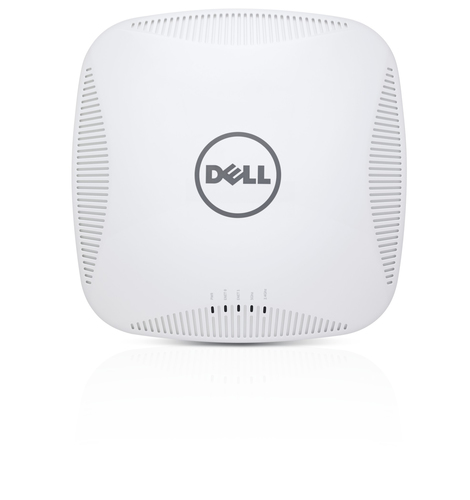
DELL PowerConnect W-AP205 1000 Mbit/s White Power over Ethernet (PoE)
- 2.4 GHz
- 5 GHz
- Maximum data transfer rate: 1000 Mbit/s
- Operating relative humidity (H-H): 5 - 95%
- Operating temperature (T-T): 0 - 40 °C
- Storage temperature (T-T): -40 - 70 °C
Where to buy
We're not tracking prices for this product yet. Check current prices directly at:
We may earn a commission when you buy through links on this page — at no extra cost to you. Learn more
About this product
WiFi without an external controller
Cost-effective, enterprise-class WiFi networking for a variety of environments. Easy to deploy, use and maintain.
Deploy with ease
Be up and running in minutes, provisioning your W-Series Instant Access Points (IAPs) in a few easy steps using virtually any laptop’s wireless connection. W-Series IAPs are designed to provide enterprise-class networking services without enterprise-size complexity and include an expanded wired + wireless IAP portfolio with high-end wireless features for hotspots and remote branches.
Protect your investment
As WLAN requirements grow, configuration settings can be used to easily convert the W-Series IAPs to campus APs that work with a centralized-controller architecture.
Enterprise-grade WiFi network
Combine enterprise capabilities with entry-level simplicity using WiFi network through W-Series IAPs with built-in virtual controllers. When multiple IAPs are connected, a single IAP acts as a primary virtual controller. If that controller fails, another W-Series IAP in the chain automatically takes over as the primary virtual controller without disrupting services. To expand your network, just add more W-Series IAPs. Configuration is automatically uploaded from the primary virtual controller.
The virtual controller technology is able to monitor and control critical network maintenance tasks, including:
- Specialized Adaptive Radio Management functions that optimize WiFi client behavior, enabling IAPs to avoid RF interference
- Auto-configuration for added IAPs
- 802.1x authentication
- Role- and device-based policy enforcement
- Rogue detection
Wired + wireless instant or remote AP
Several W-Series IAP models provide both wired and wireless connectivity, ideal for small branches or teleworkers. The wired connectivity includes additional Ethernet ports to connect wired devices as well as a USB port to connect a 3G/4G modem for internet connectivity.
Confidently manage your WiFi networks
Securely manage and administer a W-Series IAP WiFi network from a single built-in web-based GUI.
Manage multiple W-Series IAP WiFi networks using Dell W-Series AirWave Software Management Suite (AWMS). AirWave manages local or geographically dispersed deployments and aggregates them into one console. It gives you a single, accurate picture of everything that affects service quality for your users — from the wired infrastructure to the RF environment to individual mobile devices.
Enhance RF management
Build wireless networks that adjust to how WiFi clients interact. W-Series IAPs with Dell Adaptive Radio Management (ARM) technology help ensure that data, voice and video applications have sufficient network resources to operate properly, allowing maximum client performance while enhancing stability and predictability of the entire WiFi network. ARM features include:
- Spectrum load balancing that uniformly distributes clients across channels in high-density environments
- Noise awareness that dynamically shifts clients away from channels hampered by outside interference
- Band steering that enables IAPs with both radios available to dynamically transfer clients away from crowded bands and allows users to define client ratios across different bands
- Airtime fairness that delivers equal airtime access to all WiFi clients, regardless of the client type, wireless chip or operating system
Wireless Networking Services and Support
Wireless LAN Implementation
Setting up and configuring wireless network does not have to be a “Do-It-Yourself” project. Dell can install, configure, and integrate your wireless network so you can focus on other tasks. Let Dell install it for you. Add installation services to your next hardware purchase.
Wireless Site Assessment
Great wireless connectivity starts with a detailed site survey. Dell experts use specialized tools to help design, deploy, and maintain the Wi-Fi network. Dell can analyze RF interference, identify optimal placement of devices, and recommend the best design. Contact Dell for more information
Remote Consulting
Are there times when you need a little extra technical guidance? Certified experts are available to discuss networking design or help you resolve issues pertaining to the wired or wireless network. Call Dell to schedule a time with a certified system expert.
Warranty
Select Networking products carry an Extended Life Warranty with Basic Hardware Service, covering repair or replacement of the product for as long as it remains in use by the customer. In the event of discontinuance of product manufacture, Dell Extended Life Warranty extends until five (5) years after end of product model sales.
ProSupport
Choose Dell’s premium support service, ProSupport, for 24/7 direct telephone and online access to advanced-level technicians based in your region. Whether you have one office or hundreds around the world, protect your investments with this simple yet flexible approach.
Financing
Whether you’re looking for payment flexibility to spread IT costs over several budget cycles or you need a scalable financial solution to accommodate your changing technology needs, Dell Financial Services has a wide range of contracting options designed to make technology acquisition easy and affordable. Contact your Dell account manager or DFS representative to learn how financing can help you maximize ROI and lower TCO.
Deploy wire-like performance
Blur the lines between wired and wireless performance with up to 1.7Gbps in the 5GHz band and 800Mbps in the 2.4GHz band for fast and clear performance. Dell Networking W-Series access points (APs) are configured through a centralized Dell Networking W-Series mobility controller, providing wireless LAN access with: Adaptive Radio Management: Enhances stability and predictability of the entire WiFi network. Context-aware policy management: Delivers a rich mobile experience for Microsoft Lync/unified communications and collaboration (UCC). Flexible AP modes: Spectrum analysis, intrusion prevention, part-time or dedicated air monitoring, remote AP. Centralized security: No data is sent in clear.
Confidently manage your WiFi networks
All Dell Networking W-Series access points work in conjunction with any Dell Networking W-Series controller to enable flexible and secure deployment of indoor and outdoor networks ranging from small to very large wireless deployments. The Dell Networking W-Series controller-based ecosystem is ideal for enterprises that require maximum security, functionality and centralized management features. This architecture can enforce policies and security from one console and meets stringent government and military encryption certifications. Controller-based ecosystems can also serve as a termination point for your VPN.
Build and scale to meet the needs of your business
The Dell Networking W-Series portfolio includes a comprehensive variety of access points designed to fit the unique needs of your business, including: Coverage area User capacity Network density Physical environment Wireless LAN standards (802.11ac Wave 2, 802.11ac or 802.11n)
Enhance RF management
Dell Networking W-series with Dell Adaptive Radio Management (ARM) technology help ensure that data, voice and video applications have sufficient network resources to operate properly, allowing maximum client performance while enhancing stability and predictability of the entire WiFi network. ARM features include: Spectrum load balancing that uniformly distributes clients across channels in high-density environments Noise awareness that dynamically shifts clients away from channels hampered by outside interference Band steering that enables APs to dynamically transfer clients away from crowded bands Airtime fairness that delivers equal access to all WiFi clients, regardless of client type, wireless chip or OS
Specifications
Key specifications
- 2.4 GHzIndicates whether the device supports wireless connectivity on the 2.4 GHz frequency band.
- Yes
- 5 GHzIndicates whether the device supports the 5 GHz wireless frequency band.
- Yes
- Maximum data transfer rateThe maximum speed with which data can be transmitted from one device to another.
- 1000 Mbit/s
- Operating relative humidity (H-H)The range of relative humidity, expressed as a percentage, within which the device can function correctly without damage or performance loss.
- 5 - 95%
- Operating temperature (T-T)The minimum and maximum temperatures at which the product can be safely operated.
- 0 - 40 °C
- Storage temperature (T-T)The minimum and maximum temperatures at which the product can be safely stored.
- -40 - 70 °C
- CertificationSpecifies the official standards, safety approvals, or regulatory certifications the product has received.
- FCC, CE
- Antenna featuresSpecifies the design and mounting characteristics of the antennas, such as whether they are integrated or detachable (e.g., Dipole antenna).
- Integrated antenna
- Antennas quantityThe total number of antennas integrated into or supplied with the device.
- 4
- Antenna gain level (max)Antenna gain is the measurement of an antenna's ability to amplify the incoming microwave signals in a particular direction, compared with the sensitivity of an isotropic antenna in any direction, or a dipole antenna in the equatorial direction.
- 6 dBi
Show all 33 specificationsShow key specifications only
Features
- 2.4 GHzIndicates whether the device supports wireless connectivity on the 2.4 GHz frequency band.
- Yes
- 5 GHzIndicates whether the device supports the 5 GHz wireless frequency band.
- Yes
- Maximum data transfer rate (5 GHz)The highest theoretical speed at which data can be transmitted over the 5 GHz wireless band, measured in Mbit/s.
- 867 Mbit/s
Performance
- Maximum data transfer rateThe maximum speed with which data can be transmitted from one device to another.
- 1000 Mbit/s
- Reset buttonIndicates whether the device features a dedicated button to restore the unit to its original factory settings.
- Yes
Operational conditions
- Operating relative humidity (H-H)The range of relative humidity, expressed as a percentage, within which the device can function correctly without damage or performance loss.
- 5 - 95%
- Operating temperature (T-T)The minimum and maximum temperatures at which the product can be safely operated.
- 0 - 40 °C
- Storage temperature (T-T)The minimum and maximum temperatures at which the product can be safely stored.
- -40 - 70 °C
Weight & dimensions
- WidthThe measurement or extent of something from side to side.
- 150 mm
- DepthThe distance from the front to the back of something.
- 150 mm
- HeightThe measurement of the product from head to foot or from base to top.
- 41.5 mm
- WeightWeight of the product without packaging (net weight). If possible, the net weight is given including standard accessories and supplies. Please note that sometimes the manufacturer leaves out the weight of accessories and/or supplies.
- 380 g
Certificates
- CertificationSpecifies the official standards, safety approvals, or regulatory certifications the product has received.
- FCC, CE
Antenna
- Antenna featuresSpecifies the design and mounting characteristics of the antennas, such as whether they are integrated or detachable (e.g., Dipole antenna).
- Integrated antenna
- Antennas quantityThe total number of antennas integrated into or supplied with the device.
- 4
- Antenna gain level (max)Antenna gain is the measurement of an antenna's ability to amplify the incoming microwave signals in a particular direction, compared with the sensitivity of an isotropic antenna in any direction, or a dipole antenna in the equatorial direction.
- 6 dBi
Design
- Product colourThe colour e.g. red, blue, green, black, white.
- White
- LED indicatorsThe specific status lights available on the unit to provide visual feedback on its current state or connectivity (e.g., AC input, ACT, or Access).
- LAN, Power, Status
Security
- Cable lock slotHoles on the edge of devices through which a cable lock can be passed, so the device can be locked to a desk etc.
- Yes
- Cable lock slot typeThe standard of the security slot used to attach a physical locking cable to the device (e.g. Kensington or Noble).
- Kensington
Other features
- InternalThe product is built in.
- No
Power over Ethernet (PoE)
- Power over Ethernet (PoE)The device supports Power over Ethernet (PoE), which is one of several standardized or ad-hoc systems which pass electrical power along with data on Ethernet cabling. This allows a single cable to provide both data connection and electrical power to devices such as wireless access points or IP cameras.
- Yes
Power
- Power consumption (typical)Amount of power consumed by this model, often expressed in watts (W). Typical values that manufacturers give are power consumption when off, standby/suspended mode, typical use, maximum usage.
- 12.5 W
- DC-in jackThe socket/plug where the DC electricity supply connects to the device.
- Yes
Ports & interfaces
- Ethernet LAN (RJ-45) portsNumber of Ethernet LAN (RJ-45) ports (connecting interfaces) in the device. Ethernet LAN (RJ-45) ports allow a computer to connect to the ethernet.
- 1
Network
- Ethernet LAN data ratesThe different speed levels of the Ethernet LAN connection.
- 10,100,1000 Mbit/s
- Networking standardsThe way in which the network is working, e.g. IEEE 802.11a, IEEE 802.11b, IEEE 802.11g.
- IEEE 802.11ac, IEEE 802.11b, IEEE 802.11g, IEEE 802.11n, IEEE 802.3af
- ModulationModulation is the process of varying one or more properties of a periodic waveform, called the carrier signal (High Frequency Signal), with a modulating signal which typically contains information to be transmitted. The aim of digital modulation is to transfer a digital bit stream over an analog bandpass channel, for example over the public switched telephone network (where a bandpass filter limi…
- 16-QAM, 256-QAM, 64-QAM, BPSK, QPSK
Keyboard
- Frequency bandA small section of the spectrum of radio communication frequencies, in which channels are usually used or set aside for the same purpose e.g.for a channel on FM radio; for mobile networks to communicate with mobile phones.
- 2.4, 5 GHz
Packaging data
- Package widthThe distance from one side of the packaging to the other.
- 190 mm
- Package depthThe distance from the front to the back of the packaging.
- 187 mm
- Package heightThe distance from the top to the bottom of the packaging.
- 57 mm
- Package weightWeight of the packaged product.
- 550 g
Database Right data-sheet 2026 Icecat. All rights reserved. Provided “as is”, without warranty — check details with the store before buying.
Price history (90 days, best daily price)
Price history is still being collected for this product — check back soon.
Alternative models
DELL PowerConnect W-AP214 1000 Mbit/s White Power over Ethernet (PoE)

DELL PowerConnect W-AP204 1000 Mbit/s White Power over Ethernet (PoE)
DELL PowerConnect W-AP215 1000 Mbit/s White Power over Ethernet (PoE)

DELL PowerConnect W-AP103 1000 Mbit/s White Power over Ethernet (PoE)

DELL Aerohive AP230 1300 Mbit/s White Power over Ethernet (PoE)
