
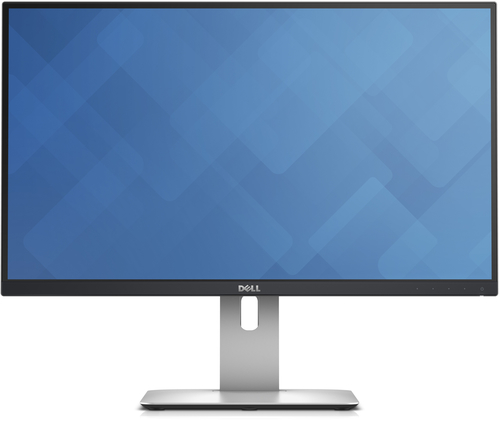
DELL UltraSharp UP2715K computer monitor 68.6 cm (27") 5120 x 2880 pixels 5K Ultra HD LED Black, Silver
- Screen: 68.6 cm (27"), 5120 x 2880 pixels, IPS
- Refresh rate: 8 ms response time
- Brightness: 350 cd/m²
- Ports: 2 × DisplayPort
- Stand: height-adjustable, tilt, VESA 100 x 100 mm
- Extras: speakers
- Colour: Black, Silver
All 74 specificationsProduct page at accessories.us.dell.com ↗
Where to buy
We're not tracking prices for this product yet. Check current prices directly at:
We may earn a commission when you buy through links on this page — at no extra cost to you. Learn more
About this product
The world’s first Ultra HD 5K monitor
Discover amazing 5K clarity on the highest-performance DellTM UltraSharp display, featuring over 14 million pixels, precise, accurate color and amazing acoustics from Harman Kardon .
- Pin-sharp 5120 x 2880 Ultra HD resolution: See four times the content of QHD with 11 million more pixels that create crisp images and breakthrough sharpness.
- Vivid, accurate and consistent color: With PremierColor, your monitor provides superb color accuracy and 99% AdobeRGB and 100% sRGB coverage.
- Speakers by Harman Kardon : Two speakers rated at an impressive 16W deliver crystal-clear, highly detailed stereo sound.
The most detail you’ve ever seen on a monitor screen
Welcome to the amazing sharpness and clarity of a 5K monitor. The Dell UltraSharp 27 Ultra HD 5K Monitor – UP2715K features an astoundingly vivid 5120x2880 Ultra HD resolution. That’s a dramatic increase in screen clarity, with more than 14 million pixels — or four times the content of QHD resolution, seven times the content of Full HD displays and almost double the number of pixels in an Ultra HD 4K monitor. The result is a breakthrough visual experience that brings outstanding realism, depth and crispness to pictures and movies.
Design and edit to perfection
If you’re a graphics or design professional in the entertainment, film, photography or engineering field, you’ll immediately recognize the benefits of a 5K monitor with Dell PremierColor. Details this incredible allow you to view your work with a whole new level of insight.
- Consistent, accurate colors: Right out of the box, Dell PremierColor delivers factory-tuned 99% AdobeRGB and 100% sRGB coverage, impressive grayscale tracking and a color calibration factory report certifying that colors are true-to-life and accurate with an extremely small deltaE of less than 2.
- Excellent color depth and color gamut: Enjoy a large range of colors and color detail with a wide color gamut. High-capacity 12-bit internal processing enables up to 1.07 billion colors, distinguishing low grayscale tones and enabling a tremendous level of detail, even in dark areas.
Customize and calibrate colors with precision
- Use the Custom Color mode to change color parameters to your exact needs. Tune and tweak onscreen colors by utilizing a wide range of color parameters such as RGBCMY saturation, RGBCMY hue, RGB gain and RGB offset.
- For even greater control and precision calibration, the UP2715K comes with a 12-bit user-accessible 3D LUT (look-up table), which is accessible via the Dell UltraSharp Color Calibration Solution software when used with the optional X-rite iDisplay Pro colorimeter.
Clear views and crystal-clear sound
Incredible clarity of an edge-to-edge display combines with high-power, high-end stereo speakers for an immersive audio and video experience.
- Improved clarity and easy cleaning: Optical bonding and an anti-reflective coating eliminate reflection from two surfaces — the LCD panel itself and the protective glass layer in front of it — allowing more light to be transmitted and dramatically improving clarity, vividness and contrast. An anti-smudge coating allows you to easily clean away fingerprints.
- High-fidelity Harman Kardon sound: Two down-firing speakers tuned to perfection by Harman Kardon and rated at an impressive 32W (2 x 16W) provide a beautiful soundscape.
Superb usability
Take in the fine, almost infinite, detail provided by the Dell UltraSharp 27 Ultra HD 5K Monitor – UP2715K in total comfort, thanks to its wide-ranging adjustability.
- The included stand enables tilt, swivel and height adjustments, along with pivot capability.
- You can wall mount the UP2715K monitor panel in your choice of landscape or portrait orientation.
Connect seamlessly with Mac and Windows PCs, along with a wide range of digital peripherals. One high-current USB 3.0 port found on the back of the monitor supplies twice the power for charging and powering BC1.2 compatible USB devices. You also get one upstream USB 3.0 port and five downstream USB 3.0 ports, two DisplayPorts (for 5K support), a mini-DisplayPort (for 4K support) and a media card reader.
Eco-conscious design
The Dell UltraSharp 27 Ultra HD 5K Monitor – UP2715K meets the latest regulatory and environmental standards.
- ENERGY STAR Qualified
- EPEAT Gold Rated
- TCO Certified Displays
Specifications
Key specifications
- Display diagonalSize of the display for this product, measured diagonally, usually in inches.
- 68.6 cm (27")
- Display resolutionThe number of distinct pixels in each dimension that can be displayed. It is usually quoted as width × height, with the units in pixels: for example, "1024 × 768" means the width is 1024 pixels and the height is 768 pixels. The higher the number of pixels, the sharper the image.
- 5120 x 2880 pixels
- Panel typeThe technology used to manufacture the panel, such as AMOLED or AH-IPS.
- IPS
- Response timeThe response time is the time difference between the moment that a source (for example a video card) sends a signal and that equipment (for example a monitor) receives or display the signal. (Used abbreviations: R/F = Rise and Fall.)
- 8 ms
- Display brightness (typical)Display brightness, measured by its Luminance, presented as a figure in nits. Typical brightness ratings for monitors range from 250 to 350 nits with a target value of between 80 to 120 nits being suitable for most displays in a normal viewing environment.
- 350 cd/m²
- DisplayPorts quantityNumber of DisplayPorts. A DisplayPort is a digital display interface developed by the Video Electronics Standards Association (VESA). The interface is primarily used to connect a video source to a display device such as a computer monitor, though it can also be used to carry audio, USB, and other forms of data.
- 2
- Height adjustmentThe part of the device that can be adjusted to change the height.
- Yes
- Tilt adjustmentThe tilt, which means the angle at which the device is pointing (up or down), can be changed.
- Yes
- Panel mounting interfaceThe product can be used wih VESA mounting interfaces.
- 100 x 100 mm
- Built-in speaker(s)The device contains speaker(s) to produce sound.
- Yes
- Product colourThe colour e.g. red, blue, green, black, white.
- Black, Silver
Show all 74 specificationsShow key specifications only
Design
- VESA mountingIndicates whether the product supports the VESA mounting standard for attachment to compatible arms, brackets, or wall mounts.
- Yes
- Market positioningUnder which category can the device be positioned in the market, e.g. camera phone.
- Business
- Product colourThe colour e.g. red, blue, green, black, white.
- Black, Silver
- Panel mounting interfaceThe product can be used wih VESA mounting interfaces.
- 100 x 100 mm
Audio
- Built-in speaker(s)The device contains speaker(s) to produce sound.
- Yes
- Number of speakersThe quantity of speakers included in/with the product.
- 2
- RMS rated powerRMS (Root mean square) is a measure of the continuous power required by a device, in particular audio amplifiers and loudspeakers.
- 32 W
Multimedia
- Built-in cameraThe product has an integrated camera.
- No
Display
- Display diagonalSize of the display for this product, measured diagonally, usually in inches.
- 68.6 cm (27")
- Display resolutionThe number of distinct pixels in each dimension that can be displayed. It is usually quoted as width × height, with the units in pixels: for example, "1024 × 768" means the width is 1024 pixels and the height is 768 pixels. The higher the number of pixels, the sharper the image.
- 5120 x 2880 pixels
- Native aspect ratioThe aspect ratio is the ratio of the width of an image to its height. The native aspect ratio is the one which the projector/display is particularly designed for. Images shown in native aspect ratio will utilize the entire resolution of the display and achieve maximum brightness. Images shown in other than native aspect ratio will always have less resolution and less brightness than images shown…
- 16:9
- Display technologyThe technology used in the display e.g. plasma, LED.
- LED
- TouchscreenA screen of a laptop, smartphone, etc., that responds to touch so you can control the interface using your fingers.
- No
- HD typeType of supported High Definition (e.g. Full HD, 4K Ultra HD).
- 5K Ultra HD
- Panel typeThe technology used to manufacture the panel, such as AMOLED or AH-IPS.
- IPS
- Display brightness (typical)Display brightness, measured by its Luminance, presented as a figure in nits. Typical brightness ratings for monitors range from 250 to 350 nits with a target value of between 80 to 120 nits being suitable for most displays in a normal viewing environment.
- 350 cd/m²
- Response timeThe response time is the time difference between the moment that a source (for example a video card) sends a signal and that equipment (for example a monitor) receives or display the signal. (Used abbreviations: R/F = Rise and Fall.)
- 8 ms
- Display surfaceThe finish of the screen's outer layer, which determines how light reflects off the surface (e.g. Glossy, Matte, or Anti-glare).
- Matt
- Supported graphics resolutionsThe graphic resolutions that can be displayed by the device. The graphic resolution describes the width and height dimensions of a display, such as a computer monitor, measured in pixels.
- 3840 x 2160
- Aspect ratioThe aspect ratio is the ratio of the width of a shape to its height. For example, 4:3 is common for standard displays and 16:9 is the ratio for Widescreen TV.
- 16:9
- Contrast ratio (typical)The difference in light intensity between the brightest white and the darkest black.
- 1000:1
- Dynamic contrast ratio marketing nameThe proprietary brand name used by the manufacturer to describe the technology that automatically adjusts the backlight to improve the contrast ratio (e.g., ASUS Smart Contrast Ratio).
- Mega Contrast
- Viewing angle, horizontalMaximum horizontal angle at which a display can be viewed with acceptable visual performance.
- 178°
- Viewing angle, verticalMaximum vertical angle at which a display can be viewed with acceptable visual performance.
- 178°
- Display number of coloursThe total number of distinct colours that the device is capable of displaying (e.g. 1.07 billion colours).
- 1.073 billion colours
- Pixel pitchThis is the parameter of a picture tube, which specifies the shortest distance between two dots of the same colour. The principle is: the smaller the dot pitch, the better sharpness of image.
- 0.116 x 0.116 mm
- Pixel densityThe number of individual pixels displayed per inch of linear screen space, measured in pixels per inch (ppi).
- 218 ppi
- Colour gamutThe range of colours that the display can accurately reproduce, typically expressed as a percentage of a standard colour space (e.g. sRGB or Adobe RGB).
- 99%
Thin Client
- Thin client installedThe product includes a thin client, which is a computer or a computer program which depends heavily on some other computer (its server) to fulfill its computational roles. This is different from the traditional fat client, which is a computer designed to take on these roles by itself. The specific roles assumed by the server may vary, from providing data persistence (for example, for diskless nod…
- No
Performance
- On/off switchThe button which is pressed to switch the device on or off.
- Yes
Other features
- TV tuner integratedDevice has an in-built TV tuner.
- No
- Supplied AC adapter typeThe type of power supply provided with the product to connect it to an alternating current source (e.g. AC).
- LED
- 3DThe device can be used with 3D technology.
- No
Certificates
- CertificationSpecifies the official standards, safety approvals, or regulatory certifications the product has received.
- TCO, RoHS
Sustainability
- Sustainability certificatesThe environmental or ethical certifications the product has received to verify its sustainability standards (e.g., ASC or ACT Organic).
- EPEAT Gold, ENERGY STAR
Packaging content
- Cables includedSpecifies the types and quantities of connection cables provided with the product (e.g., 3.5 mm to 3.5 mm or SATA).
- DisplayPort, Mini DisplayPort, USB
- Quick start guideInstructions, either online, as a computer program or in paper form, to allow you to set up and start using the product quickly.
- Yes
- ManualIndicates whether a printed user manual is included in the package.
- Yes
Weight & dimensions
- Width (with stand)The total horizontal measurement of the product when the supporting stand is attached, measured in millimetres.
- 637.3 mm
- Depth (with stand)The measurement of the product from front to back when any supporting accessory or base is attached, expressed in millimetres or centimetres.
- 204.5 mm
- Height (with stand)The total vertical measurement of the product including its base or support structure, expressed in millimetres or centimetres.
- 427.6 mm
- Weight (with stand)The total mass of the unit including its supporting base, measured in kilograms or grams.
- 542.1 g
- Width (without stand)The horizontal measurement of the device excluding the base or support structure, expressed in millimetres.
- 637.3 mm
- Depth (without stand)The measurement of the product from front to back without its base or support, typically expressed in millimetres or centimetres.
- 47.9 mm
- Height (without stand)The vertical measurement of the device when the stand is removed, measured in mm.
- 384.6 mm
- Weight (without stand)The mass of the device excluding the support base, measured in g.
- 7.14 kg
Operational conditions
- Operating temperature (T-T)The minimum and maximum temperatures at which the product can be safely operated.
- 0 - 50 °C
- Storage temperature (T-T)The minimum and maximum temperatures at which the product can be safely stored.
- -20 - 60 °C
- Operating relative humidity (H-H)The range of relative humidity, expressed as a percentage, within which the device can function correctly without damage or performance loss.
- 10 - 80%
- Storage relative humidity (H-H)The permissible range of relative humidity, expressed as a percentage, within which the product can be stored without damage.
- 5 - 90%
- Operating altitudeThe maximum and minimum height above sea level at which the device can function correctly, measured in m.
- 0 - 5000 m
- Non-operating altitudeThe maximum and minimum altitude at which the unit can be stored or transported without sustaining damage, measured in metres.
- 0 - 12191 m
- Relative humidityThe range of ambient moisture levels in the air, expressed as a percentage, within which the unit operates reliably.
- 5 - 90%
Power
- Power consumption (typical)Amount of power consumed by this model, often expressed in watts (W). Typical values that manufacturers give are power consumption when off, standby/suspended mode, typical use, maximum usage.
- 100 W
- Power consumption (standby)The amount of electricity that is consumed when the product is on standby.
- 1.2 W
- Power consumption (max)The maximum amount of power used by the device.
- 170 W
- Power consumption (off)The amount of electrical energy consumed by the device when it is switched off, measured in watts.
- 0.5 W
- AC input voltageThe voltage of the AC electricity that is inputted into the product.
- 100 - 240 V
- AC input frequencyThe range of alternating current frequencies the device can accept from the power source, measured in hertz (e.g., 45 - 65).
- 50 - 60 Hz
- Input currentThe amount of electrical current drawn by the device during operation, typically measured in amperes (A) or milliamperes (mA).
- 2.4 A
Security
- Cable lock slotHoles on the edge of devices through which a cable lock can be passed, so the device can be locked to a desk etc.
- Yes
Ergonomics
- Height adjustmentThe part of the device that can be adjusted to change the height.
- Yes
- Adjustable height (max)The maximum distance the unit can be raised vertically from its lowest position, measured in millimetres.
- 11.5 cm
- PivotIndicates whether the device can be rotated 90 degrees to switch between landscape and portrait orientation.
- Yes
- SwivellingIndicates whether the product has a mechanism that allows it to rotate horizontally.
- Yes
- Tilt adjustmentThe tilt, which means the angle at which the device is pointing (up or down), can be changed.
- Yes
Management features
- On Screen Display (OSD)Indicates whether the device can display a graphical menu or information directly on the screen for adjusting settings and viewing status.
- Yes
Ports & interfaces
- USB hub versionThe technical standard of the USB hub, if available, which determines the maximum data transfer speed (e.g., 3.2 Gen 1).
- 3.2 Gen 1 (3.1 Gen 1)
- USB Type-A downstream ports quantityThe number of USB Type-A ports available for connecting peripheral devices to the unit.
- 6
- DVI portDigital Visual Interface (DVI) is a video display interface to connect a video source to a display device, such as a computer monitor.
- No
- DisplayPorts quantityNumber of DisplayPorts. A DisplayPort is a digital display interface developed by the Video Electronics Standards Association (VESA). The interface is primarily used to connect a video source to a display device such as a computer monitor, though it can also be used to carry audio, USB, and other forms of data.
- 2
- Mini DisplayPorts quantityThe number of Mini DisplayPort interfaces available on the device for video and audio output.
- 1
Storage
- Card reader integratedA card reader is a device that enables reading and, in some cases, writing data to and from a memory card.
- Yes
Packaging data
- Package weightWeight of the packaged product.
- 13.5 kg
Database Right data-sheet 2026 Icecat. All rights reserved. Provided “as is”, without warranty — check details with the store before buying.
Expert reviews
- –
tomshardware.com2016
For those seeking the highest available pixel density in a desktop monitor, Dell and HP are at the top of the heap for the moment. Considering the technology, pricing isn't too ridiculous but it is at the premium level. Dell provides every possible tool...
- +
- 5K resolution, Many calibration options, Autocal software included, Rich saturated color, Solid build, Slick styling
- −
- Weak outofbox performance, Minor lightbleed in our sample, Middling contrast
- 90
kitguru.net2016
The most important aspect of testing is the subjective element, how good a display looks in person, and it is here where the Dell UltraSharp UP2715K really stands out.It simply looks amazing, and while you can get some idea of the bright, vivid colours fr...
- +
- Amazingly bright and crisp picture, Fully flexible stand, Attractive design
- −
- Colouraccurate displays are very expensive indeed, No HDMI ports, 5K resolution requires faffing around with multiple DisplayPort cables.
- 90
trustedreviews.com2015
Dell UP2715K – Image Quality Like all of these new, ultra-high-resolution monitors, the first thing to consider with the UP2715K is just how well its 5K resolution works with a 27-inch screen. Thankfully, the answer is very well indeed. Using Windows' sca...
- +
- Astonishing 5K resolution, Exceptional image quality, Fully adjustable stand, Surprisingly good built-in speakers
- −
- Windows sometimes doesn't cope with 5K resolution, Glossy glass screen catches reflections, No HDMI inputs
- 80
digitaltrends.com2015
The DT Accessory PackUp your game and the get the most out of your gear with the following extras, hand-picked by our editors:Nvidia GTX 960 ($209)The Nvidia GTX 960 is the least expensive choice for pushing pixels to Dell's 5K masterpiece.Mount-It! Artic...
- +
- Attractive design, Great ergonomic stand, Excellent image quality, 5K looks outstanding
- −
- Low-resolution content is iffy, Extremely expensive
Price history (90 days, best daily price)
Price history is still being collected for this product — check back soon.
Alternative models

DELL Professional P2715Q
computer monitor 68.6 cm (27") 3840 x 2160 pixels 4K Ultra HD LED Black, Silver

DELL UltraSharp U2515H
computer monitor 63.5 cm (25") 2560 x 1440 pixels Quad HD Black, Silver
DELL UltraSharp U2515H
computer monitor 63.5 cm (25") 2560 x 1440 pixels Quad HD LED Black, Silver

DELL UltraSharp U3415W
computer monitor 86.4 cm (34") 3440 x 1440 pixels Quad HD LCD Black

DELL Professional P2715Q
computer monitor 68.6 cm (27") 3840 x 2160 pixels 4K Ultra HD LED Black, Silver

DELL S2240T
computer monitor 54.6 cm (21.5") 1920 x 1080 pixels LCD Touchscreen Tabletop Black, Silver
Accessories & compatible products

DELL Precision T5810
Intel Xeon E5 v3 E5-1630V3 16 GB DDR4-SDRAM 256 GB SSD AMD FirePro W7100 Windows 7 Professional Tower Workstation Black
DELL Precision T5810
Intel Xeon E5 v3 E5-1630V3 16 GB DDR4-SDRAM 256 GB SSD AMD FirePro W7100 Windows 7 Professional Tower Workstation Black

DELL Precision T5810
Intel Xeon E5 v3 E5-1620V3 8 GB DDR4-SDRAM 1 TB HDD Windows 7 Professional Tower Workstation Black

DELL OptiPlex 7040
Intel Core i5 i5-6500 8 GB DDR4-SDRAM 128 GB SSD Windows 7 Professional SFF PC Black
DELL Precision T5810
Intel Xeon E5 v3 E5-1620V3 16 GB DDR4-SDRAM 1 TB HDD NVIDIA Quadro M2000 Windows 7 Professional Tower Workstation Black

DELL OptiPlex 7040
Intel Core i5 i5-6500T 8 GB DDR4-SDRAM 500 GB HDD Windows 7 Professional Mini PC Black