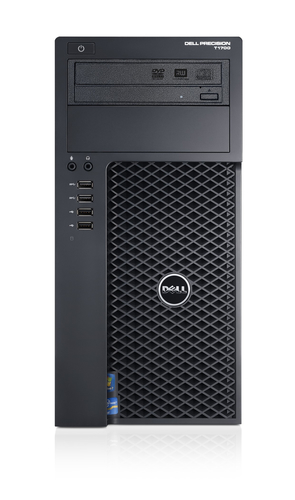
DELL Precision T1700 16 GB DDR3-SDRAM 500 GB HDD NVIDIA Quadro K2000 Windows 7 Professional Mini Tower Workstation Black
- Memory: 16 GB DDR3-SDRAM
- Storage: 500 GB HDD
- Graphics: NVIDIA Quadro K2000
- Operating system: Windows 7 Professional
- Type: Mini Tower
- Colour: Black
All 69 specificationsProduct page at dell.com ↗
Versions
 16 GB · DDR3-SDRAM · 500 GB · NVIDIA Quadro K2000 · Windows 7 Professional
 Intel Core i5 · i5-3570 · 8 GB · DDR3-SDRAM · 500 GB · NVIDIA Quadro K600 · Windows 7 Professional
 Intel Core i5 · i5-4570 · 4 GB · DDR3-SDRAM · 500 GB · Windows 7 Professional
 Intel Core i5 · i5-4570 · 8 GB · DDR3-SDRAM · 500 GB · AMD FirePro V3900 · Windows 7 Professional
 Intel Core i5 · i5-4590 · 8 GB · DDR3-SDRAM · 256 GB · Windows 7 Professional
 Intel Core i5 · i5-4590 · 8 GB · DDR3-SDRAM · 500 GB · AMD FirePro W2100 · Windows 7 Professional · Mini Tower · Workstation
- Intel Core i5 · i5-4590 · 8 GB · DDR3-SDRAM · 500 GB · AMD FirePro W2100 · Windows 7 Professional · SFF · PC
 Intel Core i5 · i5-4590 · 8 GB · DDR3-SDRAM · 500 GB · AMD FirePro W2100 · Windows 7 Professional · SFF · Workstation
- Intel Core i5 · i5-4590 · 8 GB · DDR3-SDRAM · 500 GB · Windows 7 Professional
 Intel Core i5 · i5-4590 · 8 GB · DDR3L-SDRAM · 500 GB · AMD FirePro W2100 · Windows 7 Professional
 Intel Core i7 · i7-4770 · 8 GB · DDR3-SDRAM · 1 TB · AMD FirePro V3900 · Windows 7 Professional
 Intel Core i7 · i7-4770 · 8 GB · DDR3-SDRAM · 1 TB · NVIDIA Quadro 600 · Windows 7 Professional
 Intel Core i7 · i7-4770 · 8 GB · DDR3-SDRAM · 1 TB · NVIDIA Quadro K600 · Windows 7 Professional
 Intel Core i7 · i7-4770 · 8 GB · DDR3-SDRAM · 256 GB · Windows 7 Professional
- Intel Core i7 · i7-4770 · 8 GB · DDR3-SDRAM · 500 GB · Windows 7 Professional
 Intel Core i7 · i7-4790 · 8 GB · DDR3-SDRAM · 1 TB · AMD FirePro V3900 · Windows 7 Professional
- Intel Core i7 · i7-4790 · 8 GB · DDR3-SDRAM · 1 TB · AMD FirePro W4100 · Windows 7 Professional
 Intel Core i7 · i7-4790 · 8 GB · DDR3-SDRAM · 1 TB · NVIDIA Quadro K620 · Windows 7 Professional
- Intel Core i7 · i7-4790 · 8 GB · DDR3-SDRAM · 256 GB · Windows 8.1
- Intel Core i7 · i7-4790 · 8 GB · DDR3-SDRAM · 500 GB · Windows 7 Professional
- Intel Xeon E3 V2 Family · E3-1245V2 · 8 GB · DDR3-SDRAM · 500 GB · Windows 7 Professional
- Intel Xeon E3 V3 Family · E3-1220V3 · 8 GB · DDR3-SDRAM · 500 GB · AMD FirePro V4900 · Windows 7 Professional
- Intel Xeon E3 V3 Family · E3-1220V3 · 8 GB · DDR3-SDRAM · 500 GB · AMD FirePro W4100 · Windows 7 Professional
 Intel Xeon E3 V3 Family · E3-1225V3 · 8 GB · DDR3-SDRAM · 500 GB · AMD FirePro V4900 · Windows 7 Professional
- Intel Xeon E3 V3 Family · E3-1226V3 · 8 GB · DDR3-SDRAM · 500 GB · Windows 7 Professional
- Intel Xeon E3 V3 Family · E3-1240V3 · 8 GB · DDR3-SDRAM · 1 TB · NVIDIA Quadro K600 · Windows 7 Professional · Mini Tower · Workstation
- Intel Xeon E3 V3 Family · E3-1240V3 · 8 GB · DDR3-SDRAM · 1 TB · NVIDIA Quadro K600 · Windows 7 Professional · SFF · Workstation
 Intel Xeon E3 V3 Family · E3-1240V3 · 8 GB · DDR3-SDRAM · 500 GB · NVIDIA Quadro K600 · Windows 7 Professional
- Intel Xeon E3 V3 Family · E3-1240V3 · 8 GB · DDR3-SDRAM · 500 GB · NVIDIA Quadro K2000 · Windows 7 Professional
- Intel Xeon E3 V3 Family · E3-1240V3 · 16 GB · DDR3-SDRAM · 500 GB · NVIDIA Quadro K2000 · Windows 7 Professional
- Intel Xeon E3 V3 Family · E3-1241V3 · 8 GB · DDR3-SDRAM · 1 TB · AMD FirePro W2100 · Windows 7 Professional
- Intel Xeon E3 V3 Family · E3-1241V3 · 8 GB · DDR3-SDRAM · 1 TB · NVIDIA Quadro K420 · Windows 7 Professional
- Intel Xeon E3 V3 Family · E3-1241V3 · 8 GB · DDR3-SDRAM · 256 GB · AMD FirePro W2100 · Windows 7 Professional
- Intel Xeon E3 V3 Family · E3-1241V3 · 8 GB · DDR3-SDRAM · 256 GB · NVIDIA Quadro K620 · Windows 7 Professional · SFF · PC
- Intel Xeon E3 V3 Family · E3-1241V3 · 8 GB · DDR3-SDRAM · 256 GB · NVIDIA Quadro K620 · Windows 7 Professional · SFF · Workstation
- Intel Xeon E3 V3 Family · E3-1241V3 · 8 GB · DDR3L-SDRAM · 500 GB · NVIDIA Quadro K620 · Windows 7 Professional
- Intel Xeon E3 V3 Family · E3-1241V3 · 16 GB · DDR3-SDRAM · 256 GB · NVIDIA Quadro K2200 · Windows 7 Professional
- Intel Xeon E3 V3 Family · E3-1241V3 · 16 GB · DDR3-SDRAM · 500 GB · AMD FirePro W5100 · Windows 7 Professional
- Intel Xeon E3 V3 Family · E3-1245V3 · 8 GB · DDR3-SDRAM · 1 TB · AMD FirePro V3900 · Windows 7 Professional
- Intel Xeon E3 V3 Family · E3-1245V3 · 8 GB · DDR3-SDRAM · 256 GB · Windows 7 Professional
- Intel Xeon E3 V3 Family · E3-1245V3 · 8 GB · DDR3-SDRAM · 500 GB · Windows 7 Professional · Mini Tower · Workstation
- Intel Xeon E3 V3 Family · E3-1245V3 · 8 GB · DDR3-SDRAM · 500 GB · Windows 7 Professional · SFF · Workstation
- Intel Xeon E3 V3 Family · E3-1245V3 · 16 GB · DDR3-SDRAM · 500 GB · AMD FirePro W5000 · Windows 7 Home Premium
- Intel Xeon E3 V3 Family · E3-1245V3 · 16 GB · DDR3-SDRAM · 500 GB · AMD FirePro W5000 · Windows 7 Professional
- Intel Xeon E3 V3 Family · E3-1246V3 · 8 GB · DDR3-SDRAM · 256 GB · Windows 8.1
- Intel Xeon E3 V3 Family · E3-1246V3 · 8 GB · DDR3-SDRAM · 500 GB · Windows 8.1
Where to buy
We're not tracking prices for this product yet. Check current prices directly at:
We may earn a commission when you buy through links on this page — at no extra cost to you. Learn more
About this product
Compact, affordable and powerful
Get workstation performance for about the price of a desktop with the Dell Precision T1700, available in two compact sizes that are perfect for any environment. Available with 4th Gen Intel Core i5 and i7 processors.
Powerful performance
Whether you’re building 2D or 3D models or multitasking with demanding applications, the Dell Precision T1700 workstation can power through intensive tasks easily.
- Intel Xeon processor E3-1200 v3 or 4th Generation Intel Core processors enable fast and stable processing.
- Choose Windows 7 Professional or Windows 8 Pro for easy productivity.
- Powerful graphics options include AMD FirePro or NVIDIA Quadro professional-grade discrete graphics. Integrated Intel graphics are standard.
- Dell Precision Performance Optimizer helps your professional software run at its peak performance automatically.
Built to be dependable
The Dell Precision T1700 has undergone extensive testing to ensure strong performance now and into the future.
- Optional Dell Data Protection | Security Tools and optional Dell Data Protection | Encryption help make Dell Precision T1700 a secure entry-level workstation.
- Optional mirrored RAID provides redundancy and fast recovery in the event of a drive failure.
- Up to 32GB3 of optional error-correcting code (ECC) memory corrects isolated soft-memory errors and provides a solid foundation for memory and system stability.
- Available self-encrypting drives (SEDs) can reduce security risks and unauthorized access to your data.
- Dell services, including Dell ProSupport, can help you protect your hardware investment through a customizable suite of support options.
Smart design, now in two sizes
The Dell Precision T1700 is available in two sizes: a compact mini tower and one of the industry’s most compact small form factor (SFF) designs.
- The smallest workstation in its class allows you to bring powerful performance to small spaces.
- Two front-mounted USB 3.0 ports enable fast data transfers and easy connectivity to your external media and accessories.
- ENERGY STAR 5.2 qualification makes the Dell Precision T1700 an energy-efficient part of your IT ecosystem.
- A conveniently placed handhold helps you deploy and position your workstation with minimal hassle.
ISV certified
The Dell Precision T1700 is a true workstation that’s compatible with leading independent software vendor (ISV)-certified applications for maximum uptime and productivity.
- An expanded set of ISV-certified applications ensures guaranteed software compatibility with your system and peak performance of your applications.
- Popular ISV-certified applications include AutoCAD, SolidWorks and Creo.
- Triple monitor support comes standard. Optional quad monitor support can enable even greater productivity.
Global services and support
Dell Services can help reduce IT complexity and lower costs by making IT and business solutions work harder for you. The Dell Services team can design a complete solution for your environment and business objectives.
Accessories
Essential Dell accessories help you get the most out of your Dell Precision T1700. The Dell U2413 UltraSharp monitor is perfect for color-critical work. Mount a second monitor to the Dell MDS14 Dual Monitor Stand for a clutter-free workspace and dual-monitor productivity.
Documents
- BrochureProduct Brochure ↗
- ManualUser manual ↗
Specifications
Key specifications
- Internal memoryThe amount of memory, usually measured in bytes (e.g. MB, GB), which is installed in the system's hardware.
- 16 GB
- Internal memory typeThe type of internal memory such as RAM, GDDR5.
- DDR3-SDRAM
- Total storage capacityThe total amount of data that can be stored on the device.
- 500 GB
- Storage mediaUsed for the storage of data e.g. HDD (hard disk drive), SSD (solid-state drive).
- HDD
- Discrete graphics card modelA graphics adapter (often known as a video card) generates images for a display. A discrete graphics adapter plugs into the motherboard, and usually produces much better graphics than an integrated graphics adapter. There are various models of discrete graphics adapters.
- NVIDIA Quadro K2000
- Operating system installedType of operating system on a device e.g. IOS on Apple devices, Android for mobile devices.
- Windows 7 Professional
- Chassis typeThe type of rigid framework onto which is the hosuing for device components.
- Mini Tower
- Product typeThe sub-category of the product.
- Workstation
- Product colourThe colour e.g. red, blue, green, black, white.
- Black
Show all 69 specificationsShow key specifications only
Display
- Display includedThis product includes a display.
- No
Software
- Operating system installedType of operating system on a device e.g. IOS on Apple devices, Android for mobile devices.
- Windows 7 Professional
- Operating system architectureThe way in which the operating system of a computer/smartphone (32-bit/64-bit) is set up.
- 64-bit
- Recovery operating systemThe version of the operating system used to restore the device to its original factory settings (e.g. Windows 10 Home).
- Windows 8.1
Design
- Product typeThe sub-category of the product.
- Workstation
- Chassis typeThe type of rigid framework onto which is the hosuing for device components.
- Mini Tower
- Placement supportedWhere the product can be placed e.g. indoor/outdoor, horizontal/vertical.
- Vertical
- Number of 5.25" baysA drive bay is a standard-area for adding hardware to a computer. Most drive bays are fixed to the inside of a case, but some can be removed. A 5.25" drive bay, also known as full-height bays, were found in old PCs in the early to mid-1980s. They were 3¼″ high by 5¾″ wide, and up to 8″ deep (83 × 146 × 200 mm), used mainly for hard disks and floppy disk drives.
- 2
- Number of 2.5" baysThe total number of available slots for installing 2.5-inch storage drives (e.g. SSDs).
- 4
- Product colourThe colour e.g. red, blue, green, black, white.
- Black
Graphics
- Discrete graphics cardIndicates whether the device has a dedicated graphics processor separate from the main CPU.
- Yes
- On-board graphics cardGraphics hardware which is built into the motherboard or CPU, as opposed to a separate graphics adapter (video card). On-board graphics uses CPU and RAM for graphics processing.
- No
- Discrete graphics card modelA graphics adapter (often known as a video card) generates images for a display. A discrete graphics adapter plugs into the motherboard, and usually produces much better graphics than an integrated graphics adapter. There are various models of discrete graphics adapters.
- NVIDIA Quadro K2000
- Discrete graphics card memoryThe amount of dedicated video RAM (VRAM) available on the separate graphics processing unit, measured in gigabytes (GB).
- 2 GB
- Discrete graphics memory typeThe specific generation and standard of memory used by the dedicated graphics processor (e.g. GDDR6).
- GDDR5
- Number of discrete graphics cardsThe total count of dedicated graphics processing units installed in the system, separate from any integrated graphics.
- 1
- On-board graphics card model"Graphic adapter" is the hardware that produces images on a display. "On-board" means that the graphics adapter is intergrated inside the motherboard.
- Not available
Storage
- Total storage capacityThe total amount of data that can be stored on the device.
- 500 GB
- Optical drive typeAn optical drive uses laser to read optical discs such as CDs, DVDs and Blu-Ray. Some types of optical drive are: CD ROM drive, CR-RW (CD writer) drive, DVD-ROM.
- DVD±RW
- Storage mediaUsed for the storage of data e.g. HDD (hard disk drive), SSD (solid-state drive).
- HDD
- Number of storage drives installedAmount of storage drives built into the device.
- 1
- Number of HDDs installedThe number of hard drives built into the device.
- 1
- HDD capacityThe maximum storage capacity of the hard disk, usually measured in bytes e.g. GB.
- 500 GB
- HDD interfaceThe way that a hard disk drive (HDD) is connected to the rest of the computer through a 'bus' such as ATA or SCSI.
- SATA III
- RAID supportThe device uses RAID, which is a storage technology that combines multiple disk drive components into a logical unit for the purposes of data redundancy and performance improvement. Data is distributed across the drives in one of several ways, referred to as RAID levels, depending on the specific level of redundancy and performance required.
- Yes
- RAID levelsRAID is a storage technology that combines multiple disk drive components into a logical unit for the purposes of data redundancy and performance improvement. Data is distributed across the drives in one of several ways, referred to as RAID levels, depending on the specific level of redundancy and performance required.
- 0, 1, 5, 10
Memory
- Internal memoryThe amount of memory, usually measured in bytes (e.g. MB, GB), which is installed in the system's hardware.
- 16 GB
- Maximum internal memoryThe maximum amount of memory inside a product, usually measured in bytes e.g megabytes (MB) or gigabytes (GB).
- 32 GB
- Internal memory typeThe type of internal memory such as RAM, GDDR5.
- DDR3-SDRAM
- Memory slotsNumber and type of memory expansion slots, including connector and memory module descriptions.
- 4x DIMM
- Memory clock speedThe frequency at which the memory (e.g. RAM) runs.
- 1600 MHz
- ECCECC means Error Correction Code, and it is memory that is able to detect and correct some memory errors without user intervention.
- Yes
- Non-ECCIndicates whether the memory lacks Error Correction Code (ECC) functionality to detect and fix internal data corruption.
- Yes
Certificates
- CertificationSpecifies the official standards, safety approvals, or regulatory certifications the product has received.
- ISV, EPEAT, CECP, GS Mark
Sustainability
- Sustainability certificatesThe environmental or ethical certifications the product has received to verify its sustainability standards (e.g., ASC or ACT Organic).
- ENERGY STAR
Weight & dimensions
- WidthThe measurement or extent of something from side to side.
- 175 mm
- DepthThe distance from the front to the back of something.
- 435 mm
- HeightThe measurement of the product from head to foot or from base to top.
- 360 mm
Audio
- Audio chipThe specific integrated circuit or hardware component responsible for processing audio signals (e.g., ALC3287-CGT).
- Realtek ALC269Q
Security
- Cable lock slotHoles on the edge of devices through which a cable lock can be passed, so the device can be locked to a desk etc.
- Yes
- Cable lock slot typeThe standard of the security slot used to attach a physical locking cable to the device (e.g. Kensington or Noble).
- Kensington
- Password protectionThe computer, smartphone etc. can only be used when the correct password is entered, therefore making it more secure.
- Yes
- Password protection typeSpecifies the level or component where a security password can be set to restrict access (e.g., BIOS, HDD, or Supervisor).
- BIOS
- Trusted Platform Module (TPM)Indicates whether the device includes a dedicated microcontroller designed to secure hardware through integrated cryptographic keys.
- Yes
Expansion slots
- Number of 3.5" baysA drive bay is a standard-area for adding hardware to a computer. Most drive bays are fixed to the inside of a case, but some can be removed. A 3.5" drive bay is for floppy disks.
- 2
- PCI Express x1 slotsThe number of available expansion slots that support a single lane of PCI Express connectivity for adding peripheral cards.
- 1
- PCI Express x16 (Gen 2.x) slotsPlaces where PCI Express x16 (Gen 2.x) are placed inside and connected to the computer motherboard.
- 1
- PCI Express x16 (Gen 3.x) slotsPlaces where PCI Express x16 (Gen 3.x) are placed inside and connected to the computer motherboard.
- 1
- PCI slotsThe total number of available expansion slots for installing internal hardware components.
- 1
Ports & interfaces
- USB 2.0 ports quantityNumber of USB 2.0 ports (connecting interfaces) in the device. USB 2.0 was released in April 2000 (now called "Hi-Speed"), adding higher maximum signaling rate of 480 Mbit/s (effective throughput up to 35 MB/s or 280 Mbit/s), USB 2.0 ports are usually black.
- 7
- USB 3.2 Gen 1 (3.1 Gen 1) Type-A ports quantityThe total number of available USB 3.2 Gen 1 (formerly 3.1 Gen 1) Type-A connection ports on the device.
- 4
- DisplayPorts quantityNumber of DisplayPorts. A DisplayPort is a digital display interface developed by the Video Electronics Standards Association (VESA). The interface is primarily used to connect a video source to a display device such as a computer monitor, though it can also be used to carry audio, USB, and other forms of data.
- 2
- Ethernet LAN (RJ-45) portsNumber of Ethernet LAN (RJ-45) ports (connecting interfaces) in the device. Ethernet LAN (RJ-45) ports allow a computer to connect to the ethernet.
- 1
- Headphone outputsNumber of sockets /ports where headphones are connected.
- 1
- Line-outIndicates whether the device has a dedicated audio output port for connecting to an external amplifier or powered speakers.
- Yes
- Line-inIndicates whether the device has a dedicated input port for receiving audio signals from an external source.
- Yes
- VGA (D-Sub) ports quantityNumber of VGA (D-Sub) ports (connecting interfaces) in the device. The VGA (D-Sub) connector is a 15 pin connector between a computer and a monitor. It was first introduced in 1987 by IBM.
- 1
- Microphone inThe socket where a microphone is connected to the device.
- Yes
- DVI portDigital Visual Interface (DVI) is a video display interface to connect a video source to a display device, such as a computer monitor.
- No
- PS/2 ports quantityThe number of PS/2 connectors for keyboards and mice. Its name comes from the IBM Personal System/2.
- 2
- Serial ports quantityThe number of serial ports in a computer or peripheral. A serial port is a serial communication physical interface through which information transfers in or out one bit at a time. The term "serial port" usually identifies hardware more or less compliant to the RS-232 standard, intended to interface with a modem or with a similar communication device. In modern computers and peripherals, serial po…
- 1
- Total number of SATA connectorsThe total count of Serial ATA interfaces available for connecting storage devices or optical drives.
- 4
- Number of SATA III connectorsSerial ATA (Advanced Technology Attachment) (SATA) is a computer bus interface that connects host bus adapters to mass storage devices such as hard disk drives and optical drives. SATA III (revision 3.x) interface, formally known as SATA 6Gb/s, is a third generation SATA interface running at 6.0Gb/s. The bandwidth throughput, which is supported by the interface, is up to 600MB/s. This interface i…
- 2
Power
- DC-in jackThe socket/plug where the DC electricity supply connects to the device.
- Yes
Network
- Ethernet LANAn Ethernet LAN (Local Area Network) interface is present, for a wired conection via a cable.
- Yes
- Ethernet LAN data ratesThe different speed levels of the Ethernet LAN connection.
- 10,100,1000 Mbit/s
- Cabling technologyType of cable technology performance.
- 10/100/1000Base-T(X)
Optical drive
- Optical drives quantityThe number of optical drives e.g. CD players/writers, DVD players/writers.
- 1
Performance
- Motherboard chipsetThe chipset connects the microprocessor to the rest of the motherboard.
- Intel C226
Database Right data-sheet 2026 Icecat. All rights reserved. Provided “as is”, without warranty — check details with the store before buying.
Price history (90 days, best daily price)
Price history is still being collected for this product — check back soon.
Alternative models

DELL OptiPlex 3020
Intel Core i5 i5-4570 8 GB DDR3-SDRAM 1 TB HDD Windows 7 Professional Mini Tower PC Black

DELL OptiPlex 9020
Intel Core i7 i7-4770 4 GB DDR3-SDRAM 500 GB HDD Windows 7 Professional SFF PC Black, Grey

DELL Precision T3610
Intel Xeon E5 Family E5-1620V2 16 GB DDR3-SDRAM 1 TB HDD AMD FirePro W5000 Windows 7 Professional Midi Tower Workstation Black

DELL OptiPlex 3020
Intel Pentium G G3220 4 GB DDR3-SDRAM 500 GB HDD Windows 7 Professional SFF PC Black, Grey
DELL Precision T3610
Intel Xeon E5 Family E5-1650V2 16 GB DDR3-SDRAM 2 TB HDD NVIDIA Quadro K2000 Windows 7 Professional Midi Tower Workstation Black

DELL OptiPlex 3020
Intel Core i5 i5-4570 4 GB DDR3-SDRAM 500 GB HDD Linux Mini Tower PC Black