
DELL P8624QT Interactive flat panel 2.17 m (85.6") LCD 350 cd/m² 4K Ultra HD Black Touchscreen
- Product design: Interactive flat panel
- Product colour: Black
- HDMI ports quantity: 4
- Display diagonal: 2.17 m (85.6")
- Display technology: LCD
- Display resolution: 3840 x 2160 pixels
Where to buy
We're not tracking prices for this product yet. Check current prices directly at:
We may earn a commission when you buy through links on this page — at no extra cost to you. Learn more
About this product
Bring the team together, whether they are in the room or remote, with this brilliant 85.6" 4K UHD large format monitor with 20-point touch, palm-rejection, USB-C connectivity and built-in dual 20W speakers.
Brilliance from every angle
Stunning visuals: Make every presentation brilliant on a 85.6" screen with 4K UHD resolution. Clearly captivating: Experience exceptionally sharp 4K images and text with monitor scaling technology that optimises text and fonts for increased readability. ComfortView and anti-glare, anti-smudge coatings deliver greater legibility and a better extended viewing experience. Striking presentations: No matter where you stand or sit, see consistent colours across the screen thanks to the wide viewing angle enabled by In-Plane Switching (IPS) technology. Speak to your audience: Bring every video or audio element to life with the built-in 2x20W speakers.
Built with your whole team in mind
Inclusive for all: Dell Screen Drop is the world’s first accessibility feature , designed to improve reachability for users working from different heights. Group work without the wait: Twenty-point InGlass Touch technology allows multiple workers to interact with the screen simultaneously, eliminating wait time for more natural collaboration. And, since the touch functionality is compatible with most industry standard software, it integrates seamlessly, however you work. Write naturally: Palm rejection allows users to rest their hands naturally onscreen without unwanted marks. Write in style: Mimicking a more natural writing tool, the dual-tip stylus has an ergonomic, easy-grip design, a fine writing tip and a precise eraser. It also magnetically attaches to the side of the display, so it’s never misplaced. Collaboration at your fingertips: Experience intuitive touch technology, a feature that lets you annotate with your fingers and erase with the palm of your hand.
Simplified setup
Manage your meeting spaces: With RS232, RJ45 and HDMI CEC ports, you can use remote management tools to maintain and control your Large Format monitor with a network control system. A smooth deployment: With a few painless steps, and a couple of extra hands, it’s simple to install this Dell conference room solution to a solid wall. Our displays are VESA compatible, so you can pick the mounting solution that best fits your space, whether that’s a mobile cart, stand or wall mount. All-in-one convenience: Seamlessly integrate an optional Dell OptiPlex Micro and allow IT to select the best option for varying business needs. Upgrade as you grow or easily upload your preferred corporate image with this agile display solution. Lock it down: Reduce display changes in high traffic environments with lock mode, a feature that allows IT to control menu and power options.
Convenient connectivity
Power of USB-C: Enjoy uninterrupted productivity with up to 90W of laptop charging power via your USB-C port. Seamless integration with Dell Meeting Space Solutions: This interactive touch monitor has been tested and validated to work with complete conference room ecosystems that include high quality audio, video and room control, powered by OptiPlex Micro. Secure deployment: Secure your OptiPlex Micro in a powered compartment at the back of the display, for security, convenient cable management, cable security and to avoid misplacement or unintended PC user engagement. Connect to productivity: Make your monitor a productivity hub with extensive connectivity options including HDMI, DP and USB-C that delivers power, audio and video—all in one clutter-free setup.
Dell Display Manager
Easy management. Next-level productivity. Improved multitasking: Organise your screen with Easy Arrange and save profiles with Easy Arrange Memory. Smooth deployment: Manage your fleet of monitors with features that are automatic, comprehensive and compatible with several tools . Convenient customisation: Quickly access your favorite features and functions with the menu launcher and hot keys.
Green thinking: for today and tomorrow
Environmental standards: This monitor uses 85% PCR (Post-consumer Recyclable) plastic in the design and meets the latest regulatory and environmental standards such as ENERGY STAR. Eco-conscious packaging: Dell commercial monitors ship in select packaging components made with up to 90% recycled materials . Energy conservation: Save energy when your monitor’s not in use with PowerNap , a feature that dims or puts your monitor to sleep when it’s not in use.
Documents
- Product information sheetEU Product Fiche ↗
- DocumentDell P8624QT Monitor Quick Start Guide ↗
- DocumentDell P8624QT Monitor User’s Guide ↗
- DocumentDell Display Manager 2.1 for Windows User’s Guide ↗
- DocumentDell P8624QT Monitor Outline Dimensions ↗
- DocumentDell P8624QT Monitor Teardown Instructions ↗
- DocumentCarbon Footprint ↗
Specifications
Key specifications
- Product designThe creation of a plan or convention for the construction of an object or a system.
- Interactive flat panel
- Product colourThe colour e.g. red, blue, green, black, white.
- Black
- HDMI ports quantityThe number of sockets (ports) for HDMI connections. HDMI (High-Definition Multimedia Interface) is a compact audio/video interface for transferring uncompressed video data and compressed/uncompressed digital audio data from a HDMI-compliant device ("the source device") to a compatible computer monitor, video projector, digital television, or digital audio device. HDMI is a digital replacement for…
- 4
- Display diagonalSize of the display for this product, measured diagonally, usually in inches.
- 2.17 m (85.6")
- Display technologyThe technology used in the display e.g. plasma, LED.
- LCD
- Display resolutionThe number of distinct pixels in each dimension that can be displayed. It is usually quoted as width × height, with the units in pixels: for example, "1024 × 768" means the width is 1024 pixels and the height is 768 pixels. The higher the number of pixels, the sharper the image.
- 3840 x 2160 pixels
- Display brightnessBrightness is the amount of radiating light emitted from the screen. The brightness rating is measured in candellas per square meter, commonly known as 'nits'.
- 350 cd/m²
- HD typeType of supported High Definition (e.g. Full HD, 4K Ultra HD).
- 4K Ultra HD
- Cable lock slotHoles on the edge of devices through which a cable lock can be passed, so the device can be locked to a desk etc.
- Yes
- LED indicatorsThe specific status lights available on the unit to provide visual feedback on its current state or connectivity (e.g., AC input, ACT, or Access).
- Yes
Show all 104 specificationsShow key specifications only
Design
- Product designThe creation of a plan or convention for the construction of an object or a system.
- Interactive flat panel
- Product colourThe colour e.g. red, blue, green, black, white.
- Black
- LED indicatorsThe specific status lights available on the unit to provide visual feedback on its current state or connectivity (e.g., AC input, ACT, or Access).
- Yes
- Placement supportedWhere the product can be placed e.g. indoor/outdoor, horizontal/vertical.
- Indoor
- VESA mountingIndicates whether the product supports the VESA mounting standard for attachment to compatible arms, brackets, or wall mounts.
- Yes
- Panel mounting interfaceThe product can be used wih VESA mounting interfaces.
- 600 x 400 mm
- Bezel width (bottom)The thickness of the frame surrounding the display area at the bottom edge, measured in millimetres.
- 4.7 cm
- Bezel width (top)The thickness of the frame surrounding the top edge of the display panel, measured in millimetres.
- 4.37 cm
Ports & interfaces
- HDMI ports quantityThe number of sockets (ports) for HDMI connections. HDMI (High-Definition Multimedia Interface) is a compact audio/video interface for transferring uncompressed video data and compressed/uncompressed digital audio data from a HDMI-compliant device ("the source device") to a compatible computer monitor, video projector, digital television, or digital audio device. HDMI is a digital replacement for…
- 4
- DVI portDigital Visual Interface (DVI) is a video display interface to connect a video source to a display device, such as a computer monitor.
- No
- DisplayPorts quantityNumber of DisplayPorts. A DisplayPort is a digital display interface developed by the Video Electronics Standards Association (VESA). The interface is primarily used to connect a video source to a display device such as a computer monitor, though it can also be used to carry audio, USB, and other forms of data.
- 1
- USB portThe device features a socket into which a USB cable can be plugged.
- Yes
- USB ports quantityThe total number of available Universal Serial Bus (USB) connection interfaces on the device.
- 8
- USB versionUniversal Serial Bus (USB) is an industry standard developed in the mid-1990s that defines the interface used for connection, communication and power supply between computers and electronic devices. Every new version - for example 1.1, 2.0, 3.0 - is much faster than the previous one.
- 2.0/3.2 Gen 1 (3.1 Gen 1)
- USB 2.0 Type-B ports quantityThe total number of USB 2.0 Type-B female connectors available on the device.
- 3
- USB 3.2 Gen 1 (3.1 Gen 1) Type-A ports quantityThe total number of available USB 3.2 Gen 1 (formerly 3.1 Gen 1) Type-A connection ports on the device.
- 4
- USB 3.2 Gen 1 (3.1 Gen 1) Type-C ports quantityNumber of USB 3.0 (3.1 Gen 1) ports with Type-C connector. USB 3.0 (3.1 Gen 1) is USB interface version which supports transfer rate up to 5 Gbit/s (SuperSpeed). USB Type-C connector has symmetrical design architecture and compatible with Thunderbolt 3 interface.
- 1
- USB Power Delivery up toThe maximum amount of power the device can provide or receive via a USB connection, measured in watts.
- 90 W
- USB Type-C DisplayPort Alternate ModeIndicates whether the USB Type-C port supports the transmission of native DisplayPort video signals to an external display.
- Yes
- Ethernet LAN (RJ-45) portsNumber of Ethernet LAN (RJ-45) ports (connecting interfaces) in the device. Ethernet LAN (RJ-45) ports allow a computer to connect to the ethernet.
- 1
- Audio (L/R) outThe two sockets (ports) for transmitting left audio signal (white cable) and right audio signal (red cable).
- 1
- RS-232 interfaceIndicates whether the device is equipped with an RS-232 serial communication port.
- Yes
Display
- Display diagonalSize of the display for this product, measured diagonally, usually in inches.
- 2.17 m (85.6")
- Display technologyThe technology used in the display e.g. plasma, LED.
- LCD
- Display resolutionThe number of distinct pixels in each dimension that can be displayed. It is usually quoted as width × height, with the units in pixels: for example, "1024 × 768" means the width is 1024 pixels and the height is 768 pixels. The higher the number of pixels, the sharper the image.
- 3840 x 2160 pixels
- Display brightnessBrightness is the amount of radiating light emitted from the screen. The brightness rating is measured in candellas per square meter, commonly known as 'nits'.
- 350 cd/m²
- HD typeType of supported High Definition (e.g. Full HD, 4K Ultra HD).
- 4K Ultra HD
- Viewable size diagonalThe diagonal length of the screen area that can actually display an image, measured in mm.
- 21.7 cm
- Viewable size, horizontalThe viewable size is often somewhat smaller than the actual size of a monitor, because there is a border around the image.
- 189.5 cm
- Viewable size, verticalThe height of the screen area that can actually display an image, measured in millimetres or inches.
- 106.6 cm
- Screen shapeDescribes the physical curvature of the display panel, such as whether it is flat or curved.
- Flat
- Anti-glare screenAlways gives an optimal view, even in direct sunlight.
- Yes
- Panel typeThe technology used to manufacture the panel, such as AMOLED or AH-IPS.
- IPS
- LED backlightA backlight is a form of illumination used in liquid crystal displays (LCDs). One type of backlight is made by LEDs, which can be either white or RGB (red green blue). White LEDs are used most often in notebooks and desktop screens, and in virtually all mobile LCD screens. RGB LEDs for backlighting are found in high-end color proofing displays such as HP DreamColor LP2480zx monitor or selected HP…
- Yes
- TouchscreenA screen of a laptop, smartphone, etc., that responds to touch so you can control the interface using your fingers.
- Yes
- Number of simultaneous touchpointsThe maximum number of individual points of contact that the touch-sensitive surface can detect and track at the same time.
- 20
- Native aspect ratioThe aspect ratio is the ratio of the width of an image to its height. The native aspect ratio is the one which the projector/display is particularly designed for. Images shown in native aspect ratio will utilize the entire resolution of the display and achieve maximum brightness. Images shown in other than native aspect ratio will always have less resolution and less brightness than images shown…
- 16:9
- Response timeThe response time is the time difference between the moment that a source (for example a video card) sends a signal and that equipment (for example a monitor) receives or display the signal. (Used abbreviations: R/F = Rise and Fall.)
- 8 ms
- Contrast ratio (typical)The difference in light intensity between the brightest white and the darkest black.
- 1200:1
- Viewing angle, horizontalMaximum horizontal angle at which a display can be viewed with acceptable visual performance.
- 178°
- Viewing angle, verticalMaximum vertical angle at which a display can be viewed with acceptable visual performance.
- 178°
- Display number of coloursThe total number of distinct colours that the device is capable of displaying (e.g. 1.07 billion colours).
- 1.07 billion colours
- Pixel pitchThis is the parameter of a picture tube, which specifies the shortest distance between two dots of the same colour. The principle is: the smaller the dot pitch, the better sharpness of image.
- 0.4935 x 0.4935 mm
- Horizontal scan rangeThe range of horizontal frequencies the device can process and display, measured in kHz.
- 30 - 140 kHz
- Vertical scan rangeThe range of vertical frequencies the device can process and display, measured in hertz (Hz).
- 24 - 75 Hz
- Supported graphics resolutionsThe graphic resolutions that can be displayed by the device. The graphic resolution describes the width and height dimensions of a display, such as a computer monitor, measured in pixels.
- 640 x 480 (VGA), 720 x 400, 800 x 600 (SVGA), 1024 x 768 (XGA), 1152 x 864 (XGA+), 1280 x 1024 (SXGA), 1280 x 800, 1600 x 1200, 1920 x 1080 (HD 1080), 2048 x 1152, 2560 x 1440, 3840 x 2160
- Supported video modesThe video modes that can be displayed by the device.
- 480p, 576p, 720p, 1080i, 1080p, 2160p
- Native refresh rateThe number of times per second the hardware updates, measured in hertz (Hz).
- 60 Hz
- RGB colour spaceThe specific color gamut standard the display is capable of reproducing (e.g. sRGB or Adobe RGB).
- NTSC
- Colour gamutThe range of colours that the display can accurately reproduce, typically expressed as a percentage of a standard colour space (e.g. sRGB or Adobe RGB).
- 72%
Security
- Cable lock slotHoles on the edge of devices through which a cable lock can be passed, so the device can be locked to a desk etc.
- Yes
Performance
- On/off switchThe button which is pressed to switch the device on or off.
- Yes
Power
- Power supply typeThe type of power supply which this product uses.
- Internal
- Power consumption (typical)Amount of power consumed by this model, often expressed in watts (W). Typical values that manufacturers give are power consumption when off, standby/suspended mode, typical use, maximum usage.
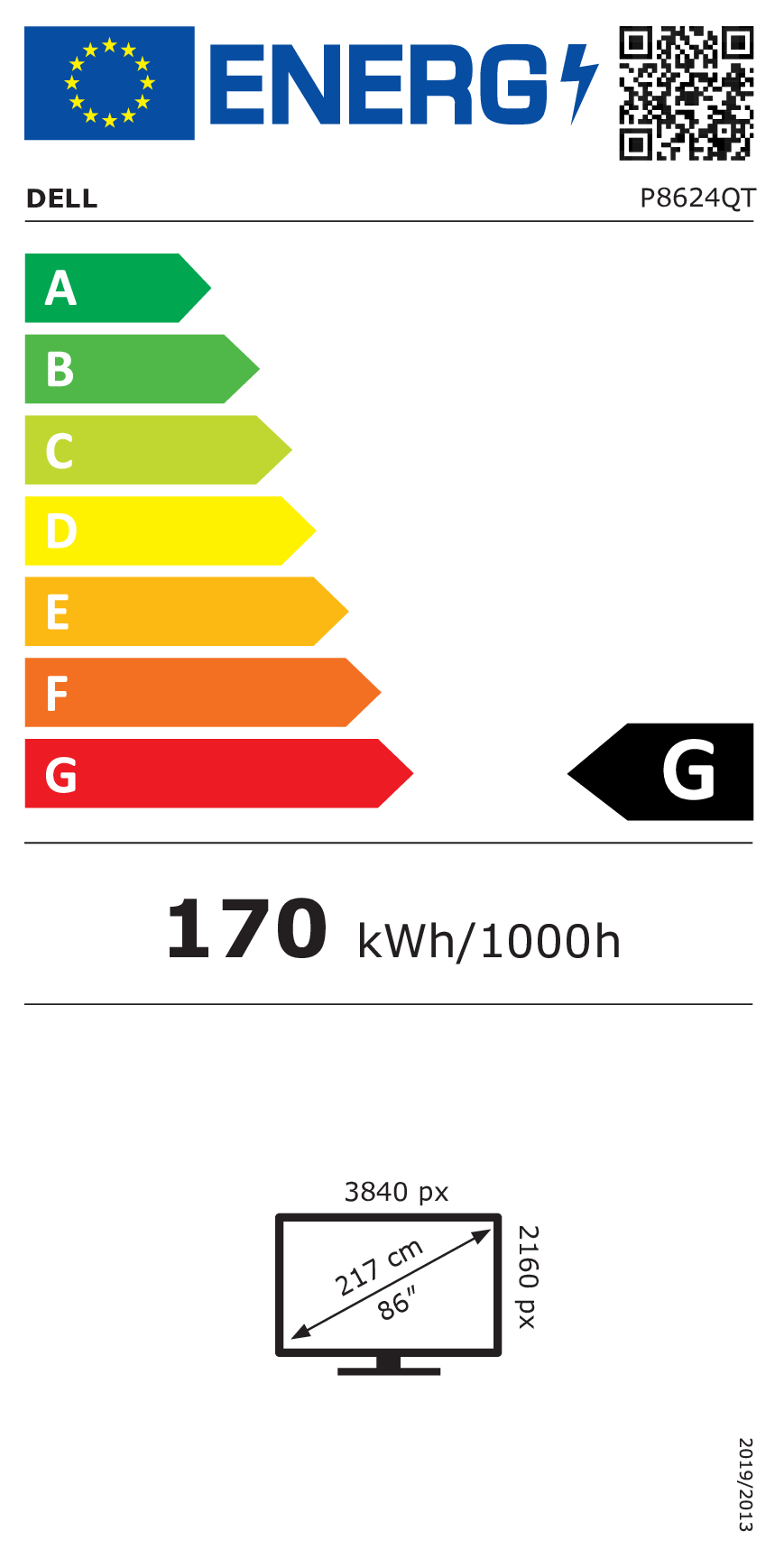
- 170 W
- Power consumption (standby)The amount of electricity that is consumed when the product is on standby.
- 0.5 W
- Power consumption (off)The amount of electrical energy consumed by the device when it is switched off, measured in watts.
- 0.3 W
- Power consumption (max)The maximum amount of power used by the device.
- 430 W
- Energy efficiency class (SDR)The energy efficiency rating of the device when operating in Standard Dynamic Range (SDR) mode, categorized from A to G.
- G
- Energy efficiency class (HDR)The energy efficiency rating of the device when High Dynamic Range (HDR) mode is active, ranging from A to G.
- Not available
- Energy consumption (SDR) per 1000 hoursThe amount of electric energy consumed by the device during standard dynamic range (SDR) operation over a period of 1000 hours, measured in kilowatt-hours (kWh).
- 170 kWh
- AC input voltageThe voltage of the AC electricity that is inputted into the product.
- 100 - 240 V
- AC input frequencyThe range of alternating current frequencies the device can accept from the power source, measured in hertz (e.g., 45 - 65).
- 50/60 Hz
- Energy efficiency scaleThe range of energy efficiency classes used to rate the product's power consumption, such as A to G.
- A to G
- USB Power Delivery (USB PD)Indicates whether the device supports the USB Power Delivery standard for faster charging and higher power levels.
- Yes
Features
- Cable managementDescription of improved cable management
- Yes
- Plug and PlayIndicates whether this product supports is "plug and play". Plug and play is hardware or software that, after being installed ("plugged in"), can immediately be used ("played with"), as opposed to hardware or software which requires configuration.
- Yes
- Heat dissipation (max)The maximum amount of heat energy released by the device during operation, measured in BTU/h.
- 1467.22 BTU/h
- Windows operating systems supportedWindows vesions wich can be used with the device.
- Windows 7 Professional, Windows 7 Ultimate, Windows 8, Windows 8.1
- HardnessA measure of how solid/firm/rigid something is.
- 9H
Sustainability
- Sustainability certificatesThe environmental or ethical certifications the product has received to verify its sustainability standards (e.g., ASC or ACT Organic).
- ENERGY STAR
- Doesn't containSpecifies the harmful or restricted substances that are not present in the product (e.g. Acetone, Alcohol, or Aluminium).
- Arsenic, Mercury, PVC/BFR
Certificates
- Compliance certificatesIndicates which regulatory, safety, and environmental standards the product complies with, as verified by recognized authorities or certification bodies.
- RoHS
Carbon footprint
- Total carbon footprint (kg of CO2e)The total mean carbon footprint value generated across various lifecycle stages (manufacturing, transportation / logistics, use and end of life) per unit (for one single product) i.e., measured in kilograms CO2e.
- 2815
- Total carbon emissions, standard deviation (kg of CO2e)The total estimated standard deviation of carbon emission calculated over various lifecycle stages per unit i.e., measured in kilograms CO2e. Deviations can be caused due to the use of default, assumed values during calculations.
- 816
- Carbon emissions, manufacturing (kg of CO2e)The mean carbon emissions during the Manufacturing stage (i.e., emissions during raw material extraction and manufacturing of components (e.g., drives, graphics cards, memory, CPU, mainboards, etc.) or assembling of the product.
- 1019.03
- Carbon emissions, logistics (kg of CO2e)The mean carbon emissions during the transportation of the product.
- 489.81
- Carbon emissions, energy usage (kg of CO2e)Use-phase carbon emissions from products that consume energy (fuels or electricity) during use.
- 1247.05
- Carbon emissions, end-of-life (kg of CO2e)The mean carbon emissions related to the End-of-Life processing of products.
- 59.12
- PAIA versionPAIA (Product Attribute to Impact Algorithm) tool for product carbon footprint calculations. The version of the PAIA tool (and year if available) used during carbon footprint calculation for a product.
- PAIA 1.3.2, 2022
Network
- Ethernet LANAn Ethernet LAN (Local Area Network) interface is present, for a wired conection via a cable.
- Yes
- Wi-FiPopular technology that allows an electronic device to exchange data or connect to the internet wirelessly using radio waves.
- No
- HID supportIndicates whether the device supports Human Interface Device (HID) protocols for standardized communication with a host system.
- Yes
Operational conditions
- Operating temperature (T-T)The minimum and maximum temperatures at which the product can be safely operated.
- 0 - 40 °C
- Operating relative humidity (H-H)The range of relative humidity, expressed as a percentage, within which the device can function correctly without damage or performance loss.
- 10 - 80%
- Storage temperature (T-T)The minimum and maximum temperatures at which the product can be safely stored.
- -20 - 60 °C
- Storage relative humidity (H-H)The permissible range of relative humidity, expressed as a percentage, within which the product can be stored without damage.
- 5 - 90%
- Operating altitudeThe maximum and minimum height above sea level at which the device can function correctly, measured in m.
- 0 - 5000 m
- Non-operating altitudeThe maximum and minimum altitude at which the unit can be stored or transported without sustaining damage, measured in metres.
- 0 - 12192 m
- Heat dissipationThe heat generated by the power supply.
- 580.06 BTU/h
Packaging content
- Cables includedSpecifies the types and quantities of connection cables provided with the product (e.g., 3.5 mm to 3.5 mm or SATA).
- AC, DisplayPort, HDMI, USB, USB Type-C
Weight & dimensions
- Display widthThe horizontal measurement of the screen area, expressed in millimetres or inches.
- 1982.6 mm
- Display depthThe measurement of the screen's thickness from the front surface to the back, expressed in millimeters.
- 82.8 mm
- Display heightThe vertical measurement of the screen area, excluding the bezel, expressed in millimetres or inches.
- 1156.6 mm
- Display weightThe total mass of the screen unit, measured in g.
- 87 kg
- Bezel width (side)The thickness of the frame surrounding the display on the left and right sides, measured in millimetres.
- 4.38 cm
Software
- Mac operating systems supportedMac operating systems e.g. OS X can be used with the device.
- Mac OS X 10.10 Yosemite, Mac OS X 10.11 El Capitan
- Linux operating systems supported8 RT. Linux (9.4, 9.5), Red Hat Enterprise Linux 5.0 (supported with a pre-built package); SUSE Linux (10.3, 11.0, 11, 11.1, 11.2), Fedora (9, 9.0, 10, 10.0, 11.0, 11, 12, 12.0), Ubuntu (8.04, 8.04.1, 8.04.2, 8.10, 9.04, 9.10, 10.04), Debian (5.0, 5.0.1, 5.0.2, 5.0.3)
- Yes
Management features
- On Screen Display (OSD)Indicates whether the device can display a graphical menu or information directly on the screen for adjusting settings and viewing status.
- Yes
Audio
- Built-in speaker(s)The device contains speaker(s) to produce sound.
- Yes
- Number of built-in speakersThe total quantity of integrated audio output drivers installed within the unit.
- 2
- RMS rated powerRMS (Root mean square) is a measure of the continuous power required by a device, in particular audio amplifiers and loudspeakers.
- 40 W
- Speaker impedanceThe electrical resistance of the audio drivers, measured in ohms.
- 8 Ω
- Speaker frequency rangeThe span of audio frequencies that the unit can reproduce, measured in hertz (Hz).
- 120 - 20000 Hz
Packaging data
- Package weightWeight of the packaged product.
- 102 kg
Database Right data-sheet 2026 Icecat. All rights reserved. Provided “as is”, without warranty — check details with the store before buying.
Price history (90 days, best daily price)
Price history is still being collected for this product — check back soon.
Alternative models

DELL P5524Q Signage Display Digital signage flat panel
138.7 cm (54.6") LCD 350 cd/m² 4K Ultra HD Black

DELL P7524QT Interactive flat panel
189.3 cm (74.5") LCD 350 cd/m² 4K Ultra HD Black Touchscreen

DELL P5524QT Signage Display Interactive flat panel
139.7 cm (55") LCD 350 cd/m² 4K Ultra HD Black Touchscreen

DELL Pro 65 Plus P6524QT Interactive flat panel
163.9 cm (64.5") LCD 350 cd/m² 4K Ultra HD Black Touchscreen
DELL P6524QT Signage Display Interactive flat panel
163.9 cm (64.5") LCD 350 cd/m² 4K Ultra HD Black Touchscreen
DELL P5524QT Interactive flat panel
139.7 cm (55") LCD 350 cd/m² 4K Ultra HD Black Touchscreen