
DELL P1917S computer monitor 48.3 cm (19") 1280 x 1024 pixels SXGA LED Black
- Screen: 48.3 cm (19"), 1280 x 1024 pixels, IPS, Flat
- Refresh rate: 6 ms response time
- Brightness: 250 cd/m²
- Ports: 1 × HDMI, 1 × DisplayPort
- Extras: USB hub
- Colour: Black
All 56 specificationsProduct page at accessories.euro.dell.com ↗
 6 ms · Black
 6 ms · Height adjustment · White
 8 ms · Height adjustment · Black
 8 ms · Height adjustment · White
Where to buy
We're not tracking prices for this product yet. Check current prices directly at:
We may earn a commission when you buy through links on this page — at no extra cost to you. Learn more
About this product
Purposefully designed for comfort and convenience.
Easily adjust your monitor to your desired angle, height, and position so you can enjoy great visuals across multiple monitors with no hassle.
- A more seamless workflow: Slim borders create a smoother and less obstructed visual experience when working across multiple monitors.
- Versatility you can count on: Enjoy full adjustability to pivot, tilt, adjust the height, and swivel your monitor to your exact preference.
- More ways to stay connected: Multiple connectivity ports on the bottom and side of the monitor allow you to easily connect to various devices.
Enhanced viewing experience
The Dell 19 Monitor | P1917S is perfect for professionals who work long hours and depend on a monitor that will display stunning visuals without inducing eye fatigue.
- Complete clarity: Get excellent picture quality with consistent color representation across an ultrawide viewing angle and a high 4million: 1 dynamic contrast ratio.
- Work comfortably with less stress: Dell's ComfortView feature helps reduces harmful blue light emission onscreen and with direct current, a flicker-free viewing experience is enabled.
- Auto Mode and PowerNap: Color settings of your applications are now customizable and allow for presets. And with PowerNap, you can worry less about wasting energy when you’re away from your computer.
Reliable and Responsible
Enjoy peace of mind with Dell services and eco-conscious features designed to keep you moving forward.
The #1 Monitor Brand
Enjoy peace of mind with unmatched reliability from the makers of the number 1 monitor brand worldwide.
Premium Panel Guarantee
The Dell Premium Panel Guarantee allows a free panel replacement during the Limited Hardware Warranty period even if only one bright pixel is found.
Advanced Exchange Service
Your Dell monitor comes with a 3-year Advanced Exchange Service so that, if necessary, a replacement monitor will be shipped to you the next business day within its 3-Year Limited Hardware Warranty.
Reliable and Responsible
Our eco-conscious design meets the latest regulatory and environmental standards such as ENERGY STAR, EPEAT Gold, TCO Certified Displays, CEL, CECP.
Documents
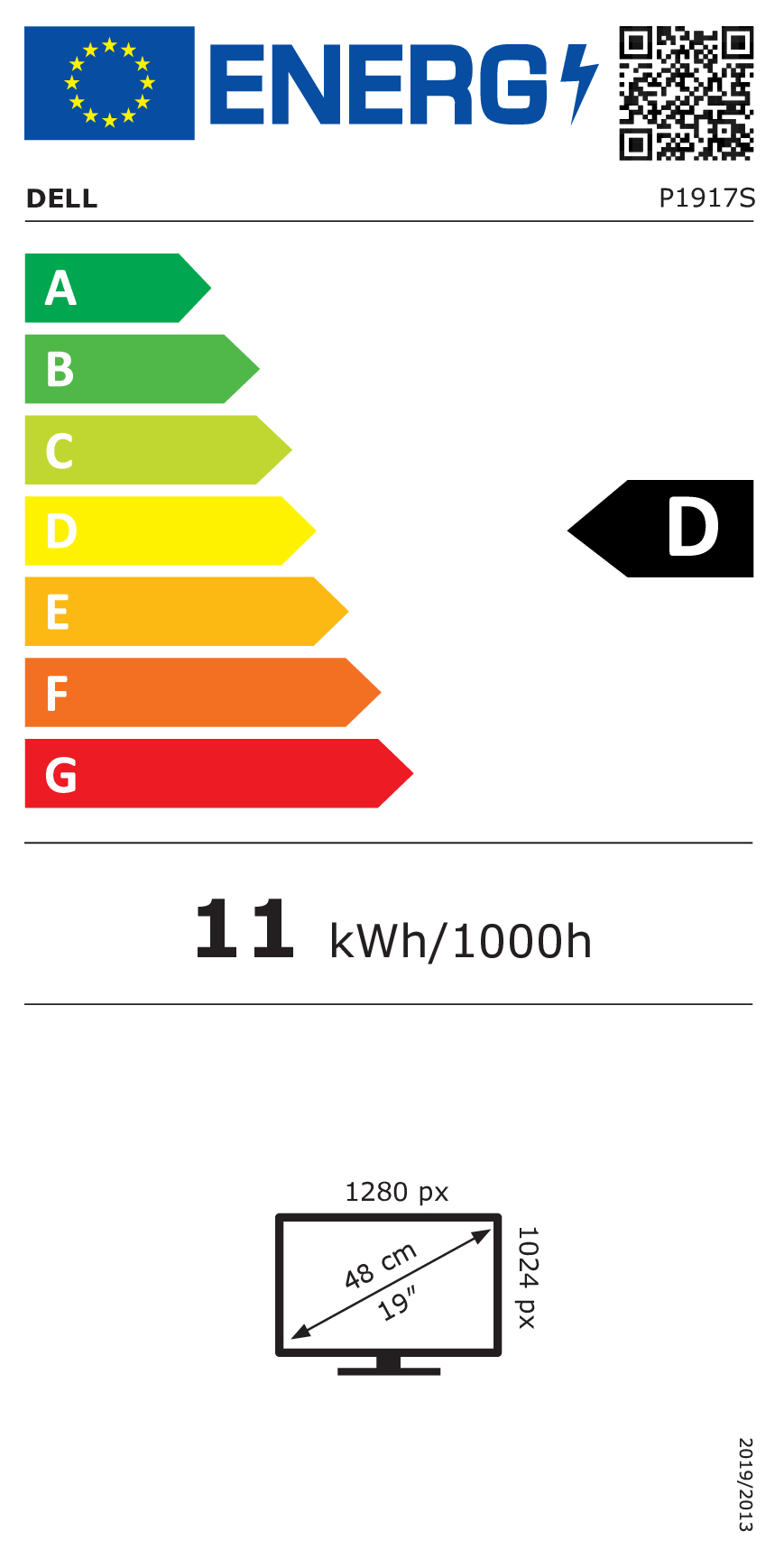
- DocumentCarbon Footprint ↗
- Product information sheetEU Product Fiche ↗
Specifications
Key specifications
- Display diagonalSize of the display for this product, measured diagonally, usually in inches.
- 48.3 cm (19")
- Display resolutionThe number of distinct pixels in each dimension that can be displayed. It is usually quoted as width × height, with the units in pixels: for example, "1024 × 768" means the width is 1024 pixels and the height is 768 pixels. The higher the number of pixels, the sharper the image.
- 1280 x 1024 pixels
- Panel typeThe technology used to manufacture the panel, such as AMOLED or AH-IPS.
- IPS
- Screen shapeDescribes the physical curvature of the display panel, such as whether it is flat or curved.
- Flat
- Response timeThe response time is the time difference between the moment that a source (for example a video card) sends a signal and that equipment (for example a monitor) receives or display the signal. (Used abbreviations: R/F = Rise and Fall.)
- 6 ms
- Display brightness (typical)Display brightness, measured by its Luminance, presented as a figure in nits. Typical brightness ratings for monitors range from 250 to 350 nits with a target value of between 80 to 120 nits being suitable for most displays in a normal viewing environment.
- 250 cd/m²
- HDMI ports quantityThe number of sockets (ports) for HDMI connections. HDMI (High-Definition Multimedia Interface) is a compact audio/video interface for transferring uncompressed video data and compressed/uncompressed digital audio data from a HDMI-compliant device ("the source device") to a compatible computer monitor, video projector, digital television, or digital audio device. HDMI is a digital replacement for…
- 1
- DisplayPorts quantityNumber of DisplayPorts. A DisplayPort is a digital display interface developed by the Video Electronics Standards Association (VESA). The interface is primarily used to connect a video source to a display device such as a computer monitor, though it can also be used to carry audio, USB, and other forms of data.
- 1
- Built-in USB hubWhether or not the device features a USB hub to connect more than one other device via USB.
- Yes
- Product colourThe colour e.g. red, blue, green, black, white.
- Black
Show all 56 specificationsShow key specifications only
Design
- VESA mountingIndicates whether the product supports the VESA mounting standard for attachment to compatible arms, brackets, or wall mounts.
- Yes
- Market positioningUnder which category can the device be positioned in the market, e.g. camera phone.
- Business
- Product colourThe colour e.g. red, blue, green, black, white.
- Black
Ports & interfaces
- Built-in USB hubWhether or not the device features a USB hub to connect more than one other device via USB.
- Yes
- USB hub versionThe technical standard of the USB hub, if available, which determines the maximum data transfer speed (e.g., 3.2 Gen 1).
- 3.2 Gen 1 (3.1 Gen 1)
- USB upstream port typeThe connector type used for the upstream connection to a host device (e.g., USB Type-B or USB Type-C).
- USB Type-B
- Number of upstream portsThe total number of available ports used to connect the device to a computer or another network source.
- 1
- USB Type-A downstream ports quantityThe number of USB Type-A ports available for connecting peripheral devices to the unit.
- 2
- VGA (D-Sub) ports quantityNumber of VGA (D-Sub) ports (connecting interfaces) in the device. The VGA (D-Sub) connector is a 15 pin connector between a computer and a monitor. It was first introduced in 1987 by IBM.
- 1
- DVI portDigital Visual Interface (DVI) is a video display interface to connect a video source to a display device, such as a computer monitor.
- No
- HDMI ports quantityThe number of sockets (ports) for HDMI connections. HDMI (High-Definition Multimedia Interface) is a compact audio/video interface for transferring uncompressed video data and compressed/uncompressed digital audio data from a HDMI-compliant device ("the source device") to a compatible computer monitor, video projector, digital television, or digital audio device. HDMI is a digital replacement for…
- 1
- DisplayPorts quantityNumber of DisplayPorts. A DisplayPort is a digital display interface developed by the Video Electronics Standards Association (VESA). The interface is primarily used to connect a video source to a display device such as a computer monitor, though it can also be used to carry audio, USB, and other forms of data.
- 1
Audio
- Built-in speaker(s)The device contains speaker(s) to produce sound.
- No
Multimedia
- Built-in cameraThe product has an integrated camera.
- No
Performance
- NVIDIA G-SYNCIndicates whether the product supports NVIDIA G-SYNC technology to synchronize the display refresh rate with the GPU to eliminate screen tearing.
- No
- AMD FreeSyncThe product includes AMD Freesync Technology for the dynamic synchronization of the graphic card and the monitor in order to avoid screen tearing.
- No
Display
- Display diagonalSize of the display for this product, measured diagonally, usually in inches.
- 48.3 cm (19")
- Display resolutionThe number of distinct pixels in each dimension that can be displayed. It is usually quoted as width × height, with the units in pixels: for example, "1024 × 768" means the width is 1024 pixels and the height is 768 pixels. The higher the number of pixels, the sharper the image.
- 1280 x 1024 pixels
- Native aspect ratioThe aspect ratio is the ratio of the width of an image to its height. The native aspect ratio is the one which the projector/display is particularly designed for. Images shown in native aspect ratio will utilize the entire resolution of the display and achieve maximum brightness. Images shown in other than native aspect ratio will always have less resolution and less brightness than images shown…
- 5:4
- Display technologyThe technology used in the display e.g. plasma, LED.
- LED
- TouchscreenA screen of a laptop, smartphone, etc., that responds to touch so you can control the interface using your fingers.
- No
- HD typeType of supported High Definition (e.g. Full HD, 4K Ultra HD).
- SXGA
- Panel typeThe technology used to manufacture the panel, such as AMOLED or AH-IPS.
- IPS
- Display brightness (typical)Display brightness, measured by its Luminance, presented as a figure in nits. Typical brightness ratings for monitors range from 250 to 350 nits with a target value of between 80 to 120 nits being suitable for most displays in a normal viewing environment.
- 250 cd/m²
- Response timeThe response time is the time difference between the moment that a source (for example a video card) sends a signal and that equipment (for example a monitor) receives or display the signal. (Used abbreviations: R/F = Rise and Fall.)
- 6 ms
- Screen shapeDescribes the physical curvature of the display panel, such as whether it is flat or curved.
- Flat
- Supported graphics resolutionsThe graphic resolutions that can be displayed by the device. The graphic resolution describes the width and height dimensions of a display, such as a computer monitor, measured in pixels.
- 1280 x 1024 (SXGA)
- Contrast ratio (typical)The difference in light intensity between the brightest white and the darkest black.
- 1000:1
- Viewing angle, horizontalMaximum horizontal angle at which a display can be viewed with acceptable visual performance.
- 178°
- Viewing angle, verticalMaximum vertical angle at which a display can be viewed with acceptable visual performance.
- 178°
- Display number of coloursThe total number of distinct colours that the device is capable of displaying (e.g. 1.07 billion colours).
- 16.78 million colours
- Pixel pitchThis is the parameter of a picture tube, which specifies the shortest distance between two dots of the same colour. The principle is: the smaller the dot pitch, the better sharpness of image.
- 0.293 x 0.293 mm
Thin Client
- Thin client installedThe product includes a thin client, which is a computer or a computer program which depends heavily on some other computer (its server) to fulfill its computational roles. This is different from the traditional fat client, which is a computer designed to take on these roles by itself. The specific roles assumed by the server may vary, from providing data persistence (for example, for diskless nod…
- No
Other features
- TV tuner integratedDevice has an in-built TV tuner.
- No
- Supplied AC adapter typeThe type of power supply provided with the product to connect it to an alternating current source (e.g. AC).
- LED
- Compliance industry standardsList of characteristics that describe methods of compliance to industry-defined standards for the product
- TCO
- 3DThe device can be used with 3D technology.
- No
Sustainability
- Sustainability certificatesThe environmental or ethical certifications the product has received to verify its sustainability standards (e.g., ASC or ACT Organic).
- ENERGY STAR
Packaging content
- Stand includedIndicates whether a support stand is supplied with the product.
- No
Weight & dimensions
- Width (without stand)The horizontal measurement of the device excluding the base or support structure, expressed in millimetres.
- 406.4 mm
- Depth (without stand)The measurement of the product from front to back without its base or support, typically expressed in millimetres or centimetres.
- 50.3 mm
- Height (without stand)The vertical measurement of the device when the stand is removed, measured in mm.
- 368.3 mm
- Weight (without stand)The mass of the device excluding the support base, measured in g.
- 5.13 kg
Power
- Energy efficiency class (SDR)The energy efficiency rating of the device when operating in Standard Dynamic Range (SDR) mode, categorized from A to G.
- D
- Energy consumption (SDR) per 1000 hoursThe amount of electric energy consumed by the device during standard dynamic range (SDR) operation over a period of 1000 hours, measured in kilowatt-hours (kWh).
- 11 kWh
- Power consumption (typical)Amount of power consumed by this model, often expressed in watts (W). Typical values that manufacturers give are power consumption when off, standby/suspended mode, typical use, maximum usage.
- 11 W
- Power consumption (standby)The amount of electricity that is consumed when the product is on standby.
- 0.2 W
- Power consumption (max)The maximum amount of power used by the device.
- 35 W
- Power consumption (off)The amount of electrical energy consumed by the device when it is switched off, measured in watts.
- 0.2 W
- Power consumption (PowerSave)The amount of electrical energy consumed by the device when it is operating in a power-saving mode, measured in Watts.
- 13 W
- AC input voltageThe voltage of the AC electricity that is inputted into the product.
- 120 - 230 V
- AC input frequencyThe range of alternating current frequencies the device can accept from the power source, measured in hertz (e.g., 45 - 65).
- 50 - 60 Hz
- Input currentThe amount of electrical current drawn by the device during operation, typically measured in amperes (A) or milliamperes (mA).
- 1.5 A
- Energy efficiency scaleThe range of energy efficiency classes used to rate the product's power consumption, such as A to G.
- A to G
Security
- Cable lock slotHoles on the edge of devices through which a cable lock can be passed, so the device can be locked to a desk etc.
- No
Ergonomics
- Height adjustmentThe part of the device that can be adjusted to change the height.
- No
Database Right data-sheet 2026 Icecat. All rights reserved. Provided “as is”, without warranty — check details with the store before buying.
Price history (90 days, best daily price)
Price history is still being collected for this product — check back soon.
Alternative models

DELL P2317H
computer monitor 58.4 cm (23") 1920 x 1080 pixels Full HD LED White

DELL P2417H
computer monitor 60.5 cm (23.8") 1920 x 1080 pixels Full HD LED Black

DELL P2217
computer monitor 55.9 cm (22") 1680 x 1050 pixels WSXGA+ LED White

DELL E Series E2318H
computer monitor 58.4 cm (23") 1920 x 1080 pixels Full HD LCD Black

DELL E Series E1715S
computer monitor 43.2 cm (17") 1280 x 1024 pixels SXGA LCD Black

DELL SE2717H
computer monitor 68.6 cm (27") 1920 x 1080 pixels Full HD LCD Black
Accessories & compatible products

DELL Canvas KV2718D graphic tablet Black 598.74 x
337.66 mm Bluetooth

DELL Precision 5720
Intel Core i7 i7-7700 68.6 cm (27") 3840 x 2160 pixels Touchscreen All-in-One workstation 16 GB DDR4-SDRAM 512 GB SSD AMD Radeon Pro WX 7100 Windows 10 Pro Wi-Fi 5 (802.11ac) Black, Grey

DELL Precision T3630
Intel Core i7 i7-8700K 32 GB DDR4-SDRAM 1.25 TB HDD+SSD Windows 10 Pro Tower Workstation Black
DELL Precision T3630
Intel Xeon E E-2146G 16 GB DDR4-SDRAM 1.25 TB HDD+SSD NVIDIA Quadro P2000 Windows 10 Pro Tower Workstation Black

DELL Precision 5720
Intel Core i7 i7-7700 68.6 cm (27") 3840 x 2160 pixels All-in-One workstation 8 GB DDR4-SDRAM 256 GB SSD AMD Radeon Pro WX 4150 Windows 10 Pro Wi-Fi 5 (802.11ac) Black, Grey

DELL Precision 5820
Intel Xeon W-2135 32 GB DDR4-SDRAM 512 GB SSD Windows 10 Pro Tower Workstation Black