
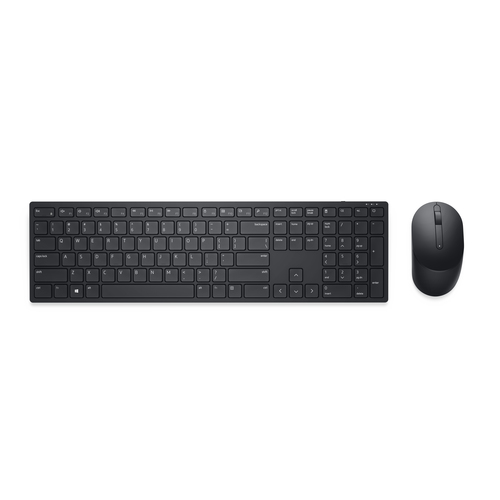
DELL KM7321W keyboard Mouse included Office RF Wireless + Bluetooth US English Grey, Titanium
- Connection: Wireless, RF Wireless + Bluetooth
- Key switches: Scissor key switch
- Layout: Full-size (100%), numeric keypad
- Extras: mouse included
- Made for: Office
- Colour: Grey, Titanium
All 41 specificationsProduct page at dell.com ↗
Model numbers
- KM7321WGY-LTNSpanish
- KM7321WGY-USUS English
Where to buy
We're not tracking prices for this product yet. Check current prices directly at:
We may earn a commission when you buy through links on this page — at no extra cost to you. Learn more
About this product
Experience superior multitasking features with a stylish and comfortable premium keyboard and mouse combo. Complete your tasks powered by one of the industry’s leading battery lives at up to 36 months.
Flexible multi-tasking
Seamlessly connect up to three devices with this premium keyboard and mouse combo. The dual mode RF 2.4 GHz and Bluetooth 5.0 connectivity lets you effortlessly switch across devices with the connection-mode key or button on your keyboard and mouse.
Navigate with precision
Easily maneuver across monitors of varying resolutions at home or in the office. Dell Peripheral Manager (DPM) software enables you to manage your input devices and adjust to your preferred preset DPIs at 1000, 1600, 2400 or 4000.
Well-crafted design
The thoughtfully designed quiet keyboard is slim and stylish with a premium feel and titan gray finish. Experience all day comfort thanks to the sculpted mouse that fits perfectly in your hand. The adjustable tilt legs on your keyboard give you the flexibility to work in your ideal typing position.
Specifications
Key specifications
- Connectivity technologyThe technology that enables connectivity of the device, e.g. wired or wireless.
- Wireless
- Device interfaceThe ports (sockets) where the device connects with other devices.
- RF Wireless + Bluetooth
- Keyboard key switchThe characteristics of the key switch, mechanical vs rubber dome. A mechanical key switch is usually more expensive, gives a stronger feedback and can be more precise.
- Scissor key switch
- Keyboard form factorKeyboard size, e.g. standard, mini.
- Full-size (100%)
- Numeric keypadSmall, palm-sized, seventeen key section of a computer keyboard, usually on the very far right. The numeric keypad features digits 0 to 9, addition (+), subtraction (-), multiplication (*) and division (/) symbols, a decimal point (.) and Num Lock and Enter keys. Laptop keyboards often do not have a numpad, but may provide numpad input by holding a modifier key (typically labelled "Fn") and opera…
- Yes
- Mouse includedA mouse is included with this product.
- Yes
- Recommended usageWhat the product should be used for, and how it should be used (e.g. ambient temperature).
- Office
- Product colourThe colour e.g. red, blue, green, black, white.
- Grey, Titanium
Show all 41 specificationsShow key specifications only
Packaging content
- Mouse includedA mouse is included with this product.
- Yes
- Receiver includedThe product includes a receiver, which is a device for picking up an external signal.
- Yes
- Wireless receiver interfaceThe type of physical connection used by the wireless receiver to connect to a host device (e.g. USB Type-A or USB Type-C).
- USB Type-A
- Batteries includedIndicates whether the required batteries are supplied with the product.
- Yes
Performance
- Recommended usageWhat the product should be used for, and how it should be used (e.g. ambient temperature).
- Office
Ports & interfaces
- Connectivity technologyThe technology that enables connectivity of the device, e.g. wired or wireless.
- Wireless
Keyboard
- Device interfaceThe ports (sockets) where the device connects with other devices.
- RF Wireless + Bluetooth
- Keyboard key switchThe characteristics of the key switch, mechanical vs rubber dome. A mechanical key switch is usually more expensive, gives a stronger feedback and can be more precise.
- Scissor key switch
- Keyboard languageThe letters which are marked on the keys for convenience of the keyboard usage with specific language.
- US English
- Pointing deviceThe type of integrated input mechanism used to control the cursor (e.g., Clickpad or DialPad).
- No
- Keyboard form factorKeyboard size, e.g. standard, mini.
- Full-size (100%)
- Numeric keypadSmall, palm-sized, seventeen key section of a computer keyboard, usually on the very far right. The numeric keypad features digits 0 to 9, addition (+), subtraction (-), multiplication (*) and division (/) symbols, a decimal point (.) and Num Lock and Enter keys. Laptop keyboards often do not have a numpad, but may provide numpad input by holding a modifier key (typically labelled "Fn") and opera…
- Yes
- Windows keysIndicates whether the product includes dedicated keys for Windows operating system shortcuts.
- Yes
- Hot keysIndicates whether the device features dedicated keys for performing specific predefined functions with a single press.
- Yes
- Programmable hot keysIndicates whether the device features programmable inputs that can be customized by the user to perform specific functions or execute macros.
- Yes
- Frequency bandA small section of the spectrum of radio communication frequencies, in which channels are usually used or set aside for the same purpose e.g.for a channel on FM radio; for mobile networks to communicate with mobile phones.
- 2.4 GHz
Weight & dimensions
- Keyboard dimensions (WxDxH)The physical width, depth, and height of the device, measured in mm.
- 433.3 x 121.5 x 28.36 mm
- Keyboard weightThe total mass of the device, typically measured in grams or kilograms.
- 561 g
- Mouse dimensions (WxDxH)The physical width, depth, and height of the device, measured in mm.
- 69.7 x 114.5 x 41.6 mm
Features
- Windows operating systems supportedWindows vesions wich can be used with the device.
- Yes
- Surface colorationType of surface coloration e.g. monotone, image.
- Monochromatic
Software
- Mac operating systems supportedMac operating systems e.g. OS X can be used with the device.
- Yes
- Linux operating systems supported8 RT. Linux (9.4, 9.5), Red Hat Enterprise Linux 5.0 (supported with a pre-built package); SUSE Linux (10.3, 11.0, 11, 11.1, 11.2), Fedora (9, 9.0, 10, 10.0, 11.0, 11, 12, 12.0), Ubuntu (8.04, 8.04.1, 8.04.2, 8.10, 9.04, 9.10, 10.04), Debian (5.0, 5.0.1, 5.0.2, 5.0.3)
- Yes
System requirements
- Mobile operating systems supportedThe operating systems e.g. Android, iOS, that can be used with the mobile device.
- Android
- Other operating systems supportedLists additional operating systems that are compatible with the product (e.g. Android, ChromeOS or FreeBSD).
- ChromeOS
Mouse
- Movement detection technologyThe technology employed to detect motion, e.g. Dual, using combinations of different sensing technologies to help reduce false triggering.
- Optical
- Movement resolutionThe sensitivity of the sensor, measured as the number of dots per inch (DPI) that the device detects during movement (e.g. 1600).
- 1600 DPI
- Buttons quantityThe number of buttons that there are in/on the product.
- 7
- Buttons typeThe type of the buttons.
- Pressed buttons
- ScrollMove displayed text or graphics in a particular direction on a computer screen in order to view different parts of them.
- Yes
- Scroll typeType of scroll in computer input device, e.g. wheel, touch.
- Wheel
- Scrolling directionsSpecifies the axis along which the scrolling function operates, such as vertical or horizontal.
- Vertical
- Mouse battery typeThe type of power cell required for operation, such as standard alkaline cells (e.g. AA, AAA) or an integrated rechargeable battery.
- AA
- Number of batteries (mouse)The total quantity of batteries required for the operation of the mouse.
- 1
Power
- Power source typeWhat the power source is.
- Battery
- Keyboard battery typeThe type of power cell required for operation, such as standard alkaline cells (e.g. AA, AAA) or an integrated rechargeable battery.
- AAA
- Number of batteries (keyboard)The total quantity of batteries required to power the device.
- 2
Design
- Keyboard styleThe style of the keyboard e.g. straight, curved.
- Straight
- Wrist restA padded cushion placed in front of a computer keyboard to rest your wrists on when typing.
- No
- Product colourThe colour e.g. red, blue, green, black, white.
- Grey, Titanium
Network
- Bluetooth versionThe type of bluetooth technology in the product e.g. Bluetooth Smart (v4.0).
- 5.0
Database Right data-sheet 2026 Icecat. All rights reserved. Provided “as is”, without warranty — check details with the store before buying.
Price history (90 days, best daily price)
Price history is still being collected for this product — check back soon.
Alternative models
DELL Pro
Keyboard and Mouse - KM5221W - French (AZERTY) - Black
DELL KM5221W
keyboard Mouse included Office RF Wireless QWERTY US International Black
DELL KM5221W
keyboard Mouse included Office RF Wireless US English Black

DELL Wired
Keyboard - KB216 - German (QWERTZ) - Black

DELL KM5221W
keyboard Mouse included Office RF Wireless Spanish Black

DELL Pro 3 Wired
keyboard HTPC USB AZERTY Belgian Black
Accessories & compatible products

DELL Pro QC24250
Intel Core Ultra 5 245 61 cm (24") 1920 x 1080 pixels All-in-One PC 16 GB DDR5-SDRAM 512 GB SSD Windows 11 Pro Wi-Fi 6E (802.11ax) Black

DELL UltraSharp U3226Q
computer monitor 80 cm (31.5") 3840 x 2160 pixels 4K Ultra HD QD-OLED Black
DELL UltraSharp U5226KW
computer monitor 132.1 cm (52") 6144 x 2560 pixels 6K Ultra HD LCD Silver

DELL Pro QCM1250
Intel Core i7 i7-14700T 16 GB DDR5-SDRAM 512 GB SSD Windows 11 Pro Micro PC Mini PC Black

DELL Pro QC24251
Intel Core i5 i5-14500T 61 cm (24") 1920 x 1080 pixels All-in-One PC 16 GB DDR5-SDRAM 512 GB SSD Windows 11 Pro Wi-Fi 6E (802.11ax) Black

DELL Pro QCS1255
AMD Ryzen 5 PRO PRO 8500G 16 GB DDR5-SDRAM 512 GB SSD Windows 11 Pro Slim PC PC Black