
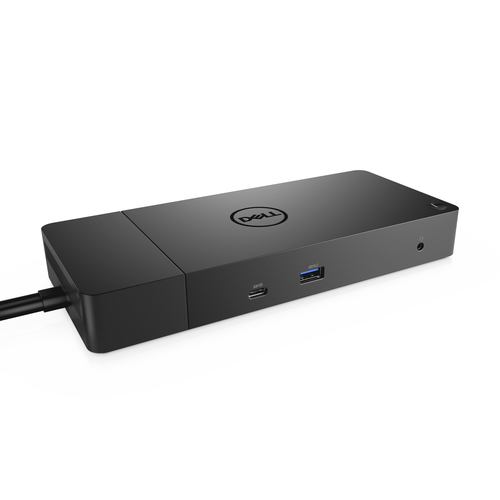
DELL D6000 Wired USB 3.2 Gen 1 (3.1 Gen 1) Type-C Black
- Product colour: Black
- Cables included: USB Type-A to USB Type-C
- AC adapter included
- User guide
- Operating temperature (T-T): 0 - 40 °C
- Windows operating systems supported: Windows 10, Windows 7, Windows 8, Windows 8.1
All 39 specificationsProduct page at dell.com ↗
Versions
 - Inspiron 14 7460, 15 Gaming 7567 - Latitude 13 3379 2-in-1, 13 3380, 3189, 3480, 3580, 5280, 5285 2-in-1, 5289 2-In-1, 5480, 5580, 7280, 7480 - Vostro 14 5468, 15 3568, 15 5568 - XPS 13 9365 2-in-1
 - Inspiron 14 7460, 15 Gaming 7567; - Latitude 13 3379 2-in-1, 13 3380, 3189, 3480, 3580, 5280, 5285 2-in-1, 5289 2-In-1, 5480, 5580, 7280, 7480; - Vostro 14 5468, 15 3568, 15 5568; - XPS 13 9365 2-in-1.
Where to buy
We're not tracking prices for this product yet. Check current prices directly at:
We may earn a commission when you buy through links on this page — at no extra cost to you. Learn more
About this product
Conveniently dock any laptop equipped with USB-C or USB3.0 ports with the Dell Universal Dock - D6000. You’ll be able to connect up to three 4K displays simultaneously.
Universal Docking Solution
Conveniently attach any laptop equipped with USB-C or USB 3.0i with the Dell Universal Dock - D6000. Enjoy universal compatibility with a wide range of PC brands and operating systems supported by DisplayLink technology. Whether you're at your desk or in a shared workspace, you can easily connect to displays, a mouse, keyboard and audio devices from your compatible system of choice.
Connect with three 4K displays simultaneously
You'll be able to connect with 3 displays simultaneously. Enjoy Ultra HD 5K on a single screen or up to three 4K displays via USB-C *† thanks to DisplayLink technology.
Fast and convenient docking solution
With plug and play, connecting to the dock is fast and convenient. Plug in a single USB-C cable and transfer audio, video, data and power. Plus, the single cable eliminates the need for an additional power adapter—keeping your workspace clean and clutter free.
Specifications
Key specifications
- Product colourThe colour e.g. red, blue, green, black, white.
- Black
- Cables includedSpecifies the types and quantities of connection cables provided with the product (e.g., 3.5 mm to 3.5 mm or SATA).
- USB Type-A to USB Type-C
- AC adapter includedIndicates whether a power supply unit for connecting the device to an AC outlet is provided in the package.
- Yes
- User guideIndicates whether a user manual or instructional guide is included with the product.
- Yes
- Operating temperature (T-T)The minimum and maximum temperatures at which the product can be safely operated.
- 0 - 40 °C
- Windows operating systems supportedWindows vesions wich can be used with the device.
- Windows 10, Windows 7, Windows 8, Windows 8.1
- Power source typeWhat the power source is.
- DC
- AC input voltageThe voltage of the AC electricity that is inputted into the product.
- 100 - 240 V
- AC input frequencyThe range of alternating current frequencies the device can accept from the power source, measured in hertz (e.g., 45 - 65).
- 50 - 60 Hz
- Power supplyThe way in which the product is powered e.g. rechargeable battery, mains electricity connected via a plug and cable.
- 130 W
Show all 39 specificationsShow key specifications only
Design
- Product colourThe colour e.g. red, blue, green, black, white.
- Black
- LED indicatorsThe specific status lights available on the unit to provide visual feedback on its current state or connectivity (e.g., AC input, ACT, or Access).
- LAN, Power
Packaging content
- Cables includedSpecifies the types and quantities of connection cables provided with the product (e.g., 3.5 mm to 3.5 mm or SATA).
- USB Type-A to USB Type-C
- AC adapter includedIndicates whether a power supply unit for connecting the device to an AC outlet is provided in the package.
- Yes
- User guideIndicates whether a user manual or instructional guide is included with the product.
- Yes
Weight & dimensions
- WidthThe measurement or extent of something from side to side.
- 78 mm
- DepthThe distance from the front to the back of something.
- 168 mm
- HeightThe measurement of the product from head to foot or from base to top.
- 30 mm
- WeightWeight of the product without packaging (net weight). If possible, the net weight is given including standard accessories and supplies. Please note that sometimes the manufacturer leaves out the weight of accessories and/or supplies.
- 380 g
Operational conditions
- Operating temperature (T-T)The minimum and maximum temperatures at which the product can be safely operated.
- 0 - 40 °C
Features
- Windows operating systems supportedWindows vesions wich can be used with the device.
- Windows 10, Windows 7, Windows 8, Windows 8.1
- Output voltageThe electrical potential difference delivered by the device, typically expressed in volts (e.g. 24-48).
- 19.5 V
- Brand compatibilityWhat other brands this brand can be used with.
- Dell
- CompatibilityThe other products, software and hardware this product can be used with.
- - Inspiron 14 7460, 15 Gaming 7567 - Latitude 13 3379 2-in-1, 13 3380, 3189, 3480, 3580, 5280, 5285 2-in-1, 5289 2-In-1, 5480, 5580, 7280, 7480 - Vostro 14 5468, 15 3568, 15 5568 - XPS 13 9365 2-in-1
Power
- Power source typeWhat the power source is.
- DC
- AC input voltageThe voltage of the AC electricity that is inputted into the product.
- 100 - 240 V
- AC input frequencyThe range of alternating current frequencies the device can accept from the power source, measured in hertz (e.g., 45 - 65).
- 50 - 60 Hz
- Power supplyThe way in which the product is powered e.g. rechargeable battery, mains electricity connected via a plug and cable.
- 130 W
- Output currentThe maximum electrical current that the device can provide to a connected load, measured in amperes (A).
- 6.7 A
- DC-in jackThe socket/plug where the DC electricity supply connects to the device.
- Yes
Storage
- Card reader integratedA card reader is a device that enables reading and, in some cases, writing data to and from a memory card.
- No
Processor
- Maximum digital resolutionThe highest number of pixels that the device can output or support, typically expressed as width by height (e.g. 3840 x 2160).
- 3840 x 2160 pixels
Security
- Cable lock slotHoles on the edge of devices through which a cable lock can be passed, so the device can be locked to a desk etc.
- Yes
- Cable lock slot typeThe standard of the security slot used to attach a physical locking cable to the device (e.g. Kensington or Noble).
- Kensington
Network
- Ethernet LANAn Ethernet LAN (Local Area Network) interface is present, for a wired conection via a cable.
- Yes
- Ethernet LAN data ratesThe different speed levels of the Ethernet LAN connection.
- 10,100,1000 Mbit/s
Ports & interfaces
- Ethernet LAN (RJ-45) portsNumber of Ethernet LAN (RJ-45) ports (connecting interfaces) in the device. Ethernet LAN (RJ-45) ports allow a computer to connect to the ethernet.
- 1
- Connectivity technologyThe technology that enables connectivity of the device, e.g. wired or wireless.
- Wired
- Host interfaceInterface that enables a host controller to communicate with a driver.
- USB 3.2 Gen 1 (3.1 Gen 1) Type-C
- USB 3.2 Gen 1 (3.1 Gen 1) Type-A ports quantityThe total number of available USB 3.2 Gen 1 (formerly 3.1 Gen 1) Type-A connection ports on the device.
- 4
- USB 3.2 Gen 1 (3.1 Gen 1) Type-C ports quantityNumber of USB 3.0 (3.1 Gen 1) ports with Type-C connector. USB 3.0 (3.1 Gen 1) is USB interface version which supports transfer rate up to 5 Gbit/s (SuperSpeed). USB Type-C connector has symmetrical design architecture and compatible with Thunderbolt 3 interface.
- 1
- PowerShareIndicates whether the device supports charging external peripherals via the USB port even when the system is powered off or in sleep mode.
- Yes
- Number of USB ports with PowerShare supportThe total number of USB ports capable of charging external devices even when the unit is powered off or in sleep mode.
- 2
- HDMI ports quantityThe number of sockets (ports) for HDMI connections. HDMI (High-Definition Multimedia Interface) is a compact audio/video interface for transferring uncompressed video data and compressed/uncompressed digital audio data from a HDMI-compliant device ("the source device") to a compatible computer monitor, video projector, digital television, or digital audio device. HDMI is a digital replacement for…
- 1
- DisplayPorts quantityNumber of DisplayPorts. A DisplayPort is a digital display interface developed by the Video Electronics Standards Association (VESA). The interface is primarily used to connect a video source to a display device such as a computer monitor, though it can also be used to carry audio, USB, and other forms of data.
- 2
- Microphone inThe socket where a microphone is connected to the device.
- No
- Combo headphone/mic portIndicates whether the device features a single integrated jack that supports both audio output for headphones and audio input for a microphone.
- No
- Line-outIndicates whether the device has a dedicated audio output port for connecting to an external amplifier or powered speakers.
- Yes
Logistics data
- Harmonized System (HS) codeThe standardized numerical method of classifying traded products used by customs authorities around the world to identify goods for tariffs and statistics.
- 84733020
Database Right data-sheet 2026 Icecat. All rights reserved. Provided “as is”, without warranty — check details with the store before buying.
Price history (90 days, best daily price)
Price history is still being collected for this product — check back soon.
Alternative models

DELL TB16 Wired Thunderbolt 3 Black

DELL WD19DC Wired USB 3.2 Gen 1
(3.1 Gen 1) Type-C Black

DELL E-PORT ADVANCED (II) N1J67 USB3 WITH
130W WRHKW Wired

DELL WD19TB Wired Thunderbolt 3 Black
DELL E Series Port Replicator SIMPLE USB3
DELL WD19 Wired USB 3.2 Gen 1
(3.1 Gen 1) Type-C Black