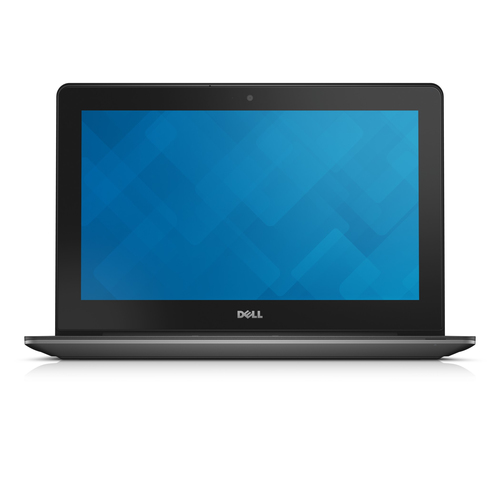
DELL Chromebook 11 29.5 cm (11.6") 4 GB DDR3L-SDRAM 16 GB SSD Black
- Display: 29.5 cm (11.6"), 1366 x 768 pixels
- Memory: 4 GB DDR3L-SDRAM
- Storage: 16 GB SSD
- Graphics: Intel HD Graphics
- Colour: Black
All 72 specificationsProduct page at dell.com ↗
Versions
 4 GB · SSD · Black
 Intel Celeron · 2955U · 2 GB · SSD · Black
 Intel Celeron · 2955U · 2 GB · SSD · Grey
 Intel Celeron · 2955U · 4 GB · SSD · Black
- Intel Celeron · 2955U · 4 GB · SSD · Grey
 Intel Celeron · N2840 · 2 GB · Flash · Black
 Intel Celeron · N2840 · 2 GB · Flash · Black, Blue
- Intel Celeron · N2840 · 2 GB · SSD · Black
 Intel Celeron · N2840 · 2 GB · SSD · Grey
- Intel Celeron · N2840 · 4 GB · Flash · Black
- Intel Celeron · N2840 · 4 GB · Flash · Black, Blue
- Intel Celeron · N2840 · 4 GB · Flash · Blue
- Intel Celeron · N2840 · 4 GB · SSD · Black
- Intel Celeron · N2840 · 4 GB · SSD · Blue
 Intel Celeron · N2840 · 4 GB · SSD · Grey
 Intel Celeron · N2840 · IPS · 2 GB · Black
- Intel Celeron · N2840 · IPS · 4 GB · SSD · Black
- Intel Celeron · N2840 · IPS · Touchscreen · 4 GB · Flash · Black
- Intel Celeron · N2840 · LCD · 2 GB · SSD · Black
 Intel Celeron · N2840 · LCD · 4 GB · SSD · Black
 Intel Celeron · N2840 · LCD · 4 GB · SSD · Black, Blue
 Intel Celeron · N2840 · Touchscreen · 4 GB · Flash · Black
- Intel Celeron · N2840 · Touchscreen · 4 GB · SSD · Black
- Intel Celeron · N2840 · Touchscreen · 4 GB · SSD · Grey
- Intel Core i3 · i3-4005U · 4 GB · SSD · Grey
Where to buy
We're not tracking prices for this product yet. Check current prices directly at:
We may earn a commission when you buy through links on this page — at no extra cost to you. Learn more
About this product
Fast: Chromebook 11 is easy to use, boots in seconds and comes with your favorite Google apps.
Secure: Built in multiple layers of security to help keep users safe from viruses and malware. In addition, updates happen automatically, for free. You will never need to purchase or install upgrades manually.
All-day performance: The Chrome OS and Chrome browser get users online in an instant and loads web pages in seconds. A high-density battery supported by a 4th Gen Intel processor provides up to 10 hours of power.
Easy Productivity: Offering easy content creation, consumption and collaboration, allowing productivity on email, create and edit documents, edit photos or videos.
Ideal mobility
High performance: Intel Haswell Dual Core x86 processor, supporting “all-day” battery life, offering 10-hour battery life with coverage throughout the day without a need to "plug-in".
Optimized form factor: 11.6”screen size, Sub 1”height, and less than 3lbs for maximum portability.
Multiple ways to connect: WiFi a/b/g/n, Bluetooth and Browser based computing allows consumers to sync with other Android phones or tablets.
Smart Connection
Connect/Sync – with other Android phones/tablets and other devices running Chrome browser.
Up-to-date, all the time
Automatic updates help Chromebook 11 stay ahead of the curve – save time and IT resources and never worry about installing new software or upgrading security.
Trouble-free security
Stay online without the risk of security threats. Apps and data are automatically scanned for viruses and malware in the cloud, so Chromebook 11 stays safe without any additional security software.
Drive student success with education solutions
Dell K-12 Education Solutions help schools effectively use technology, increase teacher productivity and engage students. From hardware and software support to IT planning and professional development for teachers, Dell helps schools build a digital learning environment from start to finish.
Upgrade to ProSupport Plus – the only complete support that combines proactive resolution, automated prevention and protection for PCs and tablets. We’ve got your business covered.
Your system comes with Dell’s 1-year Base Warranty. If your system encounters an issue covered by the warranty that cannot be resolved remotely, Dell will provide a convenient way for your system to be repaired. You can choose to extend your warranty 2-3 years and breathe easy.
Choose additional support options or upgrade to help you get the most out of your technology
ProSupport Plus combines 24x7 expert hardware and software support and repair for devices that are accidentally damaged. When needed, Dell will provide a convenient way for your system to be repaired.
ProSupport 24x7 expert hardware and software support.
We know accidents happen, and with Dell’s Accidental Damage Service you can reduce the downtime. We’ll repair a laptop damaged by an electrical surge, liquid spill or drop.
Specifications
Key specifications
- Display diagonalSize of the display for this product, measured diagonally, usually in inches.
- 29.5 cm (11.6")
- Display resolutionThe number of distinct pixels in each dimension that can be displayed. It is usually quoted as width × height, with the units in pixels: for example, "1024 × 768" means the width is 1024 pixels and the height is 768 pixels. The higher the number of pixels, the sharper the image.
- 1366 x 768 pixels
- Internal memoryThe amount of memory, usually measured in bytes (e.g. MB, GB), which is installed in the system's hardware.
- 4 GB
- Internal memory typeThe type of internal memory such as RAM, GDDR5.
- DDR3L-SDRAM
- Total storage capacityThe total amount of data that can be stored on the device.
- 16 GB
- Storage mediaUsed for the storage of data e.g. HDD (hard disk drive), SSD (solid-state drive).
- SSD
- On-board graphics card model"Graphic adapter" is the hardware that produces images on a display. "On-board" means that the graphics adapter is intergrated inside the motherboard.
- Intel HD Graphics
- Product colourThe colour e.g. red, blue, green, black, white.
- Black
Show all 72 specificationsShow key specifications only
Graphics
- On-board graphics cardGraphics hardware which is built into the motherboard or CPU, as opposed to a separate graphics adapter (video card). On-board graphics uses CPU and RAM for graphics processing.
- Yes
- On-board graphics card familyThe specific series or generation of the integrated graphics (e.g. AMD Radeon Graphics).
- Intel HD Graphics
- On-board graphics card model"Graphic adapter" is the hardware that produces images on a display. "On-board" means that the graphics adapter is intergrated inside the motherboard.
- Intel HD Graphics
Storage
- Total storage capacityThe total amount of data that can be stored on the device.
- 16 GB
- Storage mediaUsed for the storage of data e.g. HDD (hard disk drive), SSD (solid-state drive).
- SSD
- Number of SSDs installedThe total quantity of solid state drives integrated into the device.
- 1
- SSD capacityThe Solid State Drive's data storage capacity.
- 16 GB
- Optical drive typeAn optical drive uses laser to read optical discs such as CDs, DVDs and Blu-Ray. Some types of optical drive are: CD ROM drive, CR-RW (CD writer) drive, DVD-ROM.
- No
- Card reader integratedA card reader is a device that enables reading and, in some cases, writing data to and from a memory card.
- Yes
- Compatible memory cardsTypes of memory cards which can be used with this product.
- SD
Memory
- Internal memoryThe amount of memory, usually measured in bytes (e.g. MB, GB), which is installed in the system's hardware.
- 4 GB
- Internal memory typeThe type of internal memory such as RAM, GDDR5.
- DDR3L-SDRAM
- Maximum internal memoryThe maximum amount of memory inside a product, usually measured in bytes e.g megabytes (MB) or gigabytes (GB).
- 4 GB
- Maximum internal memory (64-bit)The maximum amount of 64-bit RAM that can be installed in the device, measured in GB.
- 4 GB
Display
- Display diagonalSize of the display for this product, measured diagonally, usually in inches.
- 29.5 cm (11.6")
- Display resolutionThe number of distinct pixels in each dimension that can be displayed. It is usually quoted as width × height, with the units in pixels: for example, "1024 × 768" means the width is 1024 pixels and the height is 768 pixels. The higher the number of pixels, the sharper the image.
- 1366 x 768 pixels
- TouchscreenA screen of a laptop, smartphone, etc., that responds to touch so you can control the interface using your fingers.
- No
- Native aspect ratioThe aspect ratio is the ratio of the width of an image to its height. The native aspect ratio is the one which the projector/display is particularly designed for. Images shown in native aspect ratio will utilize the entire resolution of the display and achieve maximum brightness. Images shown in other than native aspect ratio will always have less resolution and less brightness than images shown…
- 16:9
Design
- Product typeThe sub-category of the product.
- Chromebook
- Product colourThe colour e.g. red, blue, green, black, white.
- Black
- Form factorThe shape or design of the product.
- Clamshell
Packaging content
- AC adapter includedIndicates whether a power supply unit for connecting the device to an AC outlet is provided in the package.
- Yes
- Power cord includedIndicates whether a power cable is supplied with the product.
- Yes
Security
- Cable lock slotHoles on the edge of devices through which a cable lock can be passed, so the device can be locked to a desk etc.
- Yes
- Cable lock slot typeThe standard of the security slot used to attach a physical locking cable to the device (e.g. Kensington or Noble).
- Kensington
- Password protectionThe computer, smartphone etc. can only be used when the correct password is entered, therefore making it more secure.
- Yes
Power
- DC-in jackThe socket/plug where the DC electricity supply connects to the device.
- Yes
Battery
- Battery technologyThe type of battery in the device, e.g. nickel–cadmium (NiCd).
- Lithium-Ion (Li-Ion)
- Number of battery cellsThe total quantity of individual battery cells used to power the device, including configurations with primary and backup cells (e.g., 1+2).
- 3
- Battery capacityA measure of the charge stored by the battery. Determined by the mass of active material contained in the battery.
- 51 Wh
- Battery life (max)Maximum battery life. Mobile Mark (2002) is the standard often used to benchmark battery life time.
- 10 h
Processor special features
- Intel Wireless Display (Intel WiDi)Connect to TV Wirelessly With a few clicks, Intel Wireless Display expands your screen’s potential, linking mobile devices and laptops to TV screens wirelessly. Stream family favorites and view personal experiences while turning your device’s small screen into a superior, sharable experience.
- No
- Intel My WiFi Technology (Intel MWT)Intel My WiFi Technology (Intel MWT) uses an extensible software architecture that allows the operating system to think the notebook has two Wi-Fi radios performing similar, but different, functions. Each virtual Wi-Fi radio is assigned a TCP/IP stack.
- No
- Intel Smart Connect TechnologyIntel Smart Connect Technology continually and automatically updates your e-mail, applications, and social networks, even when the system is asleep.
- Yes
- Intel Anti-Theft Technology (Intel AT)Disable access to missing laptops Giving users access to corporate data and application through remote laptops boosts productivity, but it can also leave IT vulnerable to hackers and misplaced laptops. Intel Anti-Theft Technology is built into the laptop hardware, helping IT administrators outwit thieves, even when they attempt to reimage the OS, change the boot order, or install a new hard drive…
- No
- Intel Rapid Start TechnologyGet Up and Running in Seconds Stop waiting for your PC to wake up, and get a computing experience that is instantly on and ready to go with Intel Rapid Start Technology. This technology saves a snapshot of your activity on the SSD, preparing the system with previously saved active memory pages so that you can resume your work, Internet activity, or paused movie right where you left off.
- No
- Intel Smart Response TechnologyFast Access to Frequently Used Applications Intel Smart Response Technology enables a high-performance, cost-effective storage solution using either a dual solid-state and hard drive or a solid state hybrid drive (SSHD). By recognizing which data and applications are used most, Intel Smart Response Technology boosts hard drive performance so that you can create, work, and play faster than ever.
- No
- Intel Identity Protection Technology (Intel IPT)Protect Your Identity and Business Intel Identity Protection Technology (Intel IPT) protects enterprises from being penetrated by stolen credentials and online user account access with an added layer of hardware-based security and authentication as well as a multifactor authentication framework to manage different authentication methods.
- No
- Intel Hyper Threading Technology (Intel HT Technology)Improved Performance for Threaded Software Intel Hyper-Threading Technology (Intel HT Technology) makes efficient use of processor resources, enabling multiple threads to run on each core and increasing processor throughput. Available on Intel Core and Intel Xeon processors, Intel HT Technology helps run demanding applications simultaneously, protect and manage systems, and provide headroom for b…
- No
- Intel Turbo Boost TechnologyHigher Performance When You Need It Most Intel Turbo Boost Technology 2.0 accelerates processor and graphics performance by increasing the operating frequency when operating below specification limits. The maximum frequency varies depending on workload, hardware, software, and overall system configuration.
- No
- Intel Small Business Advantage (Intel SBA)Solutions to Help You Focus on Your Small Business Intel Small Business Advantage (Intel SBA) helps small businesses without a managed network manage security and productivity issues. This solution helps maintain and protect PCs automatically so that you can focus on running your business.
- No
- Intel Matrix Storage Technology (Intel MST)New Levels of Hard Disk Drive Performance and Reliability With Intel Matrix Storage Technology (Intel MST) on the latest Intel chipsets, Intel is making RAID and advanced Serial ATA capabilities an affordable reality for desktop platforms. Intel MST uses the latest Serial ATA disk interfaces for increased performance headroom, with advanced features such as native command queuing to increase stor…
- No
- Intel High Definition Audio (Intel HD Audio)Integrated Audio for Today and Tomorrow A new specification for integrated audio, Intel High Definition Audio (Intel HD Audio) delivers the features and high-end performance of an add-in audio card while playing back more channels with improved quality. Intel HD Audio provides high-quality multi-channel audio experiences with new encoding and decoding algorithms to enhance the listening experienc…
- Yes
- Intel Active Management Technology (Intel AMT)Remotely and Automatically Increase Efficiency and Effectiveness Using integrated platform capabilities and third-party management applications, Intel Active Management Technology (Intel AMT) allows IT or managed service providers to remotely monitor networked assets. Even when powered off, devices can be diagnosed and repaired with built-in manageability, receive software and virus updates, or s…
- No
- Intel Virtualization Technology (Intel VT)Simplify Virtualization and Reduce Overheads Intel Virtualization Technology (Intel VT) helps make virtualization practical by eliminating performance overheads, reducing complexity, and improving security with hardware assistance. Virtualization allows multiple workloads to share a common set of resources so that a variety of workloads can co-locate while maintaining full isolation from each oth…
- VT-x
- Enhanced Intel SpeedStep TechnologyIndicates whether the processor supports advanced power management to dynamically adjust frequency and voltage for energy efficiency.
- Yes
- Intel Clear Video HD Technology (Intel CVT HD)See the World More Vividly Intel Clear Video HD Technology delivers cleaner, sharper images, more natural, accurate, and vivid colors. View images as they were meant to be seen on devices featuring Intel Core processors with Intel Graphics Technology.
- Yes
- Intel Virtualization Technology (VT-x)Simplify Virtualization and Reduce Overheads Intel Virtualization Technology (Intel VT) helps make virtualization practical by eliminating performance overheads, reducing complexity, and improving security with hardware assistance. Virtualization allows multiple workloads to share a common set of resources so that a variety of workloads can co-locate while maintaining full isolation from each oth…
- Yes
Keyboard
- Pointing deviceThe type of integrated input mechanism used to control the cursor (e.g., Clickpad or DialPad).
- Touchpad
- Numeric keypadSmall, palm-sized, seventeen key section of a computer keyboard, usually on the very far right. The numeric keypad features digits 0 to 9, addition (+), subtraction (-), multiplication (*) and division (/) symbols, a decimal point (.) and Num Lock and Enter keys. Laptop keyboards often do not have a numpad, but may provide numpad input by holding a modifier key (typically labelled "Fn") and opera…
- No
- Full-size keyboardIndicates whether the product features a complete layout, typically including a dedicated numeric keypad.
- Yes
Ports & interfaces
- USB 2.0 ports quantityNumber of USB 2.0 ports (connecting interfaces) in the device. USB 2.0 was released in April 2000 (now called "Hi-Speed"), adding higher maximum signaling rate of 480 Mbit/s (effective throughput up to 35 MB/s or 280 Mbit/s), USB 2.0 ports are usually black.
- 2
- HDMI ports quantityThe number of sockets (ports) for HDMI connections. HDMI (High-Definition Multimedia Interface) is a compact audio/video interface for transferring uncompressed video data and compressed/uncompressed digital audio data from a HDMI-compliant device ("the source device") to a compatible computer monitor, video projector, digital television, or digital audio device. HDMI is a digital replacement for…
- 1
- DVI portDigital Visual Interface (DVI) is a video display interface to connect a video source to a display device, such as a computer monitor.
- No
- S/PDIF out portS/PDIF (Sony/Philips Digital Interconnect Format) is a digital audio interconnect used in consumer audio equipment over relatively short distances. The signal is transmitted over either a coaxial cable with RCA connectors or a fibre optic cable with TOSLINK connectors.
- No
- Microphone inThe socket where a microphone is connected to the device.
- No
- Combo headphone/mic portIndicates whether the device features a single integrated jack that supports both audio output for headphones and audio input for a microphone.
- Yes
- Docking connectorConnector used to attach a mobile electronic device simultaneously to multiple external resources. The dock connector will typically carry a variety of signals and power, through a single connector, to simplify the process of docking the mobile device. A dock connector may be embedded in a mechanical fixture used to support or align the mobile device or may be at the end of a cable.
- No
- ExpressCard slotPort for an ExpressCard, which contain electronic circuitry and connectors to which external devices (peripherals) can be connected. The ExpressCard standard has replaced the PC Card (also known as PCMCIA) standard and has been used since 2006.
- No
- CardBus PCMCIA slot typeThe type of slots for CardBus PCMCIA.
- No
- SmartCard slotA smart card, chip card, or integrated circuit card (ICC) is any pocket-sized card with embedded integrated circuits. Smart cards can provide identification, authentication, data storage and application processing. Smart card slots can be found in various electronic devices e.g. thin clients.
- No
Network
- Wi-FiPopular technology that allows an electronic device to exchange data or connect to the internet wirelessly using radio waves.
- Yes
- Wi-Fi standardsThe type of wireless local area network (LAN). It can be ad-hoc, where units in a network communicate peer-to-peer, or Infrastructure, where units communicate with each other via an access point A LAN interconnects computers in a small area e.g. home, school or office.
- 802.11a, 802.11b, 802.11g
- Ethernet LANAn Ethernet LAN (Local Area Network) interface is present, for a wired conection via a cable.
- No
- BluetoothBluetooth is a low-power radio technology developed to replace the cables and wires currently used to link or connect electronic devices such as personal computers, printers, and a wide variety of handheld devices including mobile phones. Because it uses radio-wave connectivity, a Bluetooth-enabled device has a constant, established connection to whatever browser it uses. This saves the user the…
- Yes
- Bluetooth versionThe type of bluetooth technology in the product e.g. Bluetooth Smart (v4.0).
- 4.0
Optical drive
- LightScribeOptical disc recording technology, created by Hewlett-Packard (HP), that uses specially coated recordable CD and DVD media to produce laser-etched labels with text or graphics, as opposed to stick-on labels and printable discs.
- No
Camera
- Front cameraCamera at the front of the product.
- Yes
Audio
- Audio systemSystem used to play music or speech.
- HD
- Number of built-in speakersThe total quantity of integrated audio output drivers installed within the unit.
- 2
- Speaker powerThe electrical power output delivered to the audio output components, typically measured in Watts (W).
- 2 W
- Built-in microphoneMicrophone that is found inside the product.
- Yes
Database Right data-sheet 2026 Icecat. All rights reserved. Provided “as is”, without warranty — check details with the store before buying.
Price history (90 days, best daily price)
Price history is still being collected for this product — check back soon.
Alternative models

DELL Latitude E5440
Intel Core i7 i7-4600U Laptop 35.6 cm (14") HD+ 8 GB DDR3L-SDRAM 500 GB Hybrid-HDD Windows 7 Professional Black

DELL Inspiron 3543
Intel Pentium 3805U Laptop 39.6 cm (15.6") 4 GB DDR3L-SDRAM 500 GB HDD Windows 8.1 Black

DELL XPS 9343
Intel Core i7 i7-5500U Laptop 33.8 cm (13.3") Touchscreen Quad HD+ 8 GB DDR3L-SDRAM 256 GB SSD Windows 8.1 Black, Silver QWERTY

DELL Inspiron 5548
Intel Core i5 i5-5200U Laptop 39.6 cm (15.6") HD 4 GB DDR3L-SDRAM 500 GB HDD AMD Radeon R7 M265 Windows 8.1 Black, Silver

DELL Inspiron 7548
Intel Core i7 i7-5500U Laptop 39.6 cm (15.6") Touchscreen 4K Ultra HD 8 GB DDR3L-SDRAM 1 TB HDD AMD Radeon R7 M270 Windows 8.1 Black, Silver
DELL Inspiron 3543
Intel Pentium 3805U Laptop 39.6 cm (15.6") 4 GB DDR3L-SDRAM 500 GB HDD Linux Black