
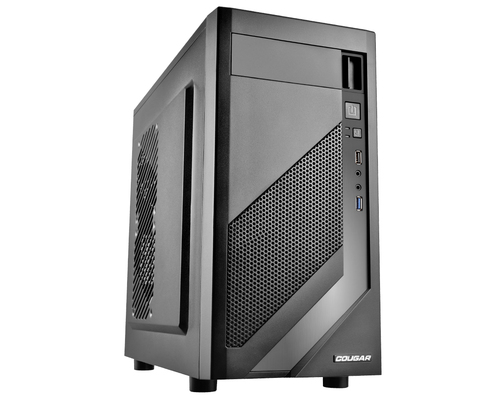
COUGAR Spike Midi Tower Black
- USB 2.0 ports quantity: 1
- USB 3.2 Gen 1 (3.1 Gen 1) Type-A ports quantity: 1
- Form factor: Midi Tower
- Type: PC
- Product colour: Black
- Supported motherboard form factors: micro ATX
Where to buy
We're not tracking prices for this product yet. Check current prices directly at:
We may earn a commission when you buy through links on this page — at no extra cost to you. Learn more
About this product
- The SPIKE delivers availability and expansion capability in a space-saving design to fully complete the gaming mission!
- Interior black painting.
- Advanced USB3.0 port for maximum data transfer speed.
- Support for 4 fans: front 80/90/120mm fan x 1; rear 80/120mm fan x 1 ; side 120mm fans x 2.
- Rear COUGAR 120mm fan x 1 is pre-installed.
- Support for longer high-end graphics card up to 330mm.
- Screw-less mechanisms on 5.25” & HDD devices.
- Support installing 2.5” HDD/SSD at bottom cover.
Documents
- BrochureProduct Brochure ↗
Specifications
Key specifications
- USB 2.0 ports quantityNumber of USB 2.0 ports (connecting interfaces) in the device. USB 2.0 was released in April 2000 (now called "Hi-Speed"), adding higher maximum signaling rate of 480 Mbit/s (effective throughput up to 35 MB/s or 280 Mbit/s), USB 2.0 ports are usually black.
- 1
- USB 3.2 Gen 1 (3.1 Gen 1) Type-A ports quantityThe total number of available USB 3.2 Gen 1 (formerly 3.1 Gen 1) Type-A connection ports on the device.
- 1
- Form factorThe shape or design of the product.
- Midi Tower
- TypeCharacteristics of the device.
- PC
- Product colourThe colour e.g. red, blue, green, black, white.
- Black
- Supported motherboard form factorsDesign of the supported motherboards.
- micro ATX
- Number of 3.5" baysA drive bay is a standard-area for adding hardware to a computer. Most drive bays are fixed to the inside of a case, but some can be removed. A 3.5" drive bay is for floppy disks.
- 2
- Number of 5.25" baysA drive bay is a standard-area for adding hardware to a computer. Most drive bays are fixed to the inside of a case, but some can be removed. A 5.25" drive bay, also known as full-height bays, were found in old PCs in the early to mid-1980s. They were 3¼″ high by 5¾″ wide, and up to 8″ deep (83 × 146 × 200 mm), used mainly for hard disks and floppy disk drives.
- 2
- Supported HDD sizesThe size of the hard disk drives which can be used by the device.
- 2.5,3.5"
- Number of front fans supported (max)The maximum quantity of cooling fans that can be installed in the front section of the chassis.
- 1
Show all 28 specificationsShow key specifications only
Ports & interfaces
- USB 2.0 ports quantityNumber of USB 2.0 ports (connecting interfaces) in the device. USB 2.0 was released in April 2000 (now called "Hi-Speed"), adding higher maximum signaling rate of 480 Mbit/s (effective throughput up to 35 MB/s or 280 Mbit/s), USB 2.0 ports are usually black.
- 1
- USB 3.2 Gen 1 (3.1 Gen 1) Type-A ports quantityThe total number of available USB 3.2 Gen 1 (formerly 3.1 Gen 1) Type-A connection ports on the device.
- 1
- Audio inputThe type of audio input that the device requires, and the connection needed.
- Yes
- Audio outputThe type of audio output that the device produces, and the connector(s).
- Yes
Power supply
- Power supply includedThere is a power supply with this product.
- No
Design
- Form factorThe shape or design of the product.
- Midi Tower
- Product colourThe colour e.g. red, blue, green, black, white.
- Black
- Supported motherboard form factorsDesign of the supported motherboards.
- micro ATX
- Number of 5.25" baysA drive bay is a standard-area for adding hardware to a computer. Most drive bays are fixed to the inside of a case, but some can be removed. A 5.25" drive bay, also known as full-height bays, were found in old PCs in the early to mid-1980s. They were 3¼″ high by 5¾″ wide, and up to 8″ deep (83 × 146 × 200 mm), used mainly for hard disks and floppy disk drives.
- 2
- Number of 2.5" baysThe total number of available slots for installing 2.5-inch storage drives (e.g. SSDs).
- 1
- Number of internal 3.5" baysThe total number of available slots inside the unit designed to hold 3.5-inch storage drives.
- 2
- Number of external 5.25" baysThe total number of available slots for installing external drive bays with a width of 5.25 inches.
- 2
- Number of expansion slotsThe total number of available slots for installing additional hardware components to extend the functionality of the device.
- 4
- Side windowA side window is a transparent side (or part of side) in a housing which enables you to see the internal space of the device.
- No
- Maximum CPU cooler heightThe maximum height of the CPU heatsink that can be installed within the unit, measured in mm.
- 15 cm
- Maximum graphics card lengthThe maximum length of a graphics card that can be physically installed inside the unit, measured in millimetres.
- 33 cm
Features
- TypeCharacteristics of the device.
- PC
Expansion slots
- Number of 3.5" baysA drive bay is a standard-area for adding hardware to a computer. Most drive bays are fixed to the inside of a case, but some can be removed. A 3.5" drive bay is for floppy disks.
- 2
Weight & dimensions
- WidthThe measurement or extent of something from side to side.
- 180 mm
- DepthThe distance from the front to the back of something.
- 425 mm
- HeightThe measurement of the product from head to foot or from base to top.
- 370 mm
Storage
- Supported HDD sizesThe size of the hard disk drives which can be used by the device.
- 2.5,3.5"
Cooling
- Number of front fans supported (max)The maximum quantity of cooling fans that can be installed in the front section of the chassis.
- 1
- Front fans diameters supportedThe size of the cooling fans that can be installed at the front of the unit, measured in millimetres (e.g. 120).
- 80,90,120 mm
- Number of side fans supported (max)The maximum number of cooling fans that can be installed on the side panel of the device.
- 2
- Side fans diameters supportedThe permissible sizes for cooling fans installed on the side panel of the chassis (e.g. 120 mm).
- 120 mm
- Rear fans installedSpecifies the number and size of the cooling fans pre-installed at the rear of the unit (e.g., 1x 120 mm).
- 1x 120 mm
- Number of rear fans supported (max)The maximum quantity of cooling fans that can be installed in the rear section of the unit.
- 1
Database Right data-sheet 2026 Icecat. All rights reserved. Provided “as is”, without warranty — check details with the store before buying.
Expert reviews
- 83
techpowerup.com2013
The Cougar Spike chassis will be available for a mere $39.99 in the near future. Affordable price Compact mATX Tower Can hold long graphics cards Cool looks Solid use of materials Screw-less locking mechanism for most drives Can hold a 2.5" drive on the f...
- +
- Affordable price, Compact mATX Tower, Can hold long graphics cards, Cool looks, Solid use of materials, Screw-less locking mechanism for most drives, Can hold a 2.5" drive on the floor, Big CPU coolers fit under certain conditions, Large PSUs are no probl...
- −
- Cheap foam feet, Plastic locks inadequate, Internal 3.5" bays may be blocked by large coolers, Only one simple, black fan included, Wasted connectivity due to one USB 2.0 and one USB 3.0 port (but full size connectivity), No opening in the motherboard tra...
- –
hardwaresecrets.com2013
The Cougar Spike provides an unprecedented cost/benefit ratio for the user who is looking for an inexpensive case for building a small gaming PC. It lacks a few features compared to more expensive models, but there is no way we can complain about these wh...
- +
- Outstanding price tag, Support for video cards up to 13” (330 mm) long, Good quality plastic parts, Support for three 3.5” hard drives and one 2.5” SSD or laptop hard drive, Tool-less installation mechanisms for 5.25” devices and two 3.5” hard drives, Tab...
- −
- No cutout in the motherboard tray for accessing the backplate of the CPU cooler, No holes for routing cables behind the motherboard tray, No clips for fastening cables using cable ties, You can't store cables behind the motherboard tray, Shop Related Prod...
- –
legitreviews.com2013
The Cougar Spike is priced unbelievably low and makes for a great entry-level gaming case! ...
Read the review at legitreviews.com ↗
Price history (90 days, best daily price)
Price history is still being collected for this product — check back soon.
Alternative models
COUGAR MG110 Mini Tower Black

COUGAR VOLANT 2-RM Midi Tower Black, Red

COUGAR MG110-W Mini Tower Black

COUGAR VOLANT 2 Midi Tower Black

COUGAR MX330 Midi Tower Black
