
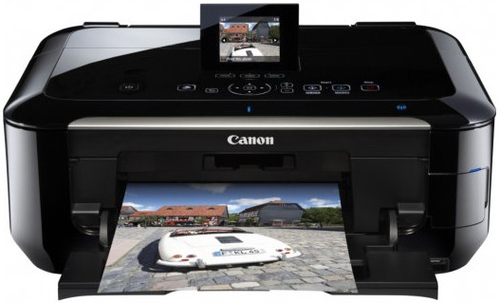
Canon PIXMA MX432 Inkjet A4 4800 x 1200 DPI 9.7 ppm Wi-Fi
- Technology: Inkjet
- Functions: Colour printing, Colour scanning, Colour copying, Colour faxing
- Print speed: 9.7 ppm
- Paper: up to A4, two-sided printing, 100 sheets input
- Print resolution: 4800 x 1200 DPI
- Connections: Wi-Fi, USB
Where to buy
We're not tracking prices for this product yet. Check current prices directly at:
We may earn a commission when you buy through links on this page — at no extra cost to you. Learn more
About this product
Bring excellent quality, speed, and ease of use to your home office all in the name of increased productivity. This begins with built-in Wi-Fi for printing and scanning virtually anywhere in your home from computers and compatible mobile devices. This also includes AirPrint, which lets you wirelessly print photos, emails, web pages, documents and more from compatible iPad, iPhone or iPod touch devices to a compatible Canon PIXMA Wireless All-In-One. An integrated 30-sheet Auto Document Feeder, FastFront, and Easy-WebPrint EX are just some of the features that can allow you to easily multi-task while your PIXMA MX432 is at work for all-new levels of efficiency.
4800 x 1200 maximum color resolution and the FINE Cartridge System means superb business document printing and efficiency while built-in imaging technology ensures the integrity of originals are preserved with each copy and scan. Maintain security standards by utilizing features to prevent misdialed fax transmissions and keep scanned files password protected.
The MX432 also allows you to turn your office into a photo lab and print beautiful, borderless5 photo lab quality photos up to 8.5" x 11" in size. Your photo printing options now also include Full HD video6 while you can enjoy computer-less printing through compatible direct print options.
The MX432 delivers the business imaging quality and versatile solutions that can assist you in bringing your business to the next level. So, you can print business documents when you need to and photos when you want to.
Specifications
Key specifications
- Print technologyIndicates the method used to print by this product.
- Inkjet
- PrintingProducing a paper copy of information stored on a computer.
- Colour printing
- ScanningTo convert a document or picture into digital form for storage or processing on a computer, by scanning it using a scanner.
- Colour scanning
- CopyingDescription of copying function (colour or monochrome).
- Colour copying
- FaxingTo send an exact copy of a document made by electronic scanning and transmitted as data by telecommunications links.
- Colour faxing
- Print speed (black, normal quality, A4/US Letter)The print speed of a printer for black & white A4 pages, normal quality. The exact speed varies depending on the system configuration, software program, and document complexity.
- 9.7 ppm
- Maximum ISO A-series paper sizeThe maximum paper size the device can handle, defined by ISO A-series.
- A4
- Duplex printingFeature of computer printers and multifunction printers (MFPs) that allows the printing of a sheet of paper on both sides (automatically or manually)
- Yes
- Total input capacityThe maximum number of sheets of paper that can be held in all input trays and feeders combined.
- 100 sheets
- Maximum resolutionMaximum printing resolution.
- 4800 x 1200 DPI
- Wi-FiPopular technology that allows an electronic device to exchange data or connect to the internet wirelessly using radio waves.
- Yes
- USB portThe device features a socket into which a USB cable can be plugged.
- Yes
Show all 52 specificationsShow key specifications only
Design
- Product colourThe colour e.g. red, blue, green, black, white.
- Black
- Market positioningUnder which category can the device be positioned in the market, e.g. camera phone.
- Home & office
- Built-in displayA display which is part of the product, so you do not need to attach another display.
- Yes
Network
- Wi-FiPopular technology that allows an electronic device to exchange data or connect to the internet wirelessly using radio waves.
- Yes
- Ethernet LANAn Ethernet LAN (Local Area Network) interface is present, for a wired conection via a cable.
- No
- BluetoothBluetooth is a low-power radio technology developed to replace the cables and wires currently used to link or connect electronic devices such as personal computers, printers, and a wide variety of handheld devices including mobile phones. Because it uses radio-wave connectivity, a Bluetooth-enabled device has a constant, established connection to whatever browser it uses. This saves the user the…
- Yes
- Mobile printing technologiesApps etc. which allow users to send a print job from a smartphone or tablet to a printer via a wireless network.
- Apple AirPrint
Paper handling
- Maximum ISO A-series paper sizeThe maximum paper size the device can handle, defined by ISO A-series.
- A4
- Maximum print sizeThe maximum size that an image can be printed with a good resolution.
- 210 x 297 mm
- Paper tray media typesSpecifies the different kinds of materials that can be loaded into the paper tray, such as envelopes, card stock, or coated paper.
- Envelopes, Glossy paper, High resolution paper, Matte paper, Photo paper, Plain paper
- ISO A-series sizes (A0...A9)Different sizes of paper from A0 (big) to A9 (small). A4 is the most common size used for printing documents.
- A4, A5, A6
Input & output capacity
- Total input capacityThe maximum number of sheets of paper that can be held in all input trays and feeders combined.
- 100 sheets
- Auto document feeder (ADF) output capacityThe maximum number of pages that can be held in the output tray after being processed by the automatic document feeder, measured in sheets.
- 30 sheets
Fax
- FaxingTo send an exact copy of a document made by electronic scanning and transmitted as data by telecommunications links.
- Colour faxing
- Fax transmission speedThe average time required to transmit a single page via fax, measured in sec/page.
- 3 sec/page
- Fax memoryThe maximum number of pages that can be stored in the internal memory for transmission or reception (e.g. 100 pages).
- 50 pages
- Fax speed dialing (max numbers)Maximum number of phone numbers storable in memory
- 20
Scanning
- ScanningTo convert a document or picture into digital form for storage or processing on a computer, by scanning it using a scanner.
- Colour scanning
- Optical scanning resolutionHow many pixels a scanner can see. Most commonly, this is measured in dots per inch (dpi).For example, a typical flatbed scanner will use a scanning head with 300 sensors per inch, so it can sample 300 dots per inch (dpi) in one direction. To scan in the other direction, it will move the scanning head along the page, stopping 300 times per inch, so it can scan 300 dpi in the other direction as we…
- 1200 x 2400 DPI
- Maximum scan resolutionThe highest level of detail the device can capture during a scan, measured in dots per inch (dpi).
- 19200 x 19200 DPI
- Maximum scan areaThe largest dimensions of the surface that can be captured in a single operation, measured in mm.
- 216 x 356 mm
- Scanner typeIndicates the type of scanner this product is.
- Flatbed & ADF scanner
- Scan technologyIndicates the technology used to scan by this product
- CIS
- Input colour depthColour depth of the input into the product. The colour depth is either the number of bits used to indicate the color of a single pixel, in a bitmapped image or video frame buffer, or the number of bits used for each color component of a single pixel. High-end laptops have 24-bit colour depth.
- 48 bit
- Output colour depthThe number of bits used to represent the colour of a single pixel in the output, which determines the total number of possible colours (e.g., 24 or 32).
- 24 bit
Copying
- CopyingDescription of copying function (colour or monochrome).
- Colour copying
- Copy speed (colour, normal quality, A4)The number of colour pages produced per minute when printing standard A4 documents at normal quality, measured in cpm.
- 4.7 cpm
Printing
- Print technologyIndicates the method used to print by this product.
- Inkjet
- PrintingProducing a paper copy of information stored on a computer.
- Colour printing
- Duplex printingFeature of computer printers and multifunction printers (MFPs) that allows the printing of a sheet of paper on both sides (automatically or manually)
- Yes
- Maximum resolutionMaximum printing resolution.
- 4800 x 1200 DPI
- Print speed (black, normal quality, A4/US Letter)The print speed of a printer for black & white A4 pages, normal quality. The exact speed varies depending on the system configuration, software program, and document complexity.
- 9.7 ppm
- Print speed (colour, normal quality, A4/US Letter)The number of colour outputs produced per minute at normal quality for A4 or US Letter sizes, measured in ppm.
- 5.5 ppm
Ports & interfaces
- PictBridgePictBridge is an industry standard introduced in 2003 from the Camera & Imaging Products Association (CIPA) for direct printing. It allows images to be printed directly from digital cameras to a printer, without having to connect the camera to a computer using common connectivity like USB or Bluetooth.
- Yes
- Standard interfacesMost common industry-standard communication protocols ranging from RS-232, RS-422, RS-423, RS-485, and LVDS to USB.
- Bluetooth, USB 2.0, Wireless LAN
- Direct printingWith direct printing it is possible to print your photographs or other documents directly to a printer from a compatible device, without the use of a computer.
- Yes
- USB portThe device features a socket into which a USB cable can be plugged.
- Yes
Other features
- All-in-one functionsList of All-in-One products' top-level functions; do not include AIO features such as fax forwarding or speed dialing
- Copy, Fax, Print, Scan
- Colour all-in-one functionsThe set of integrated color capabilities provided by the device, such as print, scan, copy, and fax.
- Copy, Fax, Print, Scan
- Modem speedThe speed at which data is transferred by a modem.
- 33.6 Kbit/s
Software
- Bundled softwareSoftware distributed with another product such as a piece of computer hardware or other electronic device, or a group of software packages which are sold together. A software suite is an example of bundled software, as is software which is pre-installed on a new computer.
- Easy-PhotoPrint EX, Easy-WebPrint EX, MP Navigator EX
- Mac operating systems supportedMac operating systems e.g. OS X can be used with the device.
- Mac OS X 10.5 Leopard, Mac OS X 10.6 Snow Leopard, Mac OS X 10.7 Lion
Weight & dimensions
- WidthThe measurement or extent of something from side to side.
- 459.7 mm
- DepthThe distance from the front to the back of something.
- 386.1 mm
- HeightThe measurement of the product from head to foot or from base to top.
- 200.7 mm
- WeightWeight of the product without packaging (net weight). If possible, the net weight is given including standard accessories and supplies. Please note that sometimes the manufacturer leaves out the weight of accessories and/or supplies.
- 8.48 kg
Sustainability
- Sustainability certificatesThe environmental or ethical certifications the product has received to verify its sustainability standards (e.g., ASC or ACT Organic).
- ENERGY STAR
Features
- Windows operating systems supportedWindows vesions wich can be used with the device.
- Windows 7 Home Basic, Windows 7 Home Premium, Windows 7 Professional, Windows 7 Starter, Windows 7 Ultimate, Windows Vista Business, Windows Vista Enterprise, Windows Vista Home Basic, Windows Vista Home Premium, Windows Vista Ultimate, Windows XP Home, Windows XP Professional
- Digital senderDevice similar to a scanner which converts paper documents into digital information for emailing, archiving, document management and more.
- No
Display
- DisplayThe description of display that can includes display type, resolution, size etc.
- LCD
- Display number of linesThe amount of lines in the display.
- 2 lines
Storage
- Card reader integratedA card reader is a device that enables reading and, in some cases, writing data to and from a memory card.
- No
Database Right data-sheet 2026 Icecat. All rights reserved. Provided “as is”, without warranty — check details with the store before buying.
Expert reviews
- 50
pcworld.com2012
If your printing and scanning needs are light, the $100 Canon Pixma MX432 color inkjet multifunction printer will likely fill your needs. Though the unit lacks an automatic duplexer, it provides a single-sided automatic document feeder, and the price ...
- +
- Fast for its class, Nice text output,
- −
- No manual duplexing support for the Mac, Pricey black ink
- 70
notebookreview.com2012
Overall, We were pleasantly impressed with the Canon Pixma MX432. We'd like to give our readers our full recommendation for this product. If you are on a budget and want an all-in-one that can print, copy, scan, fax, and print good quality photos, cons...
Read the review at notebookreview.com ↗ - 50
pcmag.com2012
The Canon Pixma MX432 Wireless Office All-in-One fits best as a personal printer in a home or small office with light duty print needs....
- +
- Small size. Standalone copier and fax. Faxes from PC hard drive. Automatic document feeder. Has Wi-Fi.
- −
- Manual duplexing only. Low paper capacity. High claimed cost per page
Price history (90 days, best daily price)
Price history is still being collected for this product — check back soon.
Alternative models

Canon PIXMA MX512 Inkjet A4 4800 x 1200 DPI 9.7 ppm Wi-Fi

Canon PIXMA MX515 Inkjet A4 4800 x 1200 DPI 9.7 ppm Wi-Fi
Canon PIXMA MG6250 Inkjet A4 9600 x 2400 DPI Wi-Fi

Canon PIXMA MX375 Inkjet A4 4800 x 1200 DPI

Canon PIXMA MG3150 Inkjet A4 4800 x 1200 DPI Wi-Fi
