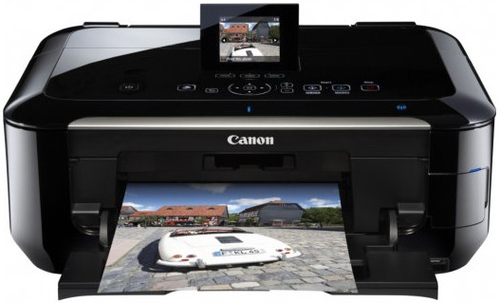
Canon PIXMA MG5310 Inkjet A4 9600 x 2400 DPI Wi-Fi
- Technology: Inkjet
- Functions: Colour printing, Colour scanning, Colour copying
- Paper: up to A4, two-sided printing, 150 sheets input
- Print resolution: 9600 x 2400 DPI
- Connections: Wi-Fi, USB
Where to buy
We're not tracking prices for this product yet. Check current prices directly at:
We may earn a commission when you buy through links on this page — at no extra cost to you. Learn more
About this product
Advanced photolab quality for the home
The ideal 5 ink All-in-One for those who enjoy powerful features and high quality printing. Canon's class leading FINE print head technology, with a minimum of 1pl ink droplets, delivers up to 9600dpi print resolution for amazing photos with smooth gradations and grain-free monochrome images. A photo-lab quality 10x15cm borderless print is produced in approximately 20 seconds and exceptional ISO ESAT speeds of 12.5 ipm for mono documents and 9.3 ipm for colour*.
Simple Operation
The centralised operation panel with 7.5cm colour TFT display delivers an intuitive user experience and with Quick Operation, features can be accessed effortlessly.
Stylish design
Compact and sleek all black finish, this device fits neatly in any home.
Enhanced connectivity
In-built Wi-Fi makes it easy to share in the home. Print from and scan directly to mobile devices using the Easy-PhotoPrint App. Apple AirPrint support* allows you to print directly from iPad & iPhone.
Cloud printing
Browse and print your favourite photos directly to the printer from online albums at CANON iMAGE GATEWAY & Google’s Picasa. Access on demand calendars, stationery and other templates without a need of a PC.
Versatile media handling
Experience versatility with Auto Duplex Print to use both sides of the paper, 2-way paper feed lets you load photo & plain paper at the same time. Print directly onto compatible CDs, DVDs and Blu-ray discs with Direct Disc Print.
Eco features
Find out your CO2 and paper savings made by double-sided printing with ECO Information to see how you are helping the environment. Save energy by using the Auto Power Off - set the printer to switch off, when not being used for a set amount of time.
Advanced Software
Turn your movie moments into beautiful prints with Canon’s unique Full HD Movie Print. New features include Merge Frames and Layout Print to create more striking images. Make your photos even more exciting by applying Fun Filter Effects with Easy-PhotoPrint EX. Use Easy-WebPrint EX to combine clips from several web pages so you only print what you need from the web. Get creative with CREATIVE PARK PREMIUM an online service that lets you download photos, illustrations, paper crafts and much more, from internationally recognised photographers & artists.
Specifications
Key specifications
- Print technologyIndicates the method used to print by this product.
- Inkjet
- PrintingProducing a paper copy of information stored on a computer.
- Colour printing
- ScanningTo convert a document or picture into digital form for storage or processing on a computer, by scanning it using a scanner.
- Colour scanning
- CopyingDescription of copying function (colour or monochrome).
- Colour copying
- Maximum ISO A-series paper sizeThe maximum paper size the device can handle, defined by ISO A-series.
- A4
- Duplex printingFeature of computer printers and multifunction printers (MFPs) that allows the printing of a sheet of paper on both sides (automatically or manually)
- Yes
- Total input capacityThe maximum number of sheets of paper that can be held in all input trays and feeders combined.
- 150 sheets
- Maximum resolutionMaximum printing resolution.
- 9600 x 2400 DPI
- Wi-FiPopular technology that allows an electronic device to exchange data or connect to the internet wirelessly using radio waves.
- Yes
- USB portThe device features a socket into which a USB cable can be plugged.
- Yes
Show all 64 specificationsShow key specifications only
Design
- Market positioningUnder which category can the device be positioned in the market, e.g. camera phone.
- Home & office
- Built-in displayA display which is part of the product, so you do not need to attach another display.
- Yes
Network
- Wi-FiPopular technology that allows an electronic device to exchange data or connect to the internet wirelessly using radio waves.
- Yes
- Ethernet LANAn Ethernet LAN (Local Area Network) interface is present, for a wired conection via a cable.
- No
- Wi-Fi standardsThe type of wireless local area network (LAN). It can be ad-hoc, where units in a network communicate peer-to-peer, or Infrastructure, where units communicate with each other via an access point A LAN interconnects computers in a small area e.g. home, school or office.
- 802.11b, 802.11g, Wi-Fi 4 (802.11n)
Paper handling
- Maximum ISO A-series paper sizeThe maximum paper size the device can handle, defined by ISO A-series.
- A4
- LegalIndicates whether the device supports the processing or output of documents in legal paper size.
- Yes
- Maximum print sizeThe maximum size that an image can be printed with a good resolution.
- 216 x 356 mm
- Paper tray media typesSpecifies the different kinds of materials that can be loaded into the paper tray, such as envelopes, card stock, or coated paper.
- Envelopes, Glossy paper, High resolution paper, Matte paper, Photo paper, Plain paper
- ISO A-series sizes (A0...A9)Different sizes of paper from A0 (big) to A9 (small). A4 is the most common size used for printing documents.
- A4, A5
- ISO B-series sizes (B0...B9)The supported paper dimensions based on the ISO 216 B-series standard (e.g. B0, B1, B2).
- B5
- Non-ISO print media sizesThe specific paper dimensions supported by the device that do not follow the International Organization for Standardization (ISO) standards (e.g., Executive or Folio).
- Legal
- Envelopes sizesThe supported dimensions of envelopes that can be processed by the device (e.g. C4, C5 or B5).
- 10, DL
- Photo paper sizes (imperial)The dimensions of photo paper supported by the device, measured in ".
- 4x6,5x7,8x10
- Paper tray media weightThe range of supported media thickness that can be loaded into the tray, measured in grams per square metre (e.g., 60-220 g/m²).
- 64 - 105 g/m²
Input & output capacity
- Total input capacityThe maximum number of sheets of paper that can be held in all input trays and feeders combined.
- 150 sheets
- Maximum input capacityThe maximum quantity of items that can be loaded into the input mechanism at one time.
- 150 sheets
Fax
- FaxingTo send an exact copy of a document made by electronic scanning and transmitted as data by telecommunications links.
- No
Scanning
- ScanningTo convert a document or picture into digital form for storage or processing on a computer, by scanning it using a scanner.
- Colour scanning
- Colour scanningIndicates whether this product scans in colour.
- Yes
- Optical scanning resolutionHow many pixels a scanner can see. Most commonly, this is measured in dots per inch (dpi).For example, a typical flatbed scanner will use a scanning head with 300 sensors per inch, so it can sample 300 dots per inch (dpi) in one direction. To scan in the other direction, it will move the scanning head along the page, stopping 300 times per inch, so it can scan 300 dpi in the other direction as we…
- 2400 x 4800 DPI
- Maximum scan resolutionThe highest level of detail the device can capture during a scan, measured in dots per inch (dpi).
- 19200 x 19200 DPI
- Maximum scan areaThe largest dimensions of the surface that can be captured in a single operation, measured in mm.
- A4 / Letter (216 x 297)
- Scanner typeIndicates the type of scanner this product is.
- Flatbed scanner
- Scan technologyIndicates the technology used to scan by this product
- CIS
- Input colour depthColour depth of the input into the product. The colour depth is either the number of bits used to indicate the color of a single pixel, in a bitmapped image or video frame buffer, or the number of bits used for each color component of a single pixel. High-end laptops have 24-bit colour depth.
- 48 bit
- Output colour depthThe number of bits used to represent the colour of a single pixel in the output, which determines the total number of possible colours (e.g., 24 or 32).
- 24 bit
- Scan driversThe scanning interfaces and software protocols supported by the device for communication with computer applications (e.g. TWAIN, WIA).
- TWAIN, WIA
Copying
- CopyingDescription of copying function (colour or monochrome).
- Colour copying
- Time to first copy (colour, normal)The time elapsed from the moment a print command is sent until the first colour page is completely printed in normal quality mode, measured in seconds.
- 14 s
- Maximum number of copiesThe highest quantity of duplicates that can be produced in a single operation, measured in copies.
- 99 copies
- Copier resizeThe range of scaling percentages available to increase or decrease the size of the original during the copying process.
- 25 - 400%
Printing
- Print technologyIndicates the method used to print by this product.
- Inkjet
- PrintingProducing a paper copy of information stored on a computer.
- Colour printing
- Duplex printingFeature of computer printers and multifunction printers (MFPs) that allows the printing of a sheet of paper on both sides (automatically or manually)
- Yes
- Maximum resolutionMaximum printing resolution.
- 9600 x 2400 DPI
- Print speed (ISO/IEC 24734) monoThe number of monochrome pages printed per minute according to the ISO/IEC 24734 standard, measured in ipm.
- 12.5 ipm
- Print speed (ISO/IEC 24734) colourThe number of colour pages the device can print per minute, measured according to the ISO/IEC 24734 standard, in ppm.
- 9.3 ipm
- Economical printingWhether or not the product is equipped with features that allow economical printing.
- Yes
Other features
- Dimensions (WxDxH)Dimensions of the product (Width x Depth x Height).
- 450 x 366 x 166 mm
- All-in-one functionsList of All-in-One products' top-level functions; do not include AIO features such as fax forwarding or speed dialing
- Copy, Print, Scan
- Colour all-in-one functionsThe set of integrated color capabilities provided by the device, such as print, scan, copy, and fax.
- Copy, Print, Scan
Ports & interfaces
- PictBridgePictBridge is an industry standard introduced in 2003 from the Camera & Imaging Products Association (CIPA) for direct printing. It allows images to be printed directly from digital cameras to a printer, without having to connect the camera to a computer using common connectivity like USB or Bluetooth.
- Yes
- Connectivity technologyThe technology that enables connectivity of the device, e.g. wired or wireless.
- Wired & Wireless
- Standard interfacesMost common industry-standard communication protocols ranging from RS-232, RS-422, RS-423, RS-485, and LVDS to USB.
- USB 2.0, Wireless LAN
- Direct printingWith direct printing it is possible to print your photographs or other documents directly to a printer from a compatible device, without the use of a computer.
- Yes
- USB portThe device features a socket into which a USB cable can be plugged.
- Yes
- USB 2.0 ports quantityNumber of USB 2.0 ports (connecting interfaces) in the device. USB 2.0 was released in April 2000 (now called "Hi-Speed"), adding higher maximum signaling rate of 480 Mbit/s (effective throughput up to 35 MB/s or 280 Mbit/s), USB 2.0 ports are usually black.
- 1
- Optional connectivitySpecifies the additional communication interfaces that can be added to the unit, such as Bluetooth, Ethernet, or various serial connections.
- Bluetooth
Software
- Drivers includedIndicates whether the necessary software drivers are provided in the package.
- Yes
- Mac operating systems supportedMac operating systems e.g. OS X can be used with the device.
- Mac OS X 10.4 Tiger, Mac OS X 10.6 Snow Leopard
Weight & dimensions
- WeightWeight of the product without packaging (net weight). If possible, the net weight is given including standard accessories and supplies. Please note that sometimes the manufacturer leaves out the weight of accessories and/or supplies.
- 8.3 kg
Operational conditions
- Operating relative humidity (H-H)The range of relative humidity, expressed as a percentage, within which the device can function correctly without damage or performance loss.
- 10 - 90%
- Operating temperature (T-T)The minimum and maximum temperatures at which the product can be safely operated.
- 5 - 35 °C
Features
- Windows operating systems supportedWindows vesions wich can be used with the device.
- Windows 7 Home Premium, Windows 7 Home Premium x64, Windows 7 Professional, Windows 7 Professional x64, Windows 7 Starter, Windows 7 Starter x64, Windows 7 Ultimate, Windows 7 Ultimate x64, Windows Vista Business, Windows Vista Business x64, Windows Vista Home Basic, Windows Vista Home Basic x64, Windows Vista Home Premium, Windows Vista Home Premium x64, Windows Vista Ultimate, Windows Vista Ultimate x64, Windows XP Home, Windows XP Home x64, Windows XP Professional, Windows XP Professional x64
- Digital senderDevice similar to a scanner which converts paper documents into digital information for emailing, archiving, document management and more.
- No
- Number of print cartridgesThe amount of print cartridges. A print cartridge is a container holding a quantity of ink which is inserted into a inkjet printer mechanism.
- 4
- Printing coloursThe colours that can be produced by the printer.
- Black, Cyan, Magenta, Yellow
- All-In-One-multitaskingIndicates whether the device is designed to handle multiple different tasks simultaneously or in rapid succession.
- Yes
Display
- DisplayThe description of display that can includes display type, resolution, size etc.
- LCD
- Display diagonalSize of the display for this product, measured diagonally, usually in inches.
- 7.62 cm (3")
Storage
- Card reader integratedA card reader is a device that enables reading and, in some cases, writing data to and from a memory card.
- Yes
- Compatible memory cardsTypes of memory cards which can be used with this product.
- Memory Stick (MS), MMC, MMC+, MS Duo, MS PRO Duo, SD, SDHC
Performance
- Security algorithmsSecurity algorithms are used to provide authentication, cipher key generation, integrity and radio link privacy to users on mobile networks. The security algorithms supported are the ones that can be used with this product.
- WEP, WPA-PSK, WPA2-PSK, WPS
Database Right data-sheet 2026 Icecat. All rights reserved. Provided “as is”, without warranty — check details with the store before buying.
Price history (90 days, best daily price)
Price history is still being collected for this product — check back soon.
Alternative models

Canon PIXMA MG3110 Inkjet A4 4800 x 1200 DPI Wi-Fi

Canon PIXMA MG4110 Inkjet A4 4800 x 1200 DPI Wi-Fi

Canon PIXMA MG2120 Inkjet A4 4800 x 1200 DPI

Canon PIXMA MG6210 Inkjet A4 9600 x 2400 DPI Wi-Fi

Canon PIXMA MG3120 Inkjet A4 4800 x 1200 DPI Wi-Fi