
BenQ RP7503 interactive whiteboard 190.5 cm (75") 3840 x 2160 pixels Touchscreen Black
- Display diagonal: 190.5 cm (75")
- Cables included: HDMI, Power, USB, USB Type-C, VGA
- Remote control included
- Mounting kit
- Stylus included
- Number of stylus pens: 2
Where to buy
We're not tracking prices for this product yet. Check current prices directly at:
We may earn a commission when you buy through links on this page — at no extra cost to you. Learn more
About this product
BenQ Board Pro
Powerful in every way
Equip your students with BenQ’s best interactive display designed to help them learn proactively, think creatively, and interact safely.
Ultimate protection for teachers and students
Defend against the spread of germs
Reduce surface transmission with ClassroomCare germ-resistant screens. The touchscreen, buttons, and front ports are made with a proprietary TÜV-certified formula that is 99.9% effective against common germs.
All-around protection
Shared surfaces can become potential vectors of germs. The RP03 comes with germ-resistant pens and remote controls for extended protection.
A breath of fresh air
Poor indoor air quality negatively affects student health and performance. Our exclusive built-in air quality sensors allow you to monitor CO₂ and PM₂.₅ , and formaldehyde levels in the classroom so you can regulate air flow accordingly.
Air ionizer
Purify the air around the RP03 with an ionizer that automatically clears impurities when pollutant levels rise.
Air quality analytics
Centrally monitor the air quality, temperature, and humidity in all your classrooms from a single dashboard.
Maximum eye protection
The RP03 is the first and only interactive display to meet Eyesafe standards, offering the highest level of protection available for the eyes. By minimizing high-energy blue light emission, the RP03 reduces eye strain while maintaining vivid, true-to-life colors.
Discover new ways to teach
Teach with confidence knowing all the classroom tools you need to give great lessons are always a tap away.
Tap and teach
Save time by securely accessing your files with a simple tap. Using an NFC card, you can access your cloud storage and load personal settings on any BenQ Board Pro.
Start whiteboarding with a tap
Open the EZWrite 6 whiteboard at any time with a quick tap of the pen.
More than just a whiteboard
Double your teaching efficiency by running two apps side by side. Have the EZWrite 6 whiteboard on one side and the browser or lesson content on the other, all on one screen.
More streamlined class management
With Google Classroom integration, you can import lesson materials and invite students to the EZWrite 6 Web whiteboard. Post announcements to the Stream for your class right from the display.
Annotate anywhere
The built-in Floating Tool lets you write on top of any app, website, document, or image. Annotate over content displayed from any connected Windows, Mac, iOS, iPad OS, Android, or Chrome OS device.
A more flexible teaching experience
Everything you need to give immersive lessons is already built in. Teach from anywhere in the classroom without external devices or additional software.
Quick access
Start a whiteboarding session, enable screen sharing, and access your files on the RP03 with a single tap.
Microphone array
Let lessons be heard clearly using the 8 built-in microphones with echo cancellation and noise reduction.
Convenient connectivity
The RP03 comes with all the front ports classrooms need, allowing you to display screens, charge devices, and enable touch.
Voice assistant
Teach from anywhere in the classroom with the remote control and voice typing for increased accessibility.
Captivate your class
Encourage active participation at every lesson with a wide variety of teaching tools that make classes fun. Whether you're teaching in person or holding a hybrid class, keep your students engaged and boost their learning retention.
Engagement on the BenQ Board
Get a smooth and intuitive writing experience that allows multiple students to interact with the display at the same time for group work and competitions. With the EZWrite 6 whiteboard, you can make use of fun classroom tools to give more engaging lessons.
40 touch points
The RP03 picks up to 40 touch points to let everyone interact on the display at the same time.
Natural writing
Zero gap between the glass and panel makes writing on the RP03 feel as smooth as writing on paper.
Fine IR+
Fine IR+ touch enables the most accurate writing experience of any BenQ Board.
Immersive audio and visuals
Experience unmatched audiovisuals on the first and only interactive display with rich Dolby Digital Plus* sound on the built-in 2 x 16 speakers with subwoofer and crystal-clear 4K UHD images.
Engagement from their seats
Empower students to participate from their seats. With InstaShare 2, students can simultaneously cast their screens onto the BenQ Board. You can also add an element of fun by using Kahoot! to play in-class games.
Uninterrupted classes
Teach anywhere
Always be ready to learn from home. With a slot-in PC or the InstaShare Button, the RP03 is compatible with all leading video conferencing software.
Learn anywhere
Teach in any distance learning environment with EZWrite 6. Interact with your students on the same whiteboard from different locations.
Plug and teach
Teach students joining from home or participate in remote events as a class on the RP03 with a dedicated port for cameras.
Tools for IT and admin staff
BenQ Boards make display management simple so you can focus on what matters.
Device analytics
Get detailed analytics of all your BenQ devices to increase operational efficiency. With customizable reports, you can easily monitor daily usage and group displays by floor, grade, or building.
Streamline account management
Use your school’s account credentials to log into BenQ Boards and access all BenQ services. Streamline account management by connecting to Azure Active Directory and enabling account synchronization.
Effective communication across school
Keep everyone informed and up to date on events, safety protocols, and emergencies. Deliver clear and effective messages to multiple BenQ displays with X-Sign Broadcast.
IP5X dust protection
The RP03 panel meets IP5X standards to ensure consistent operation, even in dust-prone environments.
Documents
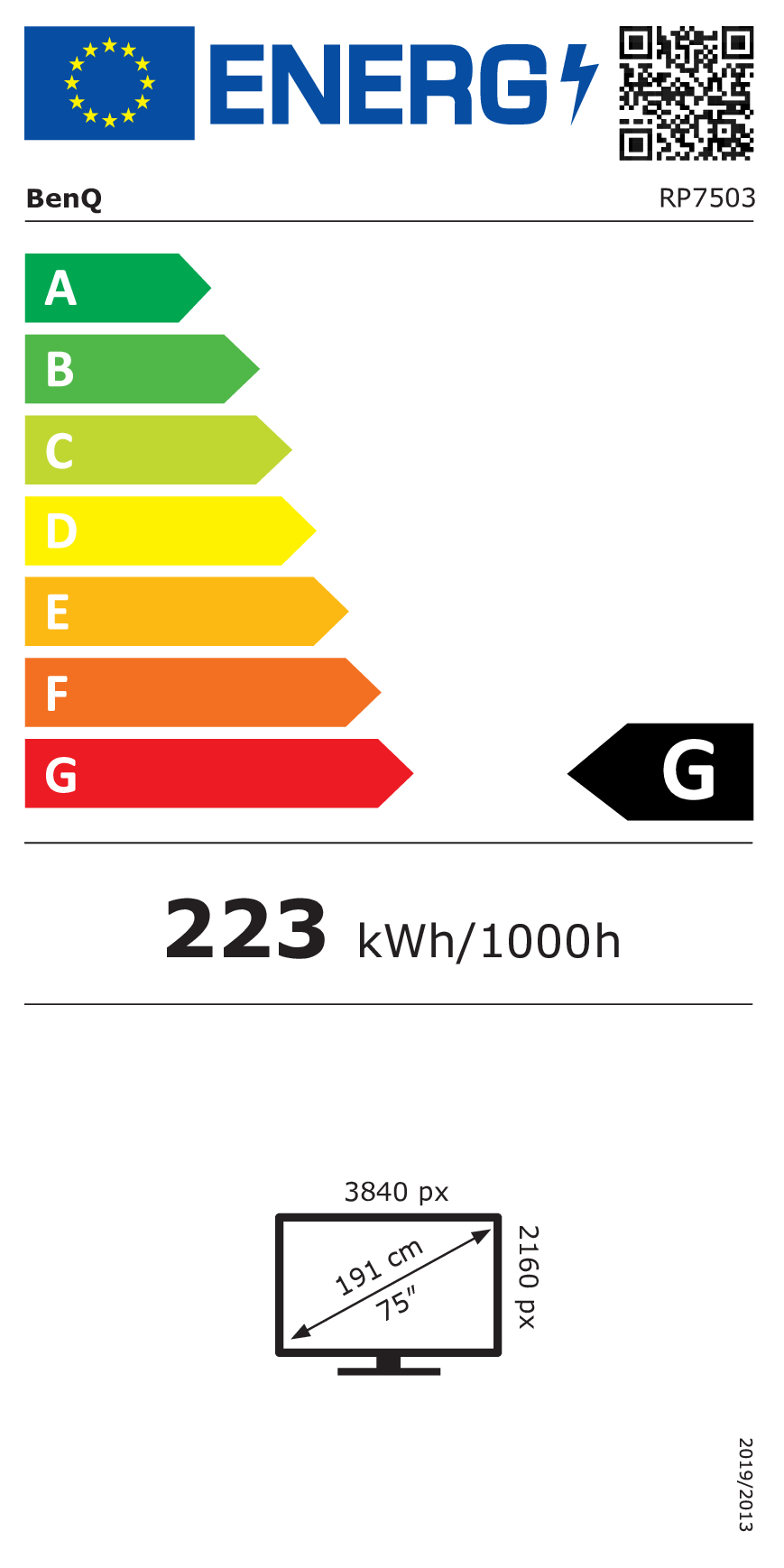
- ManualUser manual ↗
- DocumentInstallation Handbook ↗
- DocumentDismantled Information ↗
- Product information sheetEU Product Fiche ↗
Specifications
Key specifications
- Display diagonalSize of the display for this product, measured diagonally, usually in inches.
- 190.5 cm (75")
- Cables includedSpecifies the types and quantities of connection cables provided with the product (e.g., 3.5 mm to 3.5 mm or SATA).
- HDMI, Power, USB, USB Type-C, VGA
- Remote control includedComponent of an electronics device, most commonly a television set, DVD player and home theater systems originally used for operating the device wirelessly from a short line-of-sight distance.
- Yes
- Mounting kitIndicates whether the necessary hardware for installation is included with the product.
- Yes
- Stylus includedIndicates whether a stylus is provided as part of the product package.
- Yes
- Number of stylus pensThe total quantity of input pens included with the product (e.g. 1 or 2).
- 2
- Operating temperature (T-T)The minimum and maximum temperatures at which the product can be safely operated.
- 0 - 40 °C
- Operating relative humidity (H-H)The range of relative humidity, expressed as a percentage, within which the device can function correctly without damage or performance loss.
- 20 - 80%
- Storage temperature (T-T)The minimum and maximum temperatures at which the product can be safely stored.
- -10 - 60 °C
- Storage relative humidity (H-H)The permissible range of relative humidity, expressed as a percentage, within which the product can be stored without damage.
- 10 - 60%
Show all 87 specificationsShow key specifications only
Display
- Display diagonalSize of the display for this product, measured diagonally, usually in inches.
- 190.5 cm (75")
- Display brightnessBrightness is the amount of radiating light emitted from the screen. The brightness rating is measured in candellas per square meter, commonly known as 'nits'.
- 450 cd/m²
- Display resolutionThe number of distinct pixels in each dimension that can be displayed. It is usually quoted as width × height, with the units in pixels: for example, "1024 × 768" means the width is 1024 pixels and the height is 768 pixels. The higher the number of pixels, the sharper the image.
- 3840 x 2160 pixels
- Anti-glare screenAlways gives an optimal view, even in direct sunlight.
- Yes
- HD typeType of supported High Definition (e.g. Full HD, 4K Ultra HD).
- 4K Ultra HD
- Panel typeThe technology used to manufacture the panel, such as AMOLED or AH-IPS.
- IPS
- Native aspect ratioThe aspect ratio is the ratio of the width of an image to its height. The native aspect ratio is the one which the projector/display is particularly designed for. Images shown in native aspect ratio will utilize the entire resolution of the display and achieve maximum brightness. Images shown in other than native aspect ratio will always have less resolution and less brightness than images shown…
- 16:9
- Contrast ratio (typical)The difference in light intensity between the brightest white and the darkest black.
- 1200:1
- Contrast ratio (dynamic)A property of a display system, defined as the ratio of the luminance of the brightest color (white) to that of the darkest color (black) that the system is capable of producing.
- 30000:1
- Response timeThe response time is the time difference between the moment that a source (for example a video card) sends a signal and that equipment (for example a monitor) receives or display the signal. (Used abbreviations: R/F = Rise and Fall.)
- 8 ms
- TouchscreenA screen of a laptop, smartphone, etc., that responds to touch so you can control the interface using your fingers.
- Yes
- Touch technologyTechnology of touch sensetive screen e.g. dual-touch.
- Multi-touch
- Touchscreen typeThere are a variety of touchscreen technologies that have different methods of sensing touch, including resistive and capacitive.
- Infrared
- Number of simultaneous touchpointsThe maximum number of individual points of contact that the touch-sensitive surface can detect and track at the same time.
- 40
- Touch system response timeThe time it takes for the device to register and react to a touch input, measured in ms.
- 10 ms
- Colour gamutThe range of colours that the display can accurately reproduce, typically expressed as a percentage of a standard colour space (e.g. sRGB or Adobe RGB).
- 72%
Packaging content
- Cables includedSpecifies the types and quantities of connection cables provided with the product (e.g., 3.5 mm to 3.5 mm or SATA).
- HDMI, Power, USB, USB Type-C, VGA
- Remote control includedComponent of an electronics device, most commonly a television set, DVD player and home theater systems originally used for operating the device wirelessly from a short line-of-sight distance.
- Yes
- Mounting kitIndicates whether the necessary hardware for installation is included with the product.
- Yes
- Stylus includedIndicates whether a stylus is provided as part of the product package.
- Yes
- Number of stylus pensThe total quantity of input pens included with the product (e.g. 1 or 2).
- 2
- Quantity per packThe number of individual units contained within a single sales package, measured in pc(s).
- 1 pc(s)
- Power cable lengthThe total length of the electrical power cord, typically measured in metres or centimetres.
- 3 m
Weight & dimensions
- WidthThe measurement or extent of something from side to side.
- 1717.1 mm
- DepthThe distance from the front to the back of something.
- 121.7 mm
- HeightThe measurement of the product from head to foot or from base to top.
- 1065.3 mm
- WeightWeight of the product without packaging (net weight). If possible, the net weight is given including standard accessories and supplies. Please note that sometimes the manufacturer leaves out the weight of accessories and/or supplies.
- 55.5 kg
Operational conditions
- Operating temperature (T-T)The minimum and maximum temperatures at which the product can be safely operated.
- 0 - 40 °C
- Operating relative humidity (H-H)The range of relative humidity, expressed as a percentage, within which the device can function correctly without damage or performance loss.
- 20 - 80%
- Storage temperature (T-T)The minimum and maximum temperatures at which the product can be safely stored.
- -10 - 60 °C
- Storage relative humidity (H-H)The permissible range of relative humidity, expressed as a percentage, within which the product can be stored without damage.
- 10 - 60%
Power
- Power consumption (max)The maximum amount of power used by the device.
- 461.4 W
- Power consumption (typical)Amount of power consumed by this model, often expressed in watts (W). Typical values that manufacturers give are power consumption when off, standby/suspended mode, typical use, maximum usage.
- 90.1 W
- Power consumption (standby)The amount of electricity that is consumed when the product is on standby.
- 0.5 W
- AC input voltageThe voltage of the AC electricity that is inputted into the product.
- 100 - 240 V
- AC input frequencyThe range of alternating current frequencies the device can accept from the power source, measured in hertz (e.g., 45 - 65).
- 50 - 60 Hz
- Energy efficiency classThe energy efficiency of the appliance is rated in terms of a set of energy efficiency classes from A+++ to G on the label, A+++ being the most energy efficient, G the least efficient.
- G
- Energy efficiency scaleThe range of energy efficiency classes used to rate the product's power consumption, such as A to G.
- A to G
Features
- Humidity sensorIndicates whether the device is equipped with a sensor to measure the relative humidity of the surrounding air.
- Yes
- Working areaThe area that can be worked on.
- 1649.7 x 927.9 mm
- Surface materialThe substance or finish used for the outer layer of the product (e.g. Acrylic, Enamel, or Fabric).
- Tempered glass
- HardnessA measure of how solid/firm/rigid something is.
- 9H
Performance
- Temperature sensorIndicates whether the device is equipped with a sensor to monitor and report temperature.
- Yes
- Built-in processorWhether or not a processor is built into the device.
- Yes
- Low Blue Light technologyIndicates whether the product features technology designed to reduce the amount of harmful short-wave blue light emitted by the screen to decrease eye strain.
- Yes
Design
- Product colourThe colour e.g. red, blue, green, black, white.
- Black
- VESA mountingIndicates whether the product supports the VESA mounting standard for attachment to compatible arms, brackets, or wall mounts.
- Yes
- Panel mounting interfaceThe product can be used wih VESA mounting interfaces.
- 800 x 400 mm
Certificates
- CertificationSpecifies the official standards, safety approvals, or regulatory certifications the product has received.
- TÜVRheinland, SIAA ISO22196 for KOHKIN
Ports & interfaces
- USB 3.2 Gen 1 (3.1 Gen 1) Type-A hub ports quantityThe number of available USB 3.2 Gen 1 Type-A ports provided for connecting peripheral devices.
- 5
- USB 2.0 ports quantityNumber of USB 2.0 ports (connecting interfaces) in the device. USB 2.0 was released in April 2000 (now called "Hi-Speed"), adding higher maximum signaling rate of 480 Mbit/s (effective throughput up to 35 MB/s or 280 Mbit/s), USB 2.0 ports are usually black.
- 2
- USB 2.0 Type-B Touch ports quantityThe number of USB 2.0 Type-B ports available specifically for touch interface connectivity.
- 3
- HDMI ports quantityThe number of sockets (ports) for HDMI connections. HDMI (High-Definition Multimedia Interface) is a compact audio/video interface for transferring uncompressed video data and compressed/uncompressed digital audio data from a HDMI-compliant device ("the source device") to a compatible computer monitor, video projector, digital television, or digital audio device. HDMI is a digital replacement for…
- 3
- USB Type-C ports quantityThe total number of USB Type-C ports available on the device.
- 2
- HDMI versionThe specific release version of the High-Definition Multimedia Interface standard supported by the device (e.g. 1.3 or 2.0).
- 2.0
- HDMI output ports quantityThe total number of HDMI ports available for transmitting audio and video signals from the device to an external display.
- 1
- DisplayPort versionThe specific release version of the DisplayPort standard supported by the device (e.g., 1.2 or 1.4).
- 1.2a
- DisplayPorts quantityNumber of DisplayPorts. A DisplayPort is a digital display interface developed by the Video Electronics Standards Association (VESA). The interface is primarily used to connect a video source to a display device such as a computer monitor, though it can also be used to carry audio, USB, and other forms of data.
- 1
- Ethernet LAN (RJ-45) portsNumber of Ethernet LAN (RJ-45) ports (connecting interfaces) in the device. Ethernet LAN (RJ-45) ports allow a computer to connect to the ethernet.
- 2
- VGA (D-Sub) ports quantityNumber of VGA (D-Sub) ports (connecting interfaces) in the device. The VGA (D-Sub) connector is a 15 pin connector between a computer and a monitor. It was first introduced in 1987 by IBM.
- 1
- Line-inIndicates whether the device has a dedicated input port for receiving audio signals from an external source.
- Yes
- Line-outIndicates whether the device has a dedicated audio output port for connecting to an external amplifier or powered speakers.
- Yes
- OPS slotThe number of Open Pluggable Specification slots available for installing an optional modular unit.
- 1
- S/PDIF out portS/PDIF (Sony/Philips Digital Interconnect Format) is a digital audio interconnect used in consumer audio equipment over relatively short distances. The signal is transmitted over either a coaxial cable with RCA connectors or a fibre optic cable with TOSLINK connectors.
- Yes
- Microphone connectivityHow a microphone connect to a device e.g. wirelessly or via a cable and connector.
- 3.5 mm
- Headphone connectivityHow headphones connect to a device e.g. wirelessly or via a cable and connector.
- 3.5 mm
Network
- Wi-FiPopular technology that allows an electronic device to exchange data or connect to the internet wirelessly using radio waves.
- Yes
- Ethernet LANAn Ethernet LAN (Local Area Network) interface is present, for a wired conection via a cable.
- Yes
- Ethernet LAN data ratesThe different speed levels of the Ethernet LAN connection.
- 10,100,1000 Mbit/s
- Near Field Communication (NFC)Indicates whether the device supports short-range wireless connectivity for exchanging data between devices in close proximity.
- Yes
Audio
- Built-in speaker(s)The device contains speaker(s) to produce sound.
- Yes
- Number of built-in speakersThe total quantity of integrated audio output drivers installed within the unit.
- 2
- Speaker powerThe electrical power output delivered to the audio output components, typically measured in Watts (W).
- 32 W
- Built-in subwooferThe product has built-in subwoofer, which is a loudspeaker component designed to reproduce very low bass frequencies.
- Yes
- Built-in microphoneMicrophone that is found inside the product.
- Yes
- Number of microphone arraysThe total number of integrated microphone arrays used to capture audio from multiple directions.
- 8
Subwoofer
- Subwoofer RMS powerThis is a measure of the continuous power (RMS power) produced by a subwoofer.
- 16 W
Software
- Operating system installedType of operating system on a device e.g. IOS on Apple devices, Android for mobile devices.
- Android
- Operating system versionThe version of the operating system used e.g. 4.1, 4.2 for Android.
- 11
Processor
- Processor architectureThe design and internal organization of the central processing unit (e.g. ARM Cortex-A72, AMD Zen 4).
- ARM Cortex A73 + ARM Cortex A53
Memory
- Maximum internal memoryThe maximum amount of memory inside a product, usually measured in bytes e.g megabytes (MB) or gigabytes (GB).
- 8 GB
Storage
- RAM capacityThe total amount of random access memory available for the device, measured in MB.
- 64 GB
Graphics
- Graphics cardThe specific hardware component responsible for rendering images and video, such as the AMD Radeon 860M.
- Mali-G52
Packaging data
- Package widthThe distance from one side of the packaging to the other.
- 1900 mm
- Package depthThe distance from the front to the back of the packaging.
- 225 mm
- Package heightThe distance from the top to the bottom of the packaging.
- 1160 mm
- Package weightWeight of the packaged product.
- 70 kg
Database Right data-sheet 2026 Icecat. All rights reserved. Provided “as is”, without warranty — check details with the store before buying.
Price history (90 days, best daily price)
Price history is still being collected for this product — check back soon.
Alternative models

BenQ RE6503 interactive whiteboard
165.1 cm (65") Touchscreen Black

BenQ RE7501 interactive whiteboard
190.5 cm (75") 3840 x 2160 pixels Touchscreen Black

BenQ RE7503 interactive whiteboard
190.5 cm (75") Touchscreen Black

BenQ RM6503 interactive whiteboard
165.1 cm (65") 3840 x 2160 pixels Touchscreen Black, Grey

BenQ RE8603 interactive whiteboard 2.18 m
(86") Touchscreen Black
BenQ RE7501 interactive whiteboard
190.5 cm (75") 3840 x 2160 pixels Touchscreen Silver HDMI