
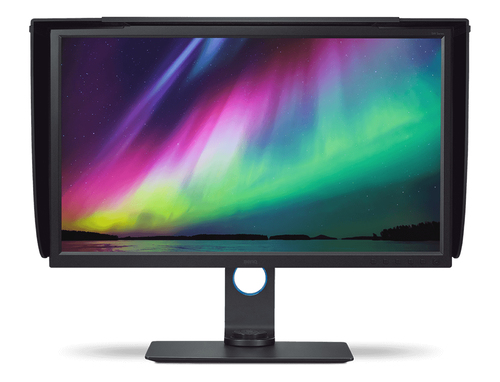
BenQ PV270 computer monitor 68.6 cm (27") 2560 x 1440 pixels Quad HD LED Black
- Screen: 68.6 cm (27"), 2560 x 1440 pixels, IPS, Flat
- Refresh rate: 5 ms response time
- Brightness: 250 cd/m²
- Ports: 1 × HDMI, 1 × DisplayPort
- Stand: height-adjustable, tilt
- Extras: USB hub
- Colour: Black
Where to buy
We're not tracking prices for this product yet. Check current prices directly at:
We may earn a commission when you buy through links on this page — at no extra cost to you. Learn more
About this product
Accurate Color You Can Count On
Designed to meet the high demands of imaging professionals, BenQ PV270 is verified with Technicolor Color Certified, ensuring reliable digital color rendering on the screen. Uncompromising color performance (Rec. 709, DCI-P3 and Adobe RGB) and powerful calibration tools make the PV270 ideal for video post-production processes.
Reliable Color Throughout the Workflow
The BenQ PV270's comprehensice and rigorous approach to color management helps ensure color is reproduced consistently throughout the video post-production workflow. From the rough cut phase, through the addiction of effects, color correction, and compositing, to the output stage, color is rendered with pinpoint accuracy so that resluts match intent perfectly.
Color Perfected
Because it's so important to the video post-production workflow, the PV270 goes the extra mile to ensure the fullest range of accurately and consistently rendered color.
Rec.709 and DCI-P3 Color Gamut
The PV270 provides 100% coverage of the Rec. 709 and 96% of the DCI-P3 standards, ensuring output for high-definition television and digital cinema matches the colors you have defined. The PV270 also provides 99% coverage of the Adobe RGB color space designed to encompass most of the colors producible for graphic art professionals.
2560x1440 (QHD) Resolution with 27” Wide-screen
The high pixel density of 2560x1440 (QHD) resolution delivers the crisp picture quality you expect for close reviews and detailed editing, and the spacious wide-screen view provides greater comfort and productivity.
Brightness Uniformity
Brightness uniformity is achieved via delicate process involving the utilization of high precision apparatus to meticulously fine-tune hundreds of sub-regions on the entire screen. It offers a more authentic and consistent viewing experience.
Backlight Sensor
Advanced luminance control not only ensures an ideal level of brightness that is quickly achieved after powering on, but also provides consistency both during a session of use and over the lifetime of the display.
Accurate Color Calibration
Video post-production work calls for fine-grained color calibration, and with PV270’s powerful calibration functions, users are assured a high-precision calibration result.
Hardware Calibration
Hardware calibration allows you to adjust the monitor’s image processing chip without changing graphics card output data. Calibration keeps images consistent with originals without being affected by graphics settings. Two monitor preset modes allow calibration results to be saved directly into the monitor.
14-bit 3D Look Up Table
With the 14-bit 3D Look Up Table (LUT), monitors can display the most accurate color mixture. 14-bit 3D LUT improves RGB color blending accuracy, resulting in impeccable color and gray tone reproduction.
Delta E≤1.5
BenQ PV270 monitor features Delta E≤1.5 in Rec. 709 and Adobe RGB color spaces to ensure colors are displayed accurately in every stage of video editing workflow. Delta E≤1.5 not only offers viewers the truest appearance of the original image, it also saves time and money by creating reliable colors and providing promising result when matching images the first time, every time.
BenQ Calibration Software
Joint-developed with X-rite, the global leader in color science and technology, Palette Master is bundled software that can validate calibration settings. A user-friendly interface and a variety of adjustment parameters make it a snap to set a customized profile for any job.
GamutDuo
GamutDuo enables you to view video simultaneously in different color spaces side-by-side for added comparison convenience and reliability. Moreover, videos from two different sources can be handled this way for easy checking.
*Enable GamutDuo by changing to PIP/PBP mode
Color Display Clone
Color Display Clone eliminates the need for guesswork to achieve accurate color across multiple locations. A built-in color temperature sensor automatically adjusts the picture to ambient light conditions, ensuring color is rendered consistently to your targeted values.
*Windows OS required and only works under Calibration mode
1080/24P Playback
Supports refresh rates of 72Hz to ensure 24p film content can be displayed at the correct cadence, without the need for pulldowns which distort playback of the source video.
*Only support with HDMI
Software Develop Kit (SDK)
An SDK and easy-to-use API are available for studios to develop customized calibration software that meets their highly specific in-house or project requirements.
Documents
- BrochureProduct Brochure ↗
Specifications
Key specifications
- Display diagonalSize of the display for this product, measured diagonally, usually in inches.
- 68.6 cm (27")
- Display resolutionThe number of distinct pixels in each dimension that can be displayed. It is usually quoted as width × height, with the units in pixels: for example, "1024 × 768" means the width is 1024 pixels and the height is 768 pixels. The higher the number of pixels, the sharper the image.
- 2560 x 1440 pixels
- Panel typeThe technology used to manufacture the panel, such as AMOLED or AH-IPS.
- IPS
- Screen shapeDescribes the physical curvature of the display panel, such as whether it is flat or curved.
- Flat
- Response timeThe response time is the time difference between the moment that a source (for example a video card) sends a signal and that equipment (for example a monitor) receives or display the signal. (Used abbreviations: R/F = Rise and Fall.)
- 5 ms
- Display brightness (typical)Display brightness, measured by its Luminance, presented as a figure in nits. Typical brightness ratings for monitors range from 250 to 350 nits with a target value of between 80 to 120 nits being suitable for most displays in a normal viewing environment.
- 250 cd/m²
- HDMI ports quantityThe number of sockets (ports) for HDMI connections. HDMI (High-Definition Multimedia Interface) is a compact audio/video interface for transferring uncompressed video data and compressed/uncompressed digital audio data from a HDMI-compliant device ("the source device") to a compatible computer monitor, video projector, digital television, or digital audio device. HDMI is a digital replacement for…
- 1
- DisplayPorts quantityNumber of DisplayPorts. A DisplayPort is a digital display interface developed by the Video Electronics Standards Association (VESA). The interface is primarily used to connect a video source to a display device such as a computer monitor, though it can also be used to carry audio, USB, and other forms of data.
- 1
- Height adjustmentThe part of the device that can be adjusted to change the height.
- Yes
- Tilt adjustmentThe tilt, which means the angle at which the device is pointing (up or down), can be changed.
- Yes
- Built-in USB hubWhether or not the device features a USB hub to connect more than one other device via USB.
- Yes
- Product colourThe colour e.g. red, blue, green, black, white.
- Black
Show all 71 specificationsShow key specifications only
Design
- VESA mountingIndicates whether the product supports the VESA mounting standard for attachment to compatible arms, brackets, or wall mounts.
- Yes
- Market positioningUnder which category can the device be positioned in the market, e.g. camera phone.
- Graphics design
- Product colourThe colour e.g. red, blue, green, black, white.
- Black
- Feet colourThe colour of the feet, which are the projecting part on which a device/piece of furniture, or each of its legs, stands.
- Black
Ports & interfaces
- Built-in USB hubWhether or not the device features a USB hub to connect more than one other device via USB.
- Yes
- USB hub versionThe technical standard of the USB hub, if available, which determines the maximum data transfer speed (e.g., 3.2 Gen 1).
- 3.2 Gen 1 (3.1 Gen 1)
- Number of upstream portsThe total number of available ports used to connect the device to a computer or another network source.
- 2
- USB Type-A downstream ports quantityThe number of USB Type-A ports available for connecting peripheral devices to the unit.
- 1
- DVI portDigital Visual Interface (DVI) is a video display interface to connect a video source to a display device, such as a computer monitor.
- Yes
- HDMI ports quantityThe number of sockets (ports) for HDMI connections. HDMI (High-Definition Multimedia Interface) is a compact audio/video interface for transferring uncompressed video data and compressed/uncompressed digital audio data from a HDMI-compliant device ("the source device") to a compatible computer monitor, video projector, digital television, or digital audio device. HDMI is a digital replacement for…
- 1
- DisplayPorts quantityNumber of DisplayPorts. A DisplayPort is a digital display interface developed by the Video Electronics Standards Association (VESA). The interface is primarily used to connect a video source to a display device such as a computer monitor, though it can also be used to carry audio, USB, and other forms of data.
- 1
- Headphone outputsNumber of sockets /ports where headphones are connected.
- 1
- Headphone connectivityHow headphones connect to a device e.g. wirelessly or via a cable and connector.
- 3.5 mm
- HDCPHigh-bandwidth Digital Content Protection (HDCP) is a form of digital copy protection to prevent copying of digital audio and video content as it travels across connections.
- Yes
Multimedia
- Built-in cameraThe product has an integrated camera.
- No
Performance
- NVIDIA G-SYNCIndicates whether the product supports NVIDIA G-SYNC technology to synchronize the display refresh rate with the GPU to eliminate screen tearing.
- No
- AMD FreeSyncThe product includes AMD Freesync Technology for the dynamic synchronization of the graphic card and the monitor in order to avoid screen tearing.
- No
Display
- Display diagonalSize of the display for this product, measured diagonally, usually in inches.
- 68.6 cm (27")
- Display resolutionThe number of distinct pixels in each dimension that can be displayed. It is usually quoted as width × height, with the units in pixels: for example, "1024 × 768" means the width is 1024 pixels and the height is 768 pixels. The higher the number of pixels, the sharper the image.
- 2560 x 1440 pixels
- Native aspect ratioThe aspect ratio is the ratio of the width of an image to its height. The native aspect ratio is the one which the projector/display is particularly designed for. Images shown in native aspect ratio will utilize the entire resolution of the display and achieve maximum brightness. Images shown in other than native aspect ratio will always have less resolution and less brightness than images shown…
- 16:9
- Display technologyThe technology used in the display e.g. plasma, LED.
- LED
- TouchscreenA screen of a laptop, smartphone, etc., that responds to touch so you can control the interface using your fingers.
- No
- HD typeType of supported High Definition (e.g. Full HD, 4K Ultra HD).
- Quad HD
- Panel typeThe technology used to manufacture the panel, such as AMOLED or AH-IPS.
- IPS
- Display brightness (typical)Display brightness, measured by its Luminance, presented as a figure in nits. Typical brightness ratings for monitors range from 250 to 350 nits with a target value of between 80 to 120 nits being suitable for most displays in a normal viewing environment.
- 250 cd/m²
- Response timeThe response time is the time difference between the moment that a source (for example a video card) sends a signal and that equipment (for example a monitor) receives or display the signal. (Used abbreviations: R/F = Rise and Fall.)
- 5 ms
- Screen shapeDescribes the physical curvature of the display panel, such as whether it is flat or curved.
- Flat
- Supported graphics resolutionsThe graphic resolutions that can be displayed by the device. The graphic resolution describes the width and height dimensions of a display, such as a computer monitor, measured in pixels.
- 2560 x 1440
- Contrast ratio (typical)The difference in light intensity between the brightest white and the darkest black.
- 1000:1
- Viewing angle, horizontalMaximum horizontal angle at which a display can be viewed with acceptable visual performance.
- 178°
- Viewing angle, verticalMaximum vertical angle at which a display can be viewed with acceptable visual performance.
- 178°
- Display number of coloursThe total number of distinct colours that the device is capable of displaying (e.g. 1.07 billion colours).
- 1.073 billion colours
- Pixel pitchThis is the parameter of a picture tube, which specifies the shortest distance between two dots of the same colour. The principle is: the smaller the dot pitch, the better sharpness of image.
- 0.233 x 0.233 mm
- Viewable size, horizontalThe viewable size is often somewhat smaller than the actual size of a monitor, because there is a border around the image.
- 59.7 cm
- Viewable size, verticalThe height of the screen area that can actually display an image, measured in millimetres or inches.
- 33.6 cm
- Digital horizontal frequencyThe range of horizontal scanning frequencies the device can support, measured in kHz.
- 30 - 89 kHz
- Digital vertical frequencyThe range of refresh rates the device can support when operating in digital mode, measured in Hertz (Hz).
- 50 - 76 Hz
- Colour gamut standardThe specific color space standard the device is designed to reproduce, such as Adobe RGB or DCI-P3.
- sRGB
- Colour gamutThe range of colours that the display can accurately reproduce, typically expressed as a percentage of a standard colour space (e.g. sRGB or Adobe RGB).
- 100%
Thin Client
- Thin client installedThe product includes a thin client, which is a computer or a computer program which depends heavily on some other computer (its server) to fulfill its computational roles. This is different from the traditional fat client, which is a computer designed to take on these roles by itself. The specific roles assumed by the server may vary, from providing data persistence (for example, for diskless nod…
- No
Other features
- TV tuner integratedDevice has an in-built TV tuner.
- No
- Supplied AC adapter typeThe type of power supply provided with the product to connect it to an alternating current source (e.g. AC).
- LED
- 3DThe device can be used with 3D technology.
- No
Features
- Mean time between failures (MTBF)Statistical model used to indicate product/mechanism reliability; expressed in hours and percentage of duty cycle. This number (in hours) does not indicate the mean time before failure for a single unit/mechanism.
- 60000 h
- Windows operating systems supportedWindows vesions wich can be used with the device.
- Windows 10 Education, Windows 10 Education x64, Windows 10 Enterprise, Windows 10 Enterprise x64, Windows 10 Home, Windows 10 Home x64, Windows 10 IOT Core, Windows 10 Pro, Windows 10 Pro x64, Windows 7 Enterprise, Windows 7 Enterprise x64, Windows 7 Home Basic, Windows 7 Home Basic x64, Windows 7 Home Premium, Windows 7 Home Premium x64, Windows 7 Professional, Windows 7 Professional x64, Windows 7 Starter, Windows 7 Starter x64, Windows 7 Ultimate, Windows 7 Ultimate x64, Windows 8, Windows 8 Enterprise, Windows 8 Enterprise x64, Windows 8 Pro, Windows 8 Pro x64, Windows 8 x64, Windows 8.1, Windows 8.1 Enterprise, Windows 8.1 Enterprise x64, Windows 8.1 Pro, Windows 8.1 Pro x64, Windows 8.1 x64
Packaging content
- Stand includedIndicates whether a support stand is supplied with the product.
- Yes
Weight & dimensions
- Weight (with stand)The total mass of the unit including its supporting base, measured in kilograms or grams.
- 7.8 kg
- Width (without stand)The horizontal measurement of the device excluding the base or support structure, expressed in millimetres.
- 639 mm
- Depth (without stand)The measurement of the product from front to back without its base or support, typically expressed in millimetres or centimetres.
- 164.2 mm
- Height (without stand)The vertical measurement of the device when the stand is removed, measured in mm.
- 542 mm
- Weight (without stand)The mass of the device excluding the support base, measured in g.
- 5.5 kg
Power
- Power consumption (typical)Amount of power consumed by this model, often expressed in watts (W). Typical values that manufacturers give are power consumption when off, standby/suspended mode, typical use, maximum usage.
- 73 W
- Power consumption (standby)The amount of electricity that is consumed when the product is on standby.
- 0.5 W
- Power consumption (off)The amount of electrical energy consumed by the device when it is switched off, measured in watts.
- 0.5 W
- AC input voltageThe voltage of the AC electricity that is inputted into the product.
- 90 - 264 V
Security
- Cable lock slotHoles on the edge of devices through which a cable lock can be passed, so the device can be locked to a desk etc.
- Yes
- Cable lock slot typeThe standard of the security slot used to attach a physical locking cable to the device (e.g. Kensington or Noble).
- Kensington
Ergonomics
- Height adjustmentThe part of the device that can be adjusted to change the height.
- Yes
- Adjustable height (max)The maximum distance the unit can be raised vertically from its lowest position, measured in millimetres.
- 13.5 cm
- PivotIndicates whether the device can be rotated 90 degrees to switch between landscape and portrait orientation.
- Yes
- SwivellingIndicates whether the product has a mechanism that allows it to rotate horizontally.
- Yes
- Swivel angle rangeThe minimum and maximum degrees to which the unit can be rotated horizontally.
- -45 - 45°
- Tilt adjustmentThe tilt, which means the angle at which the device is pointing (up or down), can be changed.
- Yes
- Tilt angle rangeThe minimum and maximum angles at which the unit can be tilted, typically expressed in degrees.
- -5 - 20°
Management features
- Picture-in-PicturePicture-in-picture (PiP) is a feature of some television receivers and similar devices. One program (channel) is displayed on the full TV screen at the same time as one or more other programs are displayed in inset windows. Sound is usually from the main program only.
- Yes
- On Screen Display (OSD)Indicates whether the device can display a graphical menu or information directly on the screen for adjusting settings and viewing status.
- Yes
- Number of OSD languagesThe total number of different languages available for the on-screen display menu (e.g. 15).
- 17
Network
- Ethernet LANAn Ethernet LAN (Local Area Network) interface is present, for a wired conection via a cable.
- Yes
Storage
- Card reader integratedA card reader is a device that enables reading and, in some cases, writing data to and from a memory card.
- Yes
Software
- Mac operating systems supportedMac operating systems e.g. OS X can be used with the device.
- Yes
Packaging data
- Package weightWeight of the packaged product.
- 12.1 kg
Database Right data-sheet 2026 Icecat. All rights reserved. Provided “as is”, without warranty — check details with the store before buying.
Expert reviews
- –
tvtechnology.com2017
The BenQ PV270 is pricier than any computer display Iʼve owned, but the reason makes sense Seeing the correct colors and contrast can save considerable money down the line when editing a project with grading and color-balance considerations.Once I was poi...
Read the review at tvtechnology.com ↗ - –
postmagazine.com2017
In the end, the BenQ PV270 is a great monitor for color critical users. Even Technicolor has thrown its Color Certified seal of approval on it. All that being said, this is not a Sony Trimaster OLED. You will pay quite a bit more for that level of equipme...
Read the review at postmagazine.com ↗ - –
thevideomode.com2016
We found this large monitor a pleasure to work with and minor adjustments are easy to apply. The screen does take up extra desk space, but photographers who are currently working with two monitors may find that a single 27-inch display will be more than s...
- +
- Superb colours, Large 27-inch display, USB 3.0 ports & SD card reader,
- −
- No 4K, No audio or headphone socket, Monitor hood awkward to assemble and fit
Price history (90 days, best daily price)
Price history is still being collected for this product — check back soon.
Alternative models

BenQ BL2423PT
computer monitor 60.5 cm (23.8") 1920 x 1080 pixels Full HD LED Black

BenQ GW2470H
computer monitor 60.5 cm (23.8") 1920 x 1080 pixels Full HD LED Black
BenQ SW320
computer monitor 80 cm (31.5") 3840 x 2160 pixels 4K Ultra HD LED Grey

BenQ EX3200R
computer monitor 80 cm (31.5") 1920 x 1080 pixels Full HD Black, Silver

BenQ EW3270ZL
computer monitor 81.3 cm (32") 2560 x 1440 pixels Quad HD LED Black

BenQ GW2455H
computer monitor 59.9 cm (23.6") 1920 x 1080 pixels Full HD LED Black