
BenQ PD3220U computer monitor 80 cm (31.5") 3840 x 2160 pixels 4K Ultra HD LED Black
- Screen: 80 cm (31.5"), 3840 x 2160 pixels, IPS, Flat
- Refresh rate: 60 Hz, 5 ms response time
- Brightness: 350 cd/m²
- Ports: 2 × HDMI, 1 × DisplayPort
- Stand: height-adjustable, tilt, VESA 100 x 100 mm
- Extras: speakers, USB hub
- Colour: Black
Where to buy
We're not tracking prices for this product yet. Check current prices directly at:
We may earn a commission when you buy through links on this page — at no extra cost to you. Learn more
About this product
Make Inspirations come alive.
Improved Design Experience through Superb Color Accuracy
Improved Accuracy and Productivity Tailored for the Sophisticated Tastes
Created with such demand in mind, BenQ’s PD3220U comes with an aesthetically elegant look that prioritizes flexibility and designers’ love for sophistication. To satisfy designers’ needs for impeccable color performances while enhancing the overall productivity for them, PD3220U comes with an upgraded color gamut that’s compatible with DCI-P3 and Display P3 while offering Thunderbolt 3 connectivity for a more efficient image and data transmission experience.
Premium Concepts Reflected through the Impeccable Color Performance
Designers rely on professional display monitors to take a laser-sharp look at colors, the most basic element of every product. By guaranteeing that all colors are impeccably accurate, designers can rest assured that customers will feel that the products they buy are worth every penny they’ve spent.
AQCOLOR TECHNOLOGY
Devoted to meet the latest professional color standard, BenQ has developed AQCOLOR technology to uphold the concept: “Accurate Reproduction". BenQ has invited a color expert to lead the team, and also joined ICC (International Color Consortium) and ISO (International Standard Organization) to establish color-related standards and implementation.
Flawless Color Reproduction through the Upgraded Color Gamut
Display P3, P3 and sRGB
PD3220U is equipped with the latest color standards, Display P3 and DCI-P3, to guarantee a consistent color application among all designers. As more apps, devices and websites adopt the color space of DCI-P3, PD3220U also comes with a full compatibility with this new color standard, allowing design professionals to effortlessly load and display images imported from different sources. Additionally, the monitor covers 95% of DCI-P3, as well as 100% of sRGB and Rec. 709 color spaces, utilizing the advanced IPS wide viewing angle technology to minimize color shift to inspire absolute design confidence.
The Industry-Leading Color Calibration for Top-Notch Color Accuracy
Out-of-The-Box Color Calibrationa
BenQ’s PD3220U monitor offers the out-of-the-box color accuracy that guarantees users can enjoy the most trustworthy color performance.
ICCsync
enQ releases a new feature to help designers effortlessly complete the steps of matching the ICC profiles between monitors and computers. Controllable through the software Display Pilot or the monitor itself, ICCsync allows designers to customize the color mapping process, and facilitates an instant color mode adjustment that emphasizes productivity.
HDR10 Support
BenQ’s DesignVue PD3220U is equipped with HDR10 technology to let designers preview video content’s HDR effect during the editing process, ensuring desirable outcomes for their final works.
Specialized Display Modes Tailored to All Designers
One fascinating aspect of the design industry is the depth and varieties it possesses. In order to fully showcase the dynamic nature of the field, designers require tools that can help bring out the highest potential of their works. BenQ’s PD3220U monitor possesses the most suitable display modes to assist designers produce works of the highest quality
Darkroom Mode
Adjusting image brightness and contrast for superb clarity and sharp details, Darkroom mode creates the optimal setting for work in darkened post-processing environments.
Animation Mode
Often problematic for designers working with intricate details in dark images, Animation mode enhances the brightness of dark areas without overexposing bright regions. Animation mode provides 10 levels of display brightness to bring out every subtlety clearly in any ambient lighting.
CAD/CAM Mode
Offering superior contrast for lines and shapes in technical illustrations, CAD/CAM mode accentuates the finest details to produce incredible display performances in Pro/E, SOLIDWORKS, AutoCAD, CATIA, or other design software. *Calibration eliminates slight color performance variations between individual panels of the same model. Therefore, the calibration data of each report will vary slightly from reports from other displays of the same model. *How to set up CAD/CAM mode
A Simple and Efficient Creative Process Made Possible
The common scene in a design studio is a workstation littered by multiple cords, used papers and all kinds of tools, making it impossible for most designers to remain productive while searching for inspiration. But it doesn’t have to be like this. With a cable and several other thoughtful features, designers can now enjoy a whole new level of efficiency and productivity while trying to turn their creative ideas into realities.
An Upgraded Design Experience with an Added Level of Efficiency Thunderbolt 3
PD3220U is integrated with Thunderbolt 3 connectivity through the 2 USB-C ports, allowing designers to get daisy-chained up to two 4K monitors and enjoy a higher speed for data transmission. It tremendously boosts the productivity at every stage of workflow. By facilitating daisy-chaining through Thunderbolt3, PD3220U lets designers to extend screens while ensuring the video, audio and data of the content are all properly extended, further enhancing the efficiency at work.
DualView
Improve your workflow and enhance productivity by switching on DualView to showcase designs in two modes (e.g. sRGB and CAD/CAM) side-by-side without the need for two screens. *How to set up DualView mode
Effortless Control for a Productive Design Process
Keyboard Video Mouse (KVM) Switch
Documents
- Product information sheetEU Product Fiche ↗
Specifications
Key specifications
- Display diagonalSize of the display for this product, measured diagonally, usually in inches.
- 80 cm (31.5")
- Display resolutionThe number of distinct pixels in each dimension that can be displayed. It is usually quoted as width × height, with the units in pixels: for example, "1024 × 768" means the width is 1024 pixels and the height is 768 pixels. The higher the number of pixels, the sharper the image.
- 3840 x 2160 pixels
- Panel typeThe technology used to manufacture the panel, such as AMOLED or AH-IPS.
- IPS
- Screen shapeDescribes the physical curvature of the display panel, such as whether it is flat or curved.
- Flat
- Maximum refresh rateThe highest number of times per second the image is updated, measured in hertz (Hz).
- 60 Hz
- Response timeThe response time is the time difference between the moment that a source (for example a video card) sends a signal and that equipment (for example a monitor) receives or display the signal. (Used abbreviations: R/F = Rise and Fall.)
- 5 ms
- Display brightness (typical)Display brightness, measured by its Luminance, presented as a figure in nits. Typical brightness ratings for monitors range from 250 to 350 nits with a target value of between 80 to 120 nits being suitable for most displays in a normal viewing environment.
- 350 cd/m²
- HDMI ports quantityThe number of sockets (ports) for HDMI connections. HDMI (High-Definition Multimedia Interface) is a compact audio/video interface for transferring uncompressed video data and compressed/uncompressed digital audio data from a HDMI-compliant device ("the source device") to a compatible computer monitor, video projector, digital television, or digital audio device. HDMI is a digital replacement for…
- 2
- DisplayPorts quantityNumber of DisplayPorts. A DisplayPort is a digital display interface developed by the Video Electronics Standards Association (VESA). The interface is primarily used to connect a video source to a display device such as a computer monitor, though it can also be used to carry audio, USB, and other forms of data.
- 1
- Height adjustmentThe part of the device that can be adjusted to change the height.
- Yes
- Tilt adjustmentThe tilt, which means the angle at which the device is pointing (up or down), can be changed.
- Yes
- Panel mounting interfaceThe product can be used wih VESA mounting interfaces.
- 100 x 100 mm
- Built-in speaker(s)The device contains speaker(s) to produce sound.
- Yes
- Built-in USB hubWhether or not the device features a USB hub to connect more than one other device via USB.
- Yes
Show all 93 specificationsShow key specifications only
Design
- VESA mountingIndicates whether the product supports the VESA mounting standard for attachment to compatible arms, brackets, or wall mounts.
- Yes
- Market positioningUnder which category can the device be positioned in the market, e.g. camera phone.
- Graphics design
- Product colourThe colour e.g. red, blue, green, black, white.
- Black
- Panel mounting interfaceThe product can be used wih VESA mounting interfaces.
- 100 x 100 mm
- Feet colourThe colour of the feet, which are the projecting part on which a device/piece of furniture, or each of its legs, stands.
- Grey
Ports & interfaces
- Built-in USB hubWhether or not the device features a USB hub to connect more than one other device via USB.
- Yes
- USB hub versionThe technical standard of the USB hub, if available, which determines the maximum data transfer speed (e.g., 3.2 Gen 1).
- 3.2 Gen 1 (3.1 Gen 1)
- Number of upstream portsThe total number of available ports used to connect the device to a computer or another network source.
- 1
- USB Type-A downstream ports quantityThe number of USB Type-A ports available for connecting peripheral devices to the unit.
- 3
- USB Type-C downstream ports quantityThe number of USB Type-C ports available for connecting peripheral devices to the unit.
- 1
- DVI portDigital Visual Interface (DVI) is a video display interface to connect a video source to a display device, such as a computer monitor.
- No
- HDMIHDMI (High-Definition Multimedia Interface) is a compact audio/video interface for transferring uncompressed video data and compressed/uncompressed digital audio data from a HDMI-compliant device ("the source device") to a compatible computer monitor, video projector, digital television, or digital audio device. HDMI is a digital replacement for existing analog video standards.
- Yes
- HDMI ports quantityThe number of sockets (ports) for HDMI connections. HDMI (High-Definition Multimedia Interface) is a compact audio/video interface for transferring uncompressed video data and compressed/uncompressed digital audio data from a HDMI-compliant device ("the source device") to a compatible computer monitor, video projector, digital television, or digital audio device. HDMI is a digital replacement for…
- 2
- HDMI versionThe specific release version of the High-Definition Multimedia Interface standard supported by the device (e.g. 1.3 or 2.0).
- 2.0
- DisplayPorts quantityNumber of DisplayPorts. A DisplayPort is a digital display interface developed by the Video Electronics Standards Association (VESA). The interface is primarily used to connect a video source to a display device such as a computer monitor, though it can also be used to carry audio, USB, and other forms of data.
- 1
- DisplayPort versionThe specific release version of the DisplayPort standard supported by the device (e.g., 1.2 or 1.4).
- 1.4
- Headphone outThe socket for connecting headphones to the device.
- Yes
- Headphone outputsNumber of sockets /ports where headphones are connected.
- 1
- HDCPHigh-bandwidth Digital Content Protection (HDCP) is a form of digital copy protection to prevent copying of digital audio and video content as it travels across connections.
- Yes
- HDCP versionThe version of the High-bandwidth Digital Content Protection standard supported by the device to prevent the unauthorized copying of digital audio and video content (e.g. 2.2).
- 2.2
Audio
- Built-in speaker(s)The device contains speaker(s) to produce sound.
- Yes
- Number of speakersThe quantity of speakers included in/with the product.
- 2
- RMS rated powerRMS (Root mean square) is a measure of the continuous power required by a device, in particular audio amplifiers and loudspeakers.
- 4 W
Multimedia
- Built-in cameraThe product has an integrated camera.
- No
Performance
- NVIDIA G-SYNCIndicates whether the product supports NVIDIA G-SYNC technology to synchronize the display refresh rate with the GPU to eliminate screen tearing.
- No
- AMD FreeSyncThe product includes AMD Freesync Technology for the dynamic synchronization of the graphic card and the monitor in order to avoid screen tearing.
- No
- On/off switchThe button which is pressed to switch the device on or off.
- Yes
- Flicker-free technologyIndicates whether the device employs technology to reduce or eliminate screen flickering to decrease eye strain during prolonged use.
- Yes
- Low Blue Light technologyIndicates whether the product features technology designed to reduce the amount of harmful short-wave blue light emitted by the screen to decrease eye strain.
- Yes
- High Dynamic Range (HDR) supportedIndicates whether the device supports High Dynamic Range for improved contrast and a wider range of colours and luminosity.
- Yes
Display
- Display diagonalSize of the display for this product, measured diagonally, usually in inches.
- 80 cm (31.5")
- Display resolutionThe number of distinct pixels in each dimension that can be displayed. It is usually quoted as width × height, with the units in pixels: for example, "1024 × 768" means the width is 1024 pixels and the height is 768 pixels. The higher the number of pixels, the sharper the image.
- 3840 x 2160 pixels
- Native aspect ratioThe aspect ratio is the ratio of the width of an image to its height. The native aspect ratio is the one which the projector/display is particularly designed for. Images shown in native aspect ratio will utilize the entire resolution of the display and achieve maximum brightness. Images shown in other than native aspect ratio will always have less resolution and less brightness than images shown…
- 16:9
- Display technologyThe technology used in the display e.g. plasma, LED.
- LED
- TouchscreenA screen of a laptop, smartphone, etc., that responds to touch so you can control the interface using your fingers.
- No
- Native refresh rateThe number of times per second the hardware updates, measured in hertz (Hz).
- 60 Hz
- HD typeType of supported High Definition (e.g. Full HD, 4K Ultra HD).
- 4K Ultra HD
- Panel typeThe technology used to manufacture the panel, such as AMOLED or AH-IPS.
- IPS
- Display brightness (typical)Display brightness, measured by its Luminance, presented as a figure in nits. Typical brightness ratings for monitors range from 250 to 350 nits with a target value of between 80 to 120 nits being suitable for most displays in a normal viewing environment.
- 350 cd/m²
- Response timeThe response time is the time difference between the moment that a source (for example a video card) sends a signal and that equipment (for example a monitor) receives or display the signal. (Used abbreviations: R/F = Rise and Fall.)
- 5 ms
- Screen shapeDescribes the physical curvature of the display panel, such as whether it is flat or curved.
- Flat
- Supported graphics resolutionsThe graphic resolutions that can be displayed by the device. The graphic resolution describes the width and height dimensions of a display, such as a computer monitor, measured in pixels.
- 3840 x 2160
- Contrast ratio (typical)The difference in light intensity between the brightest white and the darkest black.
- 1300:1
- Contrast ratio (dynamic)A property of a display system, defined as the ratio of the luminance of the brightest color (white) to that of the darkest color (black) that the system is capable of producing.
- 20000000:1
- Maximum refresh rateThe highest number of times per second the image is updated, measured in hertz (Hz).
- 60 Hz
- Viewing angle, horizontalMaximum horizontal angle at which a display can be viewed with acceptable visual performance.
- 178°
- Viewing angle, verticalMaximum vertical angle at which a display can be viewed with acceptable visual performance.
- 178°
- Display number of coloursThe total number of distinct colours that the device is capable of displaying (e.g. 1.07 billion colours).
- 1.073 billion colours
- Pixel pitchThis is the parameter of a picture tube, which specifies the shortest distance between two dots of the same colour. The principle is: the smaller the dot pitch, the better sharpness of image.
- 0.18159 x 0.18159 mm
- Pixel densityThe number of individual pixels displayed per inch of linear screen space, measured in pixels per inch (ppi).
- 140 ppi
- Viewable size, horizontalThe viewable size is often somewhat smaller than the actual size of a monitor, because there is a border around the image.
- 69.7 cm
- Viewable size, verticalThe height of the screen area that can actually display an image, measured in millimetres or inches.
- 39.2 cm
- High Dynamic Range (HDR) technologyThe specific standard or version of high contrast and color reproduction used to enhance the detail in the darkest and brightest areas of an image (e.g. DisplayHDR 600).
- High Dynamic Range 10 (HDR10)
- Colour depthThe number of bits used to represent the colour of a single pixel, which determines the total number of possible colours that can be displayed.
- 10 bit
- Colour gamut standardThe specific color space standard the device is designed to reproduce, such as Adobe RGB or DCI-P3.
- DCI-P3
- Colour gamutThe range of colours that the display can accurately reproduce, typically expressed as a percentage of a standard colour space (e.g. sRGB or Adobe RGB).
- 95%
Other features
- TV tuner integratedDevice has an in-built TV tuner.
- No
- Picture-by-Picture (PbP)Indicates whether the screen can display content from two different input sources side-by-side simultaneously.
- Yes
- Compliance industry standardsList of characteristics that describe methods of compliance to industry-defined standards for the product
- TCO 7.0
Sustainability
- Sustainability certificatesThe environmental or ethical certifications the product has received to verify its sustainability standards (e.g., ASC or ACT Organic).
- EPEAT Silver, ENERGY STAR
Weight & dimensions
- Width (with stand)The total horizontal measurement of the product when the supporting stand is attached, measured in millimetres.
- 714.8 mm
- Depth (with stand)The measurement of the product from front to back when any supporting accessory or base is attached, expressed in millimetres or centimetres.
- 185.8 mm
- Height (with stand)The total vertical measurement of the product including its base or support structure, expressed in millimetres or centimetres.
- 477.6 mm
- Weight (with stand)The total mass of the unit including its supporting base, measured in kilograms or grams.
- 10.4 kg
- Width (without stand)The horizontal measurement of the device excluding the base or support structure, expressed in millimetres.
- 714.8 mm
- Depth (without stand)The measurement of the product from front to back without its base or support, typically expressed in millimetres or centimetres.
- 86.6 mm
- Height (without stand)The vertical measurement of the device when the stand is removed, measured in mm.
- 412.2 mm
- Weight (without stand)The mass of the device excluding the support base, measured in g.
- 7.9 kg
- Height (max)The maximum distance from the top to the bottom of the product.
- 62.8 cm
Power
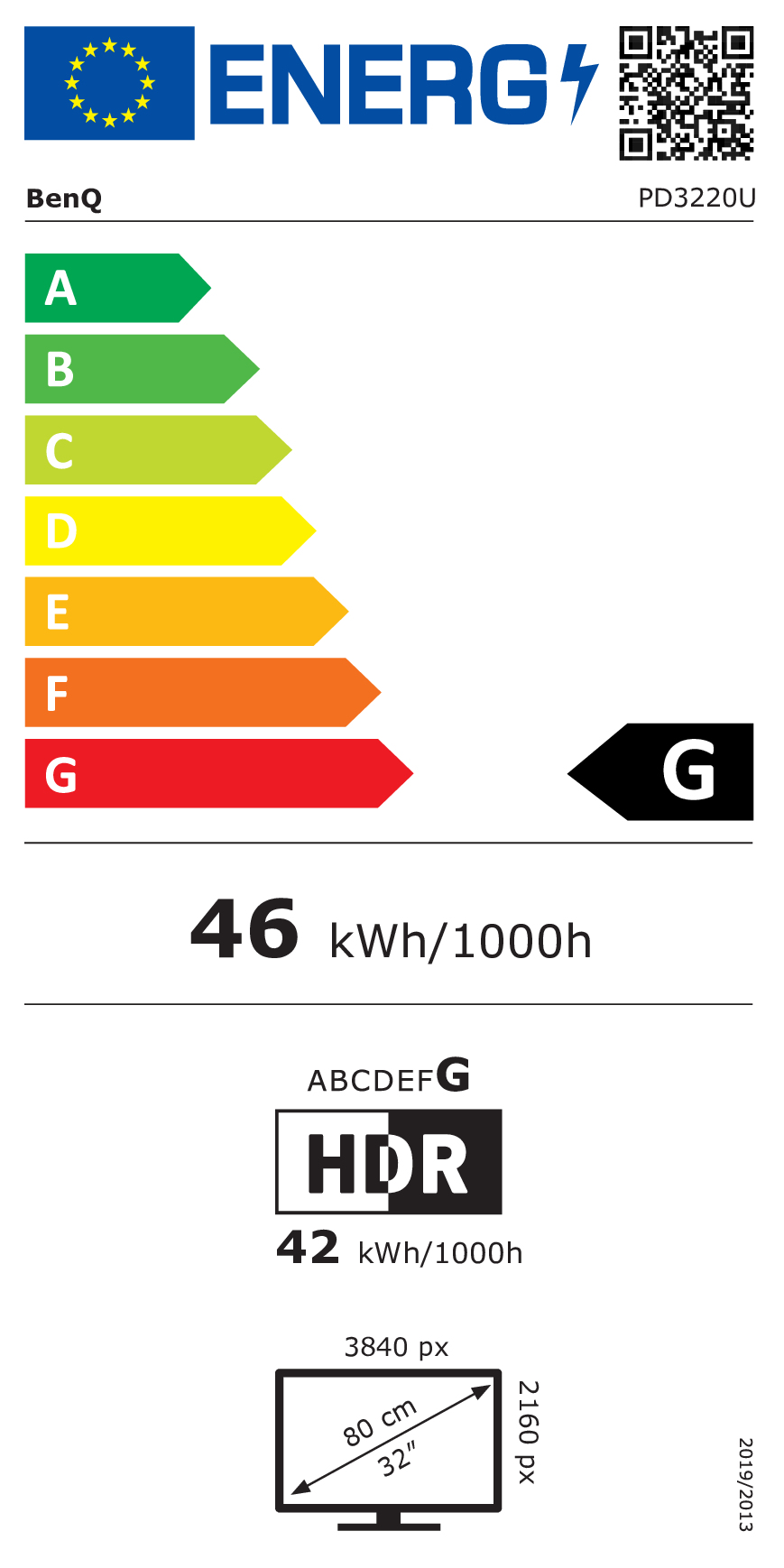
- Energy efficiency class (SDR)The energy efficiency rating of the device when operating in Standard Dynamic Range (SDR) mode, categorized from A to G.
- G
- Energy efficiency class (HDR)The energy efficiency rating of the device when High Dynamic Range (HDR) mode is active, ranging from A to G.
- G
- Energy consumption (SDR) per 1000 hoursThe amount of electric energy consumed by the device during standard dynamic range (SDR) operation over a period of 1000 hours, measured in kilowatt-hours (kWh).
- 46 kWh
- Energy consumption (HDR) per 1000 hoursThe amount of electrical energy consumed by the device when displaying High Dynamic Range (HDR) content over a period of 1000 hours, measured in kilowatt-hours (kWh).
- 42 kWh
- Power consumption (typical)Amount of power consumed by this model, often expressed in watts (W). Typical values that manufacturers give are power consumption when off, standby/suspended mode, typical use, maximum usage.
- 45.5 W
- Power consumption (standby)The amount of electricity that is consumed when the product is on standby.
- 0.5 W
- Power consumption (off)The amount of electrical energy consumed by the device when it is switched off, measured in watts.
- 0.3 W
- AC input voltageThe voltage of the AC electricity that is inputted into the product.
- 100 - 240 V
- Power supply typeThe type of power supply which this product uses.
- Internal
- Energy efficiency scaleThe range of energy efficiency classes used to rate the product's power consumption, such as A to G.
- A to G
Ergonomics
- Height adjustmentThe part of the device that can be adjusted to change the height.
- Yes
- Adjustable height (max)The maximum distance the unit can be raised vertically from its lowest position, measured in millimetres.
- 15 cm
- PivotIndicates whether the device can be rotated 90 degrees to switch between landscape and portrait orientation.
- Yes
- Pivot angleThe range of motion available for rotating the unit around its vertical axis, typically measured in degrees.
- 0 - 90°
- SwivellingIndicates whether the product has a mechanism that allows it to rotate horizontally.
- Yes
- Swivel angle rangeThe minimum and maximum degrees to which the unit can be rotated horizontally.
- -30 - 30°
- Tilt adjustmentThe tilt, which means the angle at which the device is pointing (up or down), can be changed.
- Yes
- Tilt angle rangeThe minimum and maximum angles at which the unit can be tilted, typically expressed in degrees.
- -5 - 20°
- On Screen Display (OSD) languagesThe list of available languages for the device's display interface (e.g., AFR for Afrikaans, ARA for Arabic).
- Arabic, Simplified Chinese, Traditional Chinese, Czech, German, Dutch, English, Spanish, French, Hungarian, Italian, Japanese, Korean, Polish, Portuguese, Romanian, Russian, Swedish
Management features
- Picture-in-PicturePicture-in-picture (PiP) is a feature of some television receivers and similar devices. One program (channel) is displayed on the full TV screen at the same time as one or more other programs are displayed in inset windows. Sound is usually from the main program only.
- Yes
- On Screen Display (OSD)Indicates whether the device can display a graphical menu or information directly on the screen for adjusting settings and viewing status.
- Yes
- Number of OSD languagesThe total number of different languages available for the on-screen display menu (e.g. 15).
- 18
Logistics data
- Harmonized System (HS) codeThe standardized numerical method of classifying traded products used by customs authorities around the world to identify goods for tariffs and statistics.
- 85285210
Packaging data
- Package weightWeight of the packaged product.
- 13.3 kg
Database Right data-sheet 2026 Icecat. All rights reserved. Provided “as is”, without warranty — check details with the store before buying.
Expert reviews
- 80
t3.com2023
With the BenQ PD3220U we have a factory-calibrated monitor that excels at colour accuracy and creative work, with Thunderbolt 3 support and several useful extras. As great as it is though, you need to make sure it's actually the type of monitor that you n...
- +
- Perfect for designers and creatives,Very easy on the eyes over long periods,Lots of integrated connectivity options,
- −
- Aimed at a specific type of user, Design isn't particularly inspiring, Speakers could be improved,
- 100
techradar.com2022
The BenQ PD3220U offers a high-quality build, attractive design, and impressive specs. Its4K resolution, high pixel density, and a wide color gamut provides a sharp and vibrant display, and its HDR capability adds depth to images.Its multiple connectivity...
Read the review at techradar.com ↗ - 90
creativebloq.com2022
BenQ clearly had graphic designers in mind when it built the BenQ PD3220U. However, this 32-inch 4K panel's great colour accuracy out of the box, great sRGB coverage, decent Adobe RGB and DCI-P3 colour gamuts, and nice feature set will please photographer...
- +
- Great colour accuracy, 4K at 32-inch is the sweet spot, Great connectivity
- −
- Limited Adobe RGB coverage, On the pricier side, Speakers might as well not be there
- 80
itpro.co.uk2020
It isn't enough for manufacturers to lure creative pros with the promise of calibrated panels that have a Delta E under two anymore – that's rapidly becoming the standard for mid-range screens. Instead, the likes of BenQ must entice people with features...
Read the review at itpro.co.uk ↗
Price history (90 days, best daily price)
Price history is still being collected for this product — check back soon.
Alternative models

BenQ RL2455TS
computer monitor 61 cm (24") 1920 x 1080 pixels Full HD LED Black

BenQ BL2480
computer monitor 60.5 cm (23.8") 1920 x 1080 pixels LCD Black

BenQ BL2581T
computer monitor 63.5 cm (25") 1920 x 1200 pixels Full HD LED Black

BenQ EL2870U
computer monitor 70.9 cm (27.9") 3840 x 2160 pixels 4K Ultra HD LED Black, Grey

BenQ RL2455S
computer monitor 61 cm (24") 1920 x 1080 pixels Full HD LCD Black

BenQ BL2283
computer monitor 54.6 cm (21.5") 1920 x 1080 pixels Full HD Black
Accessories & compatible products

R-Go Tools Monitor arm R-Go Zepher Single, fully adjustable, 0-8 Kg load capacity, 100% circular, black

R-Go Tools Monitor arm R-Go Caparo Single, fully adjustable with gas spring, 3-9 kg load capacity, 100% circular, black

R-Go Tools Monitor arm R-Go Zepher Dual, for two monitors, fully adjustable, 0
8 kg load capacity, 100% circular, black
