
BenQ GW2480T computer monitor 60.5 cm (23.8") 1920 x 1080 pixels Full HD LED Black
- Screen: 60.5 cm (23.8"), 1920 x 1080 pixels, IPS, Flat
- Refresh rate: 5 ms response time
- Brightness: 250 cd/m²
- Ports: 1 × HDMI, 1 × DisplayPort
- Stand: height-adjustable, tilt, VESA 100 x 100 mm
- Extras: speakers
- Colour: Black
Where to buy
We're not tracking prices for this product yet. Check current prices directly at:
We may earn a commission when you buy through links on this page — at no extra cost to you. Learn more
About this product
Be Aware of Screen Brightness
Many children study with the same screen brightness. Adjusting OSD may not be easy or persistent for parents, not to mention for kids. A simple on/off switch ensures optimal brightness under different lighting conditions. BenQ Brightness Intelligence Tech (B.I. Tech) can detect and adjust brightness automatically according to surrounding light to safeguard children's eye health.
Monitor with Height Adjustment
BenQ’s Height Adjustment Stand allows family members to find the best viewing angles for comfortable study or work, and screen sharing with an extensive range of monitor adjustments – height, tilt, pivot, and swivel. Siblings can easily adjust monitor height and viewing angles when they need to take turn using the monitor.
Connect Laptops to Monitors
Larger screens with eye-care technologies help children relieve their eye strains while doing homework at home. In addition to PC, laptops can also be connected to a monitor in a way that is easier than you think! BenQ GW2480T Eye-care Monitor for Students offers three connection ports, including HDMI, DisplayPort, and D-sub.
Digital Learning is an Inevitable Trend
Children at an early age, especially middle school students, spend more time on laptops or tablets with a short viewing distance or in dim light. These are the main reasons that cause short-sightedness. Though laptops and tablets are convenient and highly portable, they are not suitable for doing research or creating content because a small-sized display is bad for eyes and bone growth.
Maintain the Proper Distance from the Monitor
Most students are getting closer to their laptops or tablets when studying or coding. Staring at the screen for extended periods forces eyes’ ciliary muscles to keep focused at an exact spot, making it easier to cause eye fatigue or other vision problems.
The recommended viewing distance between eyes and the monitor is 60 cm to 70 cm. The GW2480T with 24-inch screen size is ideal for students to have a comfortable viewing experience.
Reduce Blue Light Exposure for Better Sleep Quality
The blue light emitted from digital devices can lower the production of melatonin. This disrupts students' sleep quality, which is closely related to their learning efficiency at school the next day.
The GW2480T with Low Blue Light Technology filters out harmful blue light for both good sleep quality and eye health.
Flicker-Free Makes for Better Viewing Comfort
After studying for a long day, students' eyes have already been exhausted, but they still have homework to complete. Screen flickering can put extra stress on their eyes, especially laptop screens, causing excessive blinking and frequent rubbing of the eyes.
The GW2480T with Flicker-Free Technology can effectively diminish eye fatigue and irritation for better viewing comfort and studying efficiency.
Study with Real Color
Scientific research shows that congenital color vision deficiency affects 8% of males and 0.5% of females. For children who like creating art, color weakness might likely affect their color recognition and interest in art learning.
The GW2480T with a Color Weakness Mode can help this group of students feel the joy of color and see the true colors of this world!
Parents and Children Enjoy Learning Together
Most parents are willing to accompany their children through their learning process. The GW2480T with a wide viewing angle makes it easier for both parents and children to enjoy the fun of learning together.
TÜV Rheinland Certification
BenQ Eye-Care Monitors are certified by TUV Rheinland, a global leader in technical and safety certification, for Flicker-Free and Low Blue Light performance that truly benefits human vision. As the first brand of Eye-Care monitors in the world, BenQ is committed to safeguarding vision health at the forefront of viewing comfort and enjoyment with this permanent addition to its monitor product line.
Documents
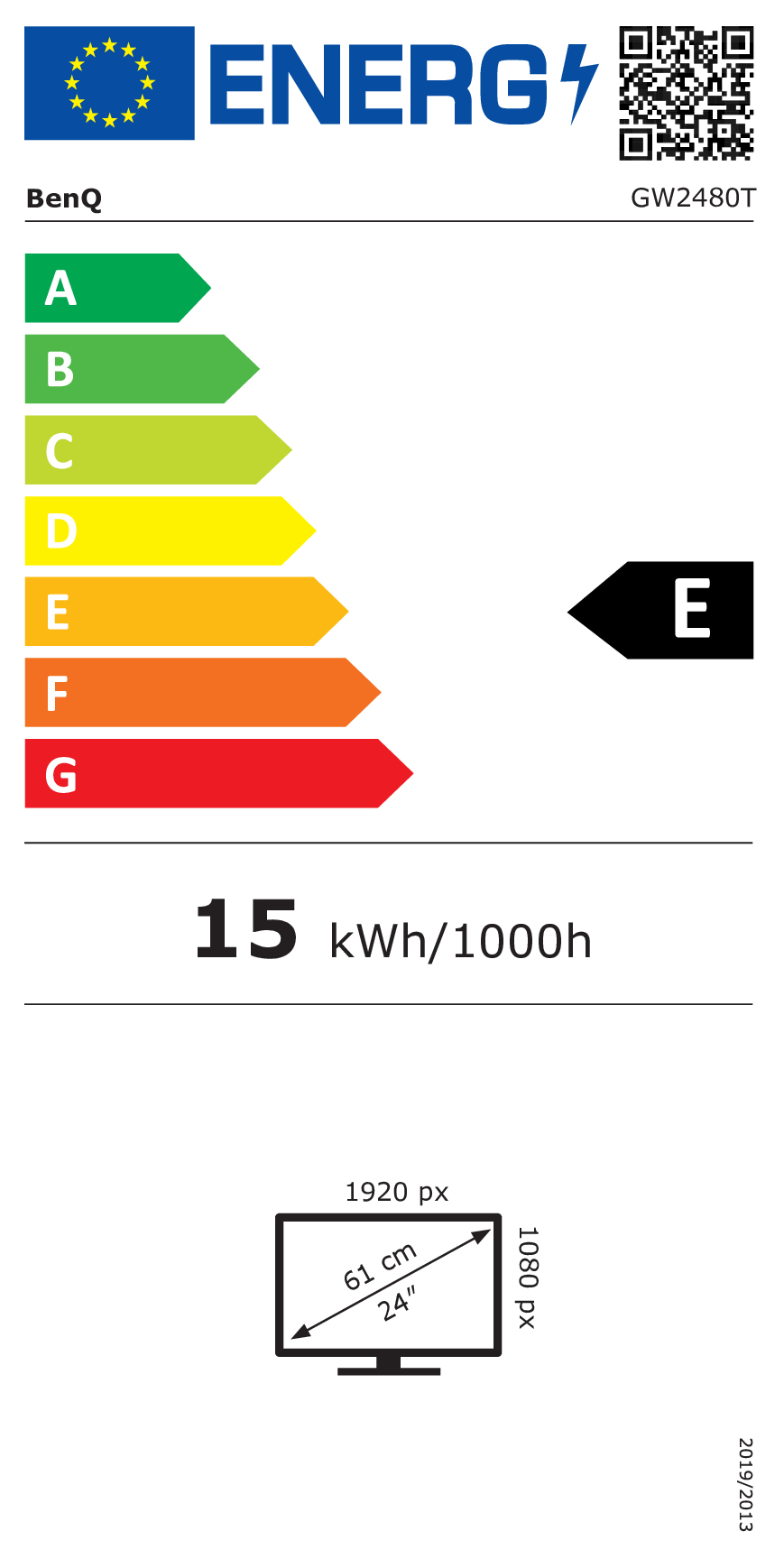
- Product information sheetEU Product Fiche ↗
Specifications
Key specifications
- Display diagonalSize of the display for this product, measured diagonally, usually in inches.
- 60.5 cm (23.8")
- Display resolutionThe number of distinct pixels in each dimension that can be displayed. It is usually quoted as width × height, with the units in pixels: for example, "1024 × 768" means the width is 1024 pixels and the height is 768 pixels. The higher the number of pixels, the sharper the image.
- 1920 x 1080 pixels
- Panel typeThe technology used to manufacture the panel, such as AMOLED or AH-IPS.
- IPS
- Screen shapeDescribes the physical curvature of the display panel, such as whether it is flat or curved.
- Flat
- Response timeThe response time is the time difference between the moment that a source (for example a video card) sends a signal and that equipment (for example a monitor) receives or display the signal. (Used abbreviations: R/F = Rise and Fall.)
- 5 ms
- Display brightness (typical)Display brightness, measured by its Luminance, presented as a figure in nits. Typical brightness ratings for monitors range from 250 to 350 nits with a target value of between 80 to 120 nits being suitable for most displays in a normal viewing environment.
- 250 cd/m²
- HDMI ports quantityThe number of sockets (ports) for HDMI connections. HDMI (High-Definition Multimedia Interface) is a compact audio/video interface for transferring uncompressed video data and compressed/uncompressed digital audio data from a HDMI-compliant device ("the source device") to a compatible computer monitor, video projector, digital television, or digital audio device. HDMI is a digital replacement for…
- 1
- DisplayPorts quantityNumber of DisplayPorts. A DisplayPort is a digital display interface developed by the Video Electronics Standards Association (VESA). The interface is primarily used to connect a video source to a display device such as a computer monitor, though it can also be used to carry audio, USB, and other forms of data.
- 1
- Height adjustmentThe part of the device that can be adjusted to change the height.
- Yes
- Tilt adjustmentThe tilt, which means the angle at which the device is pointing (up or down), can be changed.
- Yes
- Panel mounting interfaceThe product can be used wih VESA mounting interfaces.
- 100 x 100 mm
- Built-in speaker(s)The device contains speaker(s) to produce sound.
- Yes
- Product colourThe colour e.g. red, blue, green, black, white.
- Black
Show all 59 specificationsShow key specifications only
Design
- VESA mountingIndicates whether the product supports the VESA mounting standard for attachment to compatible arms, brackets, or wall mounts.
- Yes
- Market positioningUnder which category can the device be positioned in the market, e.g. camera phone.
- Home
- Product colourThe colour e.g. red, blue, green, black, white.
- Black
- Panel mounting interfaceThe product can be used wih VESA mounting interfaces.
- 100 x 100 mm
Audio
- Built-in speaker(s)The device contains speaker(s) to produce sound.
- Yes
- Number of speakersThe quantity of speakers included in/with the product.
- 2
- RMS rated powerRMS (Root mean square) is a measure of the continuous power required by a device, in particular audio amplifiers and loudspeakers.
- 1 W
Performance
- NVIDIA G-SYNCIndicates whether the product supports NVIDIA G-SYNC technology to synchronize the display refresh rate with the GPU to eliminate screen tearing.
- No
- AMD FreeSyncThe product includes AMD Freesync Technology for the dynamic synchronization of the graphic card and the monitor in order to avoid screen tearing.
- No
Display
- Display diagonalSize of the display for this product, measured diagonally, usually in inches.
- 60.5 cm (23.8")
- Display resolutionThe number of distinct pixels in each dimension that can be displayed. It is usually quoted as width × height, with the units in pixels: for example, "1024 × 768" means the width is 1024 pixels and the height is 768 pixels. The higher the number of pixels, the sharper the image.
- 1920 x 1080 pixels
- Native aspect ratioThe aspect ratio is the ratio of the width of an image to its height. The native aspect ratio is the one which the projector/display is particularly designed for. Images shown in native aspect ratio will utilize the entire resolution of the display and achieve maximum brightness. Images shown in other than native aspect ratio will always have less resolution and less brightness than images shown…
- 16:9
- Display technologyThe technology used in the display e.g. plasma, LED.
- LED
- TouchscreenA screen of a laptop, smartphone, etc., that responds to touch so you can control the interface using your fingers.
- No
- Native refresh rateThe number of times per second the hardware updates, measured in hertz (Hz).
- 60 Hz
- HD typeType of supported High Definition (e.g. Full HD, 4K Ultra HD).
- Full HD
- Panel typeThe technology used to manufacture the panel, such as AMOLED or AH-IPS.
- IPS
- Backlight typeThe technology used to illuminate the display panel, such as CCFL or various LED configurations (e.g., Edge LED, Full-Array).
- LED
- Display brightness (typical)Display brightness, measured by its Luminance, presented as a figure in nits. Typical brightness ratings for monitors range from 250 to 350 nits with a target value of between 80 to 120 nits being suitable for most displays in a normal viewing environment.
- 250 cd/m²
- Response timeThe response time is the time difference between the moment that a source (for example a video card) sends a signal and that equipment (for example a monitor) receives or display the signal. (Used abbreviations: R/F = Rise and Fall.)
- 5 ms
- Screen shapeDescribes the physical curvature of the display panel, such as whether it is flat or curved.
- Flat
- Supported graphics resolutionsThe graphic resolutions that can be displayed by the device. The graphic resolution describes the width and height dimensions of a display, such as a computer monitor, measured in pixels.
- 1920 x 1080 (HD 1080)
- Aspect ratioThe aspect ratio is the ratio of the width of a shape to its height. For example, 4:3 is common for standard displays and 16:9 is the ratio for Widescreen TV.
- 16:9
- Contrast ratio (typical)The difference in light intensity between the brightest white and the darkest black.
- 1000:1
- Contrast ratio (dynamic)A property of a display system, defined as the ratio of the luminance of the brightest color (white) to that of the darkest color (black) that the system is capable of producing.
- 20000000:1
- Viewing angle, horizontalMaximum horizontal angle at which a display can be viewed with acceptable visual performance.
- 178°
- Viewing angle, verticalMaximum vertical angle at which a display can be viewed with acceptable visual performance.
- 178°
- Display number of coloursThe total number of distinct colours that the device is capable of displaying (e.g. 1.07 billion colours).
- 16.78 million colours
- Pixel densityThe number of individual pixels displayed per inch of linear screen space, measured in pixels per inch (ppi).
- 93 ppi
- Colour depthThe number of bits used to represent the colour of a single pixel, which determines the total number of possible colours that can be displayed.
- 8 bit
- Colour gamutThe range of colours that the display can accurately reproduce, typically expressed as a percentage of a standard colour space (e.g. sRGB or Adobe RGB).
- 72%
- NTSC coverage (typical)The percentage of the NTSC color gamut that the device is capable of reproducing.
- 72%
Sustainability
- Sustainability certificatesThe environmental or ethical certifications the product has received to verify its sustainability standards (e.g., ASC or ACT Organic).
- ENERGY STAR
Weight & dimensions
- Width (with stand)The total horizontal measurement of the product when the supporting stand is attached, measured in millimetres.
- 540 mm
- Depth (with stand)The measurement of the product from front to back when any supporting accessory or base is attached, expressed in millimetres or centimetres.
- 230 mm
- Height (with stand)The total vertical measurement of the product including its base or support structure, expressed in millimetres or centimetres.
- 528 mm
- Weight (with stand)The total mass of the unit including its supporting base, measured in kilograms or grams.
- 5.7 kg
Power
- Energy efficiency class (SDR)The energy efficiency rating of the device when operating in Standard Dynamic Range (SDR) mode, categorized from A to G.
- E
- Energy efficiency class (HDR)The energy efficiency rating of the device when High Dynamic Range (HDR) mode is active, ranging from A to G.
- Not available
- Energy consumption (SDR) per 1000 hoursThe amount of electric energy consumed by the device during standard dynamic range (SDR) operation over a period of 1000 hours, measured in kilowatt-hours (kWh).
- 14.9 kWh
- Power consumption (typical)Amount of power consumed by this model, often expressed in watts (W). Typical values that manufacturers give are power consumption when off, standby/suspended mode, typical use, maximum usage.
- 27 W
- Power consumption (standby)The amount of electricity that is consumed when the product is on standby.
- 0.3 W
- Power consumption (off)The amount of electrical energy consumed by the device when it is switched off, measured in watts.
- 0.2 W
- AC input voltageThe voltage of the AC electricity that is inputted into the product.
- 100 - 240 V
- Power supply typeThe type of power supply which this product uses.
- Internal
- Energy efficiency scaleThe range of energy efficiency classes used to rate the product's power consumption, such as A to G.
- A to G
Ergonomics
- Height adjustmentThe part of the device that can be adjusted to change the height.
- Yes
- Adjustable height (max)The maximum distance the unit can be raised vertically from its lowest position, measured in millimetres.
- 14 cm
- PivotIndicates whether the device can be rotated 90 degrees to switch between landscape and portrait orientation.
- Yes
- SwivellingIndicates whether the product has a mechanism that allows it to rotate horizontally.
- Yes
- Swivel angle rangeThe minimum and maximum degrees to which the unit can be rotated horizontally.
- 45 - 45°
- Tilt adjustmentThe tilt, which means the angle at which the device is pointing (up or down), can be changed.
- Yes
- Tilt angle rangeThe minimum and maximum angles at which the unit can be tilted, typically expressed in degrees.
- -5 - 20°
Ports & interfaces
- VGA (D-Sub) ports quantityNumber of VGA (D-Sub) ports (connecting interfaces) in the device. The VGA (D-Sub) connector is a 15 pin connector between a computer and a monitor. It was first introduced in 1987 by IBM.
- 1
- HDMIHDMI (High-Definition Multimedia Interface) is a compact audio/video interface for transferring uncompressed video data and compressed/uncompressed digital audio data from a HDMI-compliant device ("the source device") to a compatible computer monitor, video projector, digital television, or digital audio device. HDMI is a digital replacement for existing analog video standards.
- Yes
- HDMI ports quantityThe number of sockets (ports) for HDMI connections. HDMI (High-Definition Multimedia Interface) is a compact audio/video interface for transferring uncompressed video data and compressed/uncompressed digital audio data from a HDMI-compliant device ("the source device") to a compatible computer monitor, video projector, digital television, or digital audio device. HDMI is a digital replacement for…
- 1
- HDMI versionThe specific release version of the High-Definition Multimedia Interface standard supported by the device (e.g. 1.3 or 2.0).
- 1.4
- DisplayPorts quantityNumber of DisplayPorts. A DisplayPort is a digital display interface developed by the Video Electronics Standards Association (VESA). The interface is primarily used to connect a video source to a display device such as a computer monitor, though it can also be used to carry audio, USB, and other forms of data.
- 1
- DisplayPort versionThe specific release version of the DisplayPort standard supported by the device (e.g., 1.2 or 1.4).
- 1.2
Database Right data-sheet 2026 Icecat. All rights reserved. Provided “as is”, without warranty — check details with the store before buying.
Expert reviews
- 94
monitornerds.com2019
The BenQ GW2480 is an excellent budget monitor for any type of use such as school work, document processing, or even casual gaming. The IPS screen isn't as vibrant as some models we've tested, but its scores fall within acceptable limits for daily use. Fe...
Read the review at monitornerds.com ↗ - –
thetechreviewer.com2018
Deciding which are the best accessories to invest in for your MacBook or MacBook Pro is not the most straightforward decision for a lot of our readers. However, our staff have owned many generations of Apple laptops over the years and have grown to learn...
Read the review at thetechreviewer.com ↗
Price history (90 days, best daily price)
Price history is still being collected for this product — check back soon.
Alternative models
BenQ EW3280U
computer monitor 81.3 cm (32") 3840 x 2160 pixels 4K Ultra HD LED Black, Brown

BenQ SW321C
computer monitor 81.3 cm (32") 3840 x 2160 pixels 4K Ultra HD LED Grey

BenQ EW2780Q
computer monitor 68.6 cm (27") 2560 x 1440 pixels Quad HD LED Black, Grey

BenQ GW2480
computer monitor 60.5 cm (23.8") 1920 x 1080 pixels Full HD LCD Black

BenQ EW2780U
computer monitor 68.6 cm (27") 3840 x 2160 pixels 4K Ultra HD LED Black, Brown

BenQ GW2280
computer monitor 54.6 cm (21.5") 1920 x 1080 pixels Full HD LED Black
Accessories & compatible products

R-Go Tools Monitor arm R-Go Zepher Single, fully adjustable, 0-8 Kg load capacity, 100% circular, black

R-Go Tools Monitor arm R-Go Caparo Single, fully adjustable with gas spring, 3-9 kg load capacity, 100% circular, black

R-Go Tools Monitor arm R-Go Zepher Dual, for two monitors, fully adjustable, 0
8 kg load capacity, 100% circular, black
