
BenQ EX3203R computer monitor 80 cm (31.5") 2560 x 1440 pixels Quad HD LED Black
- Screen: 80 cm (31.5"), 2560 x 1440 pixels, VA, Curved
- Refresh rate: 144 Hz, 4 ms response time
- Brightness: 400 cd/m²
- Adaptive sync: AMD FreeSync
- Ports: 2 × HDMI, 1 × DisplayPort
- Stand: height-adjustable, tilt
- Extras: USB hub
- Colour: Black
Where to buy
We're not tracking prices for this product yet. Check current prices directly at:
We may earn a commission when you buy through links on this page — at no extra cost to you. Learn more
About this product
Hyper-Realistic Video Quality with Display HDR 400
Featuring the leading HDR technology in a video enjoyment monitor, EX3203R offers enhanced brightness and contrast and adds incredible details and vividness to HDR video contents.EX3203R has passed the first HDR certification, and ensures optimal performance.
HDR Plus B.I. for Ultra-Fine Details
EX3203R brings HDR together with Brightness Intelligence Plus to gently soften bright areas while keeping dark details crystal clear even in dimly lit environments. By combining HDR with B.I.+ Mode, the details are brilliantly visible even in dark environments while your eyes are protected during gaming or video streaming.
QHD Resolution Delivers Ultra-Clear and Vivid Images
With almost twice the pixel density of FHD, QHD's 2560X1440 resolution can reveal details of the image in extreme clarity and sharpness to enhance your gaming enjoyment.
Designed for an Optimal Viewing Experience
Monumental Screen Size with Awe-Inspiring Curvature
Far surpassing mainstream monitors, EX3203R’s 32” presence instantly captures your attention and fills your field of vision with the 1800R curvature, an ideally immersive curve ratio for its size.
Ultra-Slim Bezel Edge-to-Edge Design for Endless Horizons
Incorporating ultra-slim bezels with edge-to-edge panels, multiple EX3203R monitors can connect seamlessly to literally surround your vision with limitless perspective.
Take control of your streaming enjoyment with ease
Universal Multi-Platform Connectivity
Comprehensively equipped with multiple HDMI, DisplayPort, and USB 3.1 ports in addition to the USB-C port, EX3203R expertly hosts multimedia content from a variety of source devices ranging from set-top boxes, Blu-rays, gaming consoles, and smart devices.
Smoother and Intense Images for Full Gaming Enjoyment
FreeSync 2 for Smoother Gaming
FreeSync 2 technology offers supremely smooth gaming experiences with the enhanced support of HDR contents. Gamers can fully enjoy the sharpened details and clarity of the HDR games and fluid gaming enjoyment without image tearing, broken frames, and choppy gameplay.
144Hz High Refresh Rate
With 144Hz high refresh rate, EX3203R brings out an ultra-smooth gaming experience.
Your Viewing Comfort Matters to Us
Height Adjustment Stand
An extensive range of heights, the adjustable stand allows you to customize your entertainment space for the perfect fit.
Caring for Your Eyes
The Industry-Leading Eye-Care Technology
BenQ's exclusive eye-care technologies reduce eye fatigue while ensuring greater user comfort after a long period of use.
Brightness Intelligence Plus Technology
Reduce Eye Strain in Any Lighting Environment
Reduce Eye Strain in Any Lighting Environment Brightness Intelligence Plus Technology (B.I.+ Tech.) detects ambient brightness and color temperature to adjust display settings, with soothing warm white for comfort and cool white for an extended period of use.
Documents
- ManualUser manual ↗
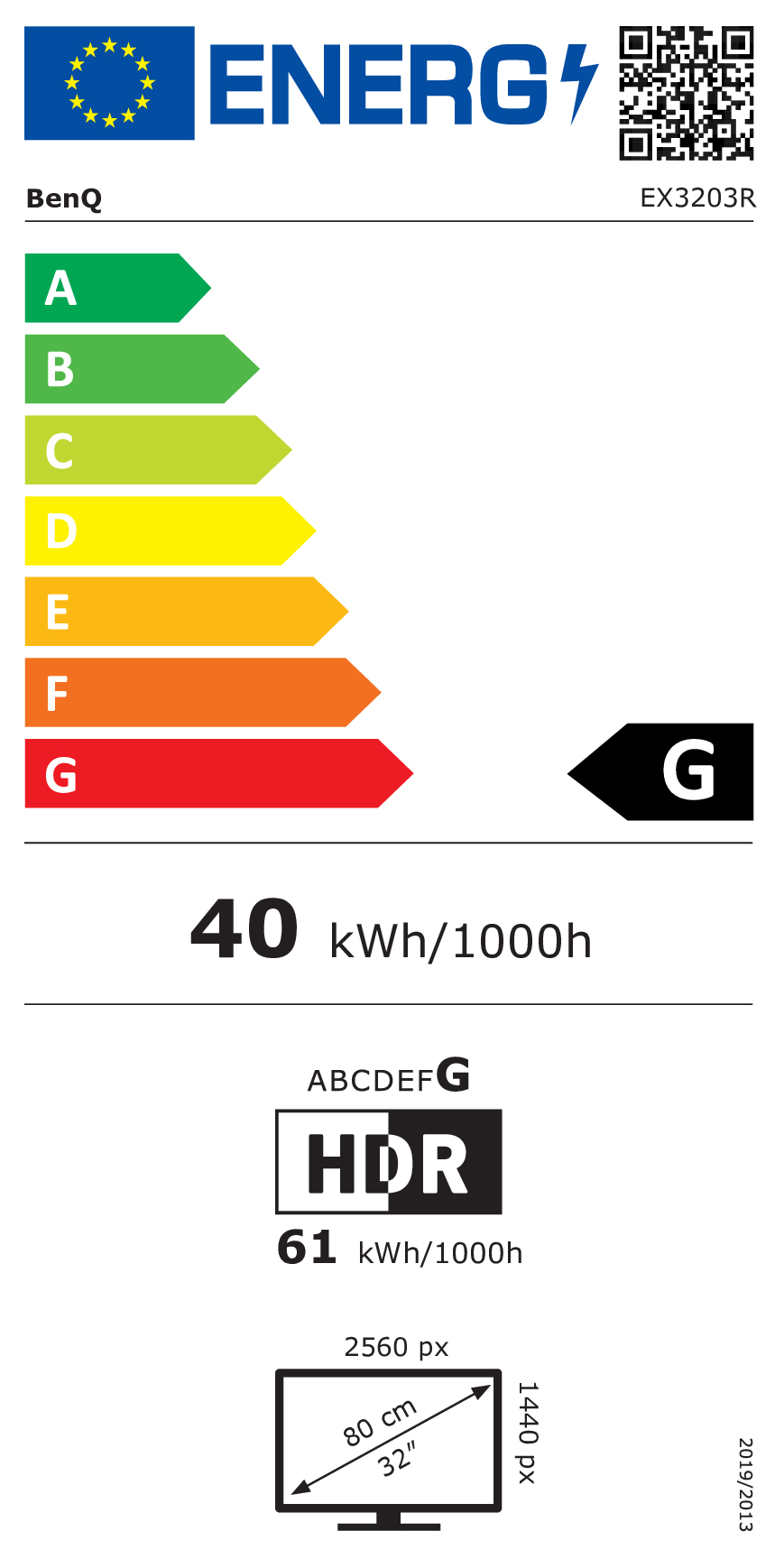
- Product information sheetEU Product Fiche ↗
Specifications
Key specifications
- Display diagonalSize of the display for this product, measured diagonally, usually in inches.
- 80 cm (31.5")
- Display resolutionThe number of distinct pixels in each dimension that can be displayed. It is usually quoted as width × height, with the units in pixels: for example, "1024 × 768" means the width is 1024 pixels and the height is 768 pixels. The higher the number of pixels, the sharper the image.
- 2560 x 1440 pixels
- Panel typeThe technology used to manufacture the panel, such as AMOLED or AH-IPS.
- VA
- Screen shapeDescribes the physical curvature of the display panel, such as whether it is flat or curved.
- Curved
- Maximum refresh rateThe highest number of times per second the image is updated, measured in hertz (Hz).
- 144 Hz
- Response timeThe response time is the time difference between the moment that a source (for example a video card) sends a signal and that equipment (for example a monitor) receives or display the signal. (Used abbreviations: R/F = Rise and Fall.)
- 4 ms
- Display brightness (typical)Display brightness, measured by its Luminance, presented as a figure in nits. Typical brightness ratings for monitors range from 250 to 350 nits with a target value of between 80 to 120 nits being suitable for most displays in a normal viewing environment.
- 400 cd/m²
- AMD FreeSyncThe product includes AMD Freesync Technology for the dynamic synchronization of the graphic card and the monitor in order to avoid screen tearing.
- Yes
- HDMI ports quantityThe number of sockets (ports) for HDMI connections. HDMI (High-Definition Multimedia Interface) is a compact audio/video interface for transferring uncompressed video data and compressed/uncompressed digital audio data from a HDMI-compliant device ("the source device") to a compatible computer monitor, video projector, digital television, or digital audio device. HDMI is a digital replacement for…
- 2
- DisplayPorts quantityNumber of DisplayPorts. A DisplayPort is a digital display interface developed by the Video Electronics Standards Association (VESA). The interface is primarily used to connect a video source to a display device such as a computer monitor, though it can also be used to carry audio, USB, and other forms of data.
- 1
- Height adjustmentThe part of the device that can be adjusted to change the height.
- Yes
- Tilt adjustmentThe tilt, which means the angle at which the device is pointing (up or down), can be changed.
- Yes
- Built-in USB hubWhether or not the device features a USB hub to connect more than one other device via USB.
- Yes
- Product colourThe colour e.g. red, blue, green, black, white.
- Black
Show all 80 specificationsShow key specifications only
Ports & interfaces
- Built-in USB hubWhether or not the device features a USB hub to connect more than one other device via USB.
- Yes
- USB hub versionThe technical standard of the USB hub, if available, which determines the maximum data transfer speed (e.g., 3.2 Gen 1).
- 3.2 Gen 1 (3.1 Gen 1)
- USB upstream port typeThe connector type used for the upstream connection to a host device (e.g., USB Type-B or USB Type-C).
- USB Type-C
- Number of upstream portsThe total number of available ports used to connect the device to a computer or another network source.
- 1
- USB Type-A downstream ports quantityThe number of USB Type-A ports available for connecting peripheral devices to the unit.
- 2
- DVI portDigital Visual Interface (DVI) is a video display interface to connect a video source to a display device, such as a computer monitor.
- No
- HDMI ports quantityThe number of sockets (ports) for HDMI connections. HDMI (High-Definition Multimedia Interface) is a compact audio/video interface for transferring uncompressed video data and compressed/uncompressed digital audio data from a HDMI-compliant device ("the source device") to a compatible computer monitor, video projector, digital television, or digital audio device. HDMI is a digital replacement for…
- 2
- DisplayPorts quantityNumber of DisplayPorts. A DisplayPort is a digital display interface developed by the Video Electronics Standards Association (VESA). The interface is primarily used to connect a video source to a display device such as a computer monitor, though it can also be used to carry audio, USB, and other forms of data.
- 1
- Headphone outThe socket for connecting headphones to the device.
- Yes
- Headphone outputsNumber of sockets /ports where headphones are connected.
- 1
- Headphone connectivityHow headphones connect to a device e.g. wirelessly or via a cable and connector.
- 3.5 mm
- HDCPHigh-bandwidth Digital Content Protection (HDCP) is a form of digital copy protection to prevent copying of digital audio and video content as it travels across connections.
- Yes
Design
- Product colourThe colour e.g. red, blue, green, black, white.
- Black
- Feet colourThe colour of the feet, which are the projecting part on which a device/piece of furniture, or each of its legs, stands.
- Silver
Audio
- Built-in speaker(s)The device contains speaker(s) to produce sound.
- No
Multimedia
- Built-in cameraThe product has an integrated camera.
- No
Performance
- NVIDIA G-SYNCIndicates whether the product supports NVIDIA G-SYNC technology to synchronize the display refresh rate with the GPU to eliminate screen tearing.
- No
- AMD FreeSyncThe product includes AMD Freesync Technology for the dynamic synchronization of the graphic card and the monitor in order to avoid screen tearing.
- Yes
- On/off switchThe button which is pressed to switch the device on or off.
- Yes
- VESA Adaptive Sync supportIndicates whether the device supports the VESA Adaptive-Sync standard to synchronize the refresh rate with the GPU to reduce screen tearing.
- Yes
- High Dynamic Range (HDR) supportedIndicates whether the device supports High Dynamic Range for improved contrast and a wider range of colours and luminosity.
- Yes
Display
- Display diagonalSize of the display for this product, measured diagonally, usually in inches.
- 80 cm (31.5")
- Display resolutionThe number of distinct pixels in each dimension that can be displayed. It is usually quoted as width × height, with the units in pixels: for example, "1024 × 768" means the width is 1024 pixels and the height is 768 pixels. The higher the number of pixels, the sharper the image.
- 2560 x 1440 pixels
- Native aspect ratioThe aspect ratio is the ratio of the width of an image to its height. The native aspect ratio is the one which the projector/display is particularly designed for. Images shown in native aspect ratio will utilize the entire resolution of the display and achieve maximum brightness. Images shown in other than native aspect ratio will always have less resolution and less brightness than images shown…
- 16:9
- Display technologyThe technology used in the display e.g. plasma, LED.
- LED
- TouchscreenA screen of a laptop, smartphone, etc., that responds to touch so you can control the interface using your fingers.
- No
- HD typeType of supported High Definition (e.g. Full HD, 4K Ultra HD).
- Quad HD
- Panel typeThe technology used to manufacture the panel, such as AMOLED or AH-IPS.
- VA
- Display brightness (typical)Display brightness, measured by its Luminance, presented as a figure in nits. Typical brightness ratings for monitors range from 250 to 350 nits with a target value of between 80 to 120 nits being suitable for most displays in a normal viewing environment.
- 400 cd/m²
- Response timeThe response time is the time difference between the moment that a source (for example a video card) sends a signal and that equipment (for example a monitor) receives or display the signal. (Used abbreviations: R/F = Rise and Fall.)
- 4 ms
- Screen shapeDescribes the physical curvature of the display panel, such as whether it is flat or curved.
- Curved
- Screen curvature ratingThe radius of the curve of the screen, expressed in millimetres (e.g. 1500R), where a smaller number indicates a more pronounced curve.
- 1800R
- Supported graphics resolutionsThe graphic resolutions that can be displayed by the device. The graphic resolution describes the width and height dimensions of a display, such as a computer monitor, measured in pixels.
- 2560 x 1440
- Contrast ratio (typical)The difference in light intensity between the brightest white and the darkest black.
- 3000:1
- Contrast ratio (dynamic)A property of a display system, defined as the ratio of the luminance of the brightest color (white) to that of the darkest color (black) that the system is capable of producing.
- 20000000:1
- Maximum refresh rateThe highest number of times per second the image is updated, measured in hertz (Hz).
- 144 Hz
- Viewing angle, horizontalMaximum horizontal angle at which a display can be viewed with acceptable visual performance.
- 178°
- Viewing angle, verticalMaximum vertical angle at which a display can be viewed with acceptable visual performance.
- 178°
- Display number of coloursThe total number of distinct colours that the device is capable of displaying (e.g. 1.07 billion colours).
- 16.78 million colours
- Response time (fast)The minimum time it takes for a pixel to change from one color to another, measured in milliseconds.
- 4 ms
- Viewable size, horizontalThe viewable size is often somewhat smaller than the actual size of a monitor, because there is a border around the image.
- 69.7 cm
- Viewable size, verticalThe height of the screen area that can actually display an image, measured in millimetres or inches.
- 39.2 cm
- DDC/CIIndicates whether the product supports the Display Data Channel Command Interface for controlling device settings via software.
- Yes
- Colour gamut standardThe specific color space standard the device is designed to reproduce, such as Adobe RGB or DCI-P3.
- DCI-P3
- Colour gamutThe range of colours that the display can accurately reproduce, typically expressed as a percentage of a standard colour space (e.g. sRGB or Adobe RGB).
- 90%
- Screen curvatureThe radius of the arc formed by the curved panel, measured in mm.
- 180 cm
Features
- Country of originCountry where the device is made. Aka Country of manufacture (COM).
- China
Packaging content
- AC adapter includedIndicates whether a power supply unit for connecting the device to an AC outlet is provided in the package.
- Yes
- Cables includedSpecifies the types and quantities of connection cables provided with the product (e.g., 3.5 mm to 3.5 mm or SATA).
- AC, HDMI, USB Type-C
- Quick start guideInstructions, either online, as a computer program or in paper form, to allow you to set up and start using the product quickly.
- Yes
Weight & dimensions
- Width (with stand)The total horizontal measurement of the product when the supporting stand is attached, measured in millimetres.
- 712.7 mm
- Depth (with stand)The measurement of the product from front to back when any supporting accessory or base is attached, expressed in millimetres or centimetres.
- 223.9 mm
- Height (with stand)The total vertical measurement of the product including its base or support structure, expressed in millimetres or centimetres.
- 536 mm
- Weight (with stand)The total mass of the unit including its supporting base, measured in kilograms or grams.
- 8.1 kg
Power
- Energy efficiency class (SDR)The energy efficiency rating of the device when operating in Standard Dynamic Range (SDR) mode, categorized from A to G.
- G
- Energy efficiency class (HDR)The energy efficiency rating of the device when High Dynamic Range (HDR) mode is active, ranging from A to G.
- G
- Energy consumption (SDR) per 1000 hoursThe amount of electric energy consumed by the device during standard dynamic range (SDR) operation over a period of 1000 hours, measured in kilowatt-hours (kWh).
- 40 kWh
- Energy consumption (HDR) per 1000 hoursThe amount of electrical energy consumed by the device when displaying High Dynamic Range (HDR) content over a period of 1000 hours, measured in kilowatt-hours (kWh).
- 61 kWh
- Power consumption (typical)Amount of power consumed by this model, often expressed in watts (W). Typical values that manufacturers give are power consumption when off, standby/suspended mode, typical use, maximum usage.
- 39.8 W
- Power consumption (standby)The amount of electricity that is consumed when the product is on standby.
- 0.3 W
- Power consumption (off)The amount of electrical energy consumed by the device when it is switched off, measured in watts.
- 0.3 W
- AC input voltageThe voltage of the AC electricity that is inputted into the product.
- 100 - 240 V
- Energy efficiency scaleThe range of energy efficiency classes used to rate the product's power consumption, such as A to G.
- A to G
- DC-in jackThe socket/plug where the DC electricity supply connects to the device.
- Yes
Security
- Cable lock slotHoles on the edge of devices through which a cable lock can be passed, so the device can be locked to a desk etc.
- Yes
- Cable lock slot typeThe standard of the security slot used to attach a physical locking cable to the device (e.g. Kensington or Noble).
- Kensington
Ergonomics
- Height adjustmentThe part of the device that can be adjusted to change the height.
- Yes
- Adjustable height (max)The maximum distance the unit can be raised vertically from its lowest position, measured in millimetres.
- 6 cm
- Tilt adjustmentThe tilt, which means the angle at which the device is pointing (up or down), can be changed.
- Yes
- Tilt angle rangeThe minimum and maximum angles at which the unit can be tilted, typically expressed in degrees.
- -5 - 20°
- On Screen Display (OSD) languagesThe list of available languages for the device's display interface (e.g., AFR for Afrikaans, ARA for Arabic).
- Simplified Chinese, Traditional Chinese, Czech, German, Dutch, English, Spanish, French, Hungarian, Italian, Japanese, Korean, Polish, Portuguese, Romanian, Russian, SER, Swedish
Management features
- On Screen Display (OSD)Indicates whether the device can display a graphical menu or information directly on the screen for adjusting settings and viewing status.
- Yes
- Number of OSD languagesThe total number of different languages available for the on-screen display menu (e.g. 15).
- 18
Other features
- 3DThe device can be used with 3D technology.
- No
Logistics data
- Harmonized System (HS) codeThe standardized numerical method of classifying traded products used by customs authorities around the world to identify goods for tariffs and statistics.
- 85285210
Packaging data
- Package widthThe distance from one side of the packaging to the other.
- 800 mm
- Package depthThe distance from the front to the back of the packaging.
- 250 mm
- Package heightThe distance from the top to the bottom of the packaging.
- 600 mm
- Package weightWeight of the packaged product.
- 13.4 kg
- Package typeThe type of product package e.g. box.
- Box
Database Right data-sheet 2026 Icecat. All rights reserved. Provided “as is”, without warranty — check details with the store before buying.
Expert reviews
- 86
bigtechquestion.com2021
I like this monitor a lot - but as I hope is clear, I wouldn't recommend it as a primary screen for a Windows setup. If you're buying for a den or child's bedroom, though, where the screen will spend 80% of its time hooked up to a console, then it's a gre...
Read the review at bigtechquestion.com ↗ - 90
gamesradar.com2019
A delightful curved gaming monitor that looks great, and performs excellently all round. Any task is handled well, and its versatility, design and overall picture quality - teamed with its reasonable price point - make this a great choice for a monitor...
- +
- Excellent balance of capabilities, Lovely picture quality and good refresh rate, Nice design and curved radius is just right, Great value
- −
- Not the fastest response time, Has no G-Sync, HDR not quite as good as most HDR TVs
- 86
techteamgb.co.uk2018
EX3203R on Amazon: techteamgb.co.uk/ex3203r This monitor from BenQ really checks all the check boxes, 32″, Curved, 144hz, 1440p, HDR, Freesync 2. Let's see if that makes it worth your money! Products shown provided by: BenQ - Patreon: www.patreon.com/tech...
Read the review at techteamgb.co.uk ↗ - 72
gadgetspeak.com2018
The viewable screen is 70x40cm which gives the notional diagonal imperial measurement of 31.5 inches. The screen has 15 degrees of back tilt and 5 degrees of forward tilt. There is no side to side movement but with a screen of this size you will not be si...
Read the review at gadgetspeak.com ↗
Price history (90 days, best daily price)
Price history is still being collected for this product — check back soon.
Alternative models

BenQ GW2480E
computer monitor 60.5 cm (23.8") 1920 x 1080 pixels Full HD LED Black

BenQ BL2480T
computer monitor 60.5 cm (23.8") 1920 x 1080 pixels Full HD LED Black

BenQ GL2580H
computer monitor 62.2 cm (24.5") 1920 x 1080 pixels Full HD LED Black

BenQ BL2780T
computer monitor 68.6 cm (27") 1920 x 1080 pixels Full HD LCD Black

BenQ EX3203R
computer monitor 80 cm (31.5") 2560 x 1440 pixels Quad HD LED Grey

BenQ GW2470HL
computer monitor 60.5 cm (23.8") 1920 x 1080 pixels Full HD LED Black