
BenQ EX271U MOBIUZ computer monitor 68.6 cm (27") 3840 x 2160 pixels 4K Ultra HD LED Black, White
- Screen: 68.6 cm (27"), 3840 x 2160 pixels, IPS, Flat
- Refresh rate: 165 Hz, 5 ms response time
- Brightness: 400 cd/m²
- Adaptive sync: AMD FreeSync
- Ports: 3 × HDMI, 1 × DisplayPort
- Stand: height-adjustable, tilt, VESA 100 x 100 mm
- Extras: USB hub
- Colour: Black, White
Where to buy
We're not tracking prices for this product yet. Check current prices directly at:
We may earn a commission when you buy through links on this page — at no extra cost to you. Learn more
About this product
The Detail-Driven Revolution
Venture into the Unknown with Gamer-Experienced Color
Dive into a gaming world where color is felt, not just seen, with Gamer-Experienced Color, a revolutionary technology redefining game colors beyond traditional boundaries, turning every scene into a masterpiece of art and emotion. Developed through extensive testing and communication with gamers, Gamer-Experienced Color offers a vibrant world tailored to meet diverse preferences, ensuring each game is showcased in the most aesthetically pleasing palette.
Track the Optimal Light and Dark with AI Contrast
By reading and calculating the content through the AI algorithm, BenQ MOBIUZ AI Contrast can optimize the contrast by zones in real-time. With AI Contrast revealing intricate details in the dark scenes, we push the balance between light and dark to a new level. You can also fine-tune your preferences with Color Vibrance and Light Tuner, bringing MOBIUZ multiverse to real life.
Color, Audio, KVM, We Shuttle Them All
Welcome on board. Enjoy Color Shuttle's expert-defined color profiles and the BenQ’s first eARC monitor for an immersive audio-visual experience. Plug-and-play across consoles and all platforms with KVM. We have everything you need!
Supercharge Your Game with Color Shuttle
Various authorized presets are tailored for the most popular games to boost the delicacy of your experience.
Plug-and-play across Platforms with KVM
Experience seamless connectivity with DP 1.4, HDMI 2.1, and USB-C to link your battle stations effortlessly. Shift through the built-in KVM (Keyboard, Video and Mouse) effortlessly among your devices.
Bulit-in eARC Monitor Rocks Your World
Address console sound with our built-in eARC gaming monitors supporting up to 7.1 channels. Additionally, experience exceptional audio quality through the built-in DAC, even when using headphones.
Scenario Mapping for All Kinds of Use
MOBIUZ’s exclusive Scenarios bundle color, audio, and eye-care settings across the system. Set up your favorite packages for different circumstances.
Cutting-edge Design Mirrors the Seek Lines of a Spacecraft
The streamlined appearance with its sleek contours and employment of advanced materials, exudes a sense of speed and durability, seamlessly complementing your game consoles.
Eye-Care Technology for Game Playing
Eye-Care Technology makes it easy on the eyes for greater comfort during long gaming sessions.
B.I. +
Brightness Intelligence Plus automatically adjusts the display brightness and color temperature for a more comfortable viewing experience.
Flicker-Free
Flicker-Free eliminates screen flicker during extended viewing. TÜV Rheinland has certified the EX271U Flicker-free.
Low Blue Light
Low blue light technology filters harmful blue light to protect your eyes. TÜV Rheinland has certified the EX271U Low Blue Light.
BenQ’s Green Commitment: A Vision of Sustainability
BenQ prioritizes eco-friendly practices in our product development, underlining our commitment to sustainability. BenQ MOBIUZ Gaming Monitors incorporate eco-friendly technology, recycled materials, and energy-efficient design.
85% PCR
The housing of monitors is made with 85% PCR (Post-Consumer Recycled) materials, contributing to environmentally conscious production practices.
Recyclable Cardboard Packing
We package our monitors in fully recyclable cardboard, minimizing our environmental impact and promoting eco-friendliness.
Auto Power Off
The Auto Power Off feature allows users to automatically power down the screen after 10, 20, or 30 minutes of inactivity, conserving energy and further promoting sustainability.
Documents
- ManualUser manual ↗
- Product information sheetEU Product Fiche ↗
Specifications
Key specifications
- Display diagonalSize of the display for this product, measured diagonally, usually in inches.
- 68.6 cm (27")
- Display resolutionThe number of distinct pixels in each dimension that can be displayed. It is usually quoted as width × height, with the units in pixels: for example, "1024 × 768" means the width is 1024 pixels and the height is 768 pixels. The higher the number of pixels, the sharper the image.
- 3840 x 2160 pixels
- Panel typeThe technology used to manufacture the panel, such as AMOLED or AH-IPS.
- IPS
- Screen shapeDescribes the physical curvature of the display panel, such as whether it is flat or curved.
- Flat
- Maximum refresh rateThe highest number of times per second the image is updated, measured in hertz (Hz).
- 165 Hz
- Response timeThe response time is the time difference between the moment that a source (for example a video card) sends a signal and that equipment (for example a monitor) receives or display the signal. (Used abbreviations: R/F = Rise and Fall.)
- 5 ms
- Display brightness (typical)Display brightness, measured by its Luminance, presented as a figure in nits. Typical brightness ratings for monitors range from 250 to 350 nits with a target value of between 80 to 120 nits being suitable for most displays in a normal viewing environment.
- 400 cd/m²
- AMD FreeSyncThe product includes AMD Freesync Technology for the dynamic synchronization of the graphic card and the monitor in order to avoid screen tearing.
- Yes
- HDMI ports quantityThe number of sockets (ports) for HDMI connections. HDMI (High-Definition Multimedia Interface) is a compact audio/video interface for transferring uncompressed video data and compressed/uncompressed digital audio data from a HDMI-compliant device ("the source device") to a compatible computer monitor, video projector, digital television, or digital audio device. HDMI is a digital replacement for…
- 3
- DisplayPorts quantityNumber of DisplayPorts. A DisplayPort is a digital display interface developed by the Video Electronics Standards Association (VESA). The interface is primarily used to connect a video source to a display device such as a computer monitor, though it can also be used to carry audio, USB, and other forms of data.
- 1
- Height adjustmentThe part of the device that can be adjusted to change the height.
- Yes
- Tilt adjustmentThe tilt, which means the angle at which the device is pointing (up or down), can be changed.
- Yes
- Panel mounting interfaceThe product can be used wih VESA mounting interfaces.
- 100 x 100 mm
- Built-in USB hubWhether or not the device features a USB hub to connect more than one other device via USB.
- Yes
Show all 91 specificationsShow key specifications only
Design
- VESA mountingIndicates whether the product supports the VESA mounting standard for attachment to compatible arms, brackets, or wall mounts.
- Yes
- Market positioningUnder which category can the device be positioned in the market, e.g. camera phone.
- Professional
- Product colourThe colour e.g. red, blue, green, black, white.
- Black, White
- Panel mounting interfaceThe product can be used wih VESA mounting interfaces.
- 100 x 100 mm
- Wall mountableThe product can be mounted on (attached to ) a wall.
- Yes
- Detachable standIndicates whether the support base can be removed from the main unit.
- Yes
- Feet colourThe colour of the feet, which are the projecting part on which a device/piece of furniture, or each of its legs, stands.
- White
Ports & interfaces
- Built-in USB hubWhether or not the device features a USB hub to connect more than one other device via USB.
- Yes
- Number of USB Type-C upstream ports quantityThe total number of USB Type-C ports available to connect the device to a host computer or source.
- 1
- USB Type-A downstream ports quantityThe number of USB Type-A ports available for connecting peripheral devices to the unit.
- 3
- USB Type-C downstream ports quantityThe number of USB Type-C ports available for connecting peripheral devices to the unit.
- 1
- USB Type-C DisplayPort Alternate ModeIndicates whether the USB Type-C port supports the transmission of native DisplayPort video signals to an external display.
- Yes
- USB Power Delivery up toThe maximum amount of power the device can provide or receive via a USB connection, measured in watts.
- 65 W
- HDMIHDMI (High-Definition Multimedia Interface) is a compact audio/video interface for transferring uncompressed video data and compressed/uncompressed digital audio data from a HDMI-compliant device ("the source device") to a compatible computer monitor, video projector, digital television, or digital audio device. HDMI is a digital replacement for existing analog video standards.
- Yes
- HDMI ports quantityThe number of sockets (ports) for HDMI connections. HDMI (High-Definition Multimedia Interface) is a compact audio/video interface for transferring uncompressed video data and compressed/uncompressed digital audio data from a HDMI-compliant device ("the source device") to a compatible computer monitor, video projector, digital television, or digital audio device. HDMI is a digital replacement for…
- 3
- HDMI versionThe specific release version of the High-Definition Multimedia Interface standard supported by the device (e.g. 1.3 or 2.0).
- 2.1
- DisplayPorts quantityNumber of DisplayPorts. A DisplayPort is a digital display interface developed by the Video Electronics Standards Association (VESA). The interface is primarily used to connect a video source to a display device such as a computer monitor, though it can also be used to carry audio, USB, and other forms of data.
- 1
- DisplayPort versionThe specific release version of the DisplayPort standard supported by the device (e.g., 1.2 or 1.4).
- 1.4
- Headphone outThe socket for connecting headphones to the device.
- Yes
- Built-in KVM switchIndicates whether the product includes an integrated keyboard, video, and mouse switch to control multiple computers with a single set of peripherals.
- Yes
- HDCPHigh-bandwidth Digital Content Protection (HDCP) is a form of digital copy protection to prevent copying of digital audio and video content as it travels across connections.
- Yes
- HDCP versionThe version of the High-bandwidth Digital Content Protection standard supported by the device to prevent the unauthorized copying of digital audio and video content (e.g. 2.2).
- 2.3
Audio
- Built-in speaker(s)The device contains speaker(s) to produce sound.
- No
Multimedia
- Built-in cameraThe product has an integrated camera.
- No
Performance
- NVIDIA G-SYNCIndicates whether the product supports NVIDIA G-SYNC technology to synchronize the display refresh rate with the GPU to eliminate screen tearing.
- No
- AMD FreeSyncThe product includes AMD Freesync Technology for the dynamic synchronization of the graphic card and the monitor in order to avoid screen tearing.
- Yes
- AMD FreeSync typeThe specific version of the adaptive synchronization technology supported by the device to reduce screen tearing and stuttering (e.g. FreeSync Premium Pro).
- FreeSync Premium
- Flicker-free technologyIndicates whether the device employs technology to reduce or eliminate screen flickering to decrease eye strain during prolonged use.
- Yes
- Low Blue Light technologyIndicates whether the product features technology designed to reduce the amount of harmful short-wave blue light emitted by the screen to decrease eye strain.
- Yes
- Game modeIndicates whether the device has a dedicated preset that optimizes performance, such as reducing input lag or enhancing contrast, for gaming.
- Yes
- High Dynamic Range (HDR) supportedIndicates whether the device supports High Dynamic Range for improved contrast and a wider range of colours and luminosity.
- Yes
Display
- Display diagonalSize of the display for this product, measured diagonally, usually in inches.
- 68.6 cm (27")
- Display resolutionThe number of distinct pixels in each dimension that can be displayed. It is usually quoted as width × height, with the units in pixels: for example, "1024 × 768" means the width is 1024 pixels and the height is 768 pixels. The higher the number of pixels, the sharper the image.
- 3840 x 2160 pixels
- Native aspect ratioThe aspect ratio is the ratio of the width of an image to its height. The native aspect ratio is the one which the projector/display is particularly designed for. Images shown in native aspect ratio will utilize the entire resolution of the display and achieve maximum brightness. Images shown in other than native aspect ratio will always have less resolution and less brightness than images shown…
- 16:9
- Display technologyThe technology used in the display e.g. plasma, LED.
- LED
- TouchscreenA screen of a laptop, smartphone, etc., that responds to touch so you can control the interface using your fingers.
- No
- Native refresh rateThe number of times per second the hardware updates, measured in hertz (Hz).
- 60 Hz
- HD typeType of supported High Definition (e.g. Full HD, 4K Ultra HD).
- 4K Ultra HD
- Panel typeThe technology used to manufacture the panel, such as AMOLED or AH-IPS.
- IPS
- LED backlightA backlight is a form of illumination used in liquid crystal displays (LCDs). One type of backlight is made by LEDs, which can be either white or RGB (red green blue). White LEDs are used most often in notebooks and desktop screens, and in virtually all mobile LCD screens. RGB LEDs for backlighting are found in high-end color proofing displays such as HP DreamColor LP2480zx monitor or selected HP…
- Yes
- Display brightness (peak)The maximum light intensity the device can achieve, measured in candelas per square metre (cd/m²).
- 400 cd/m²
- Display brightness (typical)Display brightness, measured by its Luminance, presented as a figure in nits. Typical brightness ratings for monitors range from 250 to 350 nits with a target value of between 80 to 120 nits being suitable for most displays in a normal viewing environment.
- 400 cd/m²
- Response timeThe response time is the time difference between the moment that a source (for example a video card) sends a signal and that equipment (for example a monitor) receives or display the signal. (Used abbreviations: R/F = Rise and Fall.)
- 5 ms
- Response time measurement typeThe method used to measure the time it takes for a pixel to change colors, such as GTG (Gray to Gray) or BwB (Black-white-Black).
- GTG (Gray to Gray)
- Anti-glare screenAlways gives an optimal view, even in direct sunlight.
- Yes
- Screen shapeDescribes the physical curvature of the display panel, such as whether it is flat or curved.
- Flat
- Contrast ratio (typical)The difference in light intensity between the brightest white and the darkest black.
- 1200:1
- Maximum refresh rateThe highest number of times per second the image is updated, measured in hertz (Hz).
- 165 Hz
- Viewing angle, horizontalMaximum horizontal angle at which a display can be viewed with acceptable visual performance.
- 178°
- Viewing angle, verticalMaximum vertical angle at which a display can be viewed with acceptable visual performance.
- 178°
- Display number of coloursThe total number of distinct colours that the device is capable of displaying (e.g. 1.07 billion colours).
- 1.07 billion colours
- Pixel densityThe number of individual pixels displayed per inch of linear screen space, measured in pixels per inch (ppi).
- 163 ppi
- High Dynamic Range (HDR) technologyThe specific standard or version of high contrast and color reproduction used to enhance the detail in the darkest and brightest areas of an image (e.g. DisplayHDR 600).
- DisplayHDR 400, High Dynamic Range 10 (HDR10)
- Colour gamut standardThe specific color space standard the device is designed to reproduce, such as Adobe RGB or DCI-P3.
- DCI-P3
- Colour gamutThe range of colours that the display can accurately reproduce, typically expressed as a percentage of a standard colour space (e.g. sRGB or Adobe RGB).
- 95%
Other features
- Motion blur reductionIndicates whether the device features technology designed to reduce smearing or ghosting of fast-moving objects on the screen.
- Yes
Packaging content
- Stand includedIndicates whether a support stand is supplied with the product.
- Yes
- Remote control includedComponent of an electronics device, most commonly a television set, DVD player and home theater systems originally used for operating the device wirelessly from a short line-of-sight distance.
- Yes
- Quick start guideInstructions, either online, as a computer program or in paper form, to allow you to set up and start using the product quickly.
- Yes
Weight & dimensions
- Width (with stand)The total horizontal measurement of the product when the supporting stand is attached, measured in millimetres.
- 614 mm
- Depth (with stand)The measurement of the product from front to back when any supporting accessory or base is attached, expressed in millimetres or centimetres.
- 220.2 mm
- Height (with stand)The total vertical measurement of the product including its base or support structure, expressed in millimetres or centimetres.
- 545 mm
- Weight (with stand)The total mass of the unit including its supporting base, measured in kilograms or grams.
- 7 kg
- Width (without stand)The horizontal measurement of the device excluding the base or support structure, expressed in millimetres.
- 613.8 mm
- Depth (without stand)The measurement of the product from front to back without its base or support, typically expressed in millimetres or centimetres.
- 92 mm
- Height (without stand)The vertical measurement of the device when the stand is removed, measured in mm.
- 374.9 mm
- Weight (without stand)The mass of the device excluding the support base, measured in g.
- 5 kg
Power
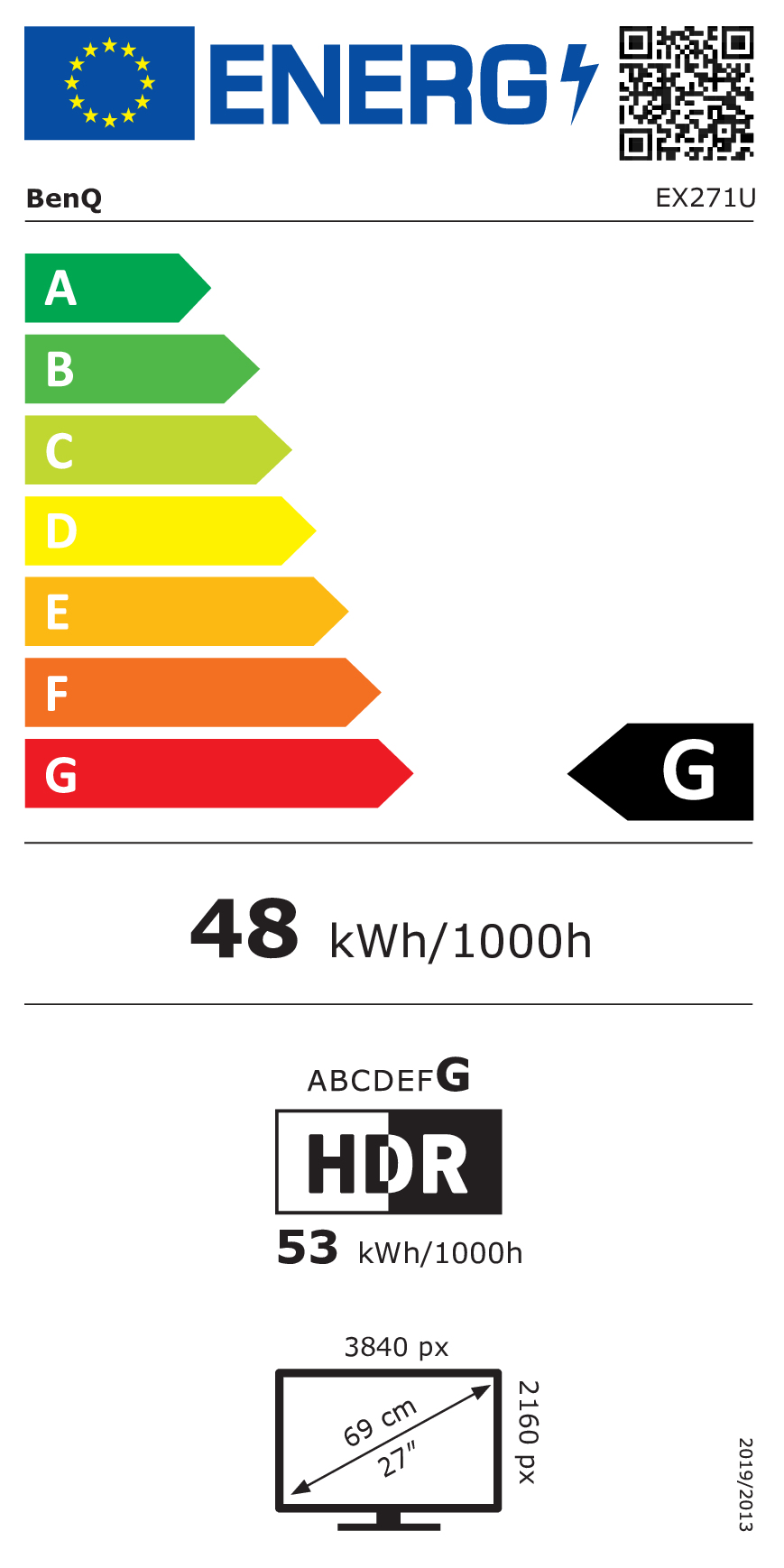
- Energy efficiency class (SDR)The energy efficiency rating of the device when operating in Standard Dynamic Range (SDR) mode, categorized from A to G.
- G
- Energy efficiency class (HDR)The energy efficiency rating of the device when High Dynamic Range (HDR) mode is active, ranging from A to G.
- G
- Energy consumption (SDR) per 1000 hoursThe amount of electric energy consumed by the device during standard dynamic range (SDR) operation over a period of 1000 hours, measured in kilowatt-hours (kWh).
- 48 kWh
- Energy consumption (HDR) per 1000 hoursThe amount of electrical energy consumed by the device when displaying High Dynamic Range (HDR) content over a period of 1000 hours, measured in kilowatt-hours (kWh).
- 52.8 kWh
- Power consumption (typical)Amount of power consumed by this model, often expressed in watts (W). Typical values that manufacturers give are power consumption when off, standby/suspended mode, typical use, maximum usage.
- 32 W
- Power consumption (standby)The amount of electricity that is consumed when the product is on standby.
- 0.5 W
- Power consumption (max)The maximum amount of power used by the device.
- 180 W
- Power consumption (off)The amount of electrical energy consumed by the device when it is switched off, measured in watts.
- 0.3 W
- AC input voltageThe voltage of the AC electricity that is inputted into the product.
- 100 - 240 V
- Power supply typeThe type of power supply which this product uses.
- Internal
- Energy efficiency scaleThe range of energy efficiency classes used to rate the product's power consumption, such as A to G.
- A to G
- USB Power Delivery (USB PD)Indicates whether the device supports the USB Power Delivery standard for faster charging and higher power levels.
- Yes
Security
- Cable lock slotHoles on the edge of devices through which a cable lock can be passed, so the device can be locked to a desk etc.
- No
Ergonomics
- Height adjustmentThe part of the device that can be adjusted to change the height.
- Yes
- Adjustable height (max)The maximum distance the unit can be raised vertically from its lowest position, measured in millimetres.
- 10 cm
- PivotIndicates whether the device can be rotated 90 degrees to switch between landscape and portrait orientation.
- Yes
- Pivot angleThe range of motion available for rotating the unit around its vertical axis, typically measured in degrees.
- 0 - 90°
- SwivellingIndicates whether the product has a mechanism that allows it to rotate horizontally.
- Yes
- Swivel angle rangeThe minimum and maximum degrees to which the unit can be rotated horizontally.
- 15 - 15°
- Tilt adjustmentThe tilt, which means the angle at which the device is pointing (up or down), can be changed.
- Yes
- Tilt angle rangeThe minimum and maximum angles at which the unit can be tilted, typically expressed in degrees.
- -5 - 15°
- On Screen Display (OSD) languagesThe list of available languages for the device's display interface (e.g., AFR for Afrikaans, ARA for Arabic).
- Arabic, Simplified Chinese, Traditional Chinese, Czech, German, Dutch, English, Spanish, French, Hungarian, Italian, Japanese, Korean, Polish, Portuguese, Romanian, Russian, Swedish
Management features
- On Screen Display (OSD)Indicates whether the device can display a graphical menu or information directly on the screen for adjusting settings and viewing status.
- Yes
- Number of OSD languagesThe total number of different languages available for the on-screen display menu (e.g. 15).
- 18
Database Right data-sheet 2026 Icecat. All rights reserved. Provided “as is”, without warranty — check details with the store before buying.
Price history (90 days, best daily price)
Price history is still being collected for this product — check back soon.
Alternative models

BenQ PD2706QN
computer monitor 68.6 cm (27") 2560 x 1440 pixels Quad HD LED Black
BenQ EX271Q MOBIUZ
computer monitor 68.6 cm (27") 2560 x 1440 pixels Quad HD LED Black, White

BenQ PD2730S
computer monitor 68.6 cm (27") 5120 x 2880 pixels 5K Ultra HD LED Black

BenQ EX271U
computer monitor 68.6 cm (27") 3840 x 2160 pixels 4K Ultra HD LED Black, White

BenQ PD3226G
computer monitor 80 cm (31.5") 3840 x 2160 pixels 4K Ultra HD LED Black

BenQ GW2791
computer monitor 68.6 cm (27") 1920 x 1080 pixels Full HD LED Black
Accessories & compatible products

R-Go Tools Monitor arm R-Go Zepher Single, fully adjustable, 0-8 Kg load capacity, 100% circular, black

R-Go Tools Monitor arm R-Go Caparo Single, fully adjustable with gas spring, 3-9 kg load capacity, 100% circular, black

R-Go Tools Monitor arm R-Go Zepher Dual, for two monitors, fully adjustable, 0
8 kg load capacity, 100% circular, black
