
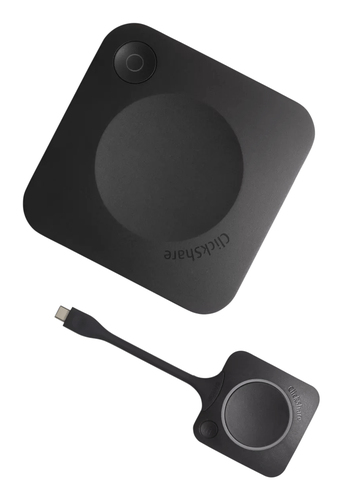
Barco ClickShare C-5 wireless presentation system HDMI Dongle
- Form factor: Dongle
- Compliance certificates: CE, Federal Communications Commission (FCC)
- Quick start guide
- Operating temperature (T-T): 0 - 40 °C
- Operating relative humidity (H-H): 0 - 85%
- Storage temperature (T-T): -20 - 60 °C
Where to buy
We're not tracking prices for this product yet. Check current prices directly at:
We may earn a commission when you buy through links on this page — at no extra cost to you. Learn more
About this product
Making presentation flow in small, medium meeting rooms and huddle spaces
Your workplace requires seamless collaboration and the flexibility to easily share content, on screen, even in the smallest meeting rooms in your company. ClickShare C-5 is the wireless presentation system that makes your meetings flow with one click in the ClickShare App, from any laptop or mobile device.
Full BYOD
ClickShare is compatible with any device. Connect your laptop via the ClickShare Button or ClickShare App. Connect smartphones and tablets via Mobile Apps or screen mirroring (AirPlay, Google Cast or Miracast).
Seamless collaboration
Turn any room into a collaboration room overnight with the ClickShare wireless room system, and enjoy engaging, productive meetings.
Wireless presentation made easy
Present & conference from your laptop in any room without cable hassle. Button or App, you decide.
Simple one-click experience
Walk in with your laptop and instantly connect to the room devices, start within seconds with one-click collaboration
Tech-agnostic
Perfectly works with your device, Windows or Mac. Connects to any display and offers full BYOD with any screen mirroring protocol.
Enterprise-ready
Secure, networked and cloud-managed, ClickShare is an IT-friendly solution, ISO27001 certified solution. Packed with five years of coverage, access to analytics and regular software updates. SmartCare included for your peace of mind. Proven ROI.
Easily share content from your device
Start a meeting within seconds. Anyone, including guests, can share content wirelessly to the central room display in full HD. With just one click in the ClickShare App, from any laptop (Windows or Mac) or mobile device for better workflow integration. Or with the ClickShare Button if you prefer a Plug&Play solution (sold separately). No cables, no training needed.
With full Bring Your Own Device (BYOD) support on a 4K canvas, our wireless presentation solution drives an easy collaborative experience in all your enterprise meeting rooms to make your content stick. We support screen mirroring with Airplay, GoogleCast and Miracast. Enjoy advanced collaboration features like view the room display on your own device or decide what you share, either your full screen or a single window.
Enhanced security and seamless integration
Designed for enterprise rollouts, the IT-grade C-10 offers you enhanced security features (ISO27001 certified) and a wide range of connectivity options. With the XMS Cloud Management Platform you enjoy remote management of units and clear analytics to drive your digital workplace. For practical questions on network deployment of the ClickShare range, check our technical support or get in touch with your Barco contact.
Boost collaboration in your meeting room
The ClickShare C-10 can be used stand-alone or in combination with your existing conference room. It empowers meetings with simple, one-click wireless content sharing. ClickShare completes the room set-up and makes presentation simple, easy and wireless. Designed to fit your business perfectly and evolve with it. With flexibility for the future built in, it’s one of the smartest investments you can make in your meeting room.
Button or App, one great experience
Have the most intuitive user experience in all meeting rooms with the ClickShare Button and the ClickShare App. You decide how you like to work.
The ClickShare Button
In seconds, you are able to present wirelessly to the meeting room display from your laptop and can enjoy a more engaging, seamless meeting experience.
The ClickShare App
Collaboration more intuitive than ever before. The App easily connects to the meeting room, offering screen sharing as well as a host of advanced features. The App works on all devices, from desktop to Android and iOS.
ClickShare Present
Services
Your business is our priority, which is why Barco's services program is designed to drive positive business outcomes together.
Our mission is to enable the brightest and most reliable outcomes for you and your customers through
Documents
- BrochureProduct Brochure ↗
- ManualUser manual ↗
Specifications
Key specifications
- Form factorThe shape or design of the product.
- Dongle
- Compliance certificatesIndicates which regulatory, safety, and environmental standards the product complies with, as verified by recognized authorities or certification bodies.
- CE, Federal Communications Commission (FCC)
- Quick start guideInstructions, either online, as a computer program or in paper form, to allow you to set up and start using the product quickly.
- Yes
- Operating temperature (T-T)The minimum and maximum temperatures at which the product can be safely operated.
- 0 - 40 °C
- Operating relative humidity (H-H)The range of relative humidity, expressed as a percentage, within which the device can function correctly without damage or performance loss.
- 0 - 85%
- Storage temperature (T-T)The minimum and maximum temperatures at which the product can be safely stored.
- -20 - 60 °C
- Storage relative humidity (H-H)The permissible range of relative humidity, expressed as a percentage, within which the product can be stored without damage.
- 0 - 90%
- Windows operating systems supportedWindows vesions wich can be used with the device.
- Windows 10, Windows 11, Windows 8, Windows 8.1
- Mac compatibilityProduct can be used with Apple Mac software and/or hardware.
- Yes
- Power source typeWhat the power source is.
- AC
Show all 52 specificationsShow key specifications only
Design
- Form factorThe shape or design of the product.
- Dongle
- Number of simultaneously connected devices (max)The maximum number of separate devices that can be linked to the unit at the same time.
- 32
- Product colourThe colour e.g. red, blue, green, black, white.
- Black
- LED indicatorsThe specific status lights available on the unit to provide visual feedback on its current state or connectivity (e.g., AC input, ACT, or Access).
- Yes
Certificates
- Compliance certificatesIndicates which regulatory, safety, and environmental standards the product complies with, as verified by recognized authorities or certification bodies.
- CE, Federal Communications Commission (FCC)
- CertificationSpecifies the official standards, safety approvals, or regulatory certifications the product has received.
- FCC, CE
Packaging content
- Quick start guideInstructions, either online, as a computer program or in paper form, to allow you to set up and start using the product quickly.
- Yes
Weight & dimensions
- WidthThe measurement or extent of something from side to side.
- 135 mm
- DepthThe distance from the front to the back of something.
- 135 mm
- HeightThe measurement of the product from head to foot or from base to top.
- 34 mm
- WeightWeight of the product without packaging (net weight). If possible, the net weight is given including standard accessories and supplies. Please note that sometimes the manufacturer leaves out the weight of accessories and/or supplies.
- 900 g
Operational conditions
- Operating temperature (T-T)The minimum and maximum temperatures at which the product can be safely operated.
- 0 - 40 °C
- Operating relative humidity (H-H)The range of relative humidity, expressed as a percentage, within which the device can function correctly without damage or performance loss.
- 0 - 85%
- Storage temperature (T-T)The minimum and maximum temperatures at which the product can be safely stored.
- -20 - 60 °C
- Storage relative humidity (H-H)The permissible range of relative humidity, expressed as a percentage, within which the product can be stored without damage.
- 0 - 90%
Features
- Windows operating systems supportedWindows vesions wich can be used with the device.
- Windows 10, Windows 11, Windows 8, Windows 8.1
- Suitable for use in country/locationSpecifies the geographical regions or countries where the product is approved or intended for sale and use (e.g. Australia, Belgium).
- China
- InterfaceInterface ports to connect pieces of equipment. USB (Universal Serial Bus) has become the most popular wired interface to connect peripherals. USB 2.0 supports speeds up to 480 Mbit/s (USB 1: 12 Mbit/s). The interface FireWire is also known as the IEEE 1394 standard. Enhanced IDE (EIDE)is sometimes referred to as Fast ATA, Fast IDE or ATA-2.
- HDMI
- Maximum operating distanceThe maximum distance from which you can operate the device.
- 30 m
- Maximum resolution (HDMI)The highest image quality and pixel density that the product can transmit via an HDMI connection.
- 3840 x 2160 pixels
- Supported video streaming resolutionsThe maximum image dimensions that can be passed through the soundbar to a connected display, such as 4096 x 2160.
- 4096 x 2160
- AirPlay mirroringIndicates whether the device supports the wireless streaming of a screen from an Apple device to the unit.
- Yes
Other features
- Mac compatibilityProduct can be used with Apple Mac software and/or hardware.
- Yes
Software
- Mac operating systems supportedMac operating systems e.g. OS X can be used with the device.
- Mac OS X 10.13 High Sierra, Mac OS X 10.14 Mojave, Mac OS X 10.15 Catalina, Mac OS X 10.15.3 Catalina, Mac OS X 11.0 Big Sur
System requirements
- Mobile operating systems supportedThe operating systems e.g. Android, iOS, that can be used with the mobile device.
- Android 10.0, Android 11.0, Android 12.0, Android 9.0, iOS 12, iOS 13, iOS 14.5, iOS 15
Power
- Power source typeWhat the power source is.
- AC
- Input voltageThe voltage (V) which is required to power the product.
- 110 / 220 V
- Power consumption (max)The maximum amount of power used by the device.
- 24 W
- Power consumption (typical)Amount of power consumed by this model, often expressed in watts (W). Typical values that manufacturers give are power consumption when off, standby/suspended mode, typical use, maximum usage.
- 10 W
- DC-in jackThe socket/plug where the DC electricity supply connects to the device.
- Yes
Ports & interfaces
- Number of HDMI outputsPort (socket) for HDMI output.
- 1
- HDMI versionThe specific release version of the High-Definition Multimedia Interface standard supported by the device (e.g. 1.3 or 2.0).
- 1.4b
- Ethernet LAN (RJ-45) portsNumber of Ethernet LAN (RJ-45) ports (connecting interfaces) in the device. Ethernet LAN (RJ-45) ports allow a computer to connect to the ethernet.
- 1
- USB 3.2 Gen 1 (3.1 Gen 1) Type-A ports quantityThe total number of available USB 3.2 Gen 1 (formerly 3.1 Gen 1) Type-A connection ports on the device.
- 1
- USB 3.2 Gen 1 (3.1 Gen 1) Type-C ports quantityNumber of USB 3.0 (3.1 Gen 1) ports with Type-C connector. USB 3.0 (3.1 Gen 1) is USB interface version which supports transfer rate up to 5 Gbit/s (SuperSpeed). USB Type-C connector has symmetrical design architecture and compatible with Thunderbolt 3 interface.
- 1
Network
- Wi-Fi standardsThe type of wireless local area network (LAN). It can be ad-hoc, where units in a network communicate peer-to-peer, or Infrastructure, where units communicate with each other via an access point A LAN interconnects computers in a small area e.g. home, school or office.
- 802.11a, 802.11g, Wi-Fi 4 (802.11n), Wi-Fi 5 (802.11ac)
- Top Wi-Fi standardConnection of this device is done via Wi-Fi in a high standard.
- Wi-Fi 5 (802.11ac)
- Ethernet LANAn Ethernet LAN (Local Area Network) interface is present, for a wired conection via a cable.
- Yes
- Ethernet LAN data ratesThe different speed levels of the Ethernet LAN connection.
- 10,100,1000 Mbit/s
- Networking standardsThe way in which the network is working, e.g. IEEE 802.11a, IEEE 802.11b, IEEE 802.11g.
- IEEE 802.11a, IEEE 802.11ac, IEEE 802.11g, IEEE 802.11n, IEEE 802.15.1
- MiracastIndicates whether the device supports wireless screen mirroring to a compatible display using the Miracast standard.
- Yes
Keyboard
- Frequency bandA small section of the spectrum of radio communication frequencies, in which channels are usually used or set aside for the same purpose e.g.for a channel on FM radio; for mobile networks to communicate with mobile phones.
- 2.4 / 5 GHz
Wireless LAN features
- Dual-bandA dual band device can work with two different bands. Dual-band WiFi (wireless) contains two different types of wireless radios that can support connections on both 2.4 GHz and 5 GHz links.
- Yes
Performance
- Security algorithmsSecurity algorithms are used to provide authentication, cipher key generation, integrity and radio link privacy to users on mobile networks. The security algorithms supported are the ones that can be used with this product.
- 802.1x RADIUS, WPA2-PSK
- Web-based managementUsing a website/web application to manage something.
- Yes
- On/off switchThe button which is pressed to switch the device on or off.
- Yes
- Smartphone/tablet remote supportThe product can be used to remotely manage a smartphone.
- Yes
Display
- Supported video modesThe video modes that can be displayed by the device.
- 2160p
Camera
- Maximum frame rateThis is the maximum frame rate, also known as frame frequency and frames per second (FPS). It is the frequency (rate) at which an imaging device produces unique consecutive images called frames. The term applies equally well to film and video cameras, computer graphics, and motion capture systems. Frame rate is most often expressed in frames per second (FPS) and is also expressed in progressive s…
- 30 fps
Security
- Cable lock slotHoles on the edge of devices through which a cable lock can be passed, so the device can be locked to a desk etc.
- Yes
- Cable lock slot typeThe standard of the security slot used to attach a physical locking cable to the device (e.g. Kensington or Noble).
- Kensington
Logistics data
- Harmonized System (HS) codeThe standardized numerical method of classifying traded products used by customs authorities around the world to identify goods for tariffs and statistics.
- 85176990
Database Right data-sheet 2026 Icecat. All rights reserved. Provided “as is”, without warranty — check details with the store before buying.
Price history (90 days, best daily price)
Price history is still being collected for this product — check back soon.
Alternative models

Barco ClickShare CX-30 wireless presentation system HDMI Desktop

Barco Next‑gen ClickShare Button

Barco ClickShare CX-50 wireless presentation system HDMI Desktop

Barco ClickShare CX‑30 Gen 2 wireless presentation system HDMI Desktop
Barco ClickShare C‑10 wireless presentation system HDMI Desktop