
BakkerElkhuizen Evoluent D Medium Wireless
- Connection: RF Wireless
- Sensor: Laser, 3200 DPI
- Buttons: 6, Wheel
- Shape: Right-hand
- Made for: Office
- Colour: Black
All 56 specificationsProduct page at bakkerelkhuizen.co.uk ↗
Where to buy
We're not tracking prices for this product yet. Check current prices directly at:
We may earn a commission when you buy through links on this page — at no extra cost to you. Learn more
About this product
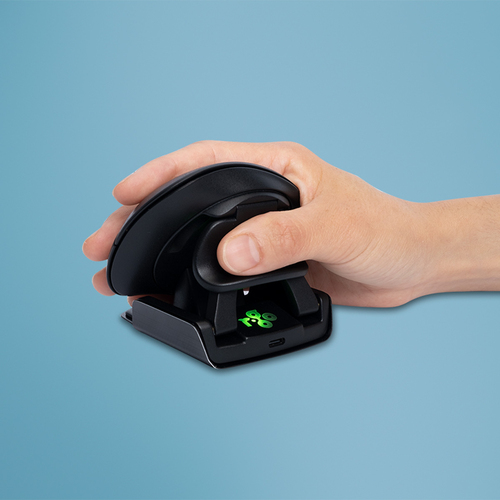
With the Evoluent D vertical mouse you experience ergonomics and comfort at a higher level, and handling is incredibly easy and intuitive.
The latest wireless Evoluent mouse with so many great features!
A patented ergonomic shape, programmable buttons, extra wide lip along the bottom edge, easy to reach thumb buttons, the USB receiver can be stored behind a magnetic battery cover, a direct reachable pointer speed button, three different mouse sizes available, functions like ‘Smart Scrolling’ and ‘Eye Comfort Control’, all those great features are combined in the Evoluent D - we give you even more reasons to get to know and love the Evoluent D.
Perfect shape, even the buttons.
The Evoluent D has grooved buttons, so your fingertips rest in a shallow groove on the buttons. This innovation secures the mouse in your hands and makes moving it much more precise. The easy-to-reach thumb buttons are smartly placed and are both within easy reach at the top and bottom of a contoured thumb rest. All those details will lead to an efficient work.
Your mouse. Your mouse button assignment.
With the free download version of the Evoluent Mouse Manager software , you can easily configure the five buttons of your Evoluent D. With the individual setting of your mouse buttons, you can work as conveniently as possible.
Three sizes, both in wireless and wired.
The Evoluent D is available in three different sizes: small, medium, and large. You can choose if you would like to have a wired or wireless version. The combination of the correct mouse size for your hand and the ergonomic shape, ensure a relaxed grip and a short time to get used to it.
Adjust the DPI conveniently. You determine the pointer speed.
The adjustable pointer speed button of the Evoluent D is easy to reach. It is placed behind the wheel which enables quick changing of the pointer speed to suit different tasks: select higher speed (higher DPI) to make the pointer move faster for general use; select lower speed (lower DPI) to make the pointer move slower and more precisely for drawing, photo editing, etc. The favourable thing is, that four lights show the different pointer speeds from slow to fast.
Plug-and-play.
The Evoluent D can be added to the computer without having to do a manual configuration. Just put the USB cable of the wired version or the USB receiver of the wireless version in your computer and start working. The USB receiver of the wireless versions of the Evoluent D can be stored behind a magnetic battery cover, so you will never lose it. The laser sensor ensures reliable tracking on most surfaces.
Cool features.
The Evoluent D has useful features for a more efficiency at work. With the ‘Excel Horizontal Scroll’ you can scroll horizontally in Microsoft Excel by pressing a thumb button and rolling the wheel. The function ‘Smart Scrolling’ enables dramatically varies sensitivity per notch in response to the speed you roll the wheel, from slow-and-precise all the way to hyper speed for blazing through long pages. With ‘Eye Comfort Control’ you can quickly lower your screen’s brightness to help reduce eye strain by simply rolling the mouse wheel. Easily change the brightness of the screen as your ambient light level changes.
Details make the difference. For the perfect ergonomic shape.
The ergonomic shape of the Evoluent D was inspired by many years of experience and research. The shape of the mouse lies perfectly in the hand and doesn’t feel too large. The ergonomic shape supports the user’s hand in a handshake position. - Grabbing the vertical mouse in a handshake position, relieves or prevents automatically pain in your arm and wrist. - The extra wide lip along the bottom edge prevents the little finger from rubbing the desk. This provides superior comfort for your work and leads to more productivity.
Ergonomic background
Prolonged use of a regular mouse can lead to pain and discomfort in the shoulders, forearms, and hands (Chang et al., 2007 & Andersen et al., 2008). The handshake position of vertical mice keeps the wrist from bending as much to the side while the forearm also turns inward to a lesser degree (Schmid, et al., 2015). This means that muscle activity in the forearm is less than it would be when using a conventional mouse (Quemelo & Vieira, 2013). Research has shown that the use of a vertical joystick mouse ensures a faster recovery from forearm, wrist and hand complaints (Aarås, et al., 2001). And therefore, vertical mice compared to standard mice lead to a healthier and more comfortable way of working.
Stylish and high quality.
The Evoluent D has not only a high functionality and guarantees a healthy, ergonomic way of working, it has also a stylish design. The various high-quality materials, the modern design in matt black with metallic highlights, and the chrome housing give the mouse a premium look and feel.
Videos & documents
BakkerElkhuizen Evoluent D
- BrochureProduct Brochure ↗
- ManualUser manual ↗
- DocumentEU Declaration of Conformity ↗
- DocumentEU Declaration of Conformity ↗
- DocumentDeclaration of Sustainability ↗
Specifications
Key specifications
- Device interfaceThe ports (sockets) where the device connects with other devices.
- RF Wireless
- Movement detection technologyThe technology employed to detect motion, e.g. Dual, using combinations of different sensing technologies to help reduce false triggering.
- Laser
- Movement resolutionThe sensitivity of the sensor, measured as the number of dots per inch (DPI) that the device detects during movement (e.g. 1600).
- 3200 DPI
- Buttons quantityThe number of buttons that there are in/on the product.
- 6
- Scroll typeType of scroll in computer input device, e.g. wheel, touch.
- Wheel
- Form factorThe shape or design of the product.
- Right-hand
- PurposeWhat the product is used for.
- Office
- Product colourThe colour e.g. red, blue, green, black, white.
- Black
Show all 56 specificationsShow key specifications only
Features
- PurposeWhat the product is used for.
- Office
- Country of originCountry where the device is made. Aka Country of manufacture (COM).
- China
- Windows operating systems supportedWindows vesions wich can be used with the device.
- Windows 10, Windows 11, Windows 7, Windows 8, Windows 8.1
- Plug and PlayIndicates whether this product supports is "plug and play". Plug and play is hardware or software that, after being installed ("plugged in"), can immediately be used ("played with"), as opposed to hardware or software which requires configuration.
- Yes
- MaterialThe material from which a thing is or can be made e.g. wood, plastic.
- Plastic
Keyboard
- Device interfaceThe ports (sockets) where the device connects with other devices.
- RF Wireless
- Multi-device supportIndicates whether the product can be paired and switched between multiple host devices.
- No
- Frequency bandA small section of the spectrum of radio communication frequencies, in which channels are usually used or set aside for the same purpose e.g.for a channel on FM radio; for mobile networks to communicate with mobile phones.
- 2.4 GHz
Mouse
- Movement detection technologyThe technology employed to detect motion, e.g. Dual, using combinations of different sensing technologies to help reduce false triggering.
- Laser
- Movement resolutionThe sensitivity of the sensor, measured as the number of dots per inch (DPI) that the device detects during movement (e.g. 1600).
- 3200 DPI
- Scroll typeType of scroll in computer input device, e.g. wheel, touch.
- Wheel
- Buttons quantityThe number of buttons that there are in/on the product.
- 6
- Number of scroll wheelsThe total count of integrated wheels used for scrolling through documents or pages (e.g., 1 or 2).
- 1
- Scrolling directionsSpecifies the axis along which the scrolling function operates, such as vertical or horizontal.
- Vertical
- Buttons typeThe type of the buttons.
- Pressed buttons
- Programmable mouse buttonsIndicates whether the device has buttons that can be customized to perform specific functions or macros.
- Yes
- Number of programmable buttonsThe total count of buttons on the device that can be customized to perform specific actions or macros via software.
- 6
- Button functionsSpecifies the assigned actions or commands triggered by the physical buttons on the device.
- Copy/Paste, DPI switch, Forward, Back
- Customizable movement resolutionIndicates whether the sensitivity of the cursor or pointer movement can be adjusted by the user.
- Yes
- Number of movement resolution modesThe number of predefined sensitivity levels available to adjust the tracking speed of the sensor (e.g., 5).
- 4
Other features
- Warranty periodThe length of time the manufacturer guarantees the product against defects, typically expressed in months or years.
- 5 year(s)
Packaging content
- Receiver includedThe product includes a receiver, which is a device for picking up an external signal.
- Yes
- Wireless receiver interfaceThe type of physical connection used by the wireless receiver to connect to a host device (e.g. USB Type-A or USB Type-C).
- USB Type-A
- Batteries includedIndicates whether the required batteries are supplied with the product.
- Yes
- User guideIndicates whether a user manual or instructional guide is included with the product.
- Yes
- Quantity per packThe number of individual units contained within a single sales package, measured in pc(s).
- 1 pc(s)
Weight & dimensions
- WidthThe measurement or extent of something from side to side.
- 88 mm
- DepthThe distance from the front to the back of something.
- 110 mm
- HeightThe measurement of the product from head to foot or from base to top.
- 77 mm
- WeightWeight of the product without packaging (net weight). If possible, the net weight is given including standard accessories and supplies. Please note that sometimes the manufacturer leaves out the weight of accessories and/or supplies.
- 167 g
Software
- Mac operating systems supportedMac operating systems e.g. OS X can be used with the device.
- Mac OS X 10.10 Yosemite, Mac OS X 10.11 El Capitan, Mac OS X 10.12 Sierra, Mac OS X 10.13 High Sierra, Mac OS X 10.14 Mojave, Mac OS X 10.15 Catalina, Mac OS X 10.5 Leopard, Mac OS X 10.6 Snow Leopard, Mac OS X 10.7 Lion, Mac OS X 10.8 Mountain Lion, Mac OS X 10.9 Mavericks
- Linux operating systems supported8 RT. Linux (9.4, 9.5), Red Hat Enterprise Linux 5.0 (supported with a pre-built package); SUSE Linux (10.3, 11.0, 11, 11.1, 11.2), Fedora (9, 9.0, 10, 10.0, 11.0, 11, 12, 12.0), Ubuntu (8.04, 8.04.1, 8.04.2, 8.10, 9.04, 9.10, 10.04), Debian (5.0, 5.0.1, 5.0.2, 5.0.3)
- Yes
System requirements
- Other operating systems supportedLists additional operating systems that are compatible with the product (e.g. Android, ChromeOS or FreeBSD).
- ChromeOS, Unix
Power
- Power sourceWhat is providing power for the product e.g. mains electricity.
- Batteries
- Number of batteries supportedThe number of batteries that can be used with the product.
- 1
- Battery typeDescription of battery supplied with the product, such battery form factor (e.g. AA/AAA).
- AA
Ports & interfaces
- Wireless rangeThe maximum distance over which the device can maintain a stable wireless connection, typically measured in metres.
- 6 m
Design
- Form factorThe shape or design of the product.
- Right-hand
- Ergonomic designIndicates whether the product has been designed to optimize comfort, efficiency, and safety for the user.
- Yes
- Vertical designIndicates whether the product features an ergonomic vertical orientation to reduce forearm twisting.
- Yes
- Product colourThe colour e.g. red, blue, green, black, white.
- Black
Logistics data
- Harmonized System (HS) codeThe standardized numerical method of classifying traded products used by customs authorities around the world to identify goods for tariffs and statistics.
- 84716070
- Products per master (outer) caseThe total quantity of individual units contained within a single master shipping case, measured in pc(s).
- 100 pc(s)
- Master (outer) case widthThe width of the outer shipping container used for bulk transport, measured in mm.
- 590 mm
- Master (outer) case lengthThe total length of the external shipping container used for bulk transport, measured in millimetres or centimetres.
- 820 mm
- Master (outer) case heightThe vertical measurement of the external shipping container used for bulk transport, typically expressed in millimetres or centimetres.
- 450 mm
- Products per palletQuantity of a single product per pallet. If more than one product is packed per carton; this is the number of products (not number of cartons) per shipping pallet.
- 1280 pc(s)
- Pallet gross widthThe total width of the product including its shipping pallet, measured in millimetres.
- 120 cm
- Pallet gross lengthThe total external length of the product including the shipping pallet, measured in millimetres.
- 100 cm
- Pallet gross heightThe total height of the product when packed on a pallet, including the pallet itself, measured in millimetres.
- 190 cm
- Pallet gross weightThe total weight of the product including the pallet and all packaging materials, measured in g.
- 329 g
- Customs product code (TARIC)The integrated Tariff of the European Union code used to identify the product for customs and trade purposes.
- 8471607090
Packaging data
- Package widthThe distance from one side of the packaging to the other.
- 110 mm
- Package depthThe distance from the front to the back of the packaging.
- 110 mm
- Package heightThe distance from the top to the bottom of the packaging.
- 100 mm
- Package weightWeight of the packaged product.
- 233 g
Database Right data-sheet 2026 Icecat. All rights reserved. Provided “as is”, without warranty — check details with the store before buying.
Price history (90 days, best daily price)
Price history is still being collected for this product — check back soon.
Alternative models

BakkerElkhuizen Evoluent D Small

BakkerElkhuizen Evoluent D Large Wireless
BakkerElkhuizen Evoluent D Medium
BakkerElkhuizen Evoluent D Large
R-Go Tools Ergonomic
mouse R-Go Twister, with break software, ambidextrous mouse for both hands, foldable, bluetooth and wired

R-Go Tools Vertical
mouse R-Go HE Basic, ergonomic mouse, medium (hand size ≥ 185 mm), right-handed, Bluetooth, grey