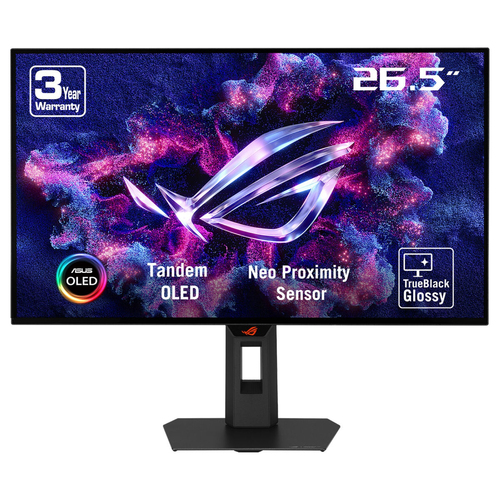
ASUS ROG Strix XG27AQWMG computer monitor 67.3 cm (26.5") 2560 x 1440 pixels Quad HD OLED Black
- Screen: 67.3 cm (26.5"), 2560 x 1440 pixels, WOLED, Flat
- Refresh rate: 280 Hz, 0.03 ms response time
- Adaptive sync: AMD FreeSync, NVIDIA G-SYNC
- Ports: 2 × HDMI, 1 × DisplayPort
- Stand: height-adjustable, tilt, VESA 100 x 100 mm
- Extras: USB hub
- Colour: Black
All 100 specificationsProduct page at rog.asus.com ↗
Model numbers
- 90LM0BZ0-B01111
- 90LM0BZ0-B01171
Where to buy
We're not tracking prices for this product yet. Check current prices directly at:
We may earn a commission when you buy through links on this page — at no extra cost to you. Learn more
About this product
Visuals Redefine. Witness The Evolution.
The ROG Strix OLED XG27AQWMG is a 27-inch QHD TrueBlack Glossy Tandem OLED gaming monitor that offers sharp visuals and features tandem OLED technology that offers 15% higher peak brightness, 25% wider color volume, and a 60% longer lifespan versus previous-generation WOLED monitors. Featuring the new Neo Proximity Sensor within the ASUS OLED Care Pro suite, the monitor is able to detect when the user is away and automatically transition to a black screen to guard against panel burn-in. Thanks to a compact stand, the XG27AQWMG takes up minimal desktop space. Plus, it offers users an extensive array of connectivity options, including DisplayPort 1.4 (DSC), HDMI 2.1, and USB hub.
Gaming-Changing Visuals
Tandem OLED Technology
Tandem OLED technology pushes the boundaries with unrivaled OLED performance and longevity. It boasts an innovative four-layer stacked-structure design that allows for enhanced light emission, superior color reproduction, and significantly-longer panel lifespan compared to previous OLED panels.
15% Higher Brightness
Tandem OLED technology gives monitor brightness a boost, giving the XG27AQWMG 15% brighter visuals than WOLED panels—so visuals pop off the screen with incredible intensity to bring games and movies to life. Plus, the XG27AQWMG complies with the VESA DisplayHDR 500 True Black standard to ensure breathtaking highlights and inky blacks for unmatched contrast and realism.
25% Larger Color Volume
The innovative four-layer stacked structure of Tandem OLED panels gives the XG27AQWMG 25% larger color volume to show off more vibrant reds, deeper blues and every shade in between—especially when gaming in HDR. Colors are more accurate, more nuanced, and more lifelike, drawing viewers deeper into the action.
60% Longer OLED Lifespan
Tandem OLED technology offers exceptional panel longevity and energy efficiency, thanks to the four-layer design. Together with the built-in heatsink, the technology provides up to 60% longer lifespan compared to previous-generation OLEDs and significantly reduces the risk of burn-in to ensure years of stunning visuals without compromise.
Supersharp and clear imagery
Exclusive TrueBlack Glossy OLED
The ROG Strix OLED XG27AQWMG features a new TrueBlack Glossy OLED panel with a zero-haze optical layer that presents deep blacks under any lighting. Its advanced anti-reflective coating reduces ambient reflections by 38% compared to previous-gen glossy WOLEDs, ensuring distraction-free gaming even in brightly lit rooms.
FOURTH-GENERATION WOLED TECHNOLOGY
Screen Protection
ASUS OLED CARE PRO
New ASUS OLED Care Pro technology provides a full set of customizable monitor settings to protect and ensure the longevity of the OLED panel. Plus, it includes the new Neo Proximity Sensor designed to guard against panel burn-in. All settings can be easily managed via DisplayWidget Center.
Neo Proximity Sensor
The built-in Neo Proximity Sensor precisely detects the user's distance from the monitor. When the user steps away, the monitor transitions to a black image to protect against panel burn-in; when the user returns, content is instantly restored onscreen. Detection distance can be customized to suit personal preference, ensuring maximum convenience and protection.
* Before activating the detection function, please ensure that the monitor sensor is properly angled and cleaned by using the bundled microfiber cloth.
Pixel cleaning
Recalibrates the screen when the monitor has been active for several hours―a process that takes just a few minutes and activates automatically when the monitor is turned off*
*Do not unplug the power cord during this time as it will interrupt the pixel-cleaning process.
SCREEN MOVE
Pixel locations are slightly shifted periodically to help prevent burn-in, and users can choose between several movement levels. movement levels.
Built to Last
Worry-free OLED Monitor
ROG OLED monitors are engineered to deliver stunning visuals for years to come. An innovative custom heatsink and a unique internal airflow design improve cooling and reduce the risk of burn-in. Additionally, each ROG monitor comes with a three-year warranty.
ROG OLED Anti-Flicker
ROG-exclusive OLED Anti-Flicker technology offers three refresh rate ranges ― High, Mid, Off ― to reduce flicker during frame rate fluctuations and maintain an immersive gaming experience.
*Videos may be simulated and dramatized for illustrative purposes.
Compact and Ergonomic Design
The new ROG Strix OLED series monitors feature a new compact stand that’s 30% smaller than those found on previous-generation XG monitors, freeing up valuable desk space for a keyboard and mouse. The stand offers tilt, swivel, and height adjustments for the ideal viewing position. The display is also VESA wall-mount-compatible.
Aspect Ratio Control
For competitive gamers who are more familiar with smaller 1080p monitors, the XG27AQWMG can be set to replicate a 24.5-inch (esports mode), as well as other visual modes.
DisplayWidget Center
DisplayWidget Center is a powerful monitor management software designed to help users optimize, personalize, and fully utilize their display via a mouse — so there's no need to access the OSD menu. Additionally, DisplayWidget Center offers firmware update notifications and includes a direct update option. Users can also import or export display configurations for sharing.
Play Smarter with AI Assistant
The AI Assistant in XG27AQWMG includes AI Visual, Dynamic Crosshair, and Dynamic Shadow Boost. These features leverage AI technology to help gamers practice more effectively to improve their skills.
Uniform brightness
When activated, the ROG-exclusive Uniform Brightness* setting within the OSD menu decreases peak brightness to keep levels consistent for better viewing—even when changing the size of bright white windows. It also makes marathon gaming sessions much more comfortable on the eyes.
ROG Strix OLED XG27AQWMG
Visuals Redefine. Witness The Evolution. The ROG Strix OLED XG27AQWMG is a 27-inch QHD TrueBlack Glossy Tandem OLED gaming monitor that offers sharp visuals and features tandem OLED technology that offers 15% higher peak brightness, 25% wider colour volume, and a 60% longer lifespan versus previous-generation WOLED monitors. Featuring the new Neo Proximity Sensor within the ASUS OLED Care Pro suite, the monitor is able to detect when the user is away and automatically transition to a black screen to guard against panel burn-in. Thanks to a compact stand, the XG27AQWMG takes up minimal desktop space. Plus, it offers users an extensive array of connectivity options, including DisplayPort 1.4 (DSC), HDMI 2.1, and USB hub.
Tandem OLED Technology
Gaming-Changing Visuals Tandem OLED technology pushes the boundaries with unrivaled OLED performance and longevity. It boasts an innovative four-layer stacked-structure design that allows for enhanced light emission, superior colour reproduction, and significantly-longer panel lifespan compared to previous OLED panels.
Exclusive TrueBlack Glossy OLED
Supersharp and clear imagery TThe ROG Strix OLED XG27AQWMG features a new TrueBlack Glossy OLED panel with a zero-haze optical layer that presents deep blacks under any lighting. Its advanced anti-reflective coating reduces ambient reflections by 38% compared to previous-gen glossy WOLEDs, ensuring distraction-free gaming even in brightly lit rooms.
Extreme Low Motion Blur
Exclusive ASUS Extreme Low Motion Blur technology reduces ghosting and motion blur.
OLED Advantages
The extremely high contrast ratio offered by the OLED panel results in the deepest black hues and vivid colours. Plus, an astounding 0.02ms grey-to-grey response time ensures supersmooth, low-latency gameplay.
ASUS OLED Care Pro
Screen Protection New ASUS OLED Care Pro technology provides a full set of customisable monitor settings to protect and ensure the longevity of the OLED panel. Plus, it includes the new Neo Proximity Sensor designed to guard against panel burn-in. All settings can be easily managed via DisplayWidget Center.
Worry-free OLED Monitor
Built to Last ROG OLED monitors are engineered to deliver stunning visuals for years to come. An innovative custom heatsink and a unique internal airflow design improve cooling and reduce the risk of burn-in. Additionally, each ROG monitor comes with a three-year Coverage.
Uniform brightness
When activated, the ROG-exclusive Uniform Brightness setting within the OSD menu decreases peak brightness to keep levels consistent for better viewing-even when changing the size of bright white windows. It also makes marathon gaming sessions much more comfortable on the eyes.
Videos & documents
ROG Strix TrueBlack Glossy OLED XG27AQWMG
- ManualUser manual ↗
- Product information sheetEU Product Fiche ↗
Specifications
Key specifications
- Display diagonalSize of the display for this product, measured diagonally, usually in inches.
- 67.3 cm (26.5")
- Display resolutionThe number of distinct pixels in each dimension that can be displayed. It is usually quoted as width × height, with the units in pixels: for example, "1024 × 768" means the width is 1024 pixels and the height is 768 pixels. The higher the number of pixels, the sharper the image.
- 2560 x 1440 pixels
- Panel typeThe technology used to manufacture the panel, such as AMOLED or AH-IPS.
- WOLED
- Screen shapeDescribes the physical curvature of the display panel, such as whether it is flat or curved.
- Flat
- Maximum refresh rateThe highest number of times per second the image is updated, measured in hertz (Hz).
- 280 Hz
- Response timeThe response time is the time difference between the moment that a source (for example a video card) sends a signal and that equipment (for example a monitor) receives or display the signal. (Used abbreviations: R/F = Rise and Fall.)
- 0.03 ms
- AMD FreeSyncThe product includes AMD Freesync Technology for the dynamic synchronization of the graphic card and the monitor in order to avoid screen tearing.
- Yes
- NVIDIA G-SYNCIndicates whether the product supports NVIDIA G-SYNC technology to synchronize the display refresh rate with the GPU to eliminate screen tearing.
- Yes
- HDMI ports quantityThe number of sockets (ports) for HDMI connections. HDMI (High-Definition Multimedia Interface) is a compact audio/video interface for transferring uncompressed video data and compressed/uncompressed digital audio data from a HDMI-compliant device ("the source device") to a compatible computer monitor, video projector, digital television, or digital audio device. HDMI is a digital replacement for…
- 2
- DisplayPorts quantityNumber of DisplayPorts. A DisplayPort is a digital display interface developed by the Video Electronics Standards Association (VESA). The interface is primarily used to connect a video source to a display device such as a computer monitor, though it can also be used to carry audio, USB, and other forms of data.
- 1
- Height adjustmentThe part of the device that can be adjusted to change the height.
- Yes
- Tilt adjustmentThe tilt, which means the angle at which the device is pointing (up or down), can be changed.
- Yes
- Panel mounting interfaceThe product can be used wih VESA mounting interfaces.
- 100 x 100 mm
- Built-in USB hubWhether or not the device features a USB hub to connect more than one other device via USB.
- Yes
Show all 100 specificationsShow key specifications only
Design
- VESA mountingIndicates whether the product supports the VESA mounting standard for attachment to compatible arms, brackets, or wall mounts.
- Yes
- Market positioningUnder which category can the device be positioned in the market, e.g. camera phone.
- Gaming
- Product colourThe colour e.g. red, blue, green, black, white.
- Black
- Panel mounting interfaceThe product can be used wih VESA mounting interfaces.
- 100 x 100 mm
- Wall mountableThe product can be mounted on (attached to ) a wall.
- Yes
- Detachable standIndicates whether the support base can be removed from the main unit.
- Yes
- Feet colourThe colour of the feet, which are the projecting part on which a device/piece of furniture, or each of its legs, stands.
- Black
Ports & interfaces
- Built-in USB hubWhether or not the device features a USB hub to connect more than one other device via USB.
- Yes
- USB hub versionThe technical standard of the USB hub, if available, which determines the maximum data transfer speed (e.g., 3.2 Gen 1).
- 3.2 Gen 1 (3.1 Gen 1)
- USB Type-A downstream ports quantityThe number of USB Type-A ports available for connecting peripheral devices to the unit.
- 2
- HDMIHDMI (High-Definition Multimedia Interface) is a compact audio/video interface for transferring uncompressed video data and compressed/uncompressed digital audio data from a HDMI-compliant device ("the source device") to a compatible computer monitor, video projector, digital television, or digital audio device. HDMI is a digital replacement for existing analog video standards.
- Yes
- HDMI ports quantityThe number of sockets (ports) for HDMI connections. HDMI (High-Definition Multimedia Interface) is a compact audio/video interface for transferring uncompressed video data and compressed/uncompressed digital audio data from a HDMI-compliant device ("the source device") to a compatible computer monitor, video projector, digital television, or digital audio device. HDMI is a digital replacement for…
- 2
- HDMI versionThe specific release version of the High-Definition Multimedia Interface standard supported by the device (e.g. 1.3 or 2.0).
- 2.1
- DisplayPorts quantityNumber of DisplayPorts. A DisplayPort is a digital display interface developed by the Video Electronics Standards Association (VESA). The interface is primarily used to connect a video source to a display device such as a computer monitor, though it can also be used to carry audio, USB, and other forms of data.
- 1
- DisplayPort versionThe specific release version of the DisplayPort standard supported by the device (e.g., 1.2 or 1.4).
- 1.2
- Headphone outThe socket for connecting headphones to the device.
- Yes
- Headphone outputsNumber of sockets /ports where headphones are connected.
- 1
- Headphone connectivityHow headphones connect to a device e.g. wirelessly or via a cable and connector.
- 3.5 mm
Audio
- Built-in speaker(s)The device contains speaker(s) to produce sound.
- No
Multimedia
- Built-in cameraThe product has an integrated camera.
- No
Performance
- NVIDIA G-SYNCIndicates whether the product supports NVIDIA G-SYNC technology to synchronize the display refresh rate with the GPU to eliminate screen tearing.
- Yes
- AMD FreeSyncThe product includes AMD Freesync Technology for the dynamic synchronization of the graphic card and the monitor in order to avoid screen tearing.
- Yes
- NVIDIA G-SYNC typeSpecifies the version of NVIDIA's adaptive sync technology supported by the device to reduce screen tearing and stuttering (e.g. G-SYNC Compatible).
- G-SYNC Compatible
- AMD FreeSync typeThe specific version of the adaptive synchronization technology supported by the device to reduce screen tearing and stuttering (e.g. FreeSync Premium Pro).
- FreeSync Premium Pro
- VESA Adaptive Sync supportIndicates whether the device supports the VESA Adaptive-Sync standard to synchronize the refresh rate with the GPU to reduce screen tearing.
- Yes
- Flicker-free technologyIndicates whether the device employs technology to reduce or eliminate screen flickering to decrease eye strain during prolonged use.
- Yes
- Low Blue Light technologyIndicates whether the product features technology designed to reduce the amount of harmful short-wave blue light emitted by the screen to decrease eye strain.
- Yes
- Game modeIndicates whether the device has a dedicated preset that optimizes performance, such as reducing input lag or enhancing contrast, for gaming.
- Yes
- High Dynamic Range (HDR) supportedIndicates whether the device supports High Dynamic Range for improved contrast and a wider range of colours and luminosity.
- Yes
Display
- Display diagonalSize of the display for this product, measured diagonally, usually in inches.
- 67.3 cm (26.5")
- Display resolutionThe number of distinct pixels in each dimension that can be displayed. It is usually quoted as width × height, with the units in pixels: for example, "1024 × 768" means the width is 1024 pixels and the height is 768 pixels. The higher the number of pixels, the sharper the image.
- 2560 x 1440 pixels
- Native aspect ratioThe aspect ratio is the ratio of the width of an image to its height. The native aspect ratio is the one which the projector/display is particularly designed for. Images shown in native aspect ratio will utilize the entire resolution of the display and achieve maximum brightness. Images shown in other than native aspect ratio will always have less resolution and less brightness than images shown…
- 16:9
- Display technologyThe technology used in the display e.g. plasma, LED.
- OLED
- TouchscreenA screen of a laptop, smartphone, etc., that responds to touch so you can control the interface using your fingers.
- No
- Native refresh rateThe number of times per second the hardware updates, measured in hertz (Hz).
- 60 Hz
- HD typeType of supported High Definition (e.g. Full HD, 4K Ultra HD).
- Quad HD
- Panel typeThe technology used to manufacture the panel, such as AMOLED or AH-IPS.
- WOLED
- Display brightness (peak)The maximum light intensity the device can achieve, measured in candelas per square metre (cd/m²).
- 1500 cd/m²
- Response timeThe response time is the time difference between the moment that a source (for example a video card) sends a signal and that equipment (for example a monitor) receives or display the signal. (Used abbreviations: R/F = Rise and Fall.)
- 0.03 ms
- Response time measurement typeThe method used to measure the time it takes for a pixel to change colors, such as GTG (Gray to Gray) or BwB (Black-white-Black).
- GTG (Gray to Gray)
- Display surfaceThe finish of the screen's outer layer, which determines how light reflects off the surface (e.g. Glossy, Matte, or Anti-glare).
- Gloss
- Screen shapeDescribes the physical curvature of the display panel, such as whether it is flat or curved.
- Flat
- Contrast ratio (typical)The difference in light intensity between the brightest white and the darkest black.
- 1500000:1
- Maximum refresh rateThe highest number of times per second the image is updated, measured in hertz (Hz).
- 280 Hz
- Viewing angle, horizontalMaximum horizontal angle at which a display can be viewed with acceptable visual performance.
- 178°
- Viewing angle, verticalMaximum vertical angle at which a display can be viewed with acceptable visual performance.
- 178°
- Display number of coloursThe total number of distinct colours that the device is capable of displaying (e.g. 1.07 billion colours).
- 1.073 billion colours
- Pixel pitchThis is the parameter of a picture tube, which specifies the shortest distance between two dots of the same colour. The principle is: the smaller the dot pitch, the better sharpness of image.
- 0.229 x 0.229 mm
- Viewable size, horizontalThe viewable size is often somewhat smaller than the actual size of a monitor, because there is a border around the image.
- 59 cm
- Viewable size, verticalThe height of the screen area that can actually display an image, measured in millimetres or inches.
- 33.2 cm
- Digital horizontal frequencyThe range of horizontal scanning frequencies the device can support, measured in kHz.
- 480 - 480 kHz
- Digital vertical frequencyThe range of refresh rates the device can support when operating in digital mode, measured in Hertz (Hz).
- 41 - 280 Hz
- High Dynamic Range (HDR) technologyThe specific standard or version of high contrast and color reproduction used to enhance the detail in the darkest and brightest areas of an image (e.g. DisplayHDR 600).
- High Dynamic Range 10 (HDR10)
- Colour depthThe number of bits used to represent the colour of a single pixel, which determines the total number of possible colours that can be displayed.
- 10 bit
- Colour gamut standardThe specific color space standard the device is designed to reproduce, such as Adobe RGB or DCI-P3.
- DCI-P3
- Colour gamutThe range of colours that the display can accurately reproduce, typically expressed as a percentage of a standard colour space (e.g. sRGB or Adobe RGB).
- 99.5%
- DCI-P3 coverageThe percentage of the DCI-P3 color gamut that the device is capable of displaying.
- 99.5%
Brand-specific features
- Brand specific technologiesProprietary features or technical innovations developed by the manufacturer to enhance performance or functionality (e.g. AI Vision or 3DWave).
- ASUS OLED Care
Other features
- Shadow controlIndicates whether the device has a feature to enhance visibility and detail in dark areas of the image.
- Yes
- Display viewable area (HxV)The actual dimensions of the screen that can display images, expressed as height by width, measured in mm.
- 590.42 x 331.88 mm
- I/O portsAn interface on a device to which you can connect another device.
- DisplayPort 1.2 N/A;DisplayPort 1.4N/A;DisplayPort 2.1N/A;DisplayPort 1.4 DSCx 1;HDMI (v1.4)N/A;HDMI (v2.0)N/A;HDMI (v2.1)x 2 (FRL);Micro HDMIN/A;USB-CN/A;D-SubN/A;DVIN/A;Dual-Link DVIN/A;Earphone jack : Yes;USB Hub : 2x USB 3.2 Gen 1 Type-A;USB 3.0 (Signal)N/A;USB-C Power Delivery : N/A;SPDIF out (Optical Digital Audio Out):N/A
Certificates
- CertificationSpecifies the official standards, safety approvals, or regulatory certifications the product has received.
- TÜV Flicker-free TÜV Low Blue Light (Hardware Solution) VESA AdaptiveSync Display 280Hz VESA DisplayHDR 500 True Black AMD FreeSync Premium Pro G-SYNC Compatible FSC MIX
Sustainability
- Sustainability certificatesThe environmental or ethical certifications the product has received to verify its sustainability standards (e.g., ASC or ACT Organic).
- Forest Stewardship Council (FSC) Mix
Packaging content
- Stand includedIndicates whether a support stand is supplied with the product.
- Yes
Weight & dimensions
- Width (with stand)The total horizontal measurement of the product when the supporting stand is attached, measured in millimetres.
- 605 mm
- Depth (with stand)The measurement of the product from front to back when any supporting accessory or base is attached, expressed in millimetres or centimetres.
- 188 mm
- Height (with stand)The total vertical measurement of the product including its base or support structure, expressed in millimetres or centimetres.
- 500 mm
- Weight (with stand)The total mass of the unit including its supporting base, measured in kilograms or grams.
- 6.7 kg
- Width (without stand)The horizontal measurement of the device excluding the base or support structure, expressed in millimetres.
- 605 mm
- Depth (without stand)The measurement of the product from front to back without its base or support, typically expressed in millimetres or centimetres.
- 63 mm
- Height (without stand)The vertical measurement of the device when the stand is removed, measured in mm.
- 368 mm
- Weight (without stand)The mass of the device excluding the support base, measured in g.
- 4.8 kg
Power
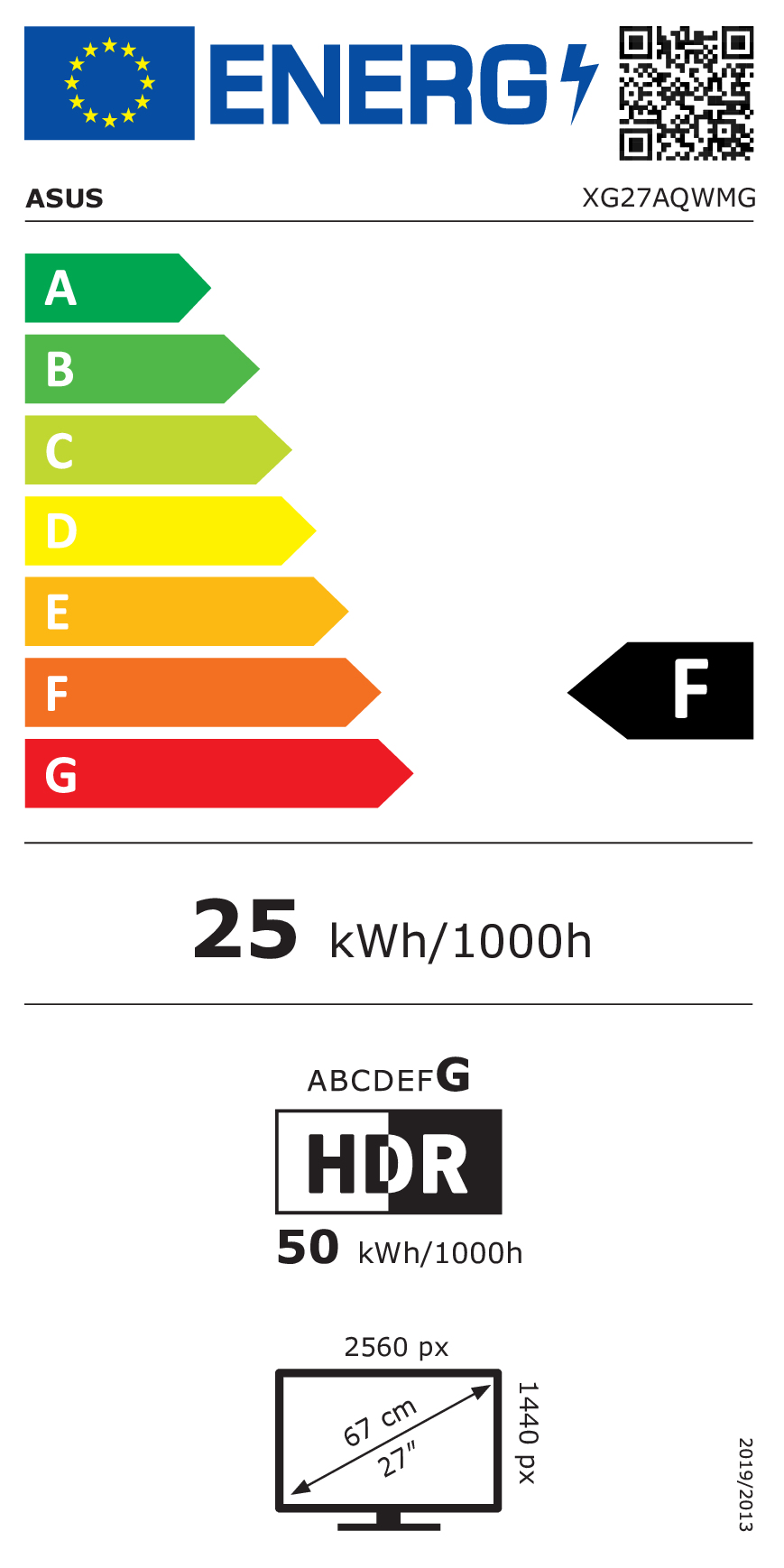
- Energy efficiency class (SDR)The energy efficiency rating of the device when operating in Standard Dynamic Range (SDR) mode, categorized from A to G.
- F
- Energy efficiency class (HDR)The energy efficiency rating of the device when High Dynamic Range (HDR) mode is active, ranging from A to G.
- G
- Energy consumption (SDR) per 1000 hoursThe amount of electric energy consumed by the device during standard dynamic range (SDR) operation over a period of 1000 hours, measured in kilowatt-hours (kWh).
- 25 kWh
- Energy consumption (HDR) per 1000 hoursThe amount of electrical energy consumed by the device when displaying High Dynamic Range (HDR) content over a period of 1000 hours, measured in kilowatt-hours (kWh).
- 50 kWh
- Power consumption (typical)Amount of power consumed by this model, often expressed in watts (W). Typical values that manufacturers give are power consumption when off, standby/suspended mode, typical use, maximum usage.
- 26.8 W
- Power consumption (standby)The amount of electricity that is consumed when the product is on standby.
- 0.5 W
- Power consumption (off)The amount of electrical energy consumed by the device when it is switched off, measured in watts.
- 0.3 W
- Power consumption (PowerSave)The amount of electrical energy consumed by the device when it is operating in a power-saving mode, measured in Watts.
- 0.5 W
- AC input voltageThe voltage of the AC electricity that is inputted into the product.
- 100 - 240 V
- AC input frequencyThe range of alternating current frequencies the device can accept from the power source, measured in hertz (e.g., 45 - 65).
- 50/60 Hz
- Power supply typeThe type of power supply which this product uses.
- External
- Energy efficiency scaleThe range of energy efficiency classes used to rate the product's power consumption, such as A to G.
- A to G
- USB Power Delivery (USB PD)Indicates whether the device supports the USB Power Delivery standard for faster charging and higher power levels.
- Yes
Security
- Cable lock slotHoles on the edge of devices through which a cable lock can be passed, so the device can be locked to a desk etc.
- Yes
- Cable lock slot typeThe standard of the security slot used to attach a physical locking cable to the device (e.g. Kensington or Noble).
- Kensington
Ergonomics
- Height adjustmentThe part of the device that can be adjusted to change the height.
- Yes
- Adjustable height (max)The maximum distance the unit can be raised vertically from its lowest position, measured in millimetres.
- 11 cm
- PivotIndicates whether the device can be rotated 90 degrees to switch between landscape and portrait orientation.
- Yes
- Pivot angleThe range of motion available for rotating the unit around its vertical axis, typically measured in degrees.
- -90 - 90°
- SwivellingIndicates whether the product has a mechanism that allows it to rotate horizontally.
- Yes
- Swivel angle rangeThe minimum and maximum degrees to which the unit can be rotated horizontally.
- -45 - 45°
- Tilt adjustmentThe tilt, which means the angle at which the device is pointing (up or down), can be changed.
- Yes
- Tilt angle rangeThe minimum and maximum angles at which the unit can be tilted, typically expressed in degrees.
- -5 - 20°
Packaging data
- Package widthThe distance from one side of the packaging to the other.
- 780 mm
- Package depthThe distance from the front to the back of the packaging.
- 186 mm
- Package heightThe distance from the top to the bottom of the packaging.
- 470 mm
- Package weightWeight of the packaged product.
- 9.1 kg
- Package typeThe type of product package e.g. box.
- Box
Database Right data-sheet 2026 Icecat. All rights reserved. Provided “as is”, without warranty — check details with the store before buying.
Expert reviews
- 80
canbuyornot.com2026
The Asus ROG Strix OLED XG27AQWMG is an excellent OLED gaming monitor that's more affordable than I expected. For starters, it comes with LG Display's Tandem OLED technology - similar to that used by the LG G5 - to produce even brighter (15% higher peak b...
- +
- Bright and crisp OLED screen,Proximity sensor works great,Reasonably priced for OLED monitor
- −
- Glossy reflective screen can be distracting,Loss of some shadow details in dark scenes
- –
tftcentral.co.uk2025
The XG27AQWMG is an excellent screen and the new 4th Gen WOLED panel and True Black glossy coating impressed us a lot. It's a double-whammy of new and exciting features and a killer combination that many people will surely love.We really liked the True Bl...
- +
- 4th Gen WOLED panel provides decent improvements in brightness, colour gamut and black depth, True Black glossy coating provides an excellent image, Very good gaming performance and a wide range of extras
- −
- HDR brightness could be enhanced, Shadow detail was poor in many configurations in SDR, Input lag for fixed 60Hz devices was high
Price history (90 days, best daily price)
Price history is still being collected for this product — check back soon.
Alternative models

ASUS ZenScreen OLED ZenScreen Duo OLED MQ149CD
computer monitor 35.6 cm (14") 1920 x 1200 pixels WUXGA Silver

ASUS AS VY249HGR BK/1MS MPRT/EU//DSUB+HDMI
computer monitor

ASUS BE27ACGN
computer monitor 68.6 cm (27") 2560 x 1440 pixels Quad HD LCD Black

ASUS VZ279HG
computer monitor 68.6 cm (27") 1920 x 1080 pixels Full HD LCD Black

ASUS BE27AQG
computer monitor 68.6 cm (27") 2560 x 1440 pixels Quad HD LCD Black

ASUS ZenScreen MB27ACF
computer monitor 68.6 cm (27") 2560 x 1440 pixels Quad HD LCD Black