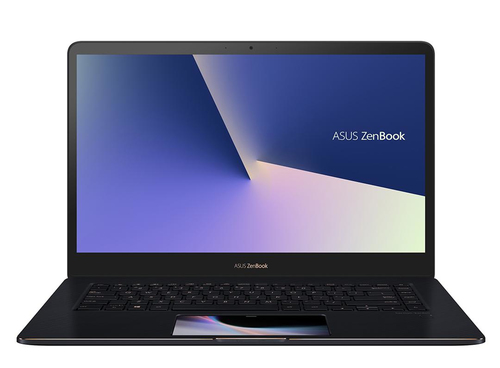
ASUS Zenbook Pro UX580GE-E2056T laptop Intel Core i9 i9-8950HK 39.6 cm (15.6") 4K Ultra HD 16 GB DDR4-SDRAM 512 GB SSD NVIDIA GeForce GTX 1050 Ti Wi-Fi 5 (802.11ac) Windows 10 Home Blue
- Processor: Intel Core i9 i9-8950HK, 6 cores
- Display: 39.6 cm (15.6"), 3840 x 2160 pixels
- Memory: 16 GB DDR4-SDRAM
- Storage: 512 GB SSD
- Graphics: NVIDIA GeForce GTX 1050 Ti
- Operating system: Windows 10 Home
- Colour: Blue
Where to buy
We're not tracking prices for this product yet. Check current prices directly at:
We may earn a commission when you buy through links on this page — at no extra cost to you. Learn more
About this product
Unleash your creative power
There’s never been a laptop like the all-powerful, all-conquering ZenBook Pro 15. It’s faster and more sophisticated than ever before, and the jaw-dropping new ScreenPad adds magic to your creativity. With ZenBook Pro 15, you don’t have to wait for the future: you can touch it, right here and right now.
Beauty that inspires
Hewn from solid metal, the thin and light ZenBook Pro 15 is a masterpiece of design and engineering. Its elegant looks and sophisticated finish hint at the awesome power within, without shouting about it. Let ZenBook Pro 15 be your inspiration.
ScreenPad
Say hello to the intelligent touchpad
ScreenPad is an exciting new way to work with your laptop. It’s an interactive display with helpful functions that intelligently adapt to match whatever you’re doing, making it easier and quicker to multitask and get things done. It can change functions automatically when you switch apps, and you can create your own shortcuts. You can also extend your Windows desktop onto ScreenPad!
Screen Extender mode
Screen Extender mode turns ScreenPad into a powerful multitasking partner. You can extend your laptop's screen onto ScreenPad, giving you a dual display in one device. Use it to keep an eye on your social media or email, or as a handy preview screen — the possibilities are endless! To change ScreenPad modes, just tap the f6 key to cycle between ScreenPad mode, Screen Extender mode and Touchpad mode.
Effortless performance
Packed with state-of-the-art components, ZenBook Pro 15 is built to handle anything you can throw at it without a fuss. It’s capable of shaming many desktops, and its high-performance processor, ultrafast storage and gaming-grade graphics let you blitz through the most demanding tasks faster than ever before. ZenBook Pro 15 will never keep you waiting.
Unstoppable computing
ZenBook Pro 15 is available with an 8th Generation Intel Core i9 hexa-core processor: it’s the first-ever Intel mobile CPU with six cores and 12 threads, outperforming the previous generation for incredibly smooth and responsive multitasking. This amazing processor takes mobile computing to a new level, giving you performance beyond your wildest imagination.
Gaming-grade graphics
ZenBook Pro 15 uses up to the latest gaming-grade NVIDIA GeForce GTX 1050 GPU for graphics performance that’s nearly twice as fast as a GeForce GTX 950M. This DirectX 12-compatible graphics monster delivers all the horsepower you need for even the most graphics-intensive tasks, such as 3D rendering or 4K UHD video playback, and flawless gaming visuals. Whether you’re a designer, a developer or a gamer, you’ll always enjoy the best possible graphics performance with ZenBook Pro 15.
Our best looking display ever
The NanoEdge 4K UHD ultraslim-bezel display on ZenBook Pro 15 is truly awe-inspiring, with pin-sharp detail and bright, vivid colors for more lifelike images. It’s gorgeous for everyday use, and is PANTONE validated with factory-calibrated color accuracy, making it a dream for graphics professionals.
More vivid than ever
To display the most vivid, most realistic colors possible, ZenBook Pro 15 supports an exceptionally wide color gamut with 100% Adobe RGB and 132% sRGB coverage. The Adobe RGB color space is the preferred choice of creative professionals for its increased range of possible colors, and makes images on ZenBook Pro 15 look simply stunning.
More accurate color
The built-in ASUS Calibration Technology on ZenBook Pro 15 provides color-accuracy tuning and uniformity compensation to make things easy when it’s time to recalibrate the display’s brightness and color consistency. And with its impressively low Delta E value, you can be sure the colors you’re seeing are accurate.
Touchscreen with ASUS Pen support
With ZenBook Pro 15 and the ASUS Pen you can really let your creativity flow. The ASUS Pen can detect even the most minute pressure variations — in 1,024 steps from 10g all the way up to 300g. It also exceeds the industry accuracy standard, so you can hold it at angles of up to 45° without affecting the quality and placement of the lines you draw. With the ASUS Pen — or any other active stylus — you can jot down your thoughts, annotate diagrams or sketch out your creative ideas in an intuitive way with a natural, responsive feel.
Incredible sound, by Harman Kardon
To equip ZenBook Pro 15 with unsurpassed audio performance, the ASUS Golden Ear team joined forces with audiophile specialists Harman Kardon to produce the next generation of ASUS SonicMaster audio technology. ZenBook Pro 15 delivers the most incredible sound you’ve ever heard on a laptop.
Comprehensive connectivity
A comprehensive set of high-performance I/O ports — including the latest Thunderbolt 3 — give ZenBook Pro 15 the ultimate, hassle-free connectivity for versatile flexibility whether you’re in the office or on the road. And the integrated gigabit-class Wi-Fi lets gives you wired-equivalent network speeds — without the wires!
All-day battery
Searching for power outlets isn’t a productive use of your time, so ZenBook Pro 15 uses a high-capacity battery and clever ASUS thermal engineering to give you all-day on-the-go autonomy. But when you do need to recharge, it shouldn’t take forever: that’s why the fast-charge technology in ZenBook Pro 15 lets you recharge to 60% capacity in just 49 minutes.
Documents
- ManualUser manual ↗
Specifications
Key specifications
- Processor familyA family of processors is a group of processors produced by one company over a short period of time e.g. Intel Pentium processors.
- Intel Core i9
- Processor modelThe model number for the processor in a computer.
- i9-8950HK
- Processor coresThe number of central processing units ('cores') in a processor. Some processors have 1 core, others have 2 (e.g. Intel Core Duo) or more (e.g. the Intel Xeon E7-2850 has 10 cores).
- 6
- Display diagonalSize of the display for this product, measured diagonally, usually in inches.
- 39.6 cm (15.6")
- Display resolutionThe number of distinct pixels in each dimension that can be displayed. It is usually quoted as width × height, with the units in pixels: for example, "1024 × 768" means the width is 1024 pixels and the height is 768 pixels. The higher the number of pixels, the sharper the image.
- 3840 x 2160 pixels
- Internal memoryThe amount of memory, usually measured in bytes (e.g. MB, GB), which is installed in the system's hardware.
- 16 GB
- Internal memory typeThe type of internal memory such as RAM, GDDR5.
- DDR4-SDRAM
- Total storage capacityThe total amount of data that can be stored on the device.
- 512 GB
- Storage mediaUsed for the storage of data e.g. HDD (hard disk drive), SSD (solid-state drive).
- SSD
- Discrete graphics card modelA graphics adapter (often known as a video card) generates images for a display. A discrete graphics adapter plugs into the motherboard, and usually produces much better graphics than an integrated graphics adapter. There are various models of discrete graphics adapters.
- NVIDIA GeForce GTX 1050 Ti
- On-board graphics card model"Graphic adapter" is the hardware that produces images on a display. "On-board" means that the graphics adapter is intergrated inside the motherboard.
- Intel UHD Graphics 630
- Operating system installedType of operating system on a device e.g. IOS on Apple devices, Android for mobile devices.
- Windows 10 Home
- Product colourThe colour e.g. red, blue, green, black, white.
- Blue
Show all 126 specificationsShow key specifications only
Weight & dimensions
- WeightWeight of the product without packaging (net weight). If possible, the net weight is given including standard accessories and supplies. Please note that sometimes the manufacturer leaves out the weight of accessories and/or supplies.
- 1.88 kg
- WidthThe measurement or extent of something from side to side.
- 365 mm
- DepthThe distance from the front to the back of something.
- 241 mm
- HeightThe measurement of the product from head to foot or from base to top.
- 18.9 mm
Software
- Operating system installedType of operating system on a device e.g. IOS on Apple devices, Android for mobile devices.
- Windows 10 Home
Graphics
- On-board graphics cardGraphics hardware which is built into the motherboard or CPU, as opposed to a separate graphics adapter (video card). On-board graphics uses CPU and RAM for graphics processing.
- Yes
- Discrete graphics cardIndicates whether the device has a dedicated graphics processor separate from the main CPU.
- Yes
- Discrete graphics card modelA graphics adapter (often known as a video card) generates images for a display. A discrete graphics adapter plugs into the motherboard, and usually produces much better graphics than an integrated graphics adapter. There are various models of discrete graphics adapters.
- NVIDIA GeForce GTX 1050 Ti
- On-board graphics card familyThe specific series or generation of the integrated graphics (e.g. AMD Radeon Graphics).
- Intel UHD Graphics
- On-board graphics card model"Graphic adapter" is the hardware that produces images on a display. "On-board" means that the graphics adapter is intergrated inside the motherboard.
- Intel UHD Graphics 630
- On-board graphics card base frequencyThe minimum clock speed at which the integrated graphics processor operates, measured in megahertz (MHz) or gigahertz (GHz).
- 350 MHz
- On-board graphics card dynamic frequency (max)The maximum clock speed reached by the integrated graphics processor, measured in MHz.
- 1200 MHz
- Maximum on-board graphics card memoryThe maximum amount of system memory that can be allocated to the integrated graphics processor, measured in megabytes (MB) or gigabytes (GB).
- 64 GB
- On-board graphics card DirectX versionThe version of the DirectX application programming interface (API) supported by the integrated graphics processor (e.g. 12).
- 12.0
- On-board graphics card OpenGL versionThe version of the Open Graphics Library (OpenGL) API supported by the integrated graphics processor (e.g. 4.6).
- 4.5
- On-board graphics card IDThe specific model identifier of the integrated graphics processor built into the system (e.g. Intel UHD Graphics 770).
- 0x3E9B
Storage
- Total storage capacityThe total amount of data that can be stored on the device.
- 512 GB
- Storage mediaUsed for the storage of data e.g. HDD (hard disk drive), SSD (solid-state drive).
- SSD
- Number of SSDs installedThe total quantity of solid state drives integrated into the device.
- 1
- SSD capacityThe Solid State Drive's data storage capacity.
- 512 GB
- Optical drive typeAn optical drive uses laser to read optical discs such as CDs, DVDs and Blu-Ray. Some types of optical drive are: CD ROM drive, CR-RW (CD writer) drive, DVD-ROM.
- No
- Card reader integratedA card reader is a device that enables reading and, in some cases, writing data to and from a memory card.
- Yes
- Compatible memory cardsTypes of memory cards which can be used with this product.
- MicroSD (TransFlash)
Memory
- Internal memoryThe amount of memory, usually measured in bytes (e.g. MB, GB), which is installed in the system's hardware.
- 16 GB
- Internal memory typeThe type of internal memory such as RAM, GDDR5.
- DDR4-SDRAM
- Memory clock speedThe frequency at which the memory (e.g. RAM) runs.
- 2400 MHz
- Memory form factorDesign of the memory e.g. 240-pin DIMM, SO-DIMM.
- On-board
- Maximum internal memoryThe maximum amount of memory inside a product, usually measured in bytes e.g megabytes (MB) or gigabytes (GB).
- 16 GB
Processor
- Processor familyA family of processors is a group of processors produced by one company over a short period of time e.g. Intel Pentium processors.
- Intel Core i9
- Processor manufacturerThe manufacturer that produced the processor.
- Intel
- Processor generationThe specific architectural version or series of the processor (e.g. 7th Gen).
- 8th gen Intel Core i9
- Processor modelThe model number for the processor in a computer.
- i9-8950HK
- Processor coresThe number of central processing units ('cores') in a processor. Some processors have 1 core, others have 2 (e.g. Intel Core Duo) or more (e.g. the Intel Xeon E7-2850 has 10 cores).
- 6
- Processor threadsThe number of virtual cores available for simultaneous processing tasks (e.g. 12 or 128).
- 12
- Processor boost frequencyThe turbo boost is an automatic, managed accelleration of the processor when one of the cores is overloaded.
- 4.8 GHz
- Processor frequencyThe clock rate is the fundamental rate in cycles per second (measured in hertz) at which a computer performs its most basic operations such as adding two numbers. There are more factors, like internal memory size, that influence a computer's actual response time.
- 2.9 GHz
- System bus rateA bus is a communication system that transfers data between components inside a computer, or between computers. The system bus rate is the speed at which data is transferred in this communication system.
- 8 GT/s
- Processor cacheThe amount of high-speed volatile memory integrated into the processor to reduce the average time to access data from the main memory, typically measured in megabytes (MB).
- 12 MB
- Processor cache typeThe architecture level or specific technology of the high-speed memory integrated into the processor (e.g., L2 or Smart Cache).
- Smart Cache
- Processor socketMechanical component(s) that provides mechanical and electrical connections between a microprocessor and a printed circuit board (PCB). This allows the processor to be replaced without soldering.
- BGA 1440
- Processor lithographyThe process which is performed by the processor e.g. CPU (Central Processing Unit).
- 14 nm
- Processor operating modesOperating modes for the processors that place restrictions on the type and scope of operations for certain processes run by the CPU. This design allows the operating system to run with more privileges than application software.
- 64-bit
- Processor seriesThe specific family or generation of the processor, such as the AMD EPYC 9004 Series or 9th Generation Intel Core i5.
- Intel Core i9-8000 Mobile series
- Processor codenameThe internal development name assigned by the manufacturer to the processor architecture (e.g., Alder Lake).
- Coffee Lake
- Bus typeThe communication interface used for data transfer between internal components, such as the CPU and chipset (e.g., QPI, DMI).
- DMI
- SteppingThe smallest increment of change that can be adjusted or displayed, or the specific revision level of a component (e.g., 0.1 or 1).
- U0
- Thermal Design Power (TDP)The maximum amount of heat the product is expected to generate under a heavy workload, typically measured in Watts (W).
- 45 W
- TjunctionThe maximum temperature allowed at the processor junction before thermal throttling or damage occurs, measured in degrees Celsius.
- 100 °C
- Maximum number of PCI Express lanesThe total number of high-speed data paths available for communication between the processor and peripheral components.
- 16
- PCI Express slots versionSpecifies the generation of the PCI Express standard supported by the expansion slots, which determines the available data transfer bandwidth (e.g., 4.0).
- 3.0
- PCI Express configurationsSpecifies the number and lane width of the available PCI Express slots or connections (e.g. 1x16+1x4).
- 1x16, 1x8+2x4, 2x8
- ECC supported by processorIndicates whether the processor supports Error Correction Code memory to detect and fix internal data corruption.
- No
Display
- Display diagonalSize of the display for this product, measured diagonally, usually in inches.
- 39.6 cm (15.6")
- Display resolutionThe number of distinct pixels in each dimension that can be displayed. It is usually quoted as width × height, with the units in pixels: for example, "1024 × 768" means the width is 1024 pixels and the height is 768 pixels. The higher the number of pixels, the sharper the image.
- 3840 x 2160 pixels
- HD typeType of supported High Definition (e.g. Full HD, 4K Ultra HD).
- 4K Ultra HD
- LED backlightA backlight is a form of illumination used in liquid crystal displays (LCDs). One type of backlight is made by LEDs, which can be either white or RGB (red green blue). White LEDs are used most often in notebooks and desktop screens, and in virtually all mobile LCD screens. RGB LEDs for backlighting are found in high-end color proofing displays such as HP DreamColor LP2480zx monitor or selected HP…
- Yes
- Native aspect ratioThe aspect ratio is the ratio of the width of an image to its height. The native aspect ratio is the one which the projector/display is particularly designed for. Images shown in native aspect ratio will utilize the entire resolution of the display and achieve maximum brightness. Images shown in other than native aspect ratio will always have less resolution and less brightness than images shown…
- 16:9
Design
- Product typeThe sub-category of the product.
- Laptop
- Product colourThe colour e.g. red, blue, green, black, white.
- Blue
- Form factorThe shape or design of the product.
- Clamshell
Power
- AC adapter powerThe maximum power output provided by the AC adapter, measured in watts (e.g. 65 W).
- 150 W
- AC adapter frequencyThe alternating current frequency range or specific value required by the power supply, measured in hertz (e.g., 50/60).
- 50 - 60 Hz
- AC adapter input voltageThe range of alternating current voltage that the power supply can safely accept from a wall outlet, measured in volts (e.g., 100-240).
- 100 - 240 V
- AC adapter output currentThe maximum electrical current supplied by the power adapter, measured in amperes (A).
- 7.7 A
- AC adapter output voltageThe electrical potential difference supplied by the power adapter to the device, measured in volts (e.g. 19).
- 19.5 V
- DC-in jackThe socket/plug where the DC electricity supply connects to the device.
- Yes
Battery
- Battery technologyThe type of battery in the device, e.g. nickel–cadmium (NiCd).
- Lithium Polymer (LiPo)
- Number of battery cellsThe total quantity of individual battery cells used to power the device, including configurations with primary and backup cells (e.g., 1+2).
- 8
- Battery capacityA measure of the charge stored by the battery. Determined by the mass of active material contained in the battery.
- 71 Wh
- Battery life (max)Maximum battery life. Mobile Mark (2002) is the standard often used to benchmark battery life time.
- 9.5 h
Processor special features
- Intel My WiFi Technology (Intel MWT)Intel My WiFi Technology (Intel MWT) uses an extensible software architecture that allows the operating system to think the notebook has two Wi-Fi radios performing similar, but different, functions. Each virtual Wi-Fi radio is assigned a TCP/IP stack.
- Yes
- Intel Identity Protection Technology (Intel IPT)Protect Your Identity and Business Intel Identity Protection Technology (Intel IPT) protects enterprises from being penetrated by stolen credentials and online user account access with an added layer of hardware-based security and authentication as well as a multifactor authentication framework to manage different authentication methods.
- Yes
- Intel Hyper Threading Technology (Intel HT Technology)Improved Performance for Threaded Software Intel Hyper-Threading Technology (Intel HT Technology) makes efficient use of processor resources, enabling multiple threads to run on each core and increasing processor throughput. Available on Intel Core and Intel Xeon processors, Intel HT Technology helps run demanding applications simultaneously, protect and manage systems, and provide headroom for b…
- Yes
- Intel Turbo Boost TechnologyHigher Performance When You Need It Most Intel Turbo Boost Technology 2.0 accelerates processor and graphics performance by increasing the operating frequency when operating below specification limits. The maximum frequency varies depending on workload, hardware, software, and overall system configuration.
- 2.0
- Enhanced Intel SpeedStep TechnologyIndicates whether the processor supports advanced power management to dynamically adjust frequency and voltage for energy efficiency.
- Yes
- Intel Clear Video HD Technology (Intel CVT HD)See the World More Vividly Intel Clear Video HD Technology delivers cleaner, sharper images, more natural, accurate, and vivid colors. View images as they were meant to be seen on devices featuring Intel Core processors with Intel Graphics Technology.
- Yes
- Intel Clear Video TechnologyIndicates whether the processor supports hardware acceleration to improve the quality and smoothness of video playback.
- Yes
- Intel InTru 3D TechnologyAdd a new dimension to your viewing experience. Now you can play games and watch your favorite 3D movies with Blu-ray Stereo 3D playback using passive or active shutter 3D glasses. InTru 3D technology by Intel in association with Dreamworks delivers it all in 1080p full high-definition resolution on your TV over HDMI 1.4.
- Yes
- Intel Quick Sync Video TechnologyCreate, Edit, and Share Video in a Flash Intel Quick Sync Video uses the dedicated media processing capabilities of Intel Graphics Technology to make video encoding tasks—such as creating DVDs or Blu-ray discs, creating and editing 3D videos, converting 2D video files into 3D, and converting video for portable media players and social networking sites—faster and easier.
- Yes
- Intel Flex Memory AccessIndicates whether the processor supports the ability to operate with memory modules of different capacities or speeds.
- Yes
- Intel AES New Instructions (Intel AES-NI)Added Security with Faster Data Encryption The Intel Advanced Encryption Standard New Instructions (Intel AES-NI) enable fast and secure data encryption and decryption for better performance and less risk from timing and cache-based attacks than table-based software implementations. Intel AES-NI supports usages such as standard key lengths, standard modes of operation, and even some nonstandard o…
- Yes
- Intel Trusted Execution TechnologyIndicates whether the processor supports hardware-based security features to protect the system from malicious software and unauthorized access.
- No
- Intel Enhanced Halt StateIndicates whether the processor supports a power-saving mode that reduces energy consumption by putting the CPU into a deeper sleep state during periods of inactivity.
- Yes
- Intel VT-x with Extended Page Tables (EPT)Indicates whether the processor supports hardware-assisted virtualization and memory management to improve the performance of virtual machines.
- Yes
- Intel Secure KeyGenerate Cryptographic Security Protocols Intel Secure Key is a security hardware-based random number generator that can generate high-quality keys for cryptographic (encryption and decryption) protocols. These keys provide quality entropy that is highly sought after in the cryptography world for added security.
- Yes
- Intel TSX-NIIndicates whether the processor supports Intel Transactional Synchronization Extensions New Instructions for improved multi-threaded performance.
- Yes
- Intel Stable Image Platform Program (SIPP)Indicates whether the product is part of the Intel Stable Image Platform Program, ensuring long-term driver and firmware stability for system image consistency.
- No
- Intel OS GuardProtect Your Operating Environment Intel OS Guard, a hardware-based security feature that protects the operating system kernel, defends against malicious data or attack code located in areas of memory marked as user mode pages, preventing any application from taking over or compromising the OS kernel.
- Yes
- Intel Software Guard Extensions (Intel SGX)Indicates whether the processor supports a set of security instructions that create isolated execution environments in memory to protect sensitive data.
- Yes
- Intel Clear Video Technology for Mobile Internet Devices (Intel CVT for MID)Indicates whether the product supports hardware-accelerated video processing to improve playback quality and reduce power consumption on small-screen mobile devices.
- Yes
- Intel 64Indicates whether the processor supports the Intel 64 architecture for 64-bit computing.
- Yes
- Execute Disable BitIndicates whether the processor supports a security feature that marks certain areas of memory as non-executable to prevent malicious code from running.
- Yes
- Idle StatesIndicates whether the processor supports power-saving modes that reduce energy consumption during periods of inactivity.
- Yes
- Thermal Monitoring TechnologiesIndicates whether the processor incorporates integrated sensors and logic to monitor operating temperatures and prevent overheating.
- Yes
- Processor package sizeThe physical dimensions of the processor housing, measured in mm.
- 42 x 28 mm
- Supported instruction setsSpecifies the hardware acceleration technologies and architectural extensions supported by the processor to optimize specific tasks, such as AVX for floating-point calculations or AES-NI for encryption.
- AVX 2.0, SSE4.1, SSE4.2
- Processor codeThe specific alphanumeric identifier assigned by the manufacturer to distinguish the exact version or revision of the central processing unit (e.g., i7-13700K).
- SRCKN
- CPU configuration (max)The maximum number of central processing units that can be installed or supported by the system.
- 1
- Embedded options availableIndicates whether the product is available in a version designed for integration into a larger system or industrial application.
- No
- Intel Virtualization Technology for Directed I/O (VT-d)Simplify Virtualization and Reduce Overheads Intel Virtualization Technology (Intel VT) helps make virtualization practical by eliminating performance overheads, reducing complexity, and improving security with hardware assistance. Virtualization allows multiple workloads to share a common set of resources so that a variety of workloads can co-locate while maintaining full isolation from each oth…
- Yes
- Intel Identity Protection Technology versionThe specific version of the hardware-based security feature in the processor designed to protect user identities and sensitive data.
- 1.00
- Intel Stable Image Platform Program (SIPP) versionThe specific version of the Intel program that ensures the hardware maintains a consistent image and driver set over the product's lifecycle.
- 0.00
- Intel Secure Key Technology versionThe version of the hardware-based security feature in the processor that provides a secure storage area for keys and sensitive data.
- 1.00
- Intel TSX-NI versionThe specific version of the Intel Transactional Synchronization Extensions (TSX) instruction set supported by the processor.
- 1.00
- Intel Virtualization Technology (VT-x)Simplify Virtualization and Reduce Overheads Intel Virtualization Technology (Intel VT) helps make virtualization practical by eliminating performance overheads, reducing complexity, and improving security with hardware assistance. Virtualization allows multiple workloads to share a common set of resources so that a variety of workloads can co-locate while maintaining full isolation from each oth…
- Yes
- Processor ARK IDThe unique identification code assigned to the processor within the ARK database for detailed technical specification tracking.
- 134903
Keyboard
- Pointing deviceThe type of integrated input mechanism used to control the cursor (e.g., Clickpad or DialPad).
- ScreenPad
- Numeric keypadSmall, palm-sized, seventeen key section of a computer keyboard, usually on the very far right. The numeric keypad features digits 0 to 9, addition (+), subtraction (-), multiplication (*) and division (/) symbols, a decimal point (.) and Num Lock and Enter keys. Laptop keyboards often do not have a numpad, but may provide numpad input by holding a modifier key (typically labelled "Fn") and opera…
- No
- Windows keysIndicates whether the product includes dedicated keys for Windows operating system shortcuts.
- Yes
Ports & interfaces
- USB 3.2 Gen 2 (3.1 Gen 2) Type-A ports quantityThe total number of USB Type-A ports that support the 3.2 Gen 2 (formerly 3.1 Gen 2) standard for high-speed data transfer.
- 2
- USB 3.2 Gen 2 (3.1 Gen 2) Type-C ports quantityNumber of USB 3.1 (3.1 Gen 2) ports with Type-C connector. USB 3.1 (3.1 Gen 2) is USB interface version which supports transfer rate up to 10 Gbit/s (SuperSpeed+). USB Type-C connector has symmetrical design architecture and compatible with Thunderbolt 3 interface.
- 2
- HDMI ports quantityThe number of sockets (ports) for HDMI connections. HDMI (High-Definition Multimedia Interface) is a compact audio/video interface for transferring uncompressed video data and compressed/uncompressed digital audio data from a HDMI-compliant device ("the source device") to a compatible computer monitor, video projector, digital television, or digital audio device. HDMI is a digital replacement for…
- 1
- Microphone inThe socket where a microphone is connected to the device.
- No
- Combo headphone/mic portIndicates whether the device features a single integrated jack that supports both audio output for headphones and audio input for a microphone.
- Yes
- ExpressCard slotPort for an ExpressCard, which contain electronic circuitry and connectors to which external devices (peripherals) can be connected. The ExpressCard standard has replaced the PC Card (also known as PCMCIA) standard and has been used since 2006.
- No
- SmartCard slotA smart card, chip card, or integrated circuit card (ICC) is any pocket-sized card with embedded integrated circuits. Smart cards can provide identification, authentication, data storage and application processing. Smart card slots can be found in various electronic devices e.g. thin clients.
- No
Network
- Wi-FiPopular technology that allows an electronic device to exchange data or connect to the internet wirelessly using radio waves.
- Yes
- Top Wi-Fi standardConnection of this device is done via Wi-Fi in a high standard.
- Wi-Fi 5 (802.11ac)
- Wi-Fi standardsThe type of wireless local area network (LAN). It can be ad-hoc, where units in a network communicate peer-to-peer, or Infrastructure, where units communicate with each other via an access point A LAN interconnects computers in a small area e.g. home, school or office.
- 802.11a, Wi-Fi 5 (802.11ac), 802.11b, 802.11g, Wi-Fi 4 (802.11n)
- Ethernet LANAn Ethernet LAN (Local Area Network) interface is present, for a wired conection via a cable.
- No
- BluetoothBluetooth is a low-power radio technology developed to replace the cables and wires currently used to link or connect electronic devices such as personal computers, printers, and a wide variety of handheld devices including mobile phones. Because it uses radio-wave connectivity, a Bluetooth-enabled device has a constant, established connection to whatever browser it uses. This saves the user the…
- Yes
- Bluetooth versionThe type of bluetooth technology in the product e.g. Bluetooth Smart (v4.0).
- 5.0
Camera
- Front cameraCamera at the front of the product.
- Yes
Audio
- Audio systemSystem used to play music or speech.
- SonicMaster
- Number of built-in speakersThe total quantity of integrated audio output drivers installed within the unit.
- 2
- Built-in microphoneMicrophone that is found inside the product.
- Yes
Database Right data-sheet 2026 Icecat. All rights reserved. Provided “as is”, without warranty — check details with the store before buying.
Expert reviews
- 80
goodhousekeeping.com2018
Expensive but worth every penny, this laptop looks stylish and makes light work of all computing whether you want to surf the web, check emails or tackle some photo editing. It's quite heavy and the battery life won't make the day, but it's a laptop that...
- +
- Sleek and stylish design, Movies and TV shows look smooth and sharp on the laptop's 15.6in screen, Simple and straightforward to use, Plenty of storage space for photos, videos and documents,
- −
- Not as fast to transfer files to and from USB sticks as other laptops, Display suffers from fingerprint marks
- –
expertreviews.co.uk2018
We’ve seen the Asus ScreenPad before, but never on such a portable laptop...
Read the review at expertreviews.co.uk ↗ - 80
ultrabookreview.com2018
On paper, the Zenbook Pro UX580 is a stunning computer for content creators and graphics professionals: it looks great, is built well, it comes with a wide-gamut 4K touchscreen and an excellent hardware configuration with the mobile Coffee Lake Core i9 pr...
- +
- compact build with very nice aesthetics, excellent clickpad with LCD screen beneath, nice 4K IPS touchscreen with 100% AdobeRGB panel, good IO, including x4 TB3 ports, lowerend configurations should perform well, with some tweaks, punchy and loud speakers...
- −
- some flex in the chassis, slightly mushy keyboard with an unusual layout, expect performance issues in continuous demanding loads, especially on the highertier configurations, no fullsize card reader, mediocre VGA camera
- 40
trustedreviews.com2018
The Zenbook Pro's dual-screen design may sound a little gimmicky, but from what I've seen it has a lot of potential, especially for power users and creatives. The second display not only looks great but is highly customisable, so if Asus can iron out the...
- +
- Large, high resolution touchscreen, Powerhouse work laptop, Stylish exterior, ScreenPad has potential
- −
- Noisy fans, Below average battery performance
Price history (90 days, best daily price)
Price history is still being collected for this product — check back soon.
Alternative models

ASUS TUF Gaming FX504GM-E4388
laptop Intel Core i7 i7-8750H 39.6 cm (15.6") Full HD 8 GB DDR4-SDRAM 1 TB HDD NVIDIA GeForce GTX 1060 Wi-Fi 5 (802.11ac) Endless OS Black

ASUS TUF Gaming FX505GE-BQ129
laptop Intel Core i7 i7-8750H 39.6 cm (15.6") Full HD 8 GB DDR4-SDRAM 256 GB SSD NVIDIA GeForce GTX 1050 Ti Wi-Fi 5 (802.11ac) FreeDOS Black

ASUS F407MA-BV154T
laptop Intel Pentium Silver N5000 35.6 cm (14") HD 4 GB DDR4-SDRAM 256 GB SSD Wi-Fi 4 (802.11n) Windows 10 Home Grey

ASUS Vivobook X540LA-XX1032T
Intel Core i3 i3-5005U Laptop 39.6 cm (15.6") HD 4 GB DDR3L-SDRAM 500 GB HDD Wi-Fi 4 (802.11n) Windows 10 Silver

ASUS C202SA-GJ0025-FR-OSS
laptop Intel Celeron N3060 Chromebook 29.5 cm (11.6") HD 4 GB LPDDR3-SDRAM 16 GB eMMC ChromeOS Blue, White
ASUS TUF Gaming FX504GE-E4640
laptop Intel Core i5 i5-8300H 39.6 cm (15.6") Full HD 8 GB DDR4-SDRAM 1 TB Hybrid-HDD NVIDIA GeForce GTX 1050 Ti Wi-Fi 5 (802.11ac) Linux Black