
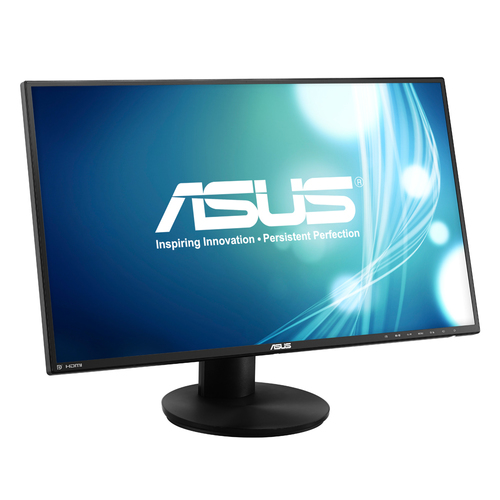
ASUS PA279Q computer monitor 68.6 cm (27") 2560 x 1440 pixels Quad HD LED Black
- Screen: 68.6 cm (27"), 2560 x 1440 pixels, AH-IPS, Flat
- Refresh rate: 6 ms response time
- Brightness: 350 cd/m²
- Ports: 1 × HDMI, 2 × DisplayPort
- Stand: height-adjustable, tilt, VESA 100 x 100 mm
- Extras: speakers
- Colour: Black
Where to buy
We're not tracking prices for this product yet. Check current prices directly at:
We may earn a commission when you buy through links on this page — at no extra cost to you. Learn more
About this product
True Color, Absolute Fidelity: Professional 27” Pre-calibrated AH-IPS 16:9 2560 x 1440 WQHD LED-backlit Monitor
- Factory pre-calibrated for unmated color accuracy (∆E< 2) with 99% Adobe RGB, 100% sRGB, and 120% NTSC
- Professional 27-inch AH-IPS display with 2560 x 1440 WQHD resolution and 109 pixels per inch for greater image detail
- DisplayPort input, Daisy-chain DisplayPort output, HDMI, and Dual-link DVI; along with six USB 3.0 ports and a 9-in-1 card reader
- Ergonomic tilt, swivel, pivot, and height adjustment for a comfortable viewing angle
True, Consistent Color
Color consistency for photographer and retouching with 99% Adobe RGB color space
The ASUS PA279Q is pre-calibrated at the factory for the highest accuracy and outstanding color space reproduction – 99% Adobe RGB, 100% sRGB, and 120%* NTSC. With a wide color gamut of 99% Adobe RGB, the colors seen in photos will be reproduced faithfully and consistently in a way that cannot otherwise be on monitors with just an sRGB color space.
*NTSC on CIE1976 or 103% NTSC on CIE 1931 test standards
10-bit color for smoother gradations
The PA279Q offers 10-bit display color for over one billion onscreen colors and support 14 bit internal lookup table (LUT), which gives smoother gradations and a more natural transition between hues.
Pre-calibrated right out-of-the box
The out-of-box settings are impressive as each PA279Q is pre-calibrated at factory to prove the best color accuracy. To ensure that each PA279Q produces the most accurate and consistent color, we carefully measure its ∆E and gamma value and track its gray-scaling. It even supports Gamma 2.2 for PC and Gamma 1.8 for Mac – offering users more flexibilities to work with. Each PA279Q guarantees industry-leading color accuracy, having been pre-calibrated to minimize the color difference to ∆E (Delta E) of less than 2 – ensuring precise reading of color input and guarantees excellent color fidelity.
Next-generation IPS display technology
The ASUS PA279Q features AH-IPS (Advanced High-Performance In-Plane Switching) display technology for superior color accuracy, a brighter image from increased backlight transmission and lower power consumption. Each PA279Q also features a brightness rated at 350cd/m² and an 100,000,000:1 ASUS Smart Contrast Ratio for enhanced image contrast.
See Better and Wider
The PA279Q WQHD monitor provides 109 pixels per inch (PPI), resulting in high quality 2560 x 1440 visuals – equaling four times the resolution of stand 720p sets. It allows users to view greater image detail and do more with an onscreen footprint larger than that of standard displays.
The screen’s 109PPI density means there are 109 RGB matrices within one inch. Generally, the more pixels a display has, the more lighting (or power) those pixels require to achieve the best visuals. However, with advanced LED backlighting on the PA279Q, power and energy savings are no longer compromised, while better visuals are assured.
Made for Work and Play
With its WQHD display, you enjoy 77% more desktop space than a full HD screen to spread out your windows and palettes. It is also about 25% sharper than a generic 27” full HD display, delivering ultra-smooth visuals thanks to 6ms (GTG) response time. This ensures you get lag-free experiences in movies and gaming, with the latter looking more vivid, with all in-game details shown in true color. The ASUS PA279Q is undoubtedly your best choice for work and play.
6-axis independent color adjustment
Customized hue and saturation control with 6 color adjustment allows you to adjust six colors (red, green, blue, cyan, magenta and yellow) independently without effecting other colors.
Uniformity compensation
The ASUS PA279Q comes with Uniformity Compensation to help solve problems like brightness and chroma (color) fluctuations on different parts of the screen. The diagram below shows the difference between the luminance recorded at each point on the screen as compared to the central reference point. Ideally, the luminance difference should be within -3% to 2%. You can turn on the Uniformity Compensation function in the OSD to prevent inconsistent and inaccurate color.
Robust Connectivity
The PA279Q has a built-in multi-format memory SD card slot and a six-port USB 3.0 hub for convenient pass-through connectivity at speeds up to ten times that of USB 2.0, with compatible devices. One USB port also supports SuperSpeed Battery Charge for accelerated (about 40% faster) USB device recharging than standard USB 3.0.
The ASUS PA279Q has DisplayPort, HDMI and dual-link DVI-D ports, and can display content from two video inputs simultaneously. DisplayPort allows users to daisy chain up to four monitors* for a multi-display workstation from one video source.
ASUS Exclusive Innovation and Design
Splendid Video Intelligence Technology
ASUS Splendid Video Intelligence Technology is built upon a color engine that automatically analyzes and determines the nature of the user’s current task, thereafter adjusting the display’s parameters according to ensure color accuracy and image fidelity. Seven preset modes (Scenery, Theater, Adobe RGB, sRGB, standard and two user modes) can be selected via a designated hotkey.
Intuitive 5 Way Navigation Key
The PA279Q has a 5-way navigation key that acts as a joystick that gives access to the QuickFit Virtual Scale function along with all OSD functions and settings.
Customizable OSD Shortcuts
The PA279Q also features two user-customizable shortcuts for frequently used monitor controls, removing the need to navigate the full on-screen menu system.
Picture-in-Picture and Picture-by-Picture
ASUS exclusive innovations Picture-in-Picture (PIP) and Picture-by-Picture (PBP) allows users to view images from different signals in almost anyway they want. PIP and PBP let users view images from different signals and let them switch between the main and PIP source, including audio, easily.
Specifications
Key specifications
- Display diagonalSize of the display for this product, measured diagonally, usually in inches.
- 68.6 cm (27")
- Display resolutionThe number of distinct pixels in each dimension that can be displayed. It is usually quoted as width × height, with the units in pixels: for example, "1024 × 768" means the width is 1024 pixels and the height is 768 pixels. The higher the number of pixels, the sharper the image.
- 2560 x 1440 pixels
- Panel typeThe technology used to manufacture the panel, such as AMOLED or AH-IPS.
- AH-IPS
- Screen shapeDescribes the physical curvature of the display panel, such as whether it is flat or curved.
- Flat
- Response timeThe response time is the time difference between the moment that a source (for example a video card) sends a signal and that equipment (for example a monitor) receives or display the signal. (Used abbreviations: R/F = Rise and Fall.)
- 6 ms
- Display brightness (typical)Display brightness, measured by its Luminance, presented as a figure in nits. Typical brightness ratings for monitors range from 250 to 350 nits with a target value of between 80 to 120 nits being suitable for most displays in a normal viewing environment.
- 350 cd/m²
- HDMI ports quantityThe number of sockets (ports) for HDMI connections. HDMI (High-Definition Multimedia Interface) is a compact audio/video interface for transferring uncompressed video data and compressed/uncompressed digital audio data from a HDMI-compliant device ("the source device") to a compatible computer monitor, video projector, digital television, or digital audio device. HDMI is a digital replacement for…
- 1
- DisplayPorts quantityNumber of DisplayPorts. A DisplayPort is a digital display interface developed by the Video Electronics Standards Association (VESA). The interface is primarily used to connect a video source to a display device such as a computer monitor, though it can also be used to carry audio, USB, and other forms of data.
- 2
- Height adjustmentThe part of the device that can be adjusted to change the height.
- Yes
- Tilt adjustmentThe tilt, which means the angle at which the device is pointing (up or down), can be changed.
- Yes
- Panel mounting interfaceThe product can be used wih VESA mounting interfaces.
- 100 x 100 mm
- Built-in speaker(s)The device contains speaker(s) to produce sound.
- Yes
- Product colourThe colour e.g. red, blue, green, black, white.
- Black
Show all 74 specificationsShow key specifications only
Design
- VESA mountingIndicates whether the product supports the VESA mounting standard for attachment to compatible arms, brackets, or wall mounts.
- Yes
- Market positioningUnder which category can the device be positioned in the market, e.g. camera phone.
- Graphics design
- Product colourThe colour e.g. red, blue, green, black, white.
- Black
- Panel mounting interfaceThe product can be used wih VESA mounting interfaces.
- 100 x 100 mm
Audio
- Built-in speaker(s)The device contains speaker(s) to produce sound.
- Yes
- Number of speakersThe quantity of speakers included in/with the product.
- 2
- RMS rated powerRMS (Root mean square) is a measure of the continuous power required by a device, in particular audio amplifiers and loudspeakers.
- 6 W
Multimedia
- Built-in cameraThe product has an integrated camera.
- No
Display
- Display diagonalSize of the display for this product, measured diagonally, usually in inches.
- 68.6 cm (27")
- Display resolutionThe number of distinct pixels in each dimension that can be displayed. It is usually quoted as width × height, with the units in pixels: for example, "1024 × 768" means the width is 1024 pixels and the height is 768 pixels. The higher the number of pixels, the sharper the image.
- 2560 x 1440 pixels
- Native aspect ratioThe aspect ratio is the ratio of the width of an image to its height. The native aspect ratio is the one which the projector/display is particularly designed for. Images shown in native aspect ratio will utilize the entire resolution of the display and achieve maximum brightness. Images shown in other than native aspect ratio will always have less resolution and less brightness than images shown…
- 16:9
- Display technologyThe technology used in the display e.g. plasma, LED.
- LED
- TouchscreenA screen of a laptop, smartphone, etc., that responds to touch so you can control the interface using your fingers.
- No
- HD typeType of supported High Definition (e.g. Full HD, 4K Ultra HD).
- Quad HD
- Panel typeThe technology used to manufacture the panel, such as AMOLED or AH-IPS.
- AH-IPS
- Display brightness (typical)Display brightness, measured by its Luminance, presented as a figure in nits. Typical brightness ratings for monitors range from 250 to 350 nits with a target value of between 80 to 120 nits being suitable for most displays in a normal viewing environment.
- 350 cd/m²
- Response timeThe response time is the time difference between the moment that a source (for example a video card) sends a signal and that equipment (for example a monitor) receives or display the signal. (Used abbreviations: R/F = Rise and Fall.)
- 6 ms
- Screen shapeDescribes the physical curvature of the display panel, such as whether it is flat or curved.
- Flat
- Supported graphics resolutionsThe graphic resolutions that can be displayed by the device. The graphic resolution describes the width and height dimensions of a display, such as a computer monitor, measured in pixels.
- 2560 x 1440
- Aspect ratioThe aspect ratio is the ratio of the width of a shape to its height. For example, 4:3 is common for standard displays and 16:9 is the ratio for Widescreen TV.
- 16:9
- Contrast ratio (dynamic)A property of a display system, defined as the ratio of the luminance of the brightest color (white) to that of the darkest color (black) that the system is capable of producing.
- 100000000:1
- Viewing angle, horizontalMaximum horizontal angle at which a display can be viewed with acceptable visual performance.
- 178°
- Viewing angle, verticalMaximum vertical angle at which a display can be viewed with acceptable visual performance.
- 178°
- Display number of coloursThe total number of distinct colours that the device is capable of displaying (e.g. 1.07 billion colours).
- 1.073 billion colours
- Pixel pitchThis is the parameter of a picture tube, which specifies the shortest distance between two dots of the same colour. The principle is: the smaller the dot pitch, the better sharpness of image.
- 0.233 x 0.233 mm
- Digital horizontal frequencyThe range of horizontal scanning frequencies the device can support, measured in kHz.
- 29 - 113 kHz
- Digital vertical frequencyThe range of refresh rates the device can support when operating in digital mode, measured in Hertz (Hz).
- 49 - 86 Hz
Thin Client
- Thin client installedThe product includes a thin client, which is a computer or a computer program which depends heavily on some other computer (its server) to fulfill its computational roles. This is different from the traditional fat client, which is a computer designed to take on these roles by itself. The specific roles assumed by the server may vary, from providing data persistence (for example, for diskless nod…
- No
Other features
- TV tuner integratedDevice has an in-built TV tuner.
- No
- Supplied AC adapter typeThe type of power supply provided with the product to connect it to an alternating current source (e.g. AC).
- AC
- 3DThe device can be used with 3D technology.
- No
Certificates
- CertificationSpecifies the official standards, safety approvals, or regulatory certifications the product has received.
- BSMI, CB, CCC, CEL level 2, C-Tick, CU, ErP, FCC, J-MOSS, PSE, TCO6.0, TUV-Ergo, TUV-GS, UkrSEPRO, UL/cUL, VCCI, WEEE, WHQL
Sustainability
- Sustainability certificatesThe environmental or ethical certifications the product has received to verify its sustainability standards (e.g., ASC or ACT Organic).
- EPEAT Gold, ENERGY STAR
Packaging content
- Cables includedSpecifies the types and quantities of connection cables provided with the product (e.g., 3.5 mm to 3.5 mm or SATA).
- AC, Audio (3.5mm), DisplayPort, DVI, HDMI, Mini DisplayPort, USB
- Quick start guideInstructions, either online, as a computer program or in paper form, to allow you to set up and start using the product quickly.
- Yes
Weight & dimensions
- Width (with stand)The total horizontal measurement of the product when the supporting stand is attached, measured in millimetres.
- 640.8 mm
- Depth (with stand)The measurement of the product from front to back when any supporting accessory or base is attached, expressed in millimetres or centimetres.
- 240 mm
- Height (with stand)The total vertical measurement of the product including its base or support structure, expressed in millimetres or centimetres.
- 559.8 mm
- Width (without stand)The horizontal measurement of the device excluding the base or support structure, expressed in millimetres.
- 640.8 mm
- Depth (without stand)The measurement of the product from front to back without its base or support, typically expressed in millimetres or centimetres.
- 69.5 mm
- Height (without stand)The vertical measurement of the device when the stand is removed, measured in mm.
- 379.7 mm
- Weight (without stand)The mass of the device excluding the support base, measured in g.
- 10 kg
Power
- Power consumption (typical)Amount of power consumed by this model, often expressed in watts (W). Typical values that manufacturers give are power consumption when off, standby/suspended mode, typical use, maximum usage.
- 49 W
- Power consumption (off)The amount of electrical energy consumed by the device when it is switched off, measured in watts.
- 0 W
- Power consumption (PowerSave)The amount of electrical energy consumed by the device when it is operating in a power-saving mode, measured in Watts.
- 0.5 W
- AC input voltageThe voltage of the AC electricity that is inputted into the product.
- 100 - 240 V
- AC input frequencyThe range of alternating current frequencies the device can accept from the power source, measured in hertz (e.g., 45 - 65).
- 50 - 60 Hz
Security
- Cable lock slotHoles on the edge of devices through which a cable lock can be passed, so the device can be locked to a desk etc.
- Yes
- Cable lock slot typeThe standard of the security slot used to attach a physical locking cable to the device (e.g. Kensington or Noble).
- Kensington
Ergonomics
- Height adjustmentThe part of the device that can be adjusted to change the height.
- Yes
- PivotIndicates whether the device can be rotated 90 degrees to switch between landscape and portrait orientation.
- Yes
- SwivellingIndicates whether the product has a mechanism that allows it to rotate horizontally.
- Yes
- Tilt adjustmentThe tilt, which means the angle at which the device is pointing (up or down), can be changed.
- Yes
- Tilt angle rangeThe minimum and maximum angles at which the unit can be tilted, typically expressed in degrees.
- -5 - 20°
Management features
- On Screen Display (OSD)Indicates whether the device can display a graphical menu or information directly on the screen for adjusting settings and viewing status.
- Yes
Network
- Wi-FiPopular technology that allows an electronic device to exchange data or connect to the internet wirelessly using radio waves.
- No
- BluetoothBluetooth is a low-power radio technology developed to replace the cables and wires currently used to link or connect electronic devices such as personal computers, printers, and a wide variety of handheld devices including mobile phones. Because it uses radio-wave connectivity, a Bluetooth-enabled device has a constant, established connection to whatever browser it uses. This saves the user the…
- No
- Ethernet LANAn Ethernet LAN (Local Area Network) interface is present, for a wired conection via a cable.
- No
Ports & interfaces
- USB hub versionThe technical standard of the USB hub, if available, which determines the maximum data transfer speed (e.g., 3.2 Gen 1).
- 3.2 Gen 1 (3.1 Gen 1)
- USB Type-A downstream ports quantityThe number of USB Type-A ports available for connecting peripheral devices to the unit.
- 6
- DVI portDigital Visual Interface (DVI) is a video display interface to connect a video source to a display device, such as a computer monitor.
- Yes
- DVI-D ports quantityThis is the amount of DVI-I interfaces. Digital Visual Interface (DVI) is a video display interface developed by the Digital Display Working Group (DDWG). The digital interface is used to connect a video source to a display device, such as a computer monitor. DVI-D means DVI digital, which means it can only support digital, but not analog.
- 1
- HDMI ports quantityThe number of sockets (ports) for HDMI connections. HDMI (High-Definition Multimedia Interface) is a compact audio/video interface for transferring uncompressed video data and compressed/uncompressed digital audio data from a HDMI-compliant device ("the source device") to a compatible computer monitor, video projector, digital television, or digital audio device. HDMI is a digital replacement for…
- 1
- DisplayPorts quantityNumber of DisplayPorts. A DisplayPort is a digital display interface developed by the Video Electronics Standards Association (VESA). The interface is primarily used to connect a video source to a display device such as a computer monitor, though it can also be used to carry audio, USB, and other forms of data.
- 2
- Audio inputThe type of audio input that the device requires, and the connection needed.
- Yes
- Headphone outputsNumber of sockets /ports where headphones are connected.
- 1
- Headphone connectivityHow headphones connect to a device e.g. wirelessly or via a cable and connector.
- 3.5 mm
- HDCPHigh-bandwidth Digital Content Protection (HDCP) is a form of digital copy protection to prevent copying of digital audio and video content as it travels across connections.
- Yes
Storage
- Card reader integratedA card reader is a device that enables reading and, in some cases, writing data to and from a memory card.
- Yes
- Compatible memory cardsTypes of memory cards which can be used with this product.
- Memory Stick (MS), MMC, MS PRO, MS PRO Duo, MS Pro-HG, MSXC, SD, SDHC, SDXC
Packaging data
- Package widthThe distance from one side of the packaging to the other.
- 756 mm
- Package depthThe distance from the front to the back of the packaging.
- 300 mm
- Package heightThe distance from the top to the bottom of the packaging.
- 456 mm
- Package weightWeight of the packaged product.
- 14 kg
Database Right data-sheet 2026 Icecat. All rights reserved. Provided “as is”, without warranty — check details with the store before buying.
Expert reviews
- 90
kitguru.net2013
I spent several weeks using the Asus ProArt PA279Q under a variety of circumstances and there is no doubt that it is a fantastic screen. Targeting the professional market, it has a price tag to match – retailing for around the £750 inc vat mark today.The...
- +
- clean colours, interface is intuitive, build quality, superb stand design, portrait and landscape support, calibration ‘out of the box’,
- −
- the cost, IPS isn't the first choice for hardcore gamers, Kitguru says: The Asus ProArt PA279Q is one of the finest screens that money can buy, Rating: 9.0, Pages: 1 2 3 4 5, Share, Facebook, Twitter, Google +, Stumbleupon, LinkedIn, Pinterest, Tags ASUS...
Price history (90 days, best daily price)
Price history is still being collected for this product — check back soon.
Alternative models

ASUS VS24AH
computer monitor 61.2 cm (24.1") 1920 x 1200 pixels Full HD LCD Black

ASUS VX279Q
computer monitor 68.6 cm (27") 1920 x 1080 pixels Full HD LED Black

ASUS VN279Q
computer monitor 68.6 cm (27") 1920 x 1080 pixels Full HD Black
ASUS VN279QLB
computer monitor 68.6 cm (27") 1920 x 1080 pixels Full HD LED Black

ASUS ML249HR
computer monitor 61 cm (24") 1920 x 1080 pixels Full HD Black

ASUS MX299Q
computer monitor 73.7 cm (29") 2560 x 1080 pixels QXGA LED Black, Silver
Accessories & compatible products

Neomounts FPMA-C050BLACK Monitor/TV mount ceiling 10-30" - h 60-85 cm

Neomounts FPMA-D935D Monitor arm 14-27"

Neomounts FPMA-D960 Monitor arm 10-30"

Neomounts FPMA-W25 Monitor/TV mount wall 10-30" - ultra-flat

Neomounts FPMA-D960D Monitor arm 10-27"
