
ASUS N3150M-E micro ATX
- Chipset: Intel
- Form factor: micro ATX
- Memory: 2 × DDR3-SDRAM
- Storage: 2 × SATA III
Where to buy
We're not tracking prices for this product yet. Check current prices directly at:
We may earn a commission when you buy through links on this page — at no extra cost to you. Learn more
About this product
Proven quality. Enduring trust.
Strict compatibility and validation
We are the world's biggest motherboard manufacturer, and renowned our design thinking that revolves around users – just like you. Our engineers employ exacting standards to guarantee quality throughout the product's life, choosing the finest components for real-world protection. Our motherboards are proven to be compatible with more than 1,000 components and devices, and undergo a minimum of 7,000 hours of strict validation. That gives you the peace of mind of knowing that ASUS motherboards are fit for all environments and applications. To build your PC with the best foundations, build it with an ASUS motherboard.
ASUS 5X Protection
Hardware safeguards to ensure long-term durability
Our be-the-best ethos underscores the choice of every single component that goes into your ASUS motherboard. We focus relentlessly on quality to ensure long-term system reliability and performance.
LANGuard for advanced LAN protection
ASUS LANGuard socket has advanced signal-coupling technology and premium surface-mounted capacitors to improve throughput, while surge-protected and electrostatically-guarded components (ESD Guards) protect your motherboard from lightning strikes and static electricity.
Enhanced DRAM overcurrent protection
Onboard resettable fuses prevent overcurrent and short-circuit damage. This extends beyond I/O ports to DRAM to safeguard the lifespan of both your system and connected device.
5K-hr solid-state capacitors that last 2.5X longer
Solid-state capacitors are able to withstand extreme temperatures of up to 105°C for as long as 5,000 hours — that's two-and-a-half (2.5X) times longer than traditional capacitors. This exceptional durability means superb real-world endurance to more typical PC operating temperatures, ensuring that ASUS motherboards continue working longer.
Stainless-steel back I/O that lasts 3X longer
ASUS motherboard back I/O panels are made from strong and corrosion-resistant stainless steel, which is bonded with a thin layer of chromium oxide to enhance anti-corrosive properties. Passing 72-hour spray salt endurance tests, ASUS stainless steel back I/O panels have a lifespan that's three times (3X) longer compared to ordinary panels.
ESD Guards for protection from electrostatic discharge
Electrostatic discharge (ESD) can happen suddenly, and its damaging effects are easily underestimated. ASUS ESD Guards are tested to very high standards, capable of up to +/- 10kV for air discharge and +/-6kV for contact discharge. We employ an active protective circuit design to guard your system against electrostatic interference and damage, providing greater component longevity.
Proven compatibility
Having the freedom to pick and choose the parts that go into your machine is at the heart of PC DIY. Our extensive certification program focuses on providing the very best compatibility with the widest range of components and devices, giving you the freedom to build and upgrade without frustration. Compatible today and compatible far into the future – that's the ASUS way.
Tested - 1,000+ compatible CPUs, memory modules, graphics cards and more
Every Braswell-based motherboard is compatible with thousands of devices. Our engineers fit and assess both server and consumer CPUs, hundreds of memory modules, dozens of graphics cards, loads of storage devices, power supplies, network devices, displays, optical drives, peripherals and many more. We do this to give you complete confidence in our products and their superb compatibility.
Complete &
Public QVL
View our Qualified Vendor List (QVL) online
We're so confident in our Braswell-based motherboards' superior compatibility that we publish our entire QVL for all to see — delivering you more choices for worry-free PC-building experiences. There are no gaps in our QVL: every compatible component is on the list for all to see. To check that a particular component or device is compatible with your motherboard, just reference the QVL for instant reassurance.
Designed — Great compatibility with ASUS products
When you choose an ASUS motherboard, it's likely you'll also go with ASUS for other components. ASUS designs products from the ground up so that graphics cards, sound cards and optical drives work flawlessly with your motherboard.
Top-to-bottom reliability
Our motherboards have superb endurance. We verify this by subjecting every board to over 7,000 hours of stringent tests. A barrage of burn-in, environmental, compatibility, software and safety tests confirm that our motherboards are exceptionally robust — with reliability that surpasses industry standards.
Extensive testing for extreme reliability, compatibility and safety
Each motherboard is subjected to extended reliability testing under heavy load conditions, from the transportation to daily operations, to make sure they are delivered to you in perfect condition. Trials include temperature and humidity, burn-in, power on/off, power consumption, insertion and thermal-shock testing among many others. Every certified-compatible component puts through an up to 24-hour aging test to ensure trouble-free operation every day – no matter what you fit or attach and no matter what you do!
4K/Ultra HD visual excellence
Native support for 4K/UHD (ultra-high-definition) resolutions of up to 3840 x 2160 via HDMI or DisplayPort —that's four times the pixel count of 1080p (1920 x 1080), offering incredible visual clarity, detail, and realism.
The smoothest, slickest mouse-controlled graphical BIOS has been improved to make it even more appealing. Whether you're a PC novice or a seasoned overclocker, the EZ and Advanced Modes help you find your way, quickly and easily.
Specifications
Key specifications
- Motherboard chipset familyThe category of motherboard chipset e.g. Intel, AMD.
- Intel
- Motherboard form factorDesign of the motherboard (ATX, BTX etc).
- micro ATX
- Number of memory slotsThe total number of available sockets for installing memory modules.
- 2
- Supported memory typesTypes of memory which can be used with the product.
- DDR3-SDRAM
- Number of SATA III connectorsSerial ATA (Advanced Technology Attachment) (SATA) is a computer bus interface that connects host bus adapters to mass storage devices such as hard disk drives and optical drives. SATA III (revision 3.x) interface, formally known as SATA 6Gb/s, is a third generation SATA interface running at 6.0Gb/s. The bandwidth throughput, which is supported by the interface, is up to 600MB/s. This interface i…
- 2
Show all 43 specificationsShow key specifications only
Features
- Component forWhat this product is used as a part of (component for).
- PC
- Motherboard form factorDesign of the motherboard (ATX, BTX etc).
- micro ATX
- Motherboard chipset familyThe category of motherboard chipset e.g. Intel, AMD.
- Intel
Memory
- Supported memory typesTypes of memory which can be used with the product.
- DDR3-SDRAM
- Number of memory slotsThe total number of available sockets for installing memory modules.
- 2
- Maximum UDIMM memoryThe total amount of unbuffered dual in-line memory module (UDIMM) capacity that can be installed, measured in gigabytes.
- 8 GB
- Supported memory clock speedsMemory clock speed is the time it takes for a computer to complete basic operations. It refers to the computer's processing speed and is measured in hertz. It is however not such a reliable measure of a computer's speed as it doesn't take into account other factors like RAM and cache size.
- 1066,1600 MHz
- Unbuffered memoryIndicates whether the device supports the use of unbuffered memory modules.
- Yes
Processor
- Processor manufacturerThe manufacturer that produced the processor.
- Intel
- Processor frequencyThe clock rate is the fundamental rate in cycles per second (measured in hertz) at which a computer performs its most basic operations such as adding two numbers. There are more factors, like internal memory size, that influence a computer's actual response time.
- 1.6 GHz
- Processor modelThe model number for the processor in a computer.
- N3150
- Processor coresThe number of central processing units ('cores') in a processor. Some processors have 1 core, others have 2 (e.g. Intel Core Duo) or more (e.g. the Intel Xeon E7-2850 has 10 cores).
- 4
Weight & dimensions
- WidthThe measurement or extent of something from side to side.
- 226 mm
- DepthThe distance from the front to the back of something.
- 178 mm
BIOS
- BIOS typeThe BIOS (Basic Input/Output System) initializes and tests system hardware components, and loads a bootloader or an operating system from a mass memory device. The BIOS additionally provides abstraction layer for the hardware, i.e. a consistent way for application programs and operating systems to interact with the keyboard, display, and other input/output devices. There are several types of BIOS…
- UEFI AMI
- BIOS memory sizeThe total storage capacity of the basic input/output system chip, measured in Mbit.
- 64 Mbit
- ACPI versionThe version of the Advanced Configuration and Power Interface standard supported by the device to manage power consumption and hardware configuration (e.g., 2.0).
- 5.0
Expansion slots
- PCI Express x1 (Gen 2.x) slotsThe number of available PCI Express x1 slots supporting generation 2.x specifications for adding expansion cards.
- 2
- PCI Express x16 (Gen 2.x) slotsPlaces where PCI Express x16 (Gen 2.x) are placed inside and connected to the computer motherboard.
- 1
Performance
- Audio output channelsAn audio output channel is an electric circuit which acts as a path for a signal produced by a device. A device may have several audio output channels.
- 7.1 channels
Power
- Power source typeWhat the power source is.
- ATX
Network
- Ethernet LANAn Ethernet LAN (Local Area Network) interface is present, for a wired conection via a cable.
- Yes
- LAN controllerThe specific hardware chip or chipset that manages the network interface and handles data transmission (e.g. Intel I219-V).
- Realtek RTL8111H
Ports & interfaces
- USB 2.0 ports quantityNumber of USB 2.0 ports (connecting interfaces) in the device. USB 2.0 was released in April 2000 (now called "Hi-Speed"), adding higher maximum signaling rate of 480 Mbit/s (effective throughput up to 35 MB/s or 280 Mbit/s), USB 2.0 ports are usually black.
- 2
- USB 3.2 Gen 1 (3.1 Gen 1) Type-A ports quantityThe total number of available USB 3.2 Gen 1 (formerly 3.1 Gen 1) Type-A connection ports on the device.
- 2
- Ethernet LAN (RJ-45) portsNumber of Ethernet LAN (RJ-45) ports (connecting interfaces) in the device. Ethernet LAN (RJ-45) ports allow a computer to connect to the ethernet.
- 1
- PS/2 ports quantityThe number of PS/2 connectors for keyboards and mice. Its name comes from the IBM Personal System/2.
- 2
- VGA (D-Sub) ports quantityNumber of VGA (D-Sub) ports (connecting interfaces) in the device. The VGA (D-Sub) connector is a 15 pin connector between a computer and a monitor. It was first introduced in 1987 by IBM.
- 1
- HDMI ports quantityThe number of sockets (ports) for HDMI connections. HDMI (High-Definition Multimedia Interface) is a compact audio/video interface for transferring uncompressed video data and compressed/uncompressed digital audio data from a HDMI-compliant device ("the source device") to a compatible computer monitor, video projector, digital television, or digital audio device. HDMI is a digital replacement for…
- 1
- Headphone outputsNumber of sockets /ports where headphones are connected.
- 1
- Microphone inThe socket where a microphone is connected to the device.
- Yes
- Parallel ports quantityThe number of parallel ports. Parallel ports, also known as printer ports, are a type of interface found on computers (personal and otherwise) for connecting peripherals. In computing, a parallel port is a parallel communication physical interface. Parallel ports were common in the 1980s and '90s (mostly conforming to industry standard IEEE 1284) but are now being replaced by USBs and other ports.
- 1
- Number of SATA III connectorsSerial ATA (Advanced Technology Attachment) (SATA) is a computer bus interface that connects host bus adapters to mass storage devices such as hard disk drives and optical drives. SATA III (revision 3.x) interface, formally known as SATA 6Gb/s, is a third generation SATA interface running at 6.0Gb/s. The bandwidth throughput, which is supported by the interface, is up to 600MB/s. This interface i…
- 2
- Peripheral (Molex) power connectors (4-pin)White 4-pinned connector used to connect a peripheral to the power supply.
- 1
Internal I/O
- USB 2.0 connectorsThe end of a cable with a USB 2.0 connector. USB 2.0 was released in April 2000 (now called "Hi-Speed"), adding higher maximum signaling rate of 480 Mbit/s (effective throughput up to 35 MB/s or 280 Mbit/s), in addition to the "USB 1.x Full Speed" signaling rate of 12 Mbit/s. USB 2.0 connectors are usually colored black.
- 1
- USB 3.2 Gen 1 (3.1 Gen 1) connectorsThis is a connector (normally attached to a cable) for USB 3.0. USB 3.0 is the second major revision of the Universal Serial Bus (USB) standard for computer connectivity. First introduced in 2008, USB 3.0 adds a new transfer mode called "SuperSpeed," (distinguishable from USB 2.0 by either the blue colour of the port or the initials SS) capable of transferring data at up to 5Gbit/s—more than ten…
- 1
- Number of SATA connectorsThe total number of Serial ATA (SATA) ports available on the unit for connecting storage devices.
- 2
- Front panel audio connectorIndicates whether the product has a dedicated header to connect audio jacks located on the front panel of a chassis.
- Yes
- ATX Power connector (24-pin)Indicates whether the product features a 24-pin ATX power connector for main power supply connectivity.
- Yes
- CPU fan connectorIndicates whether the product has a dedicated header for connecting a CPU cooling fan.
- Yes
- Number of chassis fan connectorsThe total number of internal headers available to connect case cooling fans (e.g. 3 or 4).
- 1
- Number of COM connectorsThe total number of serial communication ports available on the device (e.g. 2).
- 1
Storage
- Supported storage drive interfacesThe physical and logical connection standards supported for connecting storage drives to the system (e.g., M.2 or SATA).
- SATA III
Database Right data-sheet 2026 Icecat. All rights reserved. Provided “as is”, without warranty — check details with the store before buying.
Price history (90 days, best daily price)
Price history is still being collected for this product — check back soon.
Alternative models

ASUS J1800M-A motherboard BGA 1170 micro ATX

ASUS Z97-DELUXE/USB 3.1
Intel Z97 LGA 1150 (Socket H3) ATX

ASUS N3150I-C mini ITX

ASUS B85M-G Plus/USB 3.1
Intel B85 LGA 1150 (Socket H3) micro ATX

ASUS N3050I-C mini ITX
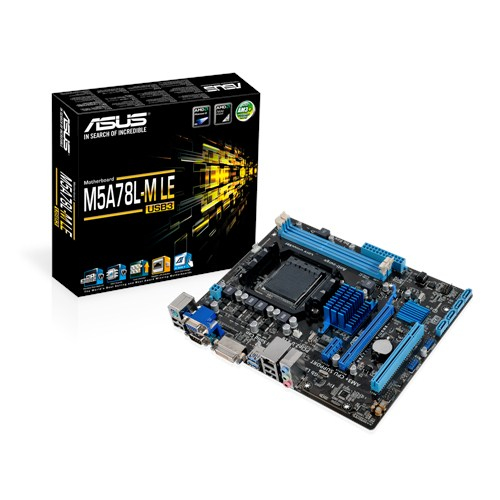
ASUS M5A78L-M LE/USB3
AMD 760G micro ATX