
ASUS ZenScreen MS32UC computer monitor 80 cm (31.5") 3840 x 2160 pixels 4K Ultra HD LED Grey, White
- Screen: 80 cm (31.5"), 3840 x 2160 pixels, IPS, Flat
- Refresh rate: 60 Hz, 5 ms response time
- Brightness: 350 cd/m²
- Ports: 1 × HDMI, 1 × DisplayPort
- Stand: height-adjustable, tilt, VESA 100 x 100 mm
- Extras: speakers, USB hub
- Colour: Grey, White
Where to buy
We're not tracking prices for this product yet. Check current prices directly at:
We may earn a commission when you buy through links on this page — at no extra cost to you. Learn more
About this product
The Smartest Choice
Level up your desktop setup with ZenScreen Smart MS32UC ― a 31.5-inch monitor that’s ideal for more than work. View images or play games on its stunning 4K HDR panel. With 400,000+ movies and TV episodes available across 10,000+ apps, Google TV takes streaming and live TV to the next level — bringing together your favorite entertainment from across your apps and organizing it all, just for you. And if you’re a streamer, go live on all your favorite sites with ZenScreen Smart MS32UC’s multi-platform streaming app. Work hard, play harder, all on one sleek screen.
*Some apps and/or content may not be available in all countries.
Work, Play, Watch, Create. One Screen for All
Hear More.
Feel Everything. Harman Kardon.
ZenScreen Smart series monitor boasts dual front-facing 5-watt speakers certified by Harman Kardon. Experience exceptional acoustics with outstanding clarity and richness that elevate moviesand games.
Powered by The #1 Streaming Platform
The most extensive app library
From apps to live TV, music, shows, and everything in between – Google TV covers it all.
Personalized entertainment
Enjoy multiple user accounts and personalized recommendations. Create profiles for each family member and get personalized suggestions.
Just ask Google Assistant
Use voice control to search apps, live TV and YouTube ― all hands-free.
Create watchlists
Never miss episodes of your favorite shows, thanks to the watchlist* feature.
The entertainment you love. With a little help from Google and AI-enabled features.
No more jumping from app to app. Google TV brings together movies, shows and more from all of your subscriptions. Need inspiration? Get curated recommendations, use Google’s powerful search to find shows across 10,000+ apps. Use your voice to find shows, play music, control smart home devices, and more. And with personalized profiles, everyone’s experience is customized for them.
The center of your smart home
Make your Google TV the center of your smart home. Control lights, temperature, and more from the new home panel, get doorbell notifications and full-screen views of your cameras and use your voice to control it all—just ask Google Assistant.
Every detail, brought to life
Experience stunning visuals with breathtaking levels of detail. 4K UHD resolution and 99% sRGB gamut ensure vibrant colors that bring pictures, videos, and movies to life. HDR support delivers deeper blacks and brighter whites, revealing hidden details in every scene.
Easy to Get All You Need Here!
Switch between work and play with one click
Simplified source control on ZenScreen Smart series monitor lets you switch between these configurations with ease.
Work without bounds
Enjoy more flexible workflows without a PC.
Your Productivity & Entertainment Center
Effortless multitasking
Multi-Control
Boost your multitasking process by controlling multiple devices with just a single mouse and keyboard*. Experience a streamlined workflow with a unified control station for ZenScreen Smart series monitor, your phone, and laptop!
Multi-View
Split the screen into two sections to simultaneously view and interact with content from different sources*. Control these directly from the ZenScreen Smart series monitor for versatile multitasking.
From your device to the big screen
ZenScreen Smart series monitor offers seamless connections to multiple devices, including PCs and smartphones through Miracast or Chromecast.
Go Live on All Your Favorite Platforms
The integrated Multi-Platform Live Streaming app on ZenScreen Smart series monitor lets you broadcast to several online streaming sites simultaneously.
Connect with convenience: Multiple Ports
ZenScreen Smart MS32UC is the perfect entertainment hub, boasting built-in Google TV with extensive wired and wireless connectivity options including USB Type-C with 90-watt Power Delivery, HDMI, DisplayPort, and two USB hubs to connect to laptops, smartphones, and tablets.
Sustaining an Incredible Future
Eco-friendly design
ZenScreen Smart MS32UC is made via an exclusive insert-molding process to keep its weight down and to create a thin profile while also cutting down on materials used. What’s more, the monitor is shipped in sustainable FSC Mix-certified packaging. This lightweight, eco-friendly, paper-based packaging is designed to keep overall volume as low as possible for more efficient shipping.
Videos & documents
The Smartest Choice ASUS ZenScreen Smart Monitor MS27UC
- ManualUser manual ↗
- Product information sheetEU Product Fiche ↗
Specifications
Key specifications
- Display diagonalSize of the display for this product, measured diagonally, usually in inches.
- 80 cm (31.5")
- Display resolutionThe number of distinct pixels in each dimension that can be displayed. It is usually quoted as width × height, with the units in pixels: for example, "1024 × 768" means the width is 1024 pixels and the height is 768 pixels. The higher the number of pixels, the sharper the image.
- 3840 x 2160 pixels
- Panel typeThe technology used to manufacture the panel, such as AMOLED or AH-IPS.
- IPS
- Screen shapeDescribes the physical curvature of the display panel, such as whether it is flat or curved.
- Flat
- Maximum refresh rateThe highest number of times per second the image is updated, measured in hertz (Hz).
- 60 Hz
- Response timeThe response time is the time difference between the moment that a source (for example a video card) sends a signal and that equipment (for example a monitor) receives or display the signal. (Used abbreviations: R/F = Rise and Fall.)
- 5 ms
- Display brightness (typical)Display brightness, measured by its Luminance, presented as a figure in nits. Typical brightness ratings for monitors range from 250 to 350 nits with a target value of between 80 to 120 nits being suitable for most displays in a normal viewing environment.
- 350 cd/m²
- HDMI ports quantityThe number of sockets (ports) for HDMI connections. HDMI (High-Definition Multimedia Interface) is a compact audio/video interface for transferring uncompressed video data and compressed/uncompressed digital audio data from a HDMI-compliant device ("the source device") to a compatible computer monitor, video projector, digital television, or digital audio device. HDMI is a digital replacement for…
- 1
- DisplayPorts quantityNumber of DisplayPorts. A DisplayPort is a digital display interface developed by the Video Electronics Standards Association (VESA). The interface is primarily used to connect a video source to a display device such as a computer monitor, though it can also be used to carry audio, USB, and other forms of data.
- 1
- Height adjustmentThe part of the device that can be adjusted to change the height.
- Yes
- Tilt adjustmentThe tilt, which means the angle at which the device is pointing (up or down), can be changed.
- Yes
- Panel mounting interfaceThe product can be used wih VESA mounting interfaces.
- 100 x 100 mm
- Built-in speaker(s)The device contains speaker(s) to produce sound.
- Yes
- Built-in USB hubWhether or not the device features a USB hub to connect more than one other device via USB.
- Yes
Show all 99 specificationsShow key specifications only
Design
- VESA mountingIndicates whether the product supports the VESA mounting standard for attachment to compatible arms, brackets, or wall mounts.
- Yes
- Market positioningUnder which category can the device be positioned in the market, e.g. camera phone.
- Home
- Product colourThe colour e.g. red, blue, green, black, white.
- Grey, White
- Panel mounting interfaceThe product can be used wih VESA mounting interfaces.
- 100 x 100 mm
- Wall mountableThe product can be mounted on (attached to ) a wall.
- Yes
- Detachable standIndicates whether the support base can be removed from the main unit.
- Yes
Ports & interfaces
- Built-in USB hubWhether or not the device features a USB hub to connect more than one other device via USB.
- Yes
- USB hub versionThe technical standard of the USB hub, if available, which determines the maximum data transfer speed (e.g., 3.2 Gen 1).
- 2.0
- Number of USB Type-C upstream ports quantityThe total number of USB Type-C ports available to connect the device to a host computer or source.
- 1
- USB Type-A downstream ports quantityThe number of USB Type-A ports available for connecting peripheral devices to the unit.
- 2
- USB Type-C DisplayPort Alternate ModeIndicates whether the USB Type-C port supports the transmission of native DisplayPort video signals to an external display.
- Yes
- USB Power Delivery up toThe maximum amount of power the device can provide or receive via a USB connection, measured in watts.
- 90 W
- HDMIHDMI (High-Definition Multimedia Interface) is a compact audio/video interface for transferring uncompressed video data and compressed/uncompressed digital audio data from a HDMI-compliant device ("the source device") to a compatible computer monitor, video projector, digital television, or digital audio device. HDMI is a digital replacement for existing analog video standards.
- Yes
- HDMI ports quantityThe number of sockets (ports) for HDMI connections. HDMI (High-Definition Multimedia Interface) is a compact audio/video interface for transferring uncompressed video data and compressed/uncompressed digital audio data from a HDMI-compliant device ("the source device") to a compatible computer monitor, video projector, digital television, or digital audio device. HDMI is a digital replacement for…
- 1
- HDMI versionThe specific release version of the High-Definition Multimedia Interface standard supported by the device (e.g. 1.3 or 2.0).
- 2.0
- DisplayPorts quantityNumber of DisplayPorts. A DisplayPort is a digital display interface developed by the Video Electronics Standards Association (VESA). The interface is primarily used to connect a video source to a display device such as a computer monitor, though it can also be used to carry audio, USB, and other forms of data.
- 1
- DisplayPort versionThe specific release version of the DisplayPort standard supported by the device (e.g., 1.2 or 1.4).
- 1.4
- Headphone outThe socket for connecting headphones to the device.
- Yes
- Headphone outputsNumber of sockets /ports where headphones are connected.
- 1
- Headphone connectivityHow headphones connect to a device e.g. wirelessly or via a cable and connector.
- 3.5 mm
- HDCPHigh-bandwidth Digital Content Protection (HDCP) is a form of digital copy protection to prevent copying of digital audio and video content as it travels across connections.
- Yes
- HDCP versionThe version of the High-bandwidth Digital Content Protection standard supported by the device to prevent the unauthorized copying of digital audio and video content (e.g. 2.2).
- 2.2
Audio
- Built-in speaker(s)The device contains speaker(s) to produce sound.
- Yes
- Number of speakersThe quantity of speakers included in/with the product.
- 2
- RMS rated powerRMS (Root mean square) is a measure of the continuous power required by a device, in particular audio amplifiers and loudspeakers.
- 10 W
Multimedia
- Built-in cameraThe product has an integrated camera.
- No
Performance
- NVIDIA G-SYNCIndicates whether the product supports NVIDIA G-SYNC technology to synchronize the display refresh rate with the GPU to eliminate screen tearing.
- No
- AMD FreeSyncThe product includes AMD Freesync Technology for the dynamic synchronization of the graphic card and the monitor in order to avoid screen tearing.
- No
- Flicker-free technologyIndicates whether the device employs technology to reduce or eliminate screen flickering to decrease eye strain during prolonged use.
- Yes
- Low Blue Light technologyIndicates whether the product features technology designed to reduce the amount of harmful short-wave blue light emitted by the screen to decrease eye strain.
- Yes
- High Dynamic Range (HDR) supportedIndicates whether the device supports High Dynamic Range for improved contrast and a wider range of colours and luminosity.
- Yes
Display
- Display diagonalSize of the display for this product, measured diagonally, usually in inches.
- 80 cm (31.5")
- Display resolutionThe number of distinct pixels in each dimension that can be displayed. It is usually quoted as width × height, with the units in pixels: for example, "1024 × 768" means the width is 1024 pixels and the height is 768 pixels. The higher the number of pixels, the sharper the image.
- 3840 x 2160 pixels
- Native aspect ratioThe aspect ratio is the ratio of the width of an image to its height. The native aspect ratio is the one which the projector/display is particularly designed for. Images shown in native aspect ratio will utilize the entire resolution of the display and achieve maximum brightness. Images shown in other than native aspect ratio will always have less resolution and less brightness than images shown…
- 16:9
- Display technologyThe technology used in the display e.g. plasma, LED.
- LED
- TouchscreenA screen of a laptop, smartphone, etc., that responds to touch so you can control the interface using your fingers.
- No
- Native refresh rateThe number of times per second the hardware updates, measured in hertz (Hz).
- 60 Hz
- HD typeType of supported High Definition (e.g. Full HD, 4K Ultra HD).
- 4K Ultra HD
- Panel typeThe technology used to manufacture the panel, such as AMOLED or AH-IPS.
- IPS
- LED backlightA backlight is a form of illumination used in liquid crystal displays (LCDs). One type of backlight is made by LEDs, which can be either white or RGB (red green blue). White LEDs are used most often in notebooks and desktop screens, and in virtually all mobile LCD screens. RGB LEDs for backlighting are found in high-end color proofing displays such as HP DreamColor LP2480zx monitor or selected HP…
- Yes
- Display brightness (peak)The maximum light intensity the device can achieve, measured in candelas per square metre (cd/m²).
- 400 cd/m²
- Display brightness (typical)Display brightness, measured by its Luminance, presented as a figure in nits. Typical brightness ratings for monitors range from 250 to 350 nits with a target value of between 80 to 120 nits being suitable for most displays in a normal viewing environment.
- 350 cd/m²
- Response timeThe response time is the time difference between the moment that a source (for example a video card) sends a signal and that equipment (for example a monitor) receives or display the signal. (Used abbreviations: R/F = Rise and Fall.)
- 5 ms
- Response time measurement typeThe method used to measure the time it takes for a pixel to change colors, such as GTG (Gray to Gray) or BwB (Black-white-Black).
- GTG (Gray to Gray)
- Anti-glare screenAlways gives an optimal view, even in direct sunlight.
- Yes
- Screen shapeDescribes the physical curvature of the display panel, such as whether it is flat or curved.
- Flat
- Contrast ratio (typical)The difference in light intensity between the brightest white and the darkest black.
- 1000:1
- Contrast ratio (dynamic)A property of a display system, defined as the ratio of the luminance of the brightest color (white) to that of the darkest color (black) that the system is capable of producing.
- 100000000:1
- Maximum refresh rateThe highest number of times per second the image is updated, measured in hertz (Hz).
- 60 Hz
- Viewing angle, horizontalMaximum horizontal angle at which a display can be viewed with acceptable visual performance.
- 178°
- Viewing angle, verticalMaximum vertical angle at which a display can be viewed with acceptable visual performance.
- 178°
- Display number of coloursThe total number of distinct colours that the device is capable of displaying (e.g. 1.07 billion colours).
- 1.073 billion colours
- Pixel pitchThis is the parameter of a picture tube, which specifies the shortest distance between two dots of the same colour. The principle is: the smaller the dot pitch, the better sharpness of image.
- 0.182 x 0.182 mm
- Viewable size, horizontalThe viewable size is often somewhat smaller than the actual size of a monitor, because there is a border around the image.
- 69.7 cm
- Viewable size, verticalThe height of the screen area that can actually display an image, measured in millimetres or inches.
- 39.2 cm
- Digital horizontal frequencyThe range of horizontal scanning frequencies the device can support, measured in kHz.
- 30 - 133.2 kHz
- Digital vertical frequencyThe range of refresh rates the device can support when operating in digital mode, measured in Hertz (Hz).
- 40 - 60 Hz
- High Dynamic Range (HDR) technologyThe specific standard or version of high contrast and color reproduction used to enhance the detail in the darkest and brightest areas of an image (e.g. DisplayHDR 600).
- High Dynamic Range 10 (HDR10), High Dynamic Range 10+ (HDR10 Plus), Hybrid Log-Gamma Pro (HLG Pro)
- Colour depthThe number of bits used to represent the colour of a single pixel, which determines the total number of possible colours that can be displayed.
- 10 bit
- Colour gamut standardThe specific color space standard the device is designed to reproduce, such as Adobe RGB or DCI-P3.
- DCI-P3
- Colour gamutThe range of colours that the display can accurately reproduce, typically expressed as a percentage of a standard colour space (e.g. sRGB or Adobe RGB).
- 98%
- DCI-P3 coverageThe percentage of the DCI-P3 color gamut that the device is capable of displaying.
- 98%
Certificates
- CertificationSpecifies the official standards, safety approvals, or regulatory certifications the product has received.
- Energy Star TÜV Flicker-free TÜV Low Blue Light VESA DisplayHDR 400 FSC MIX
Sustainability
- Sustainability certificatesThe environmental or ethical certifications the product has received to verify its sustainability standards (e.g., ASC or ACT Organic).
- ENERGY STAR, Forest Stewardship Council (FSC) Mix
Packaging content
- Stand includedIndicates whether a support stand is supplied with the product.
- Yes
Weight & dimensions
- Width (with stand)The total horizontal measurement of the product when the supporting stand is attached, measured in millimetres.
- 714 mm
- Depth (with stand)The measurement of the product from front to back when any supporting accessory or base is attached, expressed in millimetres or centimetres.
- 177 mm
- Height (with stand)The total vertical measurement of the product including its base or support structure, expressed in millimetres or centimetres.
- 579 mm
- Weight (with stand)The total mass of the unit including its supporting base, measured in kilograms or grams.
- 8.6 kg
- Width (without stand)The horizontal measurement of the device excluding the base or support structure, expressed in millimetres.
- 714 mm
- Depth (without stand)The measurement of the product from front to back without its base or support, typically expressed in millimetres or centimetres.
- 50 mm
- Height (without stand)The vertical measurement of the device when the stand is removed, measured in mm.
- 449 mm
- Weight (without stand)The mass of the device excluding the support base, measured in g.
- 6.92 kg
Power
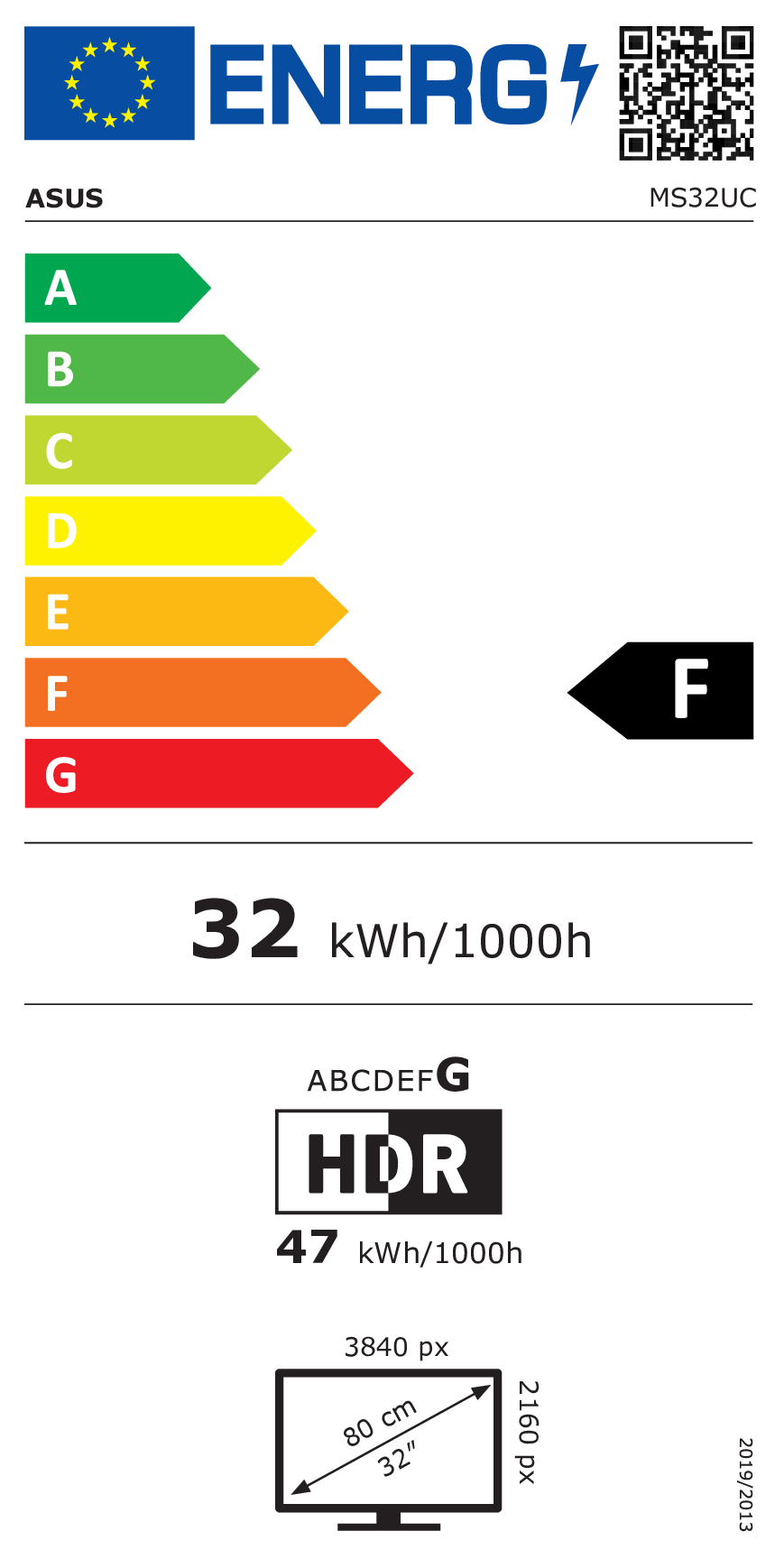
- Energy efficiency class (SDR)The energy efficiency rating of the device when operating in Standard Dynamic Range (SDR) mode, categorized from A to G.
- F
- Energy efficiency class (HDR)The energy efficiency rating of the device when High Dynamic Range (HDR) mode is active, ranging from A to G.
- G
- Energy consumption (SDR) per 1000 hoursThe amount of electric energy consumed by the device during standard dynamic range (SDR) operation over a period of 1000 hours, measured in kilowatt-hours (kWh).
- 32 kWh
- Energy consumption (HDR) per 1000 hoursThe amount of electrical energy consumed by the device when displaying High Dynamic Range (HDR) content over a period of 1000 hours, measured in kilowatt-hours (kWh).
- 47 kWh
- Power consumption (typical)Amount of power consumed by this model, often expressed in watts (W). Typical values that manufacturers give are power consumption when off, standby/suspended mode, typical use, maximum usage.
- 32 W
- Power consumption (standby)The amount of electricity that is consumed when the product is on standby.
- 0.5 W
- Power consumption (off)The amount of electrical energy consumed by the device when it is switched off, measured in watts.
- 0.3 W
- Power consumption (PowerSave)The amount of electrical energy consumed by the device when it is operating in a power-saving mode, measured in Watts.
- 0.5 W
- AC input voltageThe voltage of the AC electricity that is inputted into the product.
- 100 - 240 V
- AC input frequencyThe range of alternating current frequencies the device can accept from the power source, measured in hertz (e.g., 45 - 65).
- 50/60 Hz
- Power supply typeThe type of power supply which this product uses.
- Internal
- Energy efficiency scaleThe range of energy efficiency classes used to rate the product's power consumption, such as A to G.
- A to G
- USB Power Delivery (USB PD)Indicates whether the device supports the USB Power Delivery standard for faster charging and higher power levels.
- Yes
Security
- Cable lock slotHoles on the edge of devices through which a cable lock can be passed, so the device can be locked to a desk etc.
- No
Ergonomics
- Height adjustmentThe part of the device that can be adjusted to change the height.
- Yes
- Adjustable height (max)The maximum distance the unit can be raised vertically from its lowest position, measured in millimetres.
- 10 cm
- Tilt adjustmentThe tilt, which means the angle at which the device is pointing (up or down), can be changed.
- Yes
- Tilt angle rangeThe minimum and maximum angles at which the unit can be tilted, typically expressed in degrees.
- -5 - 20°
Network
- Wi-FiPopular technology that allows an electronic device to exchange data or connect to the internet wirelessly using radio waves.
- Yes
Smart TV
- Smart modesPredefined performance profiles that automatically adjust settings for specific use cases (e.g., Cinema, Animation, or CAD/CAM).
- AOS
Software
- Operating system installedType of operating system on a device e.g. IOS on Apple devices, Android for mobile devices.
- Android 11
Packaging data
- Package widthThe distance from one side of the packaging to the other.
- 809 mm
- Package depthThe distance from the front to the back of the packaging.
- 520 mm
- Package heightThe distance from the top to the bottom of the packaging.
- 142 mm
- Package weightWeight of the packaged product.
- 11.5 kg
- Package typeThe type of product package e.g. box.
- Box
Database Right data-sheet 2026 Icecat. All rights reserved. Provided “as is”, without warranty — check details with the store before buying.
Price history (90 days, best daily price)
Price history is still being collected for this product — check back soon.
Alternative models

ASUS BE27ACSBK
computer monitor 68.6 cm (27") 2560 x 1440 pixels Quad HD LED Black

ASUS TUF Gaming VG27AQM5A
computer monitor 68.6 cm (27") 2560 x 1440 pixels Quad HD LCD Black

ASUS TUF Gaming VG249QML5A
computer monitor 60.5 cm (23.8") 1920 x 1080 pixels Full HD LCD Black

ASUS TUF Gaming VG259Q5A
computer monitor 62.2 cm (24.5") 1920 x 1080 pixels Full HD LED Black

ASUS TUF Gaming VG279QML5A
computer monitor 68.6 cm (27") 1920 x 1080 pixels Full HD LCD Black

ASUS TUF Gaming VG279QE5A
computer monitor 68.6 cm (27") 1920 x 1080 pixels Full HD LCD Black