
ASUS MB16AMT computer monitor 39.6 cm (15.6") 1920 x 1080 pixels Touchscreen Tabletop Grey
- Screen: 39.6 cm (15.6"), 1920 x 1080 pixels, IPS, Flat
- Refresh rate: 60 Hz, 5 ms response time
- Ports: 1 × HDMI
- Extras: speakers
- Colour: Grey
All 59 specificationsProduct page at asus.com ↗
Versions
 Black, Grey
- Grey
Where to buy
We're not tracking prices for this product yet. Check current prices directly at:
We may earn a commission when you buy through links on this page — at no extra cost to you. Learn more
About this product
Tap into productivity
ASUS ZenScreen Touch MB16AMT is a slim and lightweight portable monitor with a large 7800mAh built-in battery designed to take your mobile productivity to new heights. Its responsive and intuitive 10-point touch screen supports swipe, scroll, drag and pinch gestures to help you get tasks done more efficiently. It also delivers a precise touch experience with the innovative ZenScreen Touch app, which lets you display and control apps from your Android phone for a large-screen productivity boost. Hybrid-signal USB-C and micro-HDMI connectivity enables displaying content from a wide-range of portable devices, so you can enjoy an expansive view for the best work and entertainment experiences, wherever you go.
Intuitive fingertip control
With its interactive 10-point touch screen, ZenScreen Touch MB16AMT offers a highly accurate, responsive, and seamless touch experience, enabling you to edit documents, draw on slides or play games with your fingertips. It is Windows 10 compatible, allowing you to work smarter and more efficiently.
Enjoy a larger canvas for your phone apps
The exclusive ZenScreen Touch app lets you view and control your Android phone using the larger screen of ZenScreen Touch MB16AMT. In addition to providing a more comfortable view of any content, this larger scale is perfect for complex tasks such as editing documents, photos, and video.
Hybrid-signal USB-C and micro-HDMI connectivity
Featuring hybrid-signal USB-C and micro-HDMI connectivity, ZenScreen Touch MB16AMT lets you display content from a wide variety of devices, including laptops, smartphones, game consoles, cameras and tablets, providing a more expansive view for work or play. It features an innovative hybrid-signal solution with native support for USB Type-C connections and uses an installed driver to support USB Type-A connectors for full compatibility. The reversible, any-way-up USB-C design enables quick, hassle-free connection to any device.
Built-in speakers & 7800mAh battery
With two integrated speakers, ZenScreen Touch MB16AMT enhances your audiovisual experiences, wherever you are. It also features a built-in 7800mAh battery that delivers up to four hours of operation on a single charge. With its own battery, ZenScreen Touch MB16AMT doesn't drain the power of the connected device. This allows you to work longer or watch more videos while travelling. When it's time to recharge, Quick Charge 3.0 technology doubles the battery-charging speed compared to general adapters, ensuring minimal downtime.
IPS panel with a wide 178° viewing angle
ZenScreen MB16AMT features a Full HD panel that delivers stunning 1920 x 1080 resolution visuals. It uses IPS technology to give you more flexibility when extending your screen, so you still get superb color and contrast - even from extreme viewing positions.
Sleek and ultra-portable with an inspired design
ZenScreen Touch MB16AMT is ideal for all road warriors. Even with its premium metal back cover, it weighs just 0.9kg, and its ultraslim 9mm profile ensures it fits easily in any travel bag.
Foldable Smart Case
An innovative foldable smart case protects ZenScreen Touch MB16AMT from dust and scratches. The case can be folded into a stand to prop the monitor up in either portrait or landscape orientation. ZenScreen Touch MB16AMT also features a smart pen hole on its bottom corner, where you can insert a pen to prop the screen up when not using the smart case.
Automatic screen orientation
With ASUS DisplayWidget software, ZenScreen Touch MB16AMT can automatically sense its orientation and switch the display between landscape and portrait modes while connecting to the laptop. Landscape mode is ideal for presentations and spreadsheets, while Portrait mode gives you a perfect view of items such as documents, books or websites.
ASUS Ultra-Low Blue Light technology
ASUS Ultra-Low Blue Light technology protects you from harmful blue light emissions. It offers four blue-light filter settings that are easily accessible through the on-screen display menu.
ASUS Flicker-free technology
ZenScreen Touch MB16AMT features TÜV Rheinland-certified ASUS Flicker-free technology to reduce screen flicker for a more comfortable viewing experience. This technology helps minimize instances of eyestrain and other potential negative effects that may occur when spending long hours in front of a display.
Documents
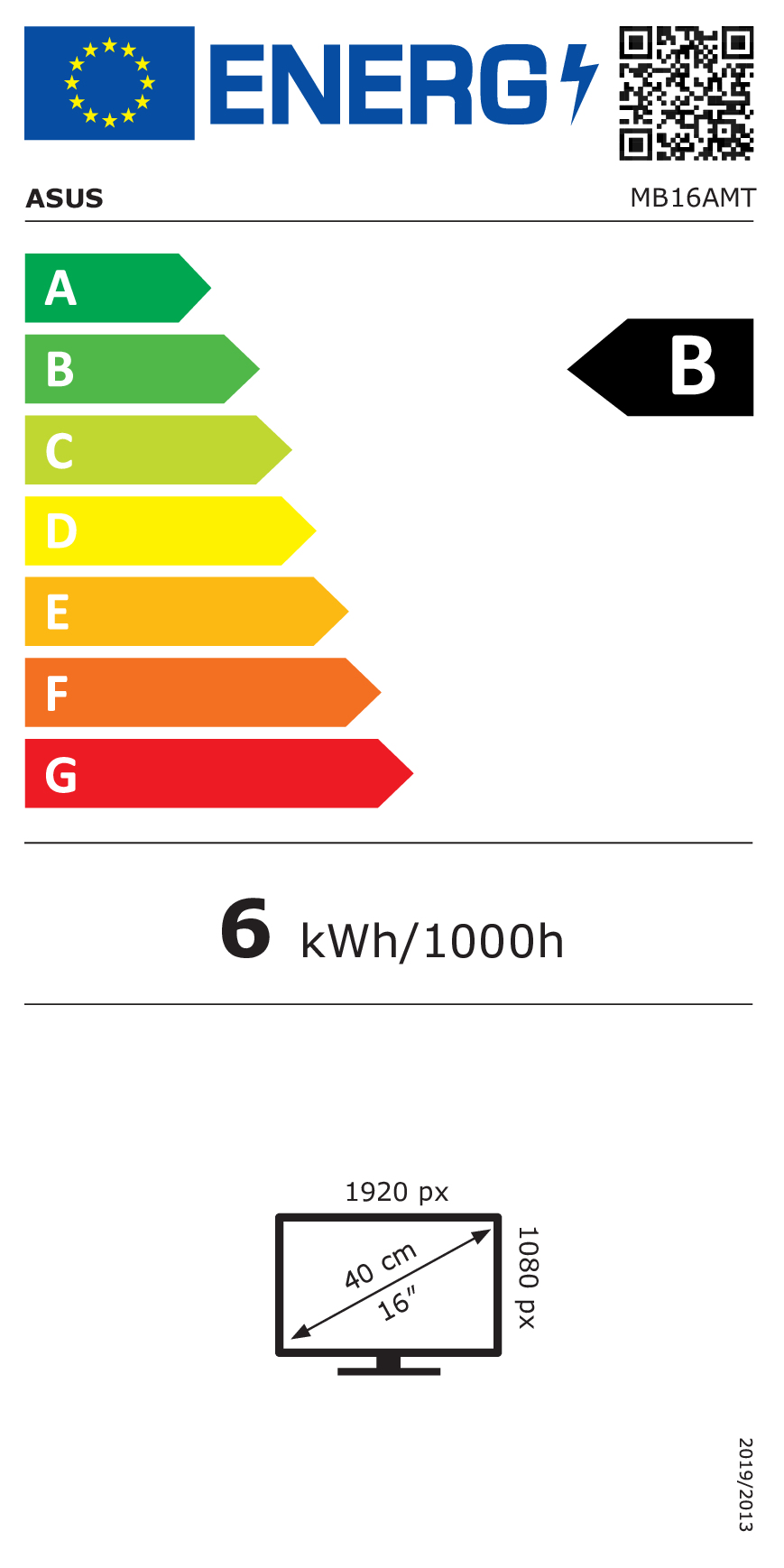
- Product information sheetEU Product Fiche ↗
Specifications
Key specifications
- Display diagonalSize of the display for this product, measured diagonally, usually in inches.
- 39.6 cm (15.6")
- Display resolutionThe number of distinct pixels in each dimension that can be displayed. It is usually quoted as width × height, with the units in pixels: for example, "1024 × 768" means the width is 1024 pixels and the height is 768 pixels. The higher the number of pixels, the sharper the image.
- 1920 x 1080 pixels
- Panel typeThe technology used to manufacture the panel, such as AMOLED or AH-IPS.
- IPS
- Screen shapeDescribes the physical curvature of the display panel, such as whether it is flat or curved.
- Flat
- Maximum refresh rateThe highest number of times per second the image is updated, measured in hertz (Hz).
- 60 Hz
- Response timeThe response time is the time difference between the moment that a source (for example a video card) sends a signal and that equipment (for example a monitor) receives or display the signal. (Used abbreviations: R/F = Rise and Fall.)
- 5 ms
- HDMI ports quantityThe number of sockets (ports) for HDMI connections. HDMI (High-Definition Multimedia Interface) is a compact audio/video interface for transferring uncompressed video data and compressed/uncompressed digital audio data from a HDMI-compliant device ("the source device") to a compatible computer monitor, video projector, digital television, or digital audio device. HDMI is a digital replacement for…
- 1
- Built-in speaker(s)The device contains speaker(s) to produce sound.
- Yes
- Product colourThe colour e.g. red, blue, green, black, white.
- Grey
Show all 59 specificationsShow key specifications only
Design
- Product colourThe colour e.g. red, blue, green, black, white.
- Grey
- Wall mountableThe product can be mounted on (attached to ) a wall.
- No
Audio
- Built-in speaker(s)The device contains speaker(s) to produce sound.
- Yes
- Number of speakersThe quantity of speakers included in/with the product.
- 2
- RMS rated powerRMS (Root mean square) is a measure of the continuous power required by a device, in particular audio amplifiers and loudspeakers.
- 2 W
- Built-in microphoneMicrophone that is found inside the product.
- No
Multimedia
- Built-in cameraThe product has an integrated camera.
- No
Performance
- NVIDIA G-SYNCIndicates whether the product supports NVIDIA G-SYNC technology to synchronize the display refresh rate with the GPU to eliminate screen tearing.
- No
- AMD FreeSyncThe product includes AMD Freesync Technology for the dynamic synchronization of the graphic card and the monitor in order to avoid screen tearing.
- No
- Flicker-free technologyIndicates whether the device employs technology to reduce or eliminate screen flickering to decrease eye strain during prolonged use.
- Yes
- OmniTapps Multitouch compatibilityThe device can use OmniTapps Multitouch, which is a software suite which allows you to create websites which are multi-touch environments.
- No
Display
- Display diagonalSize of the display for this product, measured diagonally, usually in inches.
- 39.6 cm (15.6")
- Display resolutionThe number of distinct pixels in each dimension that can be displayed. It is usually quoted as width × height, with the units in pixels: for example, "1024 × 768" means the width is 1024 pixels and the height is 768 pixels. The higher the number of pixels, the sharper the image.
- 1920 x 1080 pixels
- Native aspect ratioThe aspect ratio is the ratio of the width of an image to its height. The native aspect ratio is the one which the projector/display is particularly designed for. Images shown in native aspect ratio will utilize the entire resolution of the display and achieve maximum brightness. Images shown in other than native aspect ratio will always have less resolution and less brightness than images shown…
- 16:9
- TouchscreenA screen of a laptop, smartphone, etc., that responds to touch so you can control the interface using your fingers.
- Yes
- Panel typeThe technology used to manufacture the panel, such as AMOLED or AH-IPS.
- IPS
- Touchscreen typeThere are a variety of touchscreen technologies that have different methods of sensing touch, including resistive and capacitive.
- Tabletop
- Touchscreen technologyThe method used by the device to detect touch input, such as capacitive, infrared, or resistive technology.
- Capacitive
- Touch technologyTechnology of touch sensetive screen e.g. dual-touch.
- Multi-touch
- Number of simultaneous touchpointsThe maximum number of individual points of contact that the touch-sensitive surface can detect and track at the same time.
- 10
- Response timeThe response time is the time difference between the moment that a source (for example a video card) sends a signal and that equipment (for example a monitor) receives or display the signal. (Used abbreviations: R/F = Rise and Fall.)
- 5 ms
- Screen shapeDescribes the physical curvature of the display panel, such as whether it is flat or curved.
- Flat
- Contrast ratio (dynamic)A property of a display system, defined as the ratio of the luminance of the brightest color (white) to that of the darkest color (black) that the system is capable of producing.
- 700:1
- Maximum refresh rateThe highest number of times per second the image is updated, measured in hertz (Hz).
- 60 Hz
- Viewing angle, horizontalMaximum horizontal angle at which a display can be viewed with acceptable visual performance.
- 344.16°
- Viewing angle, verticalMaximum vertical angle at which a display can be viewed with acceptable visual performance.
- 193.59°
- Pixel pitchThis is the parameter of a picture tube, which specifies the shortest distance between two dots of the same colour. The principle is: the smaller the dot pitch, the better sharpness of image.
- 0.179 x 0.179 mm
Packaging content
- AC adapter includedIndicates whether a power supply unit for connecting the device to an AC outlet is provided in the package.
- Yes
- Cables includedSpecifies the types and quantities of connection cables provided with the product (e.g., 3.5 mm to 3.5 mm or SATA).
- USB Type-C
- Stylus includedIndicates whether a stylus is provided as part of the product package.
- Yes
- Quick start guideInstructions, either online, as a computer program or in paper form, to allow you to set up and start using the product quickly.
- Yes
System requirements
- Mobile operating systems supportedThe operating systems e.g. Android, iOS, that can be used with the mobile device.
- Android 6.0, Android 7.0, Android 8.0, Android 9.0
- Other operating systems supportedLists additional operating systems that are compatible with the product (e.g. Android, ChromeOS or FreeBSD).
- ChromeOS
Certificates
- CertificationSpecifies the official standards, safety approvals, or regulatory certifications the product has received.
- BSMI, CB, CCC, FCC, J-MOSS, KCC, UkrSEPRO, UL/cUL, VCCI, WEEE, WHQL (Windows 10, Windows 8.1, Windows 7), TUV Flicker-free , TUV Low Blue Light, CU(EAC), BIS
Weight & dimensions
- Width (with stand)The total horizontal measurement of the product when the supporting stand is attached, measured in millimetres.
- 359.7 mm
- Depth (with stand)The measurement of the product from front to back when any supporting accessory or base is attached, expressed in millimetres or centimetres.
- 9 mm
- Height (with stand)The total vertical measurement of the product including its base or support structure, expressed in millimetres or centimetres.
- 227.4 mm
- Weight (with stand)The total mass of the unit including its supporting base, measured in kilograms or grams.
- 900 g
Operational conditions
- Operating temperature (T-T)The minimum and maximum temperatures at which the product can be safely operated.
- 5 - 35 °C
- Operating relative humidity (H-H)The range of relative humidity, expressed as a percentage, within which the device can function correctly without damage or performance loss.
- 20 - 90%
Power
- Energy efficiency class (SDR)The energy efficiency rating of the device when operating in Standard Dynamic Range (SDR) mode, categorized from A to G.
- B
- Energy consumption (SDR) per 1000 hoursThe amount of electric energy consumed by the device during standard dynamic range (SDR) operation over a period of 1000 hours, measured in kilowatt-hours (kWh).
- 6 kWh
- Power consumption (typical)Amount of power consumed by this model, often expressed in watts (W). Typical values that manufacturers give are power consumption when off, standby/suspended mode, typical use, maximum usage.
- 12 W
- Power consumption (off)The amount of electrical energy consumed by the device when it is switched off, measured in watts.
- 0 W
- Power consumption (PowerSave)The amount of electrical energy consumed by the device when it is operating in a power-saving mode, measured in Watts.
- 0 W
- Energy efficiency scaleThe range of energy efficiency classes used to rate the product's power consumption, such as A to G.
- A to G
Ergonomics
- Height adjustmentThe part of the device that can be adjusted to change the height.
- No
Ports & interfaces
- HDMIHDMI (High-Definition Multimedia Interface) is a compact audio/video interface for transferring uncompressed video data and compressed/uncompressed digital audio data from a HDMI-compliant device ("the source device") to a compatible computer monitor, video projector, digital television, or digital audio device. HDMI is a digital replacement for existing analog video standards.
- Yes
- HDMI ports quantityThe number of sockets (ports) for HDMI connections. HDMI (High-Definition Multimedia Interface) is a compact audio/video interface for transferring uncompressed video data and compressed/uncompressed digital audio data from a HDMI-compliant device ("the source device") to a compatible computer monitor, video projector, digital television, or digital audio device. HDMI is a digital replacement for…
- 1
- HDCPHigh-bandwidth Digital Content Protection (HDCP) is a form of digital copy protection to prevent copying of digital audio and video content as it travels across connections.
- Yes
Features
- Windows operating systems supportedWindows vesions wich can be used with the device.
- Windows 10, Windows 7, Windows 8
- Blue light filterIndicates whether the product has a built-in feature to reduce the amount of short-wavelength blue light to help reduce eye strain.
- Yes
Software
- Mac operating systems supportedMac operating systems e.g. OS X can be used with the device.
- Yes
- Linux operating systems supported8 RT. Linux (9.4, 9.5), Red Hat Enterprise Linux 5.0 (supported with a pre-built package); SUSE Linux (10.3, 11.0, 11, 11.1, 11.2), Fedora (9, 9.0, 10, 10.0, 11.0, 11, 12, 12.0), Ubuntu (8.04, 8.04.1, 8.04.2, 8.10, 9.04, 9.10, 10.04), Debian (5.0, 5.0.1, 5.0.2, 5.0.3)
- Yes
Other features
- 3DThe device can be used with 3D technology.
- No
Logistics data
- Harmonized System (HS) codeThe standardized numerical method of classifying traded products used by customs authorities around the world to identify goods for tariffs and statistics.
- 85285210
Packaging data
- Package widthThe distance from one side of the packaging to the other.
- 485 mm
- Package depthThe distance from the front to the back of the packaging.
- 76 mm
- Package heightThe distance from the top to the bottom of the packaging.
- 305 mm
Database Right data-sheet 2026 Icecat. All rights reserved. Provided “as is”, without warranty — check details with the store before buying.
Expert reviews
- 64
rtings.com2021
The ASUS ZenScreen Touch MB16AMT is a passable 15.6 inch portable monitor. The stand-out feature of this monitor is the 10-point touchscreen, allowing you to tap, swipe, scroll, pinch, and drag. It works perfectly with Windows 10 PCs, and it's advertised...
- +
- 1080p resolution delivers clear text and images, Good reflection handling, Comes with a built-in battery
- −
- Viewing angles are worse than most IPS panels, Colors look washed out due to narrow color gamut, Doesn't get very bright
- 70
androidauthority.com2020
The Asus ZenScreen Touch MB16AMT is a capable portable display. You get all of the niceties like a touchscreen, Thunderbolt 3, speakers, a folio case, a stylus (that is also a ballpoint pen), and a truly striking design. It's a productivity machine and wo...
- +
- Outstanding design, Thunderbolt 3 support, Folio stand case and stylus pen come included, Simple menus, Contrast ratio and brightness are good enough for productivity, IPS display has great viewing angles, Battery life is decent, Speakers, Touchscreen...
- −
- SRGB is very average resulting in muted, dull colors, Can't use Thunderbolt 3 and charge the device at the same time, Up to double the price of some competitors
- –
monitornerds.com2020
The Asus MB16AMT is a better buy if you are after thanks to its multitude of extra features such as its additional micro HDMI port. We also love the added pen which is functional and essential to the monitor and for your work. The built-in battery helps a...
- +
- Thin and Light, Accurate IPS Panel, USB-C Single Cable Operation, Micro HDMI and Speakers Included, Lower Price,
- −
- Low sRGB Coverage
- 80
pcmag.com2019
The wisely designed Asus ZenScreen Touch brings touch-input capability, flexible stand options, and an on-the-go internal battery to a 15.6-inch mobile monitor, topping the field...
- +
- Gesture-based multi-touch and stylus input, Built-in battery, Comprehensive, easy-to-navigate menus, with mini-joystick for navigation, Good brightness and contrast ratio, Built-in speakers,
- −
- Pricey for a mobile monitor, Somewhat dull colors, Limited touch support for use with Macs, and none for iOS devices
Price history (90 days, best daily price)
Price history is still being collected for this product — check back soon.
Alternative models

ASUS VP28UQGL
computer monitor 71.1 cm (28") 3840 x 2160 pixels 4K Ultra HD LED Black

ASUS VA229NR
computer monitor 54.6 cm (21.5") 1920 x 1080 pixels Full HD LED Black

ASUS ProArt PA329C
computer monitor 81.3 cm (32") 3840 x 2160 pixels 4K Ultra HD LCD Black

ASUS VA326HR
computer monitor 80 cm (31.5") 1920 x 1080 pixels Full HD LED Black

ASUS TUF Gaming VG27AQ
computer monitor 68.6 cm (27") 2560 x 1440 pixels Quad HD LED Black

ASUS ZenScreen MB16AHP
computer monitor 39.6 cm (15.6") 1920 x 1080 pixels Full HD LED Black