
ASUS MB169C+ computer monitor 39.6 cm (15.6") 1920 x 1080 pixels Full HD LED Black, Grey
- Screen: 39.6 cm (15.6"), 1920 x 1080 pixels, IPS, Flat
- Refresh rate: 5 ms response time
- Brightness: 220 cd/m²
- Ports: 1 × DisplayPort
- Extras: USB hub
- Colour: Black, Grey
Where to buy
We're not tracking prices for this product yet. Check current prices directly at:
We may earn a commission when you buy through links on this page — at no extra cost to you. Learn more
About this product
MB169C+ Portable USB Type-C-powered monitor
- Portable 15.6-inch Full HD 1920 x 1080 display with a USB Type-C connector (DP Alt mode) for user convenience and compatibility with future devices
- Weighing just 0.8kg, it is the world’s lightest 15.6-inch companion display; it also has a super-slim 8.5mm profile
- Features exclusive ASUS Ultra-Low Blue Light and QuickFit Virtual Scale
ASUS MB169C+ is designed to keep you productive, especially when you're constantly on the go. It is the world's first USB Type-C-powered companion display that's compatible with today's leading laptops and future devices. With a super-slim 8.5mm profile, and weighing in at just 0.8kg — MB169C+ is also the world's lightest 15.6-inch companion display.
Dual displays for on-the-go productivity
All you need is a single USB Type-C cable for power and video transmission
MB169C+ is the world's first 15.6-inch portable companion display that uses a single USB Type-C connection for both power and video transmission from your host device. This means you have less cables to work with, so you get a neater work area. The reversible USB Type-C connector makes connecting devices simple and easy, and you won't be damaging the cable or port by plugging in devices the “wrong” way.
MB169C+ is compatible with all DP Alternate (Alt) Mode or DisplayPort over USB-C devices without the need for additional drivers.
Slim and ultra-portable modern design
MB169C+ works best as a secondary display when you're conducting dual-monitor presentations, and helps you get things done more efficiently. It tips the scales at a lightweight 800g, and with its ultra-slim 8.5mm profile — it definitely isn't going to weigh you down. It's compatible with Windows 10 and Mac OS, so you're saved from the hassle of downloading and installing drivers too.
The ASUS Smart Case protective sleeve keeps it safe from harm when you're on the move, so you can simply tuck it into your suitcase or backpack. The sleeve even doubles as a three-way adjustable stand, so you can maximize any work station.
Extend your screen on a wide-view angle IPS panel
MB169C+ has a Full HD IPS panel to give you stunning 1920 x 1080 resolution visuals with outstanding color reproduction. The wide viewing angles afforded by IPS technology also gives you better flexibility when extending your screen, so you can view it from extreme positions without the colors washing out.
Exclusive ASUS features for added versatility
Ultra-low Blue Light Monitor
The ASUS Blue Light Filter protects you from harmful blue light, and has four different filter settings which you can easily access through the new onscreen display (OSD) menu. ASUS Ultra-Low Blue Light technology helps protect your eyes by effectively lowering blue light emissions by up to 70%.
Flicker-free Technology
It's time to say goodbye to those tired, strained eyes. Designo MB169C+ features TÜV Rheinland-certified ASUS Flicker-Free technology to reduce flicker for a comfortable viewing experience. This technology helps minimize instances of eyestrain and other damaging ailments, especially when you spend long, countless hours in front of a display watching favorite videos.
QuickFit Virtual Scale*
ASUS QuickFit Virtual Scale gives you the added convenience of an onscreen alignment grid to help preview actual-size photos and documents prior to printing, and it's all done with a quick press of a hotkey.
GamePlus
ASUS GamePlus enhances your gaming experience with additional in-game crosshair options, a timer function. You get four different crosshair options to suit your game environment; while the timer keeps track of elapsed time – especially useful in real-time strategy games.
Documents
- ManualUser manual ↗
- Product information sheetEU Product Fiche ↗
Specifications
Key specifications
- Display diagonalSize of the display for this product, measured diagonally, usually in inches.
- 39.6 cm (15.6")
- Display resolutionThe number of distinct pixels in each dimension that can be displayed. It is usually quoted as width × height, with the units in pixels: for example, "1024 × 768" means the width is 1024 pixels and the height is 768 pixels. The higher the number of pixels, the sharper the image.
- 1920 x 1080 pixels
- Panel typeThe technology used to manufacture the panel, such as AMOLED or AH-IPS.
- IPS
- Screen shapeDescribes the physical curvature of the display panel, such as whether it is flat or curved.
- Flat
- Response timeThe response time is the time difference between the moment that a source (for example a video card) sends a signal and that equipment (for example a monitor) receives or display the signal. (Used abbreviations: R/F = Rise and Fall.)
- 5 ms
- Display brightness (typical)Display brightness, measured by its Luminance, presented as a figure in nits. Typical brightness ratings for monitors range from 250 to 350 nits with a target value of between 80 to 120 nits being suitable for most displays in a normal viewing environment.
- 220 cd/m²
- DisplayPorts quantityNumber of DisplayPorts. A DisplayPort is a digital display interface developed by the Video Electronics Standards Association (VESA). The interface is primarily used to connect a video source to a display device such as a computer monitor, though it can also be used to carry audio, USB, and other forms of data.
- 1
- Built-in USB hubWhether or not the device features a USB hub to connect more than one other device via USB.
- Yes
- Product colourThe colour e.g. red, blue, green, black, white.
- Black, Grey
Show all 38 specificationsShow key specifications only
Ports & interfaces
- Built-in USB hubWhether or not the device features a USB hub to connect more than one other device via USB.
- Yes
- USB hub versionThe technical standard of the USB hub, if available, which determines the maximum data transfer speed (e.g., 3.2 Gen 1).
- 3.2 Gen 1 (3.1 Gen 1)
- DVI portDigital Visual Interface (DVI) is a video display interface to connect a video source to a display device, such as a computer monitor.
- No
- DisplayPorts quantityNumber of DisplayPorts. A DisplayPort is a digital display interface developed by the Video Electronics Standards Association (VESA). The interface is primarily used to connect a video source to a display device such as a computer monitor, though it can also be used to carry audio, USB, and other forms of data.
- 1
Design
- Product colourThe colour e.g. red, blue, green, black, white.
- Black, Grey
Multimedia
- Built-in cameraThe product has an integrated camera.
- No
Display
- Display diagonalSize of the display for this product, measured diagonally, usually in inches.
- 39.6 cm (15.6")
- Display resolutionThe number of distinct pixels in each dimension that can be displayed. It is usually quoted as width × height, with the units in pixels: for example, "1024 × 768" means the width is 1024 pixels and the height is 768 pixels. The higher the number of pixels, the sharper the image.
- 1920 x 1080 pixels
- Native aspect ratioThe aspect ratio is the ratio of the width of an image to its height. The native aspect ratio is the one which the projector/display is particularly designed for. Images shown in native aspect ratio will utilize the entire resolution of the display and achieve maximum brightness. Images shown in other than native aspect ratio will always have less resolution and less brightness than images shown…
- 16:9
- Display technologyThe technology used in the display e.g. plasma, LED.
- LED
- TouchscreenA screen of a laptop, smartphone, etc., that responds to touch so you can control the interface using your fingers.
- No
- HD typeType of supported High Definition (e.g. Full HD, 4K Ultra HD).
- Full HD
- Panel typeThe technology used to manufacture the panel, such as AMOLED or AH-IPS.
- IPS
- Display brightness (typical)Display brightness, measured by its Luminance, presented as a figure in nits. Typical brightness ratings for monitors range from 250 to 350 nits with a target value of between 80 to 120 nits being suitable for most displays in a normal viewing environment.
- 220 cd/m²
- Response timeThe response time is the time difference between the moment that a source (for example a video card) sends a signal and that equipment (for example a monitor) receives or display the signal. (Used abbreviations: R/F = Rise and Fall.)
- 5 ms
- Screen shapeDescribes the physical curvature of the display panel, such as whether it is flat or curved.
- Flat
- Supported graphics resolutionsThe graphic resolutions that can be displayed by the device. The graphic resolution describes the width and height dimensions of a display, such as a computer monitor, measured in pixels.
- 1920 x 1080 (HD 1080)
- Aspect ratioThe aspect ratio is the ratio of the width of a shape to its height. For example, 4:3 is common for standard displays and 16:9 is the ratio for Widescreen TV.
- 16:9
- Contrast ratio (typical)The difference in light intensity between the brightest white and the darkest black.
- 700:1
- Display number of coloursThe total number of distinct colours that the device is capable of displaying (e.g. 1.07 billion colours).
- 262144 colours
Other features
- Supplied AC adapter typeThe type of power supply provided with the product to connect it to an alternating current source (e.g. AC).
- AC
- 3DThe device can be used with 3D technology.
- No
Weight & dimensions
- Width (with stand)The total horizontal measurement of the product when the supporting stand is attached, measured in millimetres.
- 379.1 mm
- Depth (with stand)The measurement of the product from front to back when any supporting accessory or base is attached, expressed in millimetres or centimetres.
- 8.5 mm
- Height (with stand)The total vertical measurement of the product including its base or support structure, expressed in millimetres or centimetres.
- 235.8 mm
- Weight (with stand)The total mass of the unit including its supporting base, measured in kilograms or grams.
- 800 g
Operational conditions
- Operating temperature (T-T)The minimum and maximum temperatures at which the product can be safely operated.
- 0 - 40 °C
Power
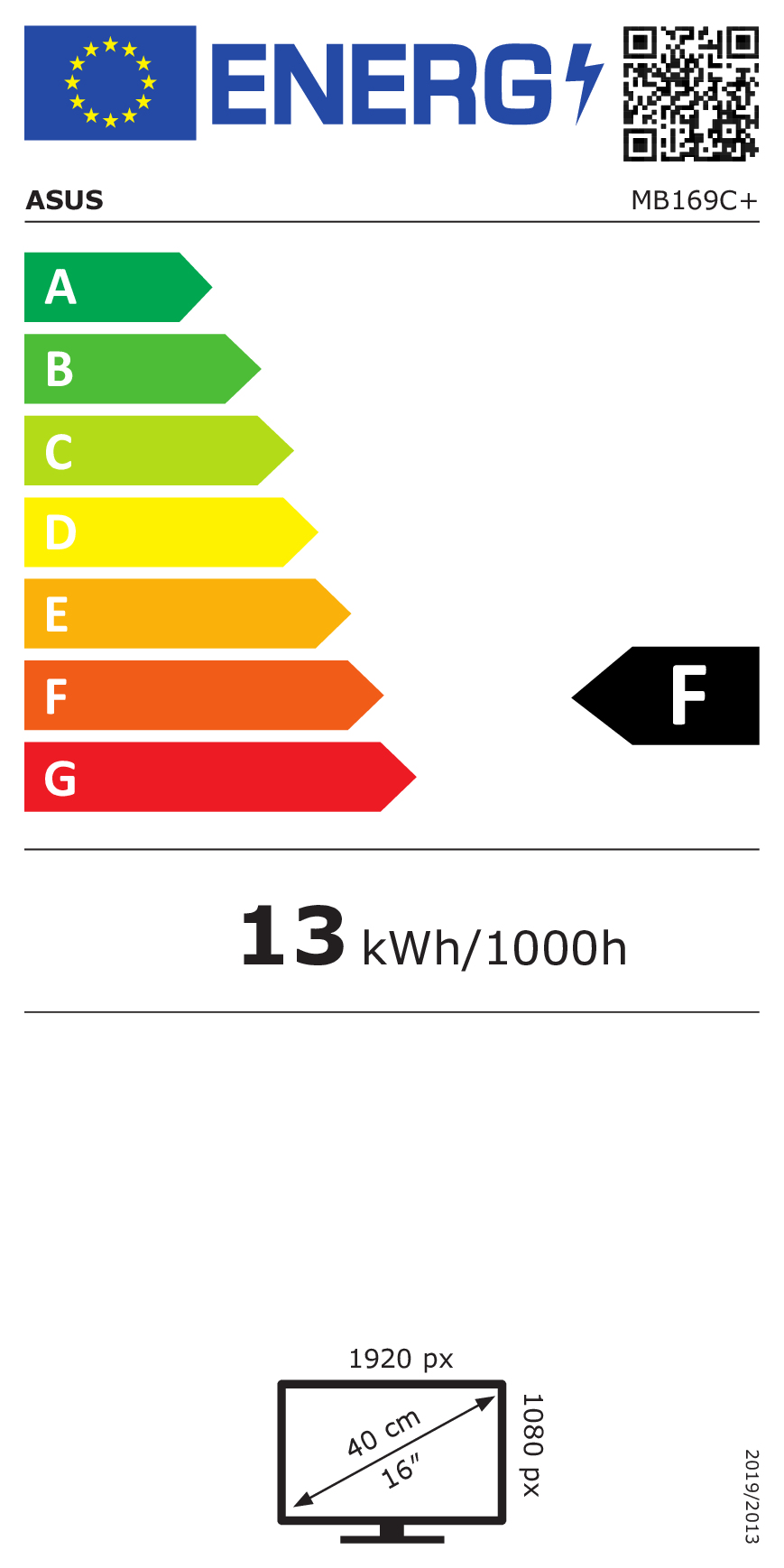
- Energy efficiency class (SDR)The energy efficiency rating of the device when operating in Standard Dynamic Range (SDR) mode, categorized from A to G.
- F
- Energy consumption (SDR) per 1000 hoursThe amount of electric energy consumed by the device during standard dynamic range (SDR) operation over a period of 1000 hours, measured in kilowatt-hours (kWh).
- 13 kWh
- Power consumption (typical)Amount of power consumed by this model, often expressed in watts (W). Typical values that manufacturers give are power consumption when off, standby/suspended mode, typical use, maximum usage.
- 7 W
Security
- Cable lock slotHoles on the edge of devices through which a cable lock can be passed, so the device can be locked to a desk etc.
- No
Ergonomics
- Height adjustmentThe part of the device that can be adjusted to change the height.
- No
Management features
- On Screen Display (OSD)Indicates whether the device can display a graphical menu or information directly on the screen for adjusting settings and viewing status.
- Yes
Logistics data
- Harmonized System (HS) codeThe standardized numerical method of classifying traded products used by customs authorities around the world to identify goods for tariffs and statistics.
- 85285210
Packaging data
- Package widthThe distance from one side of the packaging to the other.
- 435 mm
- Package depthThe distance from the front to the back of the packaging.
- 57 mm
- Package heightThe distance from the top to the bottom of the packaging.
- 297 mm
- Package weightWeight of the packaged product.
- 2 kg
Database Right data-sheet 2026 Icecat. All rights reserved. Provided “as is”, without warranty — check details with the store before buying.
Price history (90 days, best daily price)
Price history is still being collected for this product — check back soon.
Alternative models

ASUS PB277Q
computer monitor 68.6 cm (27") 2560 x 1440 pixels Quad HD Black

ASUS MX27UQ
computer monitor 68.6 cm (27") 3840 x 2160 pixels 4K Ultra HD LED White

ASUS Designo MX27UQ
computer monitor 68.6 cm (27") 3840 x 2160 pixels 4K Ultra HD LED Black, Gold

ASUS MG28UQ
computer monitor 71.1 cm (28") 3840 x 2160 pixels 4K Ultra HD Black

ASUS MG28UQ
computer monitor 71.1 cm (28") 3840 x 2160 pixels 4K Ultra HD LED Black

ASUS VT168N point touch monitor
computer monitor 39.6 cm (15.6") 1366 x 768 pixels Touchscreen Black