
ASUS MB14AHD computer monitor 35.6 cm (14") 1920 x 1080 pixels Full HD LCD Touchscreen Black
- Screen: 35.6 cm (14"), 1920 x 1080 pixels, IPS, Flat
- Refresh rate: 60 Hz, 5 ms response time
- Colour: Black
Where to buy
We're not tracking prices for this product yet. Check current prices directly at:
We may earn a commission when you buy through links on this page — at no extra cost to you. Learn more
About this product
Productivity at the tip of your stylus
ASUS ZenScreen Ink MB14AHD is a 14-inch IPS FHD portable monitor with 10-point touch functionality and ASUS Pen (SA201H)* that allows users to write, draw anytime and anywhere. The included ASUS Pen features MPP 2.0 and 4096 pressure level for precise and lag-free writing and drawing experiences. It even features an integrated stepless kickstand, enabling ZenScreen Ink to be used in almost any position.
*10-point touch and stylus only works in Windows
The ultimate portable touchscreen and pen combination
With the MPP 2.0-compliant ASUS Pen, 10-point touch functionality and portable design, ZenScreen Ink is the perfect companion for taking notes, drawing or even signing documents – anywhere, anytime. Use it as an extended display to work more efficiently on the go, or simply kick back for hands-free tasks.
ASUS Pen
Take note of every creative idea
ASUS Pen is the perfect accessory for ZenScreen Ink, empowering you to write, draw or annotate in any supported app. It features Microsoft Pen Protocol (MPP) 2.0 technology and 4096-level sensitivity for low latency and fast response, enabling smooth, natural writing experiences. With built-in magnets securing it to the top of the monitor, and lasting up to a year on a single battery charge*, ASUS Pen is ready to use whenever and wherever you want.
*Based on average daily use of two hours.
Compatible software
ZenScreen Ink is designed for productivity and is fully compatible with numerous writing software and other tools including Microsoft Windows Ink, Whiteboard and OneNote.
Tap into productivity
With its interactive 10-point touchscreen, ZenScreen Ink offers highly-accurate, responsive and seamless touch experiences*, enabling you to edit documents, draw on slides or play games with your fingertips. It is Windows 10/11 compatible, allowing you to work smarter and more efficiently.
* Availability of 10-point touchscreen functionality depends on operating system.
Flexible viewing positions
The built-in stepless kickstand supports both landscape and portrait modes. It offers up to 150° of hinge movement, so it’s easy to use and flexible for all kinds of touch or writing scenarios. There’s also an integrated tripod socket, enabling ZenScreen Ink to be elevated and oriented into any position.
Automatic screen orientation
When connected to a Windows PC, the ASUS DisplayWidget Lite tool* enables ZenScreen Ink to sense its orientation and automatically switches the display between landscape and portrait modes. Landscape mode is ideal for presentations and spreadsheets, while portrait style provides the perfect long view for documents, books or websites.
*Software required. Auto-rotate function works only with the Windows operating system.
Rich connectivity
ZenScreen Ink includes a Micro HDMI port and two USB-C ports with DisplayPort Alt Mode for quick connections to compatible devices. The USB-C ports can also be used for power input.
Protect your eyes with ASUS Eye Care technology
ASUS Ultra-Low Blue Light technology
Exclusive ASUS Ultra-Low Blue Light technology protects you from potentially harmful blue light. It offers four filter settings that are easily accessed through the onscreen display menu via the hotkey.
Blue Light Filter Level
ASUS Flicker Free technology
TÜV Rheinland-certified ASUS Flicker Free technology eliminates flicker, ensuring comfortable viewing experiences. This technology helps minimize eyestrain and other ailments typically associated with extended hours of viewing.
Documents
- Product information sheetEU Product Fiche ↗
Specifications
Key specifications
- Display diagonalSize of the display for this product, measured diagonally, usually in inches.
- 35.6 cm (14")
- Display resolutionThe number of distinct pixels in each dimension that can be displayed. It is usually quoted as width × height, with the units in pixels: for example, "1024 × 768" means the width is 1024 pixels and the height is 768 pixels. The higher the number of pixels, the sharper the image.
- 1920 x 1080 pixels
- Panel typeThe technology used to manufacture the panel, such as AMOLED or AH-IPS.
- IPS
- Screen shapeDescribes the physical curvature of the display panel, such as whether it is flat or curved.
- Flat
- Maximum refresh rateThe highest number of times per second the image is updated, measured in hertz (Hz).
- 60 Hz
- Response timeThe response time is the time difference between the moment that a source (for example a video card) sends a signal and that equipment (for example a monitor) receives or display the signal. (Used abbreviations: R/F = Rise and Fall.)
- 5 ms
- Product colourThe colour e.g. red, blue, green, black, white.
- Black
Show all 54 specificationsShow key specifications only
Design
- Product colourThe colour e.g. red, blue, green, black, white.
- Black
- Wall mountableThe product can be mounted on (attached to ) a wall.
- No
Audio
- Built-in speaker(s)The device contains speaker(s) to produce sound.
- No
- Built-in microphoneMicrophone that is found inside the product.
- No
Multimedia
- Built-in cameraThe product has an integrated camera.
- No
Performance
- NVIDIA G-SYNCIndicates whether the product supports NVIDIA G-SYNC technology to synchronize the display refresh rate with the GPU to eliminate screen tearing.
- No
- AMD FreeSyncThe product includes AMD Freesync Technology for the dynamic synchronization of the graphic card and the monitor in order to avoid screen tearing.
- No
Display
- Display diagonalSize of the display for this product, measured diagonally, usually in inches.
- 35.6 cm (14")
- Display resolutionThe number of distinct pixels in each dimension that can be displayed. It is usually quoted as width × height, with the units in pixels: for example, "1024 × 768" means the width is 1024 pixels and the height is 768 pixels. The higher the number of pixels, the sharper the image.
- 1920 x 1080 pixels
- Native aspect ratioThe aspect ratio is the ratio of the width of an image to its height. The native aspect ratio is the one which the projector/display is particularly designed for. Images shown in native aspect ratio will utilize the entire resolution of the display and achieve maximum brightness. Images shown in other than native aspect ratio will always have less resolution and less brightness than images shown…
- 16:9
- Display technologyThe technology used in the display e.g. plasma, LED.
- LCD
- TouchscreenA screen of a laptop, smartphone, etc., that responds to touch so you can control the interface using your fingers.
- Yes
- HD typeType of supported High Definition (e.g. Full HD, 4K Ultra HD).
- Full HD
- Panel typeThe technology used to manufacture the panel, such as AMOLED or AH-IPS.
- IPS
- LED backlightA backlight is a form of illumination used in liquid crystal displays (LCDs). One type of backlight is made by LEDs, which can be either white or RGB (red green blue). White LEDs are used most often in notebooks and desktop screens, and in virtually all mobile LCD screens. RGB LEDs for backlighting are found in high-end color proofing displays such as HP DreamColor LP2480zx monitor or selected HP…
- Yes
- Backlight typeThe technology used to illuminate the display panel, such as CCFL or various LED configurations (e.g., Edge LED, Full-Array).
- LED
- Touch technologyTechnology of touch sensetive screen e.g. dual-touch.
- Multi-touch
- Number of simultaneous touchpointsThe maximum number of individual points of contact that the touch-sensitive surface can detect and track at the same time.
- 10
- Display brightnessBrightness is the amount of radiating light emitted from the screen. The brightness rating is measured in candellas per square meter, commonly known as 'nits'.
- 220 cd/m²
- Response timeThe response time is the time difference between the moment that a source (for example a video card) sends a signal and that equipment (for example a monitor) receives or display the signal. (Used abbreviations: R/F = Rise and Fall.)
- 5 ms
- Screen shapeDescribes the physical curvature of the display panel, such as whether it is flat or curved.
- Flat
- Contrast ratio (typical)The difference in light intensity between the brightest white and the darkest black.
- 800:1
- Contrast ratio (dynamic)A property of a display system, defined as the ratio of the luminance of the brightest color (white) to that of the darkest color (black) that the system is capable of producing.
- 100000000:1
- Maximum refresh rateThe highest number of times per second the image is updated, measured in hertz (Hz).
- 60 Hz
- Viewing angle, horizontalMaximum horizontal angle at which a display can be viewed with acceptable visual performance.
- 170°
- Viewing angle, verticalMaximum vertical angle at which a display can be viewed with acceptable visual performance.
- 170°
- Pixel pitchThis is the parameter of a picture tube, which specifies the shortest distance between two dots of the same colour. The principle is: the smaller the dot pitch, the better sharpness of image.
- 0.161 x 0.161 mm
- Viewable size, horizontalThe viewable size is often somewhat smaller than the actual size of a monitor, because there is a border around the image.
- 30.9 cm
- Viewable size, verticalThe height of the screen area that can actually display an image, measured in millimetres or inches.
- 17.4 cm
Other features
- Display viewable area (HxV)The actual dimensions of the screen that can display images, expressed as height by width, measured in mm.
- 309.37 x 174.02 mm
Packaging content
- Cables includedSpecifies the types and quantities of connection cables provided with the product (e.g., 3.5 mm to 3.5 mm or SATA).
- AC, HDMI, USB Type-C
- Stylus includedIndicates whether a stylus is provided as part of the product package.
- Yes
Weight & dimensions
- Width (without stand)The horizontal measurement of the device excluding the base or support structure, expressed in millimetres.
- 324.2 mm
- Depth (without stand)The measurement of the product from front to back without its base or support, typically expressed in millimetres or centimetres.
- 12.5 mm
- Height (without stand)The vertical measurement of the device when the stand is removed, measured in mm.
- 201.2 mm
- Weight (without stand)The mass of the device excluding the support base, measured in g.
- 870 g
Power
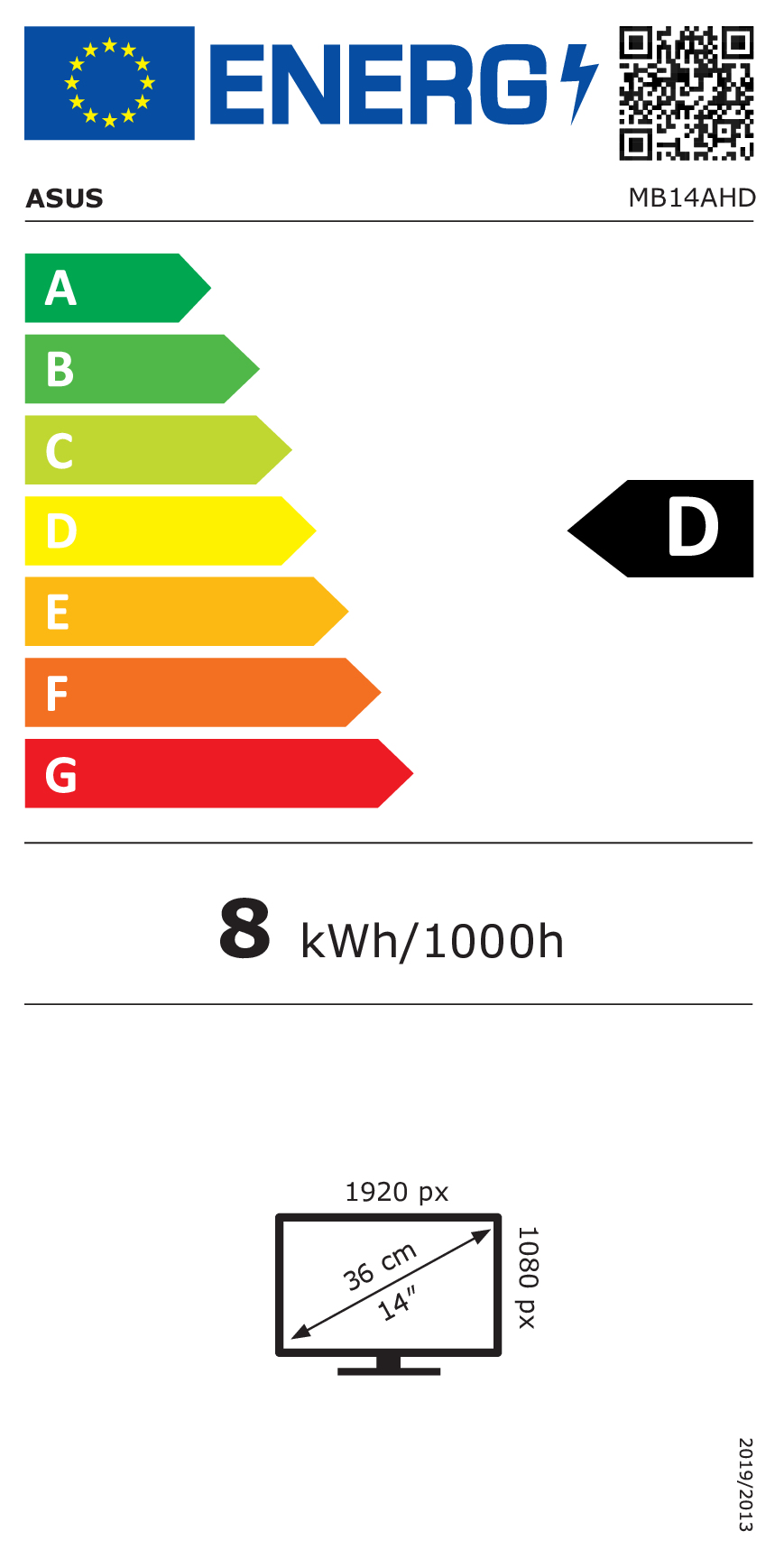
- Energy efficiency class (SDR)The energy efficiency rating of the device when operating in Standard Dynamic Range (SDR) mode, categorized from A to G.
- D
- Energy consumption (SDR) per 1000 hoursThe amount of electric energy consumed by the device during standard dynamic range (SDR) operation over a period of 1000 hours, measured in kilowatt-hours (kWh).
- 8 kWh
- Power consumption (typical)Amount of power consumed by this model, often expressed in watts (W). Typical values that manufacturers give are power consumption when off, standby/suspended mode, typical use, maximum usage.
- 10 W
- Power consumption (off)The amount of electrical energy consumed by the device when it is switched off, measured in watts.
- 0.5 W
- AC input voltageThe voltage of the AC electricity that is inputted into the product.
- 100 - 240 V
- AC input frequencyThe range of alternating current frequencies the device can accept from the power source, measured in hertz (e.g., 45 - 65).
- 50 - 60 Hz
- Energy efficiency scaleThe range of energy efficiency classes used to rate the product's power consumption, such as A to G.
- A to G
Ergonomics
- Height adjustmentThe part of the device that can be adjusted to change the height.
- No
Ports & interfaces
- USB 3.2 Gen 1 (3.1 Gen 1) Type-C ports quantityNumber of USB 3.0 (3.1 Gen 1) ports with Type-C connector. USB 3.0 (3.1 Gen 1) is USB interface version which supports transfer rate up to 5 Gbit/s (SuperSpeed). USB Type-C connector has symmetrical design architecture and compatible with Thunderbolt 3 interface.
- 2
- Micro HDMI ports quantityThe number of Micro HDMI interfaces available on the device for high-definition video and audio output or input.
- 1
- Headphone outThe socket for connecting headphones to the device.
- Yes
- Headphone outputsNumber of sockets /ports where headphones are connected.
- 1
- HDCPHigh-bandwidth Digital Content Protection (HDCP) is a form of digital copy protection to prevent copying of digital audio and video content as it travels across connections.
- Yes
Logistics data
- Harmonized System (HS) codeThe standardized numerical method of classifying traded products used by customs authorities around the world to identify goods for tariffs and statistics.
- 85285210
Packaging data
- Package widthThe distance from one side of the packaging to the other.
- 454 mm
- Package depthThe distance from the front to the back of the packaging.
- 78 mm
- Package heightThe distance from the top to the bottom of the packaging.
- 310 mm
- Package weightWeight of the packaged product.
- 2.64 kg
Database Right data-sheet 2026 Icecat. All rights reserved. Provided “as is”, without warranty — check details with the store before buying.
Expert reviews
- –
creativebloq.com2023
On paper, the ZenScreen Ink looks like a good match for the travelling creative, offering a 1080p touchscreen and stylus to accompany a laptop. On closer inspection, though, there are a number of issues with the screen that may cause it to lose some of it...
- +
- Sharp picture, Touchscreen, Stylus
- −
- Poor colour response, Not particularly bright, What's an AAAA battery
- 60
tomshardware.com2022
Asus has one of the most extensive catalogs of portable monitors out there, and it has recently expanded with the addition of the ZenScreen Ink (MB14AHD). This 14-inch device adds touch and a stylus to the mix while offering solid design and usability. Th...
Read the review at tomshardware.com ↗
Price history (90 days, best daily price)
Price history is still being collected for this product — check back soon.
Alternative models

ASUS ROG Strix XG27AQ-W
computer monitor 68.6 cm (27") 2560 x 1440 pixels Wide Quad HD White

ASUS VA27EQSB
computer monitor 68.6 cm (27") 1920 x 1080 pixels Full HD LCD Black

ASUS VA24DQLB
computer monitor 60.5 cm (23.8") 1920 x 1080 pixels Full HD LED Black

ASUS VA27VQSE
computer monitor 68.6 cm (27") 1920 x 1080 pixels Full HD Black

ASUS TUF Gaming VG248Q1B
computer monitor 61 cm (24") 1920 x 1080 pixels Full HD LED Black

ASUS VG248QG
computer monitor 61 cm (24") 1920 x 1080 pixels Full HD Black