
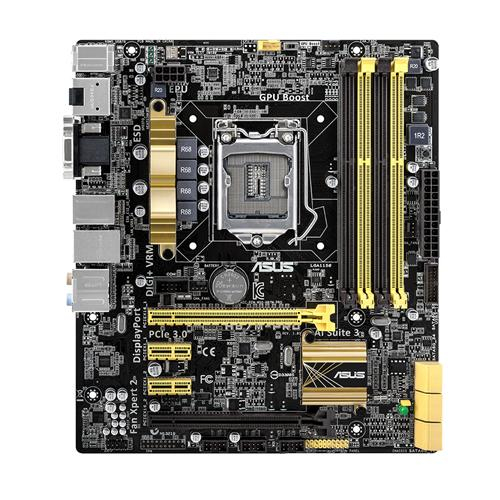
ASUS B85M-G Intel B85 LGA 1150 (Socket H3) micro ATX
- Socket: LGA 1150 (Socket H3)
- Chipset: Intel B85
- Form factor: micro ATX
- Memory: 4 × DDR3-SDRAM, up to 32 GB
- Storage: 4 × SATA III
- Network: Gigabit Ethernet
All 60 specificationsProduct page at asus.com ↗
Model numbers
- 90MB0G50-M0EAY0
- 90MB0G50-M0EAY5
- 90MB0G50-M0UBY0
Where to buy
We're not tracking prices for this product yet. Check current prices directly at:
We may earn a commission when you buy through links on this page — at no extra cost to you. Learn more
About this product
Micro-ATX B85 features high-endurance 5X Protection and new UEFI BIOS
- ASUS 5X Protection: All-round protection provides the best quality, reliability, and durability;
- USB 3.0 BOOST (UASP Support): 170% faster transfer speeds than traditional USB 3.0;
- Network iControl: Real-time network bandwidth management;
- Fan Xpert :Dedicated CPU and case fan controls;
- CrashFree BIOS 3: Restore corrupted BIOS data from USB storage;
- AI Suite 3: One-stop access to innovative ASUS features.
All-round protection provides the best quality, reliability, and durability
ASUS motherboards guard your PC with 5X Protection. We use quality components like DIGI+ VRM digital power design for precise CPU power on demand, ESD units tested to strict standards that eliminate electrostatic interference, and resettable fuses around DRAM slots to prevent overcurrent and short-circuit damage. We also use corrosion-resistant back I/O shields, all examples of ASUS providing the best possible reliability and durability.
Precise power control and long-lasting stability
Voltage regulator modules (VRMs) are among the most essential motherboard components. A good VRM intelligently delivers CPU power based on actual needs at any given time. ASUS was first with digital power design featuring faster sensing and response to deliver precise CPU power on demand. This great accuracy reduces energy waste and of course improves system stability thanks to more consistent delivery.
Short-circuit damage prevention
Onboard resettable fuses prevent overcurrent and short-circuit damage. This extends beyond I/O ports to DRAM to safeguard system and device lifespan.
Strong ESD protection for extended component lifespan
Electrostatic discharges (ESD) can happen suddenly, and their damaging effects are often underestimated. ASUS ESD Guards offer an active protective circuit design that ensures electrostatic discharges are properly grounded, providing greater component longevity.
2.5X longer lifespan with excellent durability
ASUS high-quality solid state capacitors assure a 5,000-hour lifespan, equivalent to 2.5 times longer than traditional capacitors. All capacitors pass testing under temperatures as high as 105 degrees centigrade and meet Japanese industrial standards to provide excellent durability and enhanced thermal capacity.
3X more durable corrosion-resistant coating
ASUS motherboard back I/O panels are made from strong and corrosion-resistant stainless steel, which is bonded with a thin layer of chromium oxide to enhance anti-corrosive properties. Passing 72-hour spray salt endurance tests, ASUS stainless steel back I/O panels have a usage life three times longer compared to ordinary panels.
Exclusive EZ Mode adds useful info to become even easier
Media-renowned UEFI BIOS from ASUS provides the smoothest mouse-controlled graphical BIOS, and now features more intuitive functions to quickly take you to favorite BIOS pages and frequently-accessed settings through custom shortcuts. You can even write quick notes in-BIOS for future reference, view an activity log of setting changes and modifications, and rename SATA ports. EZ Mode has a whole new look, upgraded with extra-friendly capabilities like detailed fan controls, XMP profile settings, SATA information, and fast clock adjustment. Together, these perfect your BIOS experience.
Fast Clock Adjustment
Easily change the time and date in EZ Mode using the mouse.
EZ XMP Settings
Quickly apply XMP settings in UEFI BIOS EZ Mode, achieving better DRAM performance.
EZ Fan Settings
As demanded by the community, detailed fan controls come to EZ Mode so you can switch fan profiles for quick cooling and noise-level supervision.
SATA Information
Displays each SATA port details for you to easily recognize devices.
Get all your favorite functions on one page
F4 or right click to add settings to My Favorites under Advanced Mode, which cuts time spent on searching and further speeds up system tuning.
One press to apply and access frequent settings
Now you can customize your own shortcut log by pressing F4 or right clicking to create shortcuts to frequently-used settings. Instantly access them by simply hitting the F3 hotkey.
Quick Note
You no longer need to have a pen and paper notepad around. Quick Note works inside the BIOS so you can just type remarks and ideas to help you remember important settings info and save time on trial and error.
Last Modified
Always forget those important BIOS changes you did? This friendly function creates a tuning log to track your BIOS settings history, which can be saved onto a USB drive.
SATA Port Renaming
You can rename your SATA ports for easy identification, including by usage scenario. Get greater convenience and spend less time on finding the right devices when you want to change settings.
World’s 1st USB 3.0 UASP support – instantly 170% faster
Complete USB 3.0 solution – performance boost under Turbo Mode or UASP Mode for most USB devices.
Simple plug and boost – auto detection design ensures best performance.
Go to the limit with iGPU level up!
GPU Boost accelerates the integrated GPU for extreme graphics performance. The user-friendly interface facilitates flexible frequency adjustments. It easily delivers stable system-wide upgrades for every use.
Real-time network bandwidth management
One click to prioritize network traffic for applications you're currently using or set up favorite profiles to run at specific times. Avoid network congestion, speed up downloading, and make sure online gaming runs optimized, all through an intuitive user interface.
PCI Express 3.0
PCI Express 3.0 uses improved encoding that provides twice the performance of PCI Express 2.0. Total bandwidth for an x16 link reaches 32GB/s, delivering unprecedented data speeds combined with the convenience and seamless transition offered by complete backward compatibility.
Specifications
Key specifications
- Processor socketMechanical component(s) that provides mechanical and electrical connections between a microprocessor and a printed circuit board (PCB). This allows the processor to be replaced without soldering.
- LGA 1150 (Socket H3)
- Motherboard chipsetThe chipset connects the microprocessor to the rest of the motherboard.
- Intel B85
- Motherboard chipset familyThe category of motherboard chipset e.g. Intel, AMD.
- Intel
- Motherboard form factorDesign of the motherboard (ATX, BTX etc).
- micro ATX
- Number of memory slotsThe total number of available sockets for installing memory modules.
- 4
- Supported memory typesTypes of memory which can be used with the product.
- DDR3-SDRAM
- Maximum internal memoryThe maximum amount of memory inside a product, usually measured in bytes e.g megabytes (MB) or gigabytes (GB).
- 32 GB
- Number of SATA III connectorsSerial ATA (Advanced Technology Attachment) (SATA) is a computer bus interface that connects host bus adapters to mass storage devices such as hard disk drives and optical drives. SATA III (revision 3.x) interface, formally known as SATA 6Gb/s, is a third generation SATA interface running at 6.0Gb/s. The bandwidth throughput, which is supported by the interface, is up to 600MB/s. This interface i…
- 4
- Ethernet interface typeThe maximum data transfer rate supported by the network port, expressed in gigabits per second (e.g., 10 Gigabit Ethernet).
- Gigabit Ethernet
Show all 60 specificationsShow key specifications only
Features
- Component forWhat this product is used as a part of (component for).
- PC
- Motherboard form factorDesign of the motherboard (ATX, BTX etc).
- micro ATX
- Motherboard chipset familyThe category of motherboard chipset e.g. Intel, AMD.
- Intel
- Windows operating systems supportedWindows vesions wich can be used with the device.
- Windows 7 Home Basic, Windows 7 Home Basic x64, Windows 7 Home Premium, Windows 7 Home Premium x64, Windows 7 Professional, Windows 7 Professional x64, Windows 7 Starter, Windows 7 Starter x64, Windows 7 Ultimate, Windows 7 Ultimate x64, Windows 8, Windows 8 Enterprise, Windows 8 Enterprise x64, Windows 8 Pro, Windows 8 Pro x64, Windows 8 x64
Memory
- Supported memory typesTypes of memory which can be used with the product.
- DDR3-SDRAM
- Number of memory slotsThe total number of available sockets for installing memory modules.
- 4
- Memory slots typeA memory slot, also known as a memory socket or RAM slot, is what allows computer memory (RAM) to be inserted into the computer. Depending on the motherboard, there will usually be 2 to 4 memory slots (sometimes more on high-end motherboards). The most common types of RAM are SDRAM and DDR for desktop computers and SODIMM for laptop computers, each having various types and speeds.
- DIMM
- Memory channelsThe number of communication paths between the memory controller and the RAM, which affects data transfer bandwidth (e.g., Dual-channel).
- Dual-channel
- ECC сompatibilitySpecifies whether the product supports Error Correction Code (ECC) memory, which detects and fixes data corruption (e.g., ECC, non-ECC).
- Non-ECC
- Supported memory clock speedsMemory clock speed is the time it takes for a computer to complete basic operations. It refers to the computer's processing speed and is measured in hertz. It is however not such a reliable measure of a computer's speed as it doesn't take into account other factors like RAM and cache size.
- 1066,1333,1600 MHz
- Maximum internal memoryThe maximum amount of memory inside a product, usually measured in bytes e.g megabytes (MB) or gigabytes (GB).
- 32 GB
- Supported memory module capacitiesThe maximum amount of RAM that can be installed per memory slot, such as 128GB or 192GB.
- 8GB
- Unbuffered memoryIndicates whether the device supports the use of unbuffered memory modules.
- Yes
Processor
- Processor manufacturerThe manufacturer that produced the processor.
- Intel
- Processor socketMechanical component(s) that provides mechanical and electrical connections between a microprocessor and a printed circuit board (PCB). This allows the processor to be replaced without soldering.
- LGA 1150 (Socket H3)
- Compatible processor seriesA processor which is compatible with this device, belongs to a 'series' which is part of 'family' e.g Celeron D, Celeron G, Celeron M, or, in some cases, is the same as 'family'.
- Intel Celeron, Intel Pentium
- PCI Express slots versionSpecifies the generation of the PCI Express standard supported by the expansion slots, which determines the available data transfer bandwidth (e.g., 4.0).
- 2.0, 3.0
Packaging content
- Quick installation guideIndicates whether a simplified, fast-start manual is included with the product.
- Yes
- Cables includedSpecifies the types and quantities of connection cables provided with the product (e.g., 3.5 mm to 3.5 mm or SATA).
- SATA
Software
- Drivers includedIndicates whether the necessary software drivers are provided in the package.
- Yes
Weight & dimensions
- WidthThe measurement or extent of something from side to side.
- 233 mm
- DepthThe distance from the front to the back of something.
- 193 mm
BIOS
- BIOS typeThe BIOS (Basic Input/Output System) initializes and tests system hardware components, and loads a bootloader or an operating system from a mass memory device. The BIOS additionally provides abstraction layer for the hardware, i.e. a consistent way for application programs and operating systems to interact with the keyboard, display, and other input/output devices. There are several types of BIOS…
- AMI
- BIOS memory sizeThe total storage capacity of the basic input/output system chip, measured in Mbit.
- 64 Mbit
- ACPI versionThe version of the Advanced Configuration and Power Interface standard supported by the device to manage power consumption and hardware configuration (e.g., 2.0).
- 2.0a
- Clear CMOS jumperIndicates whether the product features a physical jumper to reset the CMOS settings to their factory defaults.
- Yes
Expansion slots
- PCI Express x1 slotsThe number of available expansion slots that support a single lane of PCI Express connectivity for adding peripheral cards.
- 2
- PCI Express x16 slotsThe total number of available PCI Express x16 expansion slots for installing high-bandwidth components.
- 1
Performance
- Motherboard chipsetThe chipset connects the microprocessor to the rest of the motherboard.
- Intel B85
- Audio output channelsAn audio output channel is an electric circuit which acts as a path for a signal produced by a device. A device may have several audio output channels.
- 7.1 channels
- Ethernet interface typeThe maximum data transfer rate supported by the network port, expressed in gigabits per second (e.g., 10 Gigabit Ethernet).
- Gigabit Ethernet
Audio
- Audio chipThe specific integrated circuit or hardware component responsible for processing audio signals (e.g., ALC3287-CGT).
- Realtek ALC887-VD2
Power
- Power source typeWhat the power source is.
- ATX
Network
- Ethernet LANAn Ethernet LAN (Local Area Network) interface is present, for a wired conection via a cable.
- Yes
- LAN controllerThe specific hardware chip or chipset that manages the network interface and handles data transmission (e.g. Intel I219-V).
- Realtek 8111G
Ports & interfaces
- USB 2.0 ports quantityNumber of USB 2.0 ports (connecting interfaces) in the device. USB 2.0 was released in April 2000 (now called "Hi-Speed"), adding higher maximum signaling rate of 480 Mbit/s (effective throughput up to 35 MB/s or 280 Mbit/s), USB 2.0 ports are usually black.
- 4
- USB 3.2 Gen 1 (3.1 Gen 1) Type-A ports quantityThe total number of available USB 3.2 Gen 1 (formerly 3.1 Gen 1) Type-A connection ports on the device.
- 2
- Ethernet LAN (RJ-45) portsNumber of Ethernet LAN (RJ-45) ports (connecting interfaces) in the device. Ethernet LAN (RJ-45) ports allow a computer to connect to the ethernet.
- 1
- PS/2 ports quantityThe number of PS/2 connectors for keyboards and mice. Its name comes from the IBM Personal System/2.
- 2
- VGA (D-Sub) ports quantityNumber of VGA (D-Sub) ports (connecting interfaces) in the device. The VGA (D-Sub) connector is a 15 pin connector between a computer and a monitor. It was first introduced in 1987 by IBM.
- 1
- HDMI ports quantityThe number of sockets (ports) for HDMI connections. HDMI (High-Definition Multimedia Interface) is a compact audio/video interface for transferring uncompressed video data and compressed/uncompressed digital audio data from a HDMI-compliant device ("the source device") to a compatible computer monitor, video projector, digital television, or digital audio device. HDMI is a digital replacement for…
- 1
- DVI-D ports quantityThis is the amount of DVI-I interfaces. Digital Visual Interface (DVI) is a video display interface developed by the Digital Display Working Group (DDWG). The digital interface is used to connect a video source to a display device, such as a computer monitor. DVI-D means DVI digital, which means it can only support digital, but not analog.
- 1
- Headphone outputsNumber of sockets /ports where headphones are connected.
- 1
- Microphone inThe socket where a microphone is connected to the device.
- Yes
- Number of SATA III connectorsSerial ATA (Advanced Technology Attachment) (SATA) is a computer bus interface that connects host bus adapters to mass storage devices such as hard disk drives and optical drives. SATA III (revision 3.x) interface, formally known as SATA 6Gb/s, is a third generation SATA interface running at 6.0Gb/s. The bandwidth throughput, which is supported by the interface, is up to 600MB/s. This interface i…
- 4
- Peripheral (Molex) power connectors (4-pin)White 4-pinned connector used to connect a peripheral to the power supply.
- 1
Internal I/O
- USB 2.0 connectorsThe end of a cable with a USB 2.0 connector. USB 2.0 was released in April 2000 (now called "Hi-Speed"), adding higher maximum signaling rate of 480 Mbit/s (effective throughput up to 35 MB/s or 280 Mbit/s), in addition to the "USB 1.x Full Speed" signaling rate of 12 Mbit/s. USB 2.0 connectors are usually colored black.
- 2
- USB 3.2 Gen 1 (3.1 Gen 1) connectorsThis is a connector (normally attached to a cable) for USB 3.0. USB 3.0 is the second major revision of the Universal Serial Bus (USB) standard for computer connectivity. First introduced in 2008, USB 3.0 adds a new transfer mode called "SuperSpeed," (distinguishable from USB 2.0 by either the blue colour of the port or the initials SS) capable of transferring data at up to 5Gbit/s—more than ten…
- 1
- Number of SATA II connectorsSerial ATA (Advanced Technology Attachment) (SATA) is a computer bus interface that connects host bus adapters to mass storage devices such as hard disk drives and optical drives. SATA II (revision 2.x) interface, formally known as SATA 3Gb/s, is a second generation SATA interface running at 3.0 Gb/s. The bandwidth throughput, which is supported by the interface, is up to 300MB/s.
- 2
- S/PDIF out connectorIndicates whether the product features a Sony/Philips Digital Interface (S/PDIF) port for transmitting digital audio signals.
- Yes
- Front panel audio connectorIndicates whether the product has a dedicated header to connect audio jacks located on the front panel of a chassis.
- Yes
- ATX Power connector (24-pin)Indicates whether the product features a 24-pin ATX power connector for main power supply connectivity.
- Yes
- CPU fan connectorIndicates whether the product has a dedicated header for connecting a CPU cooling fan.
- Yes
- Number of chassis fan connectorsThe total number of internal headers available to connect case cooling fans (e.g. 3 or 4).
- 1
- Chassis intrusion connectorIndicates whether the product has a dedicated header to connect a switch that detects when the case has been opened.
- Yes
- Number of COM connectorsThe total number of serial communication ports available on the device (e.g. 2).
- 1
Graphics
- Maximum graphics card memoryThe highest amount of dedicated video RAM that the device can support or utilize, measured in gigabytes (GB) or megabytes (MB).
- 1024 MB
- On-board graphics cardGraphics hardware which is built into the motherboard or CPU, as opposed to a separate graphics adapter (video card). On-board graphics uses CPU and RAM for graphics processing.
- Yes
Printing
- Maximum resolutionMaximum printing resolution.
- 4096 x 2160 pixels
Storage
- Supported storage drive interfacesThe physical and logical connection standards supported for connecting storage drives to the system (e.g., M.2 or SATA).
- SATA II, SATA III
Database Right data-sheet 2026 Icecat. All rights reserved. Provided “as is”, without warranty — check details with the store before buying.
Price history (90 days, best daily price)
Price history is still being collected for this product — check back soon.
Alternative models

ASUS Z87I-Pro
Intel Z87 LGA 1150 (Socket H3) mini ITX

ASUS H87M-Plus
Intel HM87 LGA 1150 (Socket H3) micro ATX

ASUS Z87-Deluxe
Intel Z87 LGA 1150 (Socket H3) ATX
ASUS H87M-Pro
Intel H87 LGA 1150 (Socket H3) micro ATX

ASUS Z87-Expert
Intel Z87 LGA 1150 (Socket H3) ATX

ASUS Gryphon Z87
Intel Z87 LGA 1150 (Socket H3) micro ATX