
ACT Wireless Ergonomic Mouse with Bluetooth and USB-C/USB-A
- Connection: RF Wireless + Bluetooth
- Sensor: Optical, 2400 DPI
- Buttons: 7, Wheel
- Shape: Right-hand
- Made for: Office
- Colour: Black, Silver
Where to buy
We're not tracking prices for this product yet. Check current prices directly at:
We may earn a commission when you buy through links on this page — at no extra cost to you. Learn more
About this product
Prevent mouse-related strain injuries with the ACT AC5155 Wireless Ergonomic Mouse. Connect this mouse to three different devices simultaneously via Bluetooth (2x) and the USB-C/USB-A combo receiver (1x). The receiver can be stored inside the mouse. Choose your preferred accuracy with the DPI switch: 1000/1600/2400. Accessible thumb buttons ensure fast navigation through web pages. Additionally, the mouse has an intelligent power-saving function and an on/off switch.
Control three devices with one mouse, easily switch between the devices
The AC5155 Ergonomic Multi-Connect Wireless Mouse can be used on three different devices, including computers, laptops and tablets. Connect the mouse to two devices via Bluetooth or to a computer or laptop via the included 2-in-1 receiver. Switch between the devices using the dedicated button on the side of the mouse. The LED on the mouse shows which device is active.
Prevent mouse-related strain injuries
Use the AC5155 Ergonomic Mouse to help prevent mouse-related strain injuries. This ergonomic mouse is designed to fit your hand comfortably and maintain a natural hand and arm position.
2-in-1 receiver
Would you like to connect the wireless mouse to a computer/laptop with a USB-C or USB-A port? The AC5155 has a special USB dongle. Despite its compact design, the dongle has both a USB-C and USB-A connector and can be stored in the mouse’s battery compartment.
Connect via Bluetooth: use the mouse without a dongle
Want to use the mouse but forgot the USB dongle? Don’t stress out! Simply connect the mouse to your device via Bluetooth. Pair the AC5155 with two different Bluetooth devices.
DPI switch: 1000/1600/2400
Select your preferred level of accuracy and precision with ease using the DPI switch. Choose between the DPI levels: 1000/1600/2400 and select your preferred level.
For professional and home use
The AC5155 has a comfortable grip. Use the solid scroll wheel and the accessible side buttons to navigate through applications and pages.
Low battery power saving
The Ergonomic Wireless Mouse has an intelligent power-saving feature. The mouse enters a sleep mode when it hasn’t been used for a while. The mouse also has a physical on/off switch so you can fully disable the mouse. Ideal for extending the battery life when the mouse is stored in a laptop bag and the buttons are accidentally touched.
Documents
- ManualUser manual ↗
Specifications
Features
- PurposeWhat the product is used for.
- Office
- Surface colorationType of surface coloration e.g. monotone, image.
- Monochromatic
Keyboard
- Device interfaceThe ports (sockets) where the device connects with other devices.
- RF Wireless + Bluetooth
- Frequency bandA small section of the spectrum of radio communication frequencies, in which channels are usually used or set aside for the same purpose e.g.for a channel on FM radio; for mobile networks to communicate with mobile phones.
- 2.4 GHz
Mouse
- Movement detection technologyThe technology employed to detect motion, e.g. Dual, using combinations of different sensing technologies to help reduce false triggering.
- Optical
- Movement resolutionThe sensitivity of the sensor, measured as the number of dots per inch (DPI) that the device detects during movement (e.g. 1600).
- 2400 DPI
- Scroll typeType of scroll in computer input device, e.g. wheel, touch.
- Wheel
- Buttons quantityThe number of buttons that there are in/on the product.
- 7
- Buttons typeThe type of the buttons.
- Pressed buttons
- Silent clickIndicates whether the device uses switches designed to minimize the audible noise produced during clicking.
- Yes
- Customizable movement resolutionIndicates whether the sensitivity of the cursor or pointer movement can be adjusted by the user.
- Yes
Packaging content
- Receiver includedThe product includes a receiver, which is a device for picking up an external signal.
- Yes
- Wireless receiver interfaceThe type of physical connection used by the wireless receiver to connect to a host device (e.g. USB Type-A or USB Type-C).
- USB Type-A + USB Type-C
- Quantity per packThe number of individual units contained within a single sales package, measured in pc(s).
- 1 pc(s)
Power
- Power sourceWhat is providing power for the product e.g. mains electricity.
- Batteries
- Number of batteries supportedThe number of batteries that can be used with the product.
- 1
- Battery typeDescription of battery supplied with the product, such battery form factor (e.g. AA/AAA).
- AA
Design
- Form factorThe shape or design of the product.
- Right-hand
- Ergonomic designIndicates whether the product has been designed to optimize comfort, efficiency, and safety for the user.
- Yes
- Vertical designIndicates whether the product features an ergonomic vertical orientation to reduce forearm twisting.
- Yes
- Product colourThe colour e.g. red, blue, green, black, white.
- Black, Silver
Network
- Bluetooth versionThe type of bluetooth technology in the product e.g. Bluetooth Smart (v4.0).
- 5.0
Database Right data-sheet 2026 Icecat. All rights reserved. Provided “as is”, without warranty — check details with the store before buying.
Price history (90 days, best daily price)
Price history is still being collected for this product — check back soon.
Alternative models
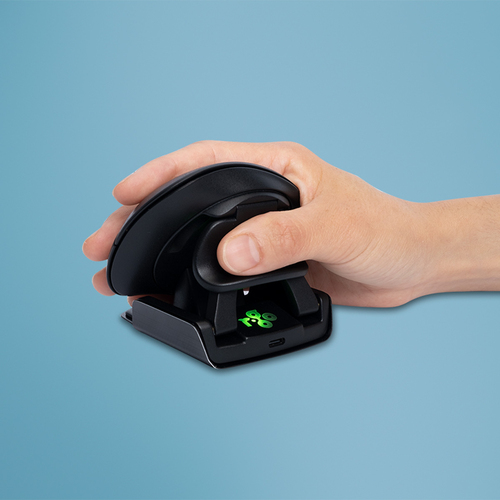
R-Go Tools Ergonomic
mouse R-Go Twister, with break software, ambidextrous mouse for both hands, foldable, bluetooth and wired

R-Go Tools Vertical
mouse R-Go HE Basic, ergonomic mouse, medium (hand size ≥ 185 mm), right-handed, Bluetooth, grey

R-Go Tools Ergonomic
mouse R-Go HE Break with break software, medium (hand size 165-185 mm), right-handed, Bluetooth, black

ACT Wireless Ergonomic
Mouse 1600 DPI

ACT Wired Gaming
Mouse with illumination 3200 dpi

ACT Wireless
mouse 2400 DPI with silent click, eco-friendly, made from recycled materials