
Acer XB321HK computer monitor 81.3 cm (32") 3840 x 2160 pixels 4K Ultra HD LED Black, Red
- Screen: 81.3 cm (32"), 3840 x 2160 pixels, IPS, Flat
- Refresh rate: 4 ms response time
- Brightness: 350 cd/m²
- Adaptive sync: NVIDIA G-SYNC
- Ports: 1 × HDMI, 1 × DisplayPort
- Stand: height-adjustable, tilt
- Extras: speakers, USB hub
- Colour: Black, Red
Where to buy
We're not tracking prices for this product yet. Check current prices directly at:
We may earn a commission when you buy through links on this page — at no extra cost to you. Learn more
About this product
Pixel power
Gaming monitors used to sacrifice color for speed, but now there’s no need to compromise with a range of gorgeous and powerful displays. IPS technology provides rich color and you can even overclock to 165Hz of gaming glory. Once you try it, you won’t go back.
NVIDIA G-SYNC
Get the smoothest gaming experience on the planet with NVIDIA G-SYNC. G-SYNC eliminates screen tearing and minimizes stuttering by syncing the refresh rate of your monitor with the frames rendered by your GPU. This is legendary PC gaming.
Seize control
Take charge of any situation with Predator GameView. Adjust dark boost levels, make precise color adjustments and set up aim points for hip-fire accuracy. Save custom settings in three profiles you can switch between at any time.
NVIDIA ULMB
Tired of that ugly motion blur when you drift around corners? Get a superb racing experience with NVIDIA ULMB (Ultra Low Motion Blur) technology for crystal clear gameplay at high frame rates.
All the colors
Good color brings game worlds to life and lets you pick out enemies with precision. We managed to get the XB1 series up to 100% sRGB. Now that’s some accurate color!
Get comfortable
Predator EyeProtect’s Flicker-less, Blue-light Filter, ComfyView and Low-dimming technologies minimize eye-strain from long gaming sessions.
ZeroFrame
One for fun, two for multi-tasking, three for an ultimate gaming experience. Enjoy immersive multiple-monitor setups with ZeroFrame bezels that keep you in the game.
Documents
Specifications
Key specifications
- Display diagonalSize of the display for this product, measured diagonally, usually in inches.
- 81.3 cm (32")
- Display resolutionThe number of distinct pixels in each dimension that can be displayed. It is usually quoted as width × height, with the units in pixels: for example, "1024 × 768" means the width is 1024 pixels and the height is 768 pixels. The higher the number of pixels, the sharper the image.
- 3840 x 2160 pixels
- Panel typeThe technology used to manufacture the panel, such as AMOLED or AH-IPS.
- IPS
- Screen shapeDescribes the physical curvature of the display panel, such as whether it is flat or curved.
- Flat
- Response timeThe response time is the time difference between the moment that a source (for example a video card) sends a signal and that equipment (for example a monitor) receives or display the signal. (Used abbreviations: R/F = Rise and Fall.)
- 4 ms
- Display brightness (typical)Display brightness, measured by its Luminance, presented as a figure in nits. Typical brightness ratings for monitors range from 250 to 350 nits with a target value of between 80 to 120 nits being suitable for most displays in a normal viewing environment.
- 350 cd/m²
- NVIDIA G-SYNCIndicates whether the product supports NVIDIA G-SYNC technology to synchronize the display refresh rate with the GPU to eliminate screen tearing.
- Yes
- HDMI ports quantityThe number of sockets (ports) for HDMI connections. HDMI (High-Definition Multimedia Interface) is a compact audio/video interface for transferring uncompressed video data and compressed/uncompressed digital audio data from a HDMI-compliant device ("the source device") to a compatible computer monitor, video projector, digital television, or digital audio device. HDMI is a digital replacement for…
- 1
- DisplayPorts quantityNumber of DisplayPorts. A DisplayPort is a digital display interface developed by the Video Electronics Standards Association (VESA). The interface is primarily used to connect a video source to a display device such as a computer monitor, though it can also be used to carry audio, USB, and other forms of data.
- 1
- Height adjustmentThe part of the device that can be adjusted to change the height.
- Yes
- Tilt adjustmentThe tilt, which means the angle at which the device is pointing (up or down), can be changed.
- Yes
- Built-in speaker(s)The device contains speaker(s) to produce sound.
- Yes
- Built-in USB hubWhether or not the device features a USB hub to connect more than one other device via USB.
- Yes
- Product colourThe colour e.g. red, blue, green, black, white.
- Black, Red
Show all 47 specificationsShow key specifications only
Ports & interfaces
- Built-in USB hubWhether or not the device features a USB hub to connect more than one other device via USB.
- Yes
- USB hub versionThe technical standard of the USB hub, if available, which determines the maximum data transfer speed (e.g., 3.2 Gen 1).
- 3.2 Gen 1 (3.1 Gen 1)
- Number of upstream portsThe total number of available ports used to connect the device to a computer or another network source.
- 4
- DVI portDigital Visual Interface (DVI) is a video display interface to connect a video source to a display device, such as a computer monitor.
- No
- HDMI ports quantityThe number of sockets (ports) for HDMI connections. HDMI (High-Definition Multimedia Interface) is a compact audio/video interface for transferring uncompressed video data and compressed/uncompressed digital audio data from a HDMI-compliant device ("the source device") to a compatible computer monitor, video projector, digital television, or digital audio device. HDMI is a digital replacement for…
- 1
- DisplayPorts quantityNumber of DisplayPorts. A DisplayPort is a digital display interface developed by the Video Electronics Standards Association (VESA). The interface is primarily used to connect a video source to a display device such as a computer monitor, though it can also be used to carry audio, USB, and other forms of data.
- 1
Design
- Market positioningUnder which category can the device be positioned in the market, e.g. camera phone.
- Gaming
- Product colourThe colour e.g. red, blue, green, black, white.
- Black, Red
Audio
- Built-in speaker(s)The device contains speaker(s) to produce sound.
- Yes
- Number of speakersThe quantity of speakers included in/with the product.
- 2
Multimedia
- Built-in cameraThe product has an integrated camera.
- No
Performance
- NVIDIA G-SYNCIndicates whether the product supports NVIDIA G-SYNC technology to synchronize the display refresh rate with the GPU to eliminate screen tearing.
- Yes
- On/off switchThe button which is pressed to switch the device on or off.
- Yes
Display
- Display diagonalSize of the display for this product, measured diagonally, usually in inches.
- 81.3 cm (32")
- Display resolutionThe number of distinct pixels in each dimension that can be displayed. It is usually quoted as width × height, with the units in pixels: for example, "1024 × 768" means the width is 1024 pixels and the height is 768 pixels. The higher the number of pixels, the sharper the image.
- 3840 x 2160 pixels
- Native aspect ratioThe aspect ratio is the ratio of the width of an image to its height. The native aspect ratio is the one which the projector/display is particularly designed for. Images shown in native aspect ratio will utilize the entire resolution of the display and achieve maximum brightness. Images shown in other than native aspect ratio will always have less resolution and less brightness than images shown…
- 16:9
- Display technologyThe technology used in the display e.g. plasma, LED.
- LED
- TouchscreenA screen of a laptop, smartphone, etc., that responds to touch so you can control the interface using your fingers.
- No
- HD typeType of supported High Definition (e.g. Full HD, 4K Ultra HD).
- 4K Ultra HD
- Panel typeThe technology used to manufacture the panel, such as AMOLED or AH-IPS.
- IPS
- Display brightness (typical)Display brightness, measured by its Luminance, presented as a figure in nits. Typical brightness ratings for monitors range from 250 to 350 nits with a target value of between 80 to 120 nits being suitable for most displays in a normal viewing environment.
- 350 cd/m²
- Response timeThe response time is the time difference between the moment that a source (for example a video card) sends a signal and that equipment (for example a monitor) receives or display the signal. (Used abbreviations: R/F = Rise and Fall.)
- 4 ms
- Screen shapeDescribes the physical curvature of the display panel, such as whether it is flat or curved.
- Flat
- Supported graphics resolutionsThe graphic resolutions that can be displayed by the device. The graphic resolution describes the width and height dimensions of a display, such as a computer monitor, measured in pixels.
- 3840 x 2160
- Aspect ratioThe aspect ratio is the ratio of the width of a shape to its height. For example, 4:3 is common for standard displays and 16:9 is the ratio for Widescreen TV.
- 16:9
- Display number of coloursThe total number of distinct colours that the device is capable of displaying (e.g. 1.07 billion colours).
- 1.073 billion colours
Thin Client
- Thin client installedThe product includes a thin client, which is a computer or a computer program which depends heavily on some other computer (its server) to fulfill its computational roles. This is different from the traditional fat client, which is a computer designed to take on these roles by itself. The specific roles assumed by the server may vary, from providing data persistence (for example, for diskless nod…
- No
Other features
- TV tuner integratedDevice has an in-built TV tuner.
- No
- Supplied AC adapter typeThe type of power supply provided with the product to connect it to an alternating current source (e.g. AC).
- LED
- 3DThe device can be used with 3D technology.
- No
Sustainability
- Sustainability certificatesThe environmental or ethical certifications the product has received to verify its sustainability standards (e.g., ASC or ACT Organic).
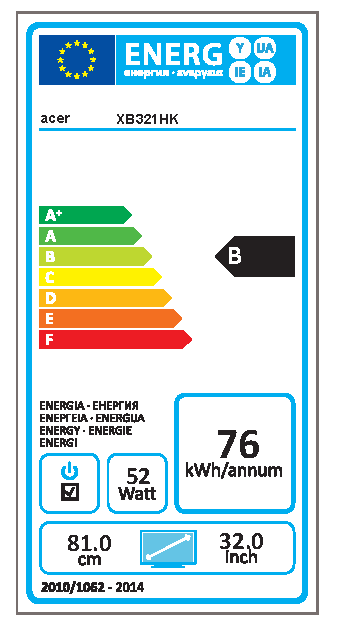
- ENERGY STAR
Weight & dimensions
- Width (with stand)The total horizontal measurement of the product when the supporting stand is attached, measured in millimetres.
- 737.9 mm
- Depth (with stand)The measurement of the product from front to back when any supporting accessory or base is attached, expressed in millimetres or centimetres.
- 309.9 mm
- Height (with stand)The total vertical measurement of the product including its base or support structure, expressed in millimetres or centimetres.
- 582 mm
- Weight (with stand)The total mass of the unit including its supporting base, measured in kilograms or grams.
- 11.3 kg
- Width (without stand)The horizontal measurement of the device excluding the base or support structure, expressed in millimetres.
- 737.9 mm
- Depth (without stand)The measurement of the product from front to back without its base or support, typically expressed in millimetres or centimetres.
- 62 mm
- Height (without stand)The vertical measurement of the device when the stand is removed, measured in mm.
- 435.5 mm
- Weight (without stand)The mass of the device excluding the support base, measured in g.
- 8 kg
Power
- Power consumption (typical)Amount of power consumed by this model, often expressed in watts (W). Typical values that manufacturers give are power consumption when off, standby/suspended mode, typical use, maximum usage.
- 56 W
- Power consumption (standby)The amount of electricity that is consumed when the product is on standby.
- 0.49 W
- Power consumption (off)The amount of electrical energy consumed by the device when it is switched off, measured in watts.
- 0.47 W
Security
- Cable lock slotHoles on the edge of devices through which a cable lock can be passed, so the device can be locked to a desk etc.
- No
Ergonomics
- Height adjustmentThe part of the device that can be adjusted to change the height.
- Yes
- Adjustable height (max)The maximum distance the unit can be raised vertically from its lowest position, measured in millimetres.
- 12 cm
- Tilt adjustmentThe tilt, which means the angle at which the device is pointing (up or down), can be changed.
- Yes
- Tilt angle rangeThe minimum and maximum angles at which the unit can be tilted, typically expressed in degrees.
- -5 - 25°
Database Right data-sheet 2026 Icecat. All rights reserved. Provided “as is”, without warranty — check details with the store before buying.
Expert reviews
- 90
kitguru.net2017
The Acer Predator XB321HK is a 32-inch, 4K monitor that uses a quality IPS LCD panel and includes Nvidia's G-Sync technology for smooth gaming performance. With its larger screen size it makes for an ideal way to really appreciate the benefits of 4K, comp...
Read the review at kitguru.net ↗ - –
tomshardware.com2016
The Acer Predator XB321HK isn't cheap but we think it's worth every penny. It's a flagship display that earns every bit of its title. Ultra HD gaming is still a challenge just because of the massive number of pixels that have to be moved. You'll need...
- +
- GSync, Ultra HD, 32inch IPS screen, Clarity, Vivid and accurate color, Styling & build quality
- −
- No swivel or portrait adjustment, no DisplayPort 1.3
Price history (90 days, best daily price)
Price history is still being collected for this product — check back soon.
Alternative models

Acer K2 K272HUL Dbmidpx
computer monitor 68.6 cm (27") 2560 x 1440 pixels Quad HD LED Black

Acer XB271HUbmiprz
computer monitor 68.6 cm (27") 2560 x 1440 pixels Quad HD LED Black, Red

Acer Predator Z35 bmiphz
computer monitor 88.9 cm (35") 2560 x 1080 pixels UW-UXGA LCD Black, Red

Acer Predator XB241H
computer monitor 61 cm (24") 1920 x 1080 pixels Full HD LED Black, Red

Acer Predator XB281HK
computer monitor 71.1 cm (28") 3840 x 2160 pixels 4K Ultra HD LED Black, Red

Acer Predator Z35 bmiphz
computer monitor 88.9 cm (35") 2560 x 1080 pixels QXGA LCD Black