
Acer NITRO VG0 VG240Y X1 computer monitor 60.5 cm (23.8") 1920 x 1080 pixels Full HD Black
- Screen: 60.5 cm (23.8"), 1920 x 1080 pixels, Flat
- Refresh rate: 1 ms response time
- Brightness: 250 cd/m²
- Adaptive sync: AMD FreeSync
- Ports: 1 × HDMI, 1 × DisplayPort
- Colour: Black
Where to buy
We're not tracking prices for this product yet. Check current prices directly at:
We may earn a commission when you buy through links on this page — at no extra cost to you. Learn more
Documents
Specifications
Key specifications
- Display diagonalSize of the display for this product, measured diagonally, usually in inches.
- 60.5 cm (23.8")
- Display resolutionThe number of distinct pixels in each dimension that can be displayed. It is usually quoted as width × height, with the units in pixels: for example, "1024 × 768" means the width is 1024 pixels and the height is 768 pixels. The higher the number of pixels, the sharper the image.
- 1920 x 1080 pixels
- Screen shapeDescribes the physical curvature of the display panel, such as whether it is flat or curved.
- Flat
- Response timeThe response time is the time difference between the moment that a source (for example a video card) sends a signal and that equipment (for example a monitor) receives or display the signal. (Used abbreviations: R/F = Rise and Fall.)
- 1 ms
- Display brightness (typical)Display brightness, measured by its Luminance, presented as a figure in nits. Typical brightness ratings for monitors range from 250 to 350 nits with a target value of between 80 to 120 nits being suitable for most displays in a normal viewing environment.
- 250 cd/m²
- AMD FreeSyncThe product includes AMD Freesync Technology for the dynamic synchronization of the graphic card and the monitor in order to avoid screen tearing.
- Yes
- HDMI ports quantityThe number of sockets (ports) for HDMI connections. HDMI (High-Definition Multimedia Interface) is a compact audio/video interface for transferring uncompressed video data and compressed/uncompressed digital audio data from a HDMI-compliant device ("the source device") to a compatible computer monitor, video projector, digital television, or digital audio device. HDMI is a digital replacement for…
- 1
- DisplayPorts quantityNumber of DisplayPorts. A DisplayPort is a digital display interface developed by the Video Electronics Standards Association (VESA). The interface is primarily used to connect a video source to a display device such as a computer monitor, though it can also be used to carry audio, USB, and other forms of data.
- 1
- Product colourThe colour e.g. red, blue, green, black, white.
- Black
Show all 25 specificationsShow key specifications only
Design
- VESA mountingIndicates whether the product supports the VESA mounting standard for attachment to compatible arms, brackets, or wall mounts.
- Yes
- Product colourThe colour e.g. red, blue, green, black, white.
- Black
Performance
- AMD FreeSyncThe product includes AMD Freesync Technology for the dynamic synchronization of the graphic card and the monitor in order to avoid screen tearing.
- Yes
- AMD FreeSync typeThe specific version of the adaptive synchronization technology supported by the device to reduce screen tearing and stuttering (e.g. FreeSync Premium Pro).
- FreeSync Premium
Display
- Display diagonalSize of the display for this product, measured diagonally, usually in inches.
- 60.5 cm (23.8")
- Display resolutionThe number of distinct pixels in each dimension that can be displayed. It is usually quoted as width × height, with the units in pixels: for example, "1024 × 768" means the width is 1024 pixels and the height is 768 pixels. The higher the number of pixels, the sharper the image.
- 1920 x 1080 pixels
- Native aspect ratioThe aspect ratio is the ratio of the width of an image to its height. The native aspect ratio is the one which the projector/display is particularly designed for. Images shown in native aspect ratio will utilize the entire resolution of the display and achieve maximum brightness. Images shown in other than native aspect ratio will always have less resolution and less brightness than images shown…
- 16:9
- TouchscreenA screen of a laptop, smartphone, etc., that responds to touch so you can control the interface using your fingers.
- No
- HD typeType of supported High Definition (e.g. Full HD, 4K Ultra HD).
- Full HD
- Display brightness (typical)Display brightness, measured by its Luminance, presented as a figure in nits. Typical brightness ratings for monitors range from 250 to 350 nits with a target value of between 80 to 120 nits being suitable for most displays in a normal viewing environment.
- 250 cd/m²
- Response timeThe response time is the time difference between the moment that a source (for example a video card) sends a signal and that equipment (for example a monitor) receives or display the signal. (Used abbreviations: R/F = Rise and Fall.)
- 1 ms
- Anti-glare screenAlways gives an optimal view, even in direct sunlight.
- Yes
- Screen shapeDescribes the physical curvature of the display panel, such as whether it is flat or curved.
- Flat
- Contrast ratio (dynamic)A property of a display system, defined as the ratio of the luminance of the brightest color (white) to that of the darkest color (black) that the system is capable of producing.
- 100000000:1
Power
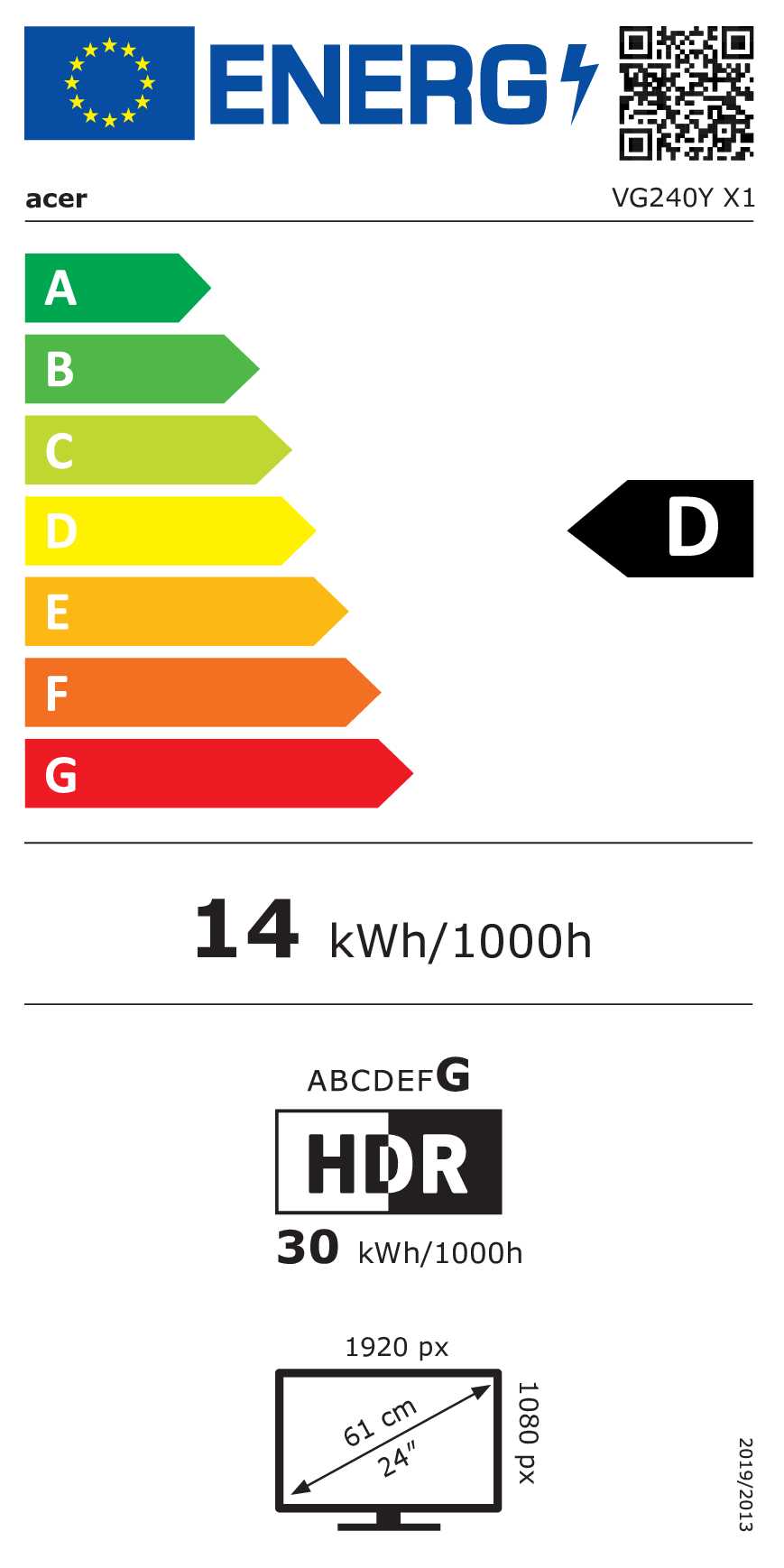
- Energy efficiency class (SDR)The energy efficiency rating of the device when operating in Standard Dynamic Range (SDR) mode, categorized from A to G.
- D
- Energy efficiency class (HDR)The energy efficiency rating of the device when High Dynamic Range (HDR) mode is active, ranging from A to G.
- G
- Energy consumption (SDR) per 1000 hoursThe amount of electric energy consumed by the device during standard dynamic range (SDR) operation over a period of 1000 hours, measured in kilowatt-hours (kWh).
- 14 kWh
- Energy consumption (HDR) per 1000 hoursThe amount of electrical energy consumed by the device when displaying High Dynamic Range (HDR) content over a period of 1000 hours, measured in kilowatt-hours (kWh).
- 30 kWh
- Energy efficiency scaleThe range of energy efficiency classes used to rate the product's power consumption, such as A to G.
- A to G
Ports & interfaces
- HDMIHDMI (High-Definition Multimedia Interface) is a compact audio/video interface for transferring uncompressed video data and compressed/uncompressed digital audio data from a HDMI-compliant device ("the source device") to a compatible computer monitor, video projector, digital television, or digital audio device. HDMI is a digital replacement for existing analog video standards.
- Yes
- HDMI ports quantityThe number of sockets (ports) for HDMI connections. HDMI (High-Definition Multimedia Interface) is a compact audio/video interface for transferring uncompressed video data and compressed/uncompressed digital audio data from a HDMI-compliant device ("the source device") to a compatible computer monitor, video projector, digital television, or digital audio device. HDMI is a digital replacement for…
- 1
- HDMI versionThe specific release version of the High-Definition Multimedia Interface standard supported by the device (e.g. 1.3 or 2.0).
- 1.4
- DisplayPorts quantityNumber of DisplayPorts. A DisplayPort is a digital display interface developed by the Video Electronics Standards Association (VESA). The interface is primarily used to connect a video source to a display device such as a computer monitor, though it can also be used to carry audio, USB, and other forms of data.
- 1
- DisplayPort out versionThe version of the DisplayPort output standard supported by the device (e.g. 1.4).
- 1.2
- Headphone outThe socket for connecting headphones to the device.
- Yes
Database Right data-sheet 2026 Icecat. All rights reserved. Provided “as is”, without warranty — check details with the store before buying.
Expert reviews
- –
laptopmedia.com2020
Well, in terms of display quality, there is a lot the Nitro VG240Y provides – a 144Hz refresh rate, Full HD resolution, comfortable viewing angles, great contrast ratio, and adequate default settings. Moreover, it doesn't use PWM, which makes it comfortab...
- +
- 144Hz refresh rate, Adequate default settings, Well populated OSD menu, Complete sRGB color gamut coverage and standard-matching dE values, Wide viewing angles, good contrast ratio and FreeSync support
- −
- Lacks USB expansion, Stand feels static, Response time is a little slow (fixed from the OSD menu)
- –
monitornerds.com2020
The Acer VG240Y provides excellent value if you want reasonable image quality and responsiveness from a cheap gaming monitor. The default calibration profile of the monitor provides decent accuracy, but some adjustments are necessary if you want to reduce...
- +
- Excellent Price, Reasonable Color Quality, Great Contrast, FreeSync/G-Sync Compatible,
- −
- Strobing Mode Adds Overshoot, Overdrive is Limited, Dim Backlight, Stand Limited to Tilt
Price history (90 days, best daily price)
Price history is still being collected for this product — check back soon.
Alternative models

Acer NITRO VG0 VG240Y Gbmipx
computer monitor 60.5 cm (23.8") 1920 x 1080 pixels Full HD LCD Black

Acer Vero CB2 CB272 G
computer monitor 68.6 cm (27") 1920 x 1080 pixels Full HD LCD Black

Acer NITRO VG0 VG270 G
computer monitor 68.6 cm (27") 1920 x 1080 pixels Full HD Black

Acer CB2 CB242Y G
computer monitor 60.5 cm (23.8") 1920 x 1080 pixels Full HD LCD Black

Acer SB273G0BI
computer monitor 68.6 cm (27") 1920 x 1080 pixels Full HD LED Black

Acer Predator UM.CXXEE.501
computer monitor 86.4 cm (34") 3440 x 1440 pixels UltraWide Quad HD QD-OLED Black
Accessories & compatible products

R-Go Tools Monitor arm R-Go Zepher Single, fully adjustable, 0-8 Kg load capacity, 100% circular, black

R-Go Tools Monitor arm R-Go Caparo Single, fully adjustable with gas spring, 3-9 kg load capacity, 100% circular, black

R-Go Tools Monitor arm R-Go Zepher Dual, for two monitors, fully adjustable, 0
8 kg load capacity, 100% circular, black
