
Acer B6 B246HL computer monitor 61 cm (24") 1920 x 1080 pixels Full HD LED Black, Grey
- Screen: 61 cm (24"), 1920 x 1080 pixels, TN+Film, Flat
- Refresh rate: 60 Hz, 5 ms response time
- Brightness: 250 cd/m²
- Ports: 1 × DisplayPort
- Stand: height-adjustable
- Extras: speakers
- Colour: Black, Grey
All 52 specificationsProduct page at acer.com ↗
Versions
 TN · Tilt adjustment
 TN+Film · Tilt adjustment
Where to buy
We're not tracking prices for this product yet. Check current prices directly at:
We may earn a commission when you buy through links on this page — at no extra cost to you. Learn more
About this product
Ideal for use in office environments, libraries and computer labs, B6 Series monitors deliver dynamic and energizing visuals thanks to their high display resolution and true-to-life colors. They also feature an ergonomic design for comfortable all-day computing, and they use eco-friendly technologies to save power and cut energy costs.
Sharp details
Focus more clearly on your tasks thanks to the very high resolution of these monitors. Choose from WQHD1 resolution all the way up to Ultra HD (4K2K)1 resolution, which delivers four times more pixels and detail than Full HD.
Comfortable computing
Work comfortably for hours with Acer B6 Series monitors. Acer ComfyView technology reduces glare, for greater eye comfort. In-Plane-Switching1 technology lets you see perfect images from wide viewing angles, for even more clarity and comfort.
Brilliant colors
These monitors deliver 100% sRGB coverage1, for perfectly recreated colors. Some models feature 6-axis color adjustment, which lets you fine-tune the colors for amazing color accuracy.
Flexible design
Find a working angle that's perfect for you with the Acer ErgoStand1, a stand that lets you easily adjust the screen’s height, as well as letting you tilt and swivel it easily. Another great feature of the ErgoStand is that it allows you to effortlessly rotate the screen to portrait mode.
Eco-friendly design
Professional Series monitors comply with RoHS, EPEAT3 Gold, TCO, and ENERGY STAR 6.0 requirements.1 Their Acer EcoDisplay design plus white LED backlighting yield significant power savings. More than 10% of the material used in these monitors is post-consumer recycled (PCR) plastic,2 further reducing environmental impact.
Documents
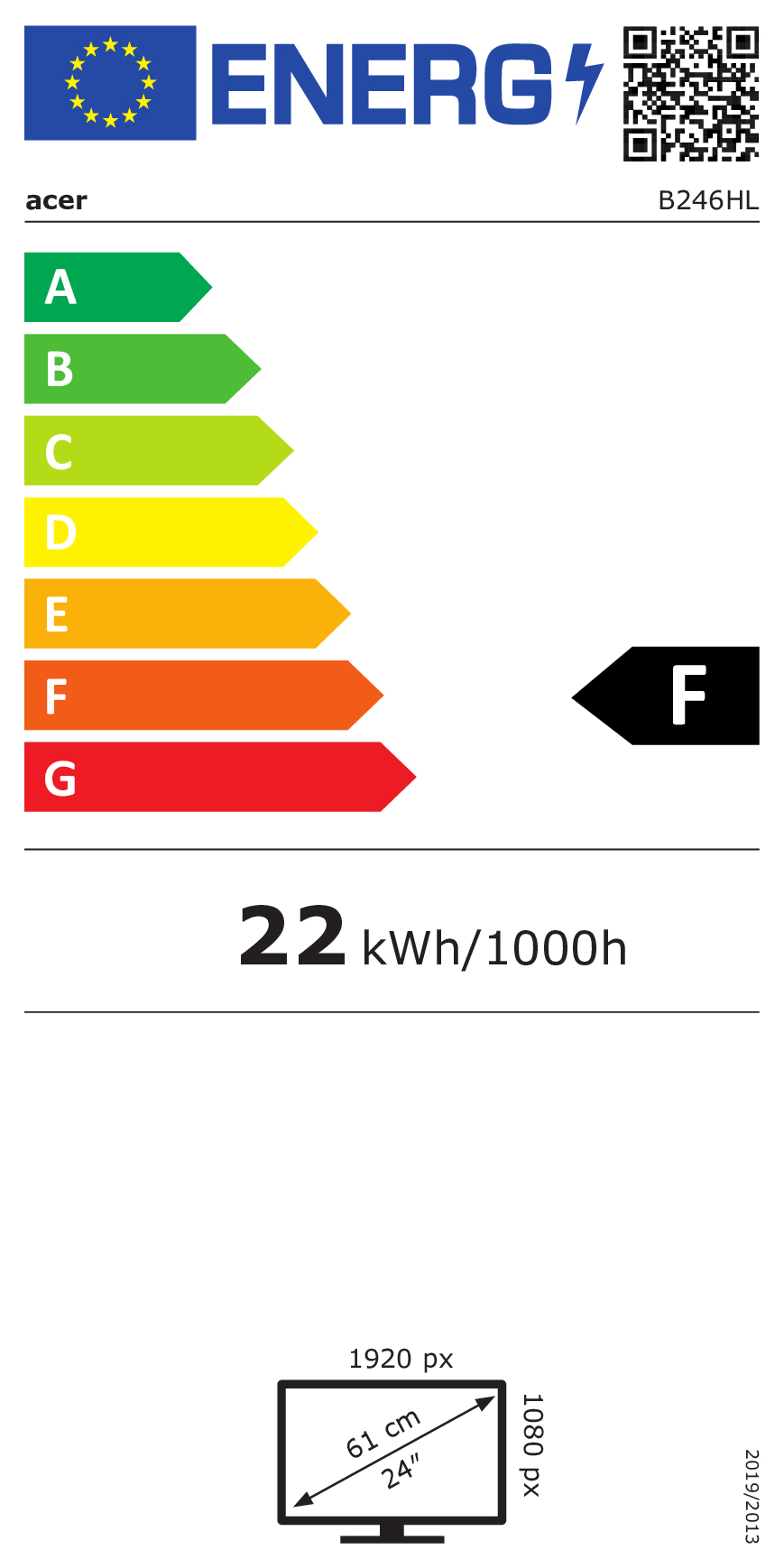
- Product information sheetEU Product Fiche ↗
Specifications
Key specifications
- Display diagonalSize of the display for this product, measured diagonally, usually in inches.
- 61 cm (24")
- Display resolutionThe number of distinct pixels in each dimension that can be displayed. It is usually quoted as width × height, with the units in pixels: for example, "1024 × 768" means the width is 1024 pixels and the height is 768 pixels. The higher the number of pixels, the sharper the image.
- 1920 x 1080 pixels
- Panel typeThe technology used to manufacture the panel, such as AMOLED or AH-IPS.
- TN+Film
- Screen shapeDescribes the physical curvature of the display panel, such as whether it is flat or curved.
- Flat
- Maximum refresh rateThe highest number of times per second the image is updated, measured in hertz (Hz).
- 60 Hz
- Response timeThe response time is the time difference between the moment that a source (for example a video card) sends a signal and that equipment (for example a monitor) receives or display the signal. (Used abbreviations: R/F = Rise and Fall.)
- 5 ms
- Display brightness (typical)Display brightness, measured by its Luminance, presented as a figure in nits. Typical brightness ratings for monitors range from 250 to 350 nits with a target value of between 80 to 120 nits being suitable for most displays in a normal viewing environment.
- 250 cd/m²
- DisplayPorts quantityNumber of DisplayPorts. A DisplayPort is a digital display interface developed by the Video Electronics Standards Association (VESA). The interface is primarily used to connect a video source to a display device such as a computer monitor, though it can also be used to carry audio, USB, and other forms of data.
- 1
- Height adjustmentThe part of the device that can be adjusted to change the height.
- Yes
- Built-in speaker(s)The device contains speaker(s) to produce sound.
- Yes
- Product colourThe colour e.g. red, blue, green, black, white.
- Black, Grey
Show all 52 specificationsShow key specifications only
Design
- Product colourThe colour e.g. red, blue, green, black, white.
- Black, Grey
- Feet colourThe colour of the feet, which are the projecting part on which a device/piece of furniture, or each of its legs, stands.
- Black
Audio
- Built-in speaker(s)The device contains speaker(s) to produce sound.
- Yes
Multimedia
- Built-in cameraThe product has an integrated camera.
- No
Performance
- NVIDIA G-SYNCIndicates whether the product supports NVIDIA G-SYNC technology to synchronize the display refresh rate with the GPU to eliminate screen tearing.
- No
- AMD FreeSyncThe product includes AMD Freesync Technology for the dynamic synchronization of the graphic card and the monitor in order to avoid screen tearing.
- No
- On/off switchThe button which is pressed to switch the device on or off.
- No
Display
- Display diagonalSize of the display for this product, measured diagonally, usually in inches.
- 61 cm (24")
- Display resolutionThe number of distinct pixels in each dimension that can be displayed. It is usually quoted as width × height, with the units in pixels: for example, "1024 × 768" means the width is 1024 pixels and the height is 768 pixels. The higher the number of pixels, the sharper the image.
- 1920 x 1080 pixels
- Native aspect ratioThe aspect ratio is the ratio of the width of an image to its height. The native aspect ratio is the one which the projector/display is particularly designed for. Images shown in native aspect ratio will utilize the entire resolution of the display and achieve maximum brightness. Images shown in other than native aspect ratio will always have less resolution and less brightness than images shown…
- 16:9
- Display technologyThe technology used in the display e.g. plasma, LED.
- LED
- TouchscreenA screen of a laptop, smartphone, etc., that responds to touch so you can control the interface using your fingers.
- No
- HD typeType of supported High Definition (e.g. Full HD, 4K Ultra HD).
- Full HD
- Panel typeThe technology used to manufacture the panel, such as AMOLED or AH-IPS.
- TN+Film
- Display brightness (typical)Display brightness, measured by its Luminance, presented as a figure in nits. Typical brightness ratings for monitors range from 250 to 350 nits with a target value of between 80 to 120 nits being suitable for most displays in a normal viewing environment.
- 250 cd/m²
- Response timeThe response time is the time difference between the moment that a source (for example a video card) sends a signal and that equipment (for example a monitor) receives or display the signal. (Used abbreviations: R/F = Rise and Fall.)
- 5 ms
- Screen shapeDescribes the physical curvature of the display panel, such as whether it is flat or curved.
- Flat
- Supported graphics resolutionsThe graphic resolutions that can be displayed by the device. The graphic resolution describes the width and height dimensions of a display, such as a computer monitor, measured in pixels.
- 1920 x 1080 (HD 1080)
- Aspect ratioThe aspect ratio is the ratio of the width of a shape to its height. For example, 4:3 is common for standard displays and 16:9 is the ratio for Widescreen TV.
- 16:9
- Contrast ratio (dynamic)A property of a display system, defined as the ratio of the luminance of the brightest color (white) to that of the darkest color (black) that the system is capable of producing.
- 100000000:1
- Maximum refresh rateThe highest number of times per second the image is updated, measured in hertz (Hz).
- 60 Hz
- Viewing angle, horizontalMaximum horizontal angle at which a display can be viewed with acceptable visual performance.
- 170°
- Viewing angle, verticalMaximum vertical angle at which a display can be viewed with acceptable visual performance.
- 160°
- Display number of coloursThe total number of distinct colours that the device is capable of displaying (e.g. 1.07 billion colours).
- 16.78 million colours
Thin Client
- Thin client installedThe product includes a thin client, which is a computer or a computer program which depends heavily on some other computer (its server) to fulfill its computational roles. This is different from the traditional fat client, which is a computer designed to take on these roles by itself. The specific roles assumed by the server may vary, from providing data persistence (for example, for diskless nod…
- No
Packaging content
- AC adapter includedIndicates whether a power supply unit for connecting the device to an AC outlet is provided in the package.
- Yes
- Cables includedSpecifies the types and quantities of connection cables provided with the product (e.g., 3.5 mm to 3.5 mm or SATA).
- DVI, DisplayPort, VGA
Other features
- Supplied AC adapter typeThe type of power supply provided with the product to connect it to an alternating current source (e.g. AC).
- LED
- 3DThe device can be used with 3D technology.
- No
Certificates
- CertificationSpecifies the official standards, safety approvals, or regulatory certifications the product has received.
- TCO
Sustainability
- Sustainability certificatesThe environmental or ethical certifications the product has received to verify its sustainability standards (e.g., ASC or ACT Organic).
- EPEAT Silver
Weight & dimensions
- Width (with stand)The total horizontal measurement of the product when the supporting stand is attached, measured in millimetres.
- 567 mm
- Depth (with stand)The measurement of the product from front to back when any supporting accessory or base is attached, expressed in millimetres or centimetres.
- 221.2 mm
- Height (with stand)The total vertical measurement of the product including its base or support structure, expressed in millimetres or centimetres.
- 535.5 mm
- Weight (with stand)The total mass of the unit including its supporting base, measured in kilograms or grams.
- 6.09 kg
- Width (without stand)The horizontal measurement of the device excluding the base or support structure, expressed in millimetres.
- 567 mm
- Depth (without stand)The measurement of the product from front to back without its base or support, typically expressed in millimetres or centimetres.
- 52 mm
- Height (without stand)The vertical measurement of the device when the stand is removed, measured in mm.
- 335.9 mm
- Weight (without stand)The mass of the device excluding the support base, measured in g.
- 3.44 kg
Power
- Energy efficiency class (SDR)The energy efficiency rating of the device when operating in Standard Dynamic Range (SDR) mode, categorized from A to G.
- F
- Energy consumption (SDR) per 1000 hoursThe amount of electric energy consumed by the device during standard dynamic range (SDR) operation over a period of 1000 hours, measured in kilowatt-hours (kWh).
- 22 kWh
- Power consumption (typical)Amount of power consumed by this model, often expressed in watts (W). Typical values that manufacturers give are power consumption when off, standby/suspended mode, typical use, maximum usage.
- 22.1 W
- Power consumption (standby)The amount of electricity that is consumed when the product is on standby.
- 0.5 W
- Power consumption (off)The amount of electrical energy consumed by the device when it is switched off, measured in watts.
- 0.3 W
- AC input voltageThe voltage of the AC electricity that is inputted into the product.
- 110 - 220 V
- Energy efficiency scaleThe range of energy efficiency classes used to rate the product's power consumption, such as A to G.
- A to G
Security
- Cable lock slotHoles on the edge of devices through which a cable lock can be passed, so the device can be locked to a desk etc.
- No
Ergonomics
- Height adjustmentThe part of the device that can be adjusted to change the height.
- Yes
- PivotIndicates whether the device can be rotated 90 degrees to switch between landscape and portrait orientation.
- Yes
Ports & interfaces
- VGA (D-Sub) ports quantityNumber of VGA (D-Sub) ports (connecting interfaces) in the device. The VGA (D-Sub) connector is a 15 pin connector between a computer and a monitor. It was first introduced in 1987 by IBM.
- 1
- DVI portDigital Visual Interface (DVI) is a video display interface to connect a video source to a display device, such as a computer monitor.
- Yes
- DisplayPorts quantityNumber of DisplayPorts. A DisplayPort is a digital display interface developed by the Video Electronics Standards Association (VESA). The interface is primarily used to connect a video source to a display device such as a computer monitor, though it can also be used to carry audio, USB, and other forms of data.
- 1
Database Right data-sheet 2026 Icecat. All rights reserved. Provided “as is”, without warranty — check details with the store before buying.
Price history (90 days, best daily price)
Price history is still being collected for this product — check back soon.
Alternative models

Acer G7 G277HL
computer monitor 68.6 cm (27") 1920 x 1080 pixels Full HD LED Black

Acer Predator XB240H Bbmjdpr
computer monitor 61 cm (24") 1920 x 1080 pixels Full HD LED Black

Acer T2 T272HUL
computer monitor 68.6 cm (27") 2560 x 1440 pixels LED Touchscreen Black

Acer XB 271H
computer monitor 68.6 cm (27") 1920 x 1080 pixels Full HD LED Black, Red

Acer Predator X34
computer monitor 86.4 cm (34") 3440 x 1440 pixels UltraWide Quad HD LED Black, Silver

Acer XR XR342CK
computer monitor 86.4 cm (34") 3440 x 1440 pixels UltraWide Quad HD LED Black, Silver