
Samsung DM82E-BR interactive whiteboard Black
- Dodávané kabely: AC, Sériový
- Dálkový ovladač
- Baterie
- Stručný návod
- Provozní rozsah teplot (T-T): 0 - 40 °C
- Doporučená provozní relativní vlhkost: 10 - 80%
Kde koupit
Ceny tohoto produktu zatím nesledujeme. Aktuální ceny najdete přímo v obchodech:
Když nakoupíte přes odkazy na této stránce, můžeme získat provizi — bez nákladů navíc pro vás. Více informací
O produktu
- Smooth and comfortable writing with Touch Overlay
- Easily manage content with Magic WB S2 embedded software
- Connect external devices for simple data access and sharing
- Intuitive design for user convenience and storage efficiency
A Smoother, More Interactive Writing Experience Using Touch
Featuring a pre-assembled Touch Overlay and a variety of collabouration-enhancing capabilities, the Samsung e-Board display alleviates misconceptions that digital display writing is complex and unnatural. Instead, the DME-BR’s touchscreen offers a smooth and comfortable writing experience. The DME-BR display’s hand touch function enables up to 10 different participants to touch the display’s screen using two fingers to make content selections, comments or edits, with those individual actions easily recognisable to the entire group. This versatile usability promotes efficiency and productivity by compiling individual feedback within a single source and offering greater visibility to all participants of discussed content.
For added convenience, the Samsung e-Board display also comes with a hand eraser tool useful for erasing larger areas of the screen. Instead of users having to search for and work through a specific removal function key, the simple and intuitive hand eraser makes content revision fast and user-friendly.
A More Engaging, Interactive Content Management Experience
The Samsung SMART Signage e-Board display’s embedded Magic WB S2* interactive content management software solution transforms a traditional presentation into a dynamic business or educational experience. As an all-in-one touch solution, Samsung’s free Magic WB S2 programme delivers added flexibility for extensive collabouration before, during and after meetings or classes without requiring the use of separate dedicated PCs or additional devices. A touch-activated floating menu enables users to independently control, display and shuffle between multiple screens and various text, image, audio and video content files. Once sessions conclude, Magic WB S2’s compatibility with standard office software programs lets users update, save, capture, print and share files for later viewing. With the support of the Magic WB S2 solution, the Samsung e-Board display enhances the overall knowledge-sharing process through deeper engagement and all-inclusive file management.
*Note: Samsung’s Magic WB S2 software, an advanced version of Magic WB, is available for e-Board display users, but requires a separate PC for operation.
Versatile Usability with Extensive Connectivity and Easy-to-Use Touch Capability
Today’s business and educational environments require advanced compatibility for users to easily read and share content. Through its enhanced and versatile connectivity, Samsung’s e-Board display allows users to access, share and revise content via their own laptops, tablets and smartphones. This superior connectivity stems from the display being equipped to support a range of signal input sources, including HDMI, D-Sub, DisplayPort (DP), DVI and USB ports, which are compatible with nearly all external devices. Furthermore, the Samsung e-Board display’s auto switching for the touch function eliminates the headache of needing two different cables to use touch with a notebook PC. Instead, the display features an easily assessable touch out cable (USB upstream) on the side of the front pen tray. Users just need to plug the single touch cable into the USB, connect the cable to the notebook PC and setup source. Together, these integrated solutions simplify multi-device setup and connectivity, as well as ensure convenient utilisation of the display’s advanced touch capability.
An Intuitive Design that Promotes Efficiency and Usability
The Samsung SMART Signage e-Board display’s pre-assembled design allows users to comfortably install, control and work with the all-in-one e-Board solution. As part of its professional-grade design, the Samsung e-Board display incorporates a front pen tray for convenient storage and easy access to display components. With a design format resembling that of an analog white board, the Samsung e-Board helps ensure user familiarly and seamless technology adoption, while also bringing design sophistication and advanced functionality to business and educational environments. Additionally, the display’s design positions simplified hot keys on the front and side of the pen tray. The shortcut hot keys allow users to easily locate and select frequently-used functions, including touch on / off, quick menu, power on / off, touch out USB and HDMI, with the simple push of a button.
With the Samsung SMART Signage e-Board, business professionals and educators can economically utilise space while delivering the functionality essential for effective collabouration and productivity.
Dokumenty
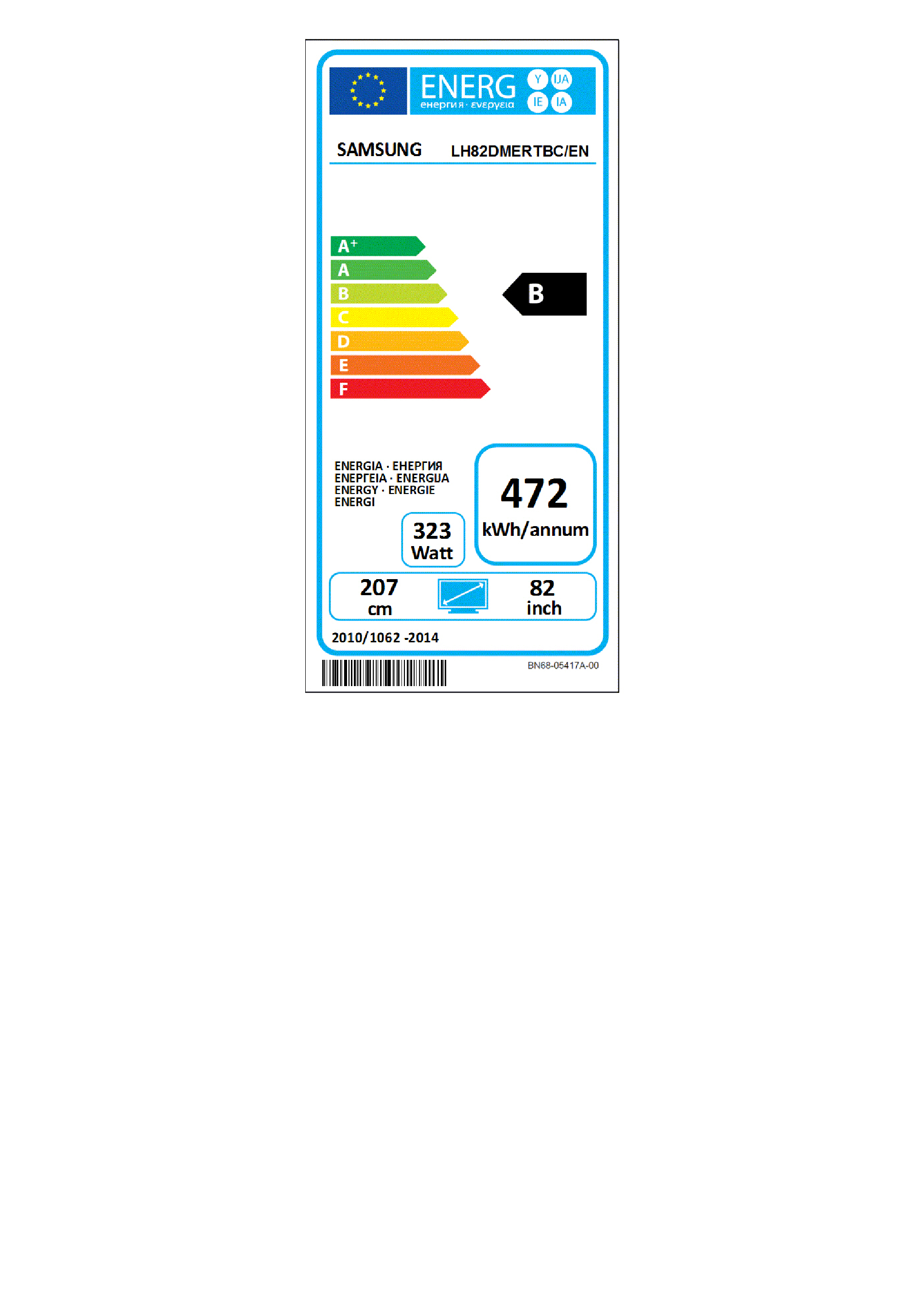
- Informační list produktuEU Product Fiche ↗
Parametry
Hlavní parametry
- Dodávané kabely
- AC, Sériový
- Dálkový ovladač
- Ano
- Baterie
- Ano
- Stručný návod
- Ano
- Provozní rozsah teplot (T-T)
- 0 - 40 °C
- Doporučená provozní relativní vlhkost
- 10 - 80%
- Maximální spotřeba energie
- 495 W
- Spotřeba elektrické energie
- 329 W
- Spotřeba energie (v pohotovosti)
- 0,5 W
- Vstupní střídavé napětí
- 100 - 240 V
Zobrazit všechny parametry (38)Zobrazit jen hlavní parametry
Obsah balení
- Dodávané kabely
- AC, Sériový
- Dálkový ovladač
- Ano
- Baterie
- Ano
- Stručný návod
- Ano
Hmotnost a rozměry
- Šířka
- 1911,8 mm
- Hloubka
- 140 mm
- Výška
- 1121,7 mm
- Hmotnost
- 78,2 kg
Provozní podmínky
- Provozní rozsah teplot (T-T)
- 0 - 40 °C
- Doporučená provozní relativní vlhkost
- 10 - 80%
Příkon
- Maximální spotřeba energie
- 495 W
- Spotřeba elektrické energie
- 329 W
- Spotřeba energie (v pohotovosti)
- 0,5 W
- Vstupní střídavé napětí
- 100 - 240 V
- Frekvence vstupního střídavého napětí
- 50 - 60 Hz
- Třída energetické účinnosti (stará)
- B
Vzhled
- Barva
- Černá
- Podpora standardu VESA pro montáž
- Ano
- Rozhraní upevnění panelu
- 600 x 400 mm
Osvědčení
- Certifikace
- FCC (USA) Teil 15, Unterteil B Klasse A, CE (Europa): EN55022:2006 + A1:2007, EN55024:1998 + A1:2001 + A2:2003, VCCI (Japan): VCCI V-3 / 2010.04 Klasse A, KCC / EK (Korea): Tuner: KN13 / KN20, ohne Tuner: KN22 / KN24, BSMI (Taiwan): CNS13438 (ITE EMI) Class A / CNS13439 (AV EMI) / CNS14409 (AV EMS) / CNS14972 (Digital), C-Tick (Australien): AS / NZS CISPR22:2009, CCC (China):GB9254-2008, GB17625,1-2012, GOST (Russland / GUS): GOST R 51317 Serie, GOST 22505-97, EN55022:2006 + A1:2007, EN55024:1998 + A1:2001 + A2:2003 CB (Europa): IEC60950-1 / EN60950-1, CCC (China): GB4943.1-2011, PSB (Singapur): PSB + IEC60950-1, NOM (Mexiko): NOM-001-SCFI-1993, IRAM (Argentinien): IRAM + IEC60950-1, SASO (Saudi Arabien): SASO + IEC60950-1, BIS (Indien): IEC60950-1 / IS13252, NOM (Mexiko): Tuner: NOM-001-SCFI-1993, ohne Tuner: NOM-019-SCFI-1998, KC (Korea): K 60950-1, EAC (Russland): EAC + IEC60950-1, INMETRO (Brasilien): INMETRO + IEC60950-1, BSMI (Taiwan): BSMI + IEC60950-1, RCM (Australien): EC60950-1 / AS / NZS 60950-1, CSA (Kanada): cUL, UL (USA): cUL60950-1, TUV (Deutschland): CE, NEMKO (Norwegen): CE
Možnosti připojení
- Počet HDMI portů
- 3
- Komponentní videovstup (YPbPr/YCbCr)
- 1
- Počet portů Ethernetu (RJ-45)
- 1
Počítačová síť
- Wi-Fi
- Ano
Zvuk
- Vestavěné reproduktory
- Ano
Obrazovka
- Kontrastní poměr (typický)
- 5000:1
- Odezva
- 8 ms
- Dotyková obrazovka
- Ne
- Vodorovný pozorovací úhel
- 178°
- Svislý porozovací úhel
- 178°
- Rozteč pixelů
- 0,3135 x 0,9405 mm
- Barevný gamut
- 68%
- Rozsah vodorovného snímání
- 48 - 75 kHz
- Rozsah svislého snímání
- 30 - 81 Hz
Údaje o balení
- Šířka balení
- 2069 mm
- Hloubka balení
- 513 mm
- Výška balení
- 1280 mm
- Hmotnost včetně balení
- 94,6 kg
Database Right data-sheet 2026 Icecat. All rights reserved. Poskytováno „tak, jak je“, bez záruky — před nákupem si podrobnosti ověřte v obchodě.
Historie cen (90 dní, nejlepší denní cena)
Historii cen tohoto produktu teprve sbíráme — podívejte se brzy znovu.
Alternativní modely

Samsung DM75E-BR interactive whiteboard
190.5 cm (75") 1920 x 1080 pixels Touchscreen Black

Samsung DM65E-BR interactive whiteboard
165.1 cm (65") 1920 x 1080 pixels Touchscreen Black
Samsung DM82E-BM interactive whiteboard 2.08 m
(82") 1920 x 1080 pixels Touchscreen Black

Samsung DM82E-BR interactive whiteboard 2.08 m
(82") 1920 x 1080 pixels Touchscreen Black USB

Epson V12H468001 interactive whiteboard 2.44 m
(96") White

Samsung DM65E-BR interactive whiteboard
165.1 cm (65") 1920 x 1080 pixels Touchscreen Black USB

