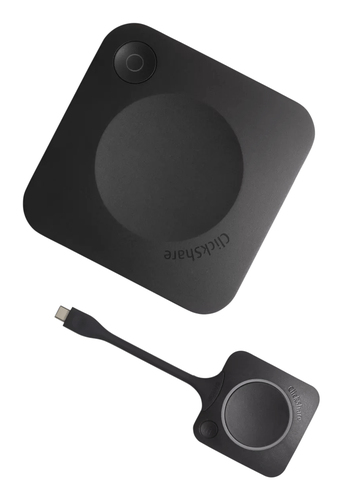
Barco ClickShare CX-20 wireless presentation system HDMI Desktop
- Formát: Desktop
- Provozní rozsah teplot (T-T): 0 - 40 °C
- Doporučená provozní relativní vlhkost: 0 - 85%
- Rozsah teplot při skladování (T-T): -20 - 60 °C
- Rozsah relativní vlhkosti při skladování (H-H): 0 - 90%
- Podporované operační systémy Windows: Windows 10, Windows 11
Všechny parametry (30)Stránka produktu na barco.com ↗
Verze
 Windows 10, Windows 8, Windows 8.1
 Windows 10, Windows 11
Kde koupit
Ceny tohoto produktu zatím nesledujeme. Aktuální ceny najdete přímo v obchodech:
Když nakoupíte přes odkazy na této stránce, můžeme získat provizi — bez nákladů navíc pro vás. Více informací
O produktu
Easy wireless conferencing for small meeting rooms and huddle spaces
Organizations today requires smooth hybrid collaboration and flexibility, especially when it comes to team meetings in huddle rooms, and this is exactly what Barco ClickShare CX-20 provides. Encouraging creative innovation through seamless wireless conferencing, ClickShare CX-20 makes hybrid collaboration flow with one click..
Organizations today requires smooth hybrid collaboration and flexibility, especially when it comes to team meetings in huddle rooms, and this is exactly what Barco ClickShare CX-20 provides. Encouraging creative innovation through seamless wireless conferencing, ClickShare CX-20 makes hybrid collaboration flow with one click..
Start a huddle meeting from your device
With ClickShare CX-20, it’s easier than ever to start remote huddle meetings from your device, bringing a seamless and immersive conferencing experience to all participants, whether local, guest or remote. Use your preferred conferencing software combined with the ClickShare Conferencing Button and you can start your conference in less than seven seconds. The CX-20 connects wirelessly to existing huddle room cameras, speakerphones and audio peripherals, saving time and maximizing efficiency.
Decide how you want to collaborate
ClickShare CX-20 provides you with exceptional flexibility and choice, enabling you to decide just how you want to collaborate. Whether you’re on PC, Mac or mobile, the ClickShare Wireless Conferencing Button and ClickShare Collaboration App facilitate a user experience that’s both straightforward and consistent. In addition to its multi-device compatibility, ClickShare CX-20 is also fully compatible with your conferencing platform (UC) technology and your brand of USB-peripherals. Additional features such as local view of the room display help to optimize the experience.
Enhanced security and seamless integration
A perfect fit for any business environment, the ClickShare CX-20 wireless conferencing system comes equipped with a selection of great features for enhanced security and seamless integration. ClickShare Conference provides hassle-free integration with any IT network, while the XMS (Cloud) Management Platform provides for easy device management, as well as an intuitive user experience and clear analytics to get more out of your digital workspace.
Better hybrid meetings? Yes! With smart, intuitive meeting flows in the ClickShare App
Smart intent-based meeting flows make your meeting experience stress-free. Walk into the room, you immediately see if the room is available or booked. Automatically connect to the meeting room (PresentSense ultrasound proximity detection) or plug in a Button. ClickShare guides you as a host or participant (HostFlow). Start the meeting from your personal calendar with a single click (One-Click-Join).
Share your presentation, keep track of remote participant’s video, side by side (ConferenceView). Share full screen or application window, while keeping your laptop screen private for note taking. When you end the call, the meeting room becomes a digital signage display.
Dokumenty
- BrožuraProduct Brochure ↗
- NávodUser manual ↗
Parametry
Hlavní parametry
- Formát
- Desktop
- Provozní rozsah teplot (T-T)
- 0 - 40 °C
- Doporučená provozní relativní vlhkost
- 0 - 85%
- Rozsah teplot při skladování (T-T)
- -20 - 60 °C
- Rozsah relativní vlhkosti při skladování (H-H)
- 0 - 90%
- Podporované operační systémy Windows
- Windows 10, Windows 11
- Kompatibilní s Mac OS
- Ano
- Podporované operační systémy Mac
- Mac OS X 11.0 Big Sur
- Podporované mobilní operační systémy
- Android 11.0, Android 12.0, iOS 14, iOS 14.5, iOS 15
- Typ zdroje
- AC
Zobrazit všechny parametry (30)Zobrazit jen hlavní parametry
Vzhled
- Formát
- Desktop
- Barva
- Černá
Hmotnost a rozměry
- Šířka
- 135 mm
- Hloubka
- 135 mm
- Výška
- 34 mm
- Hmotnost
- 900 g
Provozní podmínky
- Provozní rozsah teplot (T-T)
- 0 - 40 °C
- Doporučená provozní relativní vlhkost
- 0 - 85%
- Rozsah teplot při skladování (T-T)
- -20 - 60 °C
- Rozsah relativní vlhkosti při skladování (H-H)
- 0 - 90%
Funkce
- Podporované operační systémy Windows
- Windows 10, Windows 11
- Rozhraní
- HDMI
Další charakteristiky
- Kompatibilní s Mac OS
- Ano
Software
- Podporované operační systémy Mac
- Mac OS X 11.0 Big Sur
Systémové požadavky
- Podporované mobilní operační systémy
- Android 11.0, Android 12.0, iOS 14, iOS 14.5, iOS 15
Příkon
- Typ zdroje
- AC
- Vstupní napětí
- 110 - 220 V
- Maximální spotřeba energie
- 24 W
Možnosti připojení
- Počet výstupů HDMI
- 1
- Počet portů Ethernetu (RJ-45)
- 1
- Počet portů USB 2.0
- 2
Počítačová síť
- Standardy Wi-Fi
- 802.11a, 802,11g, Wi-Fi 4 (802.11n), Wi-Fi 5 (802.11ac)
- Wi-Fi standard
- Wi-Fi 5 (802.11ac)
- Připojení na síť Ethernet
- Ano
Klávesnice
- Frekvenční pásmo
- 2,4, 5 GHz
Vlastnosti bezdrátové sítě
- Dvoupásmový
- Ano
Výkon
- Šifrování/zabezpečení
- WPA2-PSK
Obrazovka
- Podporované grafické rozlišení
- 3840 x 2160
Bezpečnost
- Slot pro zámek
- Ano
- Typ zámku kabelu
- Kensington
Database Right data-sheet 2026 Icecat. All rights reserved. Poskytováno „tak, jak je“, bez záruky — před nákupem si podrobnosti ověřte v obchodě.
Historie cen (90 dní, nejlepší denní cena)
Historii cen tohoto produktu teprve sbíráme — podívejte se brzy znovu.
Alternativní modely

Barco ClickShare CX-50 wireless presentation system HDMI Desktop

Barco ClickShare CX-20 set Gen 2 wireless presentation system HDMI Desktop

Barco ClickShare C-5 wireless presentation system HDMI Dongle

Barco ClickShare CX‑30 Gen 2 wireless presentation system HDMI Desktop

Barco ClickShare C-5 G2 wireless presentation system HDMI Dongle