
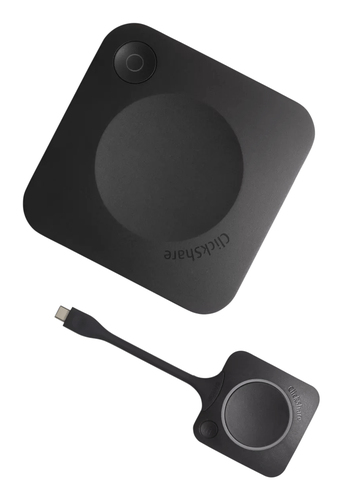
Barco ClickShare C-10 wireless presentation system HDMI Dongle
- Formát: Dongle
- Provozní rozsah teplot (T-T): 0 - 40 °C
- Doporučená provozní relativní vlhkost: 0 - 85%
- Rozsah teplot při skladování (T-T): -20 - 60 °C
- Rozsah relativní vlhkosti při skladování (H-H): 0 - 90%
- Podporované operační systémy Windows: Windows 10, Windows 11, Windows 8, Windows 8.1
Všechny parametry (47)Stránka produktu na barco.com ↗
Verze
 0 - 85%
- 0 - 90%
Kde koupit
Ceny tohoto produktu zatím nesledujeme. Aktuální ceny najdete přímo v obchodech:
Když nakoupíte přes odkazy na této stránce, můžeme získat provizi — bez nákladů navíc pro vás. Více informací
O produktu
Making presentation flow in medium-sized and large meeting rooms
Technology can help to make meeting participants engaged, inspired and active. ClickShare C-10 adds interactive features to full BYOD, easy wireless presentation in any medium to large meeting room. It is the wireless presentation hub that makes your meetings flow with one click in the ClickShare Button or ClickShare App, from any laptop or mobile device.
Full BYOD
ClickShare is compatible with any device. Connect your laptop via the ClickShare Button or ClickShare App. Connect smartphones and tablets via Mobile Apps or screen mirroring (AirPlay, Google Cast or Miracast).
Seamless collaboration
Turn any room into a collaboration room overnight with the ClickShare wireless room system, and enjoy engaging, productive meetings.
Wireless presentation made easy
Present & conference from your laptop in any room without cable hassle. Button or App, you decide.
Simple one-click experience
Walk in with your laptop and instantly connect to the room devices, start within seconds with one-click collaboration
Tech-agnostic
Perfectly works with your device, Windows or Mac. Connects to any display and offers full BYOD with any screen mirroring protocol.
Enterprise-ready
Secure, networked and cloud-managed, ClickShare is an IT-friendly solution, ISO27001 certified solution. Packed with five years of coverage, access to analytics and regular software updates. SmartCare included for your peace of mind. Proven ROI.
Full BYOD content sharing
With the ClickShare C-10, you can start a meeting and get your content on screen within seconds. No matter the device you are using. Plug & Play with the ClickShare Button, that works perfectly on both pc or Mac. Go for workflow integration with the ClickShare App on laptop, mobile or tablet. Or enable full Bring Your Own Device (BYOD) on a 4K canvas: screen mirroring with Airplay, GoogleCast and Miracast works flawlessly.
Anyone, including guests, can share content wirelessly to the central room display with our one-click meeting experience. Two users can share side by side in full HD on screen. No cables, no software to download, no training needed.
Enjoy interactive, creative meetings
ClickShare C-10 users can benefit from advanced interactive features including local view of the room display, decide what they share (either a full screen or a single window), annotation, blackboarding and touch back support that allows users to control the touchscreen in the room. Designed especially to make meetings richer and more dynamic. C-10 makes hybrid collaboration flow in creative meetings, brainstorms and discussion in one click.
Enhanced security and seamless integration
Designed for enterprise rollouts, the IT-grade C-10 offers you enhanced security features (ISO27001 certified) and a wide range of connectivity options. With the XMS Cloud Management Platform you enjoy remote management of units and clear analytics to drive your digital workplace. For practical questions on network deployment of the ClickShare range, check our technical support or get in touch with your Barco contact.
Boost collaboration in your meeting room
The ClickShare C-10 can be used stand-alone or in combination with your existing conference room. It empowers meetings with simple, one-click wireless content sharing. ClickShare completes the room set-up and makes presentation simple, easy and wireless. Designed to fit your business perfectly and evolve with it. With flexibility for the future built in, it’s one of the smartest investments you can make in your meeting room.
Button or App, one great experience
Have the most intuitive user experience in all meeting rooms with the ClickShare Button and the ClickShare App. You decide how you like to work.
The ClickShare Button
In seconds, you are able to present wirelessly to the meeting room display from your laptop and can enjoy a more engaging, seamless meeting experience.
The ClickShare App
Collaboration more intuitive than ever before. The App easily connects to the meeting room, offering screen sharing as well as a host of advanced features. The App works on all devices, from desktop to Android and iOS.
ClickShare Present
Services
Your business is our priority, which is why Barco's services program is designed to drive positive business outcomes together.
Our mission is to enable the brightest and most reliable outcomes for you and your customers through
- a first-time right experience.
- ultimate peace-of-mind.
- maximum efficiency and ROI
- additional service revenues
Dokumenty
- BrožuraProduct Brochure ↗
Parametry
Hlavní parametry
- Formát
- Dongle
- Provozní rozsah teplot (T-T)
- 0 - 40 °C
- Doporučená provozní relativní vlhkost
- 0 - 85%
- Rozsah teplot při skladování (T-T)
- -20 - 60 °C
- Rozsah relativní vlhkosti při skladování (H-H)
- 0 - 90%
- Podporované operační systémy Windows
- Windows 10, Windows 11, Windows 8, Windows 8.1
- Typ zdroje
- AC
- Vstupní napětí
- 110 / 220 V
- Maximální spotřeba energie
- 24 W
- Spotřeba elektrické energie
- 10 W
Zobrazit všechny parametry (47)Zobrazit jen hlavní parametry
Vzhled
- Formát
- Dongle
- Barva
- Černá
- LED indikátory
- Ano
Hmotnost a rozměry
- Šířka
- 135 mm
- Hloubka
- 135 mm
- Výška
- 34 mm
- Hmotnost
- 900 g
Provozní podmínky
- Provozní rozsah teplot (T-T)
- 0 - 40 °C
- Doporučená provozní relativní vlhkost
- 0 - 85%
- Rozsah teplot při skladování (T-T)
- -20 - 60 °C
- Rozsah relativní vlhkosti při skladování (H-H)
- 0 - 90%
Funkce
- Podporované operační systémy Windows
- Windows 10, Windows 11, Windows 8, Windows 8.1
- Rozhraní
- HDMI
- Maximální provozní vzdálenost
- 30 m
- Maximální rozlišení (HDMI)
- 3840 x 2160 px
- Podporovaná rozlišení streamování videa
- 4096 x 2160
- Funkce zrcadlení AirPlay
- Ano
Software
- Podporované operační systémy Mac
- Mac OS X 10.13 High Sierra, Mac OS X 10.14 Mojave, Mac OS X 10.15 Catalina, Mac OS X 10.15.3 Catalina, Mac OS X 11.0 Big Sur
Systémové požadavky
- Podporované mobilní operační systémy
- Android 10.0, Android 11.0, Android 12.0, Android 9.0, iOS 12, iOS 13, iOS 14.5, iOS 15
Příkon
- Typ zdroje
- AC
- Vstupní napětí
- 110 / 220 V
- Maximální spotřeba energie
- 24 W
- Spotřeba elektrické energie
- 10 W
- Napájecí konektor
- Ano
Možnosti připojení
- Počet výstupů HDMI
- 1
- Verze HDMI
- 1.4b
- Počet portů Ethernetu (RJ-45)
- 1
- Počet portů USB 3.2 (3.1 1. generace) Typ A
- 1
- Počet portů USB 3.2 Gen 1 (3.1 Gen 1) Typ C
- 1
Počítačová síť
- Standardy Wi-Fi
- 802.11a, 802,11g, Wi-Fi 4 (802.11n), Wi-Fi 5 (802.11ac)
- Wi-Fi standard
- Wi-Fi 5 (802.11ac)
- Připojení na síť Ethernet
- Ano
- Přenosová rychlost sítě Ethernet
- 10,100,1000 Mbit/s
- Síťové standardy
- IEEE 802.11a, IEEE 802.11ac, IEEE 802.11g, IEEE 802.11n, IEEE 802.15.1
- Miracast
- Ano
Klávesnice
- Frekvenční pásmo
- 2,4 / 5 GHz
Vlastnosti bezdrátové sítě
- Dvoupásmový
- Ano
Výkon
- Šifrování/zabezpečení
- 802.1x RADIUS, WPA2-PSK
- Správa prostřednictvím webového rozhraní
- Ano
- Bezpečnostní spínač
- Ano
- Počet uživatelů
- 32 uživatel/ů
- Ovládání prostřednictvím chytrého telefonu
- Ano
Obrazovka
- Zobrazovací formát
- 2160p
Fotoaparát
- Maximální snímkovací frekvence záznamu
- 30 fps
Bezpečnost
- Slot pro zámek
- Ano
- Typ zámku kabelu
- Kensington
Osvědčení
- Certifikace
- FCC/CE
Database Right data-sheet 2026 Icecat. All rights reserved. Poskytováno „tak, jak je“, bez záruky — před nákupem si podrobnosti ověřte v obchodě.
Historie cen (90 dní, nejlepší denní cena)
Historii cen tohoto produktu teprve sbíráme — podívejte se brzy znovu.
Alternativní modely
Barco ClickShare C‑10 wireless presentation system HDMI Desktop

Barco ClickShare C-5 wireless presentation system HDMI Dongle

Barco ClickShare CX‑30 Gen 2 wireless presentation system HDMI Desktop

Barco ClickShare CX-50 wireless presentation system HDMI Desktop
Barco ClickShare CX-20 set Gen 2 wireless presentation system HDMI Desktop