
Acer Predator X34GS computer monitor 86.4 cm (34") 3440 x 1440 pixels UltraWide Quad HD LCD Black
- Obrazovka: 86,4 cm (34"), 3440 x 1440 px, IPS, Zakřivený
- Obnovovací frekvence: 180 Hz, 1 ms doba odezvy
- Jas: 550 cd/m²
- Adaptivní synchronizace: NVIDIA G-SYNC
- Porty: 2 × DisplayPort
- Stojan: nastavitelná výška, náklon, VESA 100 x 100 mm
- Výbava: USB hub
- Barva: Černá
Kde koupit
Ceny tohoto produktu zatím nesledujeme. Aktuální ceny najdete přímo v obchodech:
Když nakoupíte přes odkazy na této stránce, můžeme získat provizi — bez nákladů navíc pro vás. Více informací
O produktu
Fitted with a 1900R curve, up to 180Hz Refresh, and an Agile-Splendor IPS panel that revs up to 0.5ms response time – the Predator X34 Series has a single purpose: complete, total immersion.
BIG SCREEN, BIGGER CURVE
Curved displays take gaming to a new level of play – one that pulls you in, wraps around your vision and refuses to let go. So, when it came to delivering gameplay in full 34-inch panoramic glory – only a 1900R curve in breathtaking 21:9 would do.
AGILE-SPLENDOR IPS
Few displays can match the speed of this display. Using fast crystal liquid technology and a wide color gamut, the X34 can achieve a 0.5ms response time while maintaining a high color gamut – meaning all the on-screen action comes through nice and smooth with almost no ghosting or color banding.
LET’S GET HYPER
Demolish the possibility of motion blur and reach the peak of gaming potential with an overclockable refresh rate revving up to 180Hz. With support for Adaptive-Sync or NVIDIA G-SYNC Technology, your GPU can match up with the display’s refresh rate for smooth, tear-free gaming.
FUTURISTIC DESIGN
The silver-hued arms span out in two directions – holding the display aloft, welcoming you to the world of curve while allowing you to tilt, swivel and vertically adjust the monolithic display to find that ergonomic sweet spot with deadly ease.
PUMP UP THE VOLUME
No speakers? No problem. Two powerful 7-watt speakers have your back.
ZEROFRAME
Less bezels means more visible display for you to enjoy.
PORT HAVEN
3X HDMI 2.0, DP 1.4, USB Type-C, and a USB 3.0 HUB for four other devices.
NVIDIA REFLEX LATENCY ANALYZER
Want to be at the top of the competitive ladder? Use NVIDIA’s Reflex Latency Analyzer to measure exactly how long it takes for your click to register on screen. Finally, a way to accurately measure the bond, or lack thereof, between mouse, PC and your display is all yours.
HOW IT WORKS
By detecting the clicks coming from your mouse and measuring the time it takes for a resulting display pixel change (i.e. gun fire) to happen on the screen. A measurement and report ensues.
WHAT YOU GET
GeForce Experience’s new Performance Overlay reports the latency metrics in real-time. The analyzer then breaks the system latency measurement up into Mouse Latency, PC + Display Latency, and System Latency.
ESPORTS MODE
This ensures the lowest latency by turning off variable backlight. It increases black levels with dark boost technology, and fine tunes gamma levels to offset darker contrast areas to better distinguish objects in dim areas.
PREDATOR GAMEVIEW
Accessed via the OSD (on-screen display), GameView provides a number of useful features, such as setting the level of dark boost, ambient lighting, gaming profiles (up to 8), and more. Using this will optimize the display for the type of game you are playing.
DARK BOOST
Gain an edge over the competition and fine-tune your visuals with greater details in dimly lit environments.
AIM POINTS
Minimize misfires with aim-points. You have three options to choose from through your OSD or GameView settings.
GAME MODES
There are three game modes to choose from: action, racing and sports. Use the default profile or customize your own to fit your preferences.
TECH FOR THE EYES
With the right tech, you too can protect your eyes from the strains of long gaming sessions. Featuring: Flickerless, BlueLightShield, ComfyView and Acer Low Dimming technologies.
FLICKERLESS
This technology works by providing stable, consistent power to the display and eliminating any chance for noticeable flicker.
BLUELIGHTSHIELD
Choose from four filter settings via the OSD if you suspect that blue lights, being emitted from the LED panel, are causing eyestrain. We know the X34 is impressive but we never said don’t blink!
Dokumenty
- NávodUser manual ↗
- Informační list produktuEU Product Fiche ↗
Parametry
Hlavní parametry
- Úhlopříčka displeje
- 86,4 cm (34")
- Rozlišení displeje
- 3440 x 1440 px
- Typ panelu
- IPS
- Tvar obrazovky
- Zakřivený
- Maximální rychlost obnovy
- 180 Hz
- Odezva
- 1 ms
- Jas obrazovky (typický)
- 550 cd/m²
- G-SYNC společnosti NVIDIA
- Ano
- Počet připojení DisplayPorts
- 2
- Nastavení výšky
- Ano
- Nastavení sklonu
- Ano
- Rozhraní upevnění panelu
- 100 x 100 mm
- Zabudovaný USB hub
- Ano
- Barva
- Černá
Zobrazit všechny parametry (60)Zobrazit jen hlavní parametry
Vzhled
- Podpora standardu VESA pro montáž
- Ano
- Tržní kategorie
- Hraní
- Barva
- Černá
- Rozhraní upevnění panelu
- 100 x 100 mm
- Barva nohou
- Černá
Možnosti připojení
- Zabudovaný USB hub
- Ano
- HDMI
- Ano
- Počet připojení DisplayPorts
- 2
- Výstup sluchátek
- Ano
- Výstupy pro sluchátka
- 1
Multimédia
- Integrovaný fotoaparát
- Ne
Výkon
- G-SYNC společnosti NVIDIA
- Ano
- AMD FreeSync
- Ne
- Typ NVIDIA G-SYNC
- G-SYNC Compatible
- Podpora HDR
- Ano
Obrazovka
- Úhlopříčka displeje
- 86,4 cm (34")
- Rozlišení displeje
- 3440 x 1440 px
- Nativní poměr stran
- 21:9
- Technologie displeje
- LCD
- Dotyková obrazovka
- Ne
- Typ HD rozlišení
- UltraWide Quad HD
- Typ panelu
- IPS
- Typ podsvětlení
- LED
- Jas obrazovky (typický)
- 550 cd/m²
- Odezva
- 1 ms
- Tvar obrazovky
- Zakřivený
- Parametry zakřivení obrazovky
- 1900R
- Kontrastní poměr (typický)
- 1000:1
- Dynamický kontrast
- 100000000:1
- Maximální rychlost obnovy
- 180 Hz
- Vodorovný pozorovací úhel
- 178°
- Svislý porozovací úhel
- 178°
- Počet barev displeje
- 1,07 mld. barev
- Úhlopříčka obrazovky (v metrických jednotkách)
- 86,4 cm
- Technologie vysokého dynamického rozsahu (HDR)
- DisplayHDR 400
Obsah balení
- Stojan v ceně
- Ano
- Dodávané kabely
- AC, DisplayPort, HDMI, USB, USB typu C
Hmotnost a rozměry
- Šířka (s podstavcem)
- 815 mm
- Hloubka (s podstavcem)
- 309 mm
- Výška (s podstavcem)
- 474 mm
- Hmotnost (se stojánkem)
- 8,6 kg
- Šířka (bez stojánku)
- 815 mm
- Hloubka (bez stojánku)
- 309 mm
- Výška (bez stojánku)
- 360 mm
- Hmotnost (bez stojánku)
- 5,6 kg
Příkon
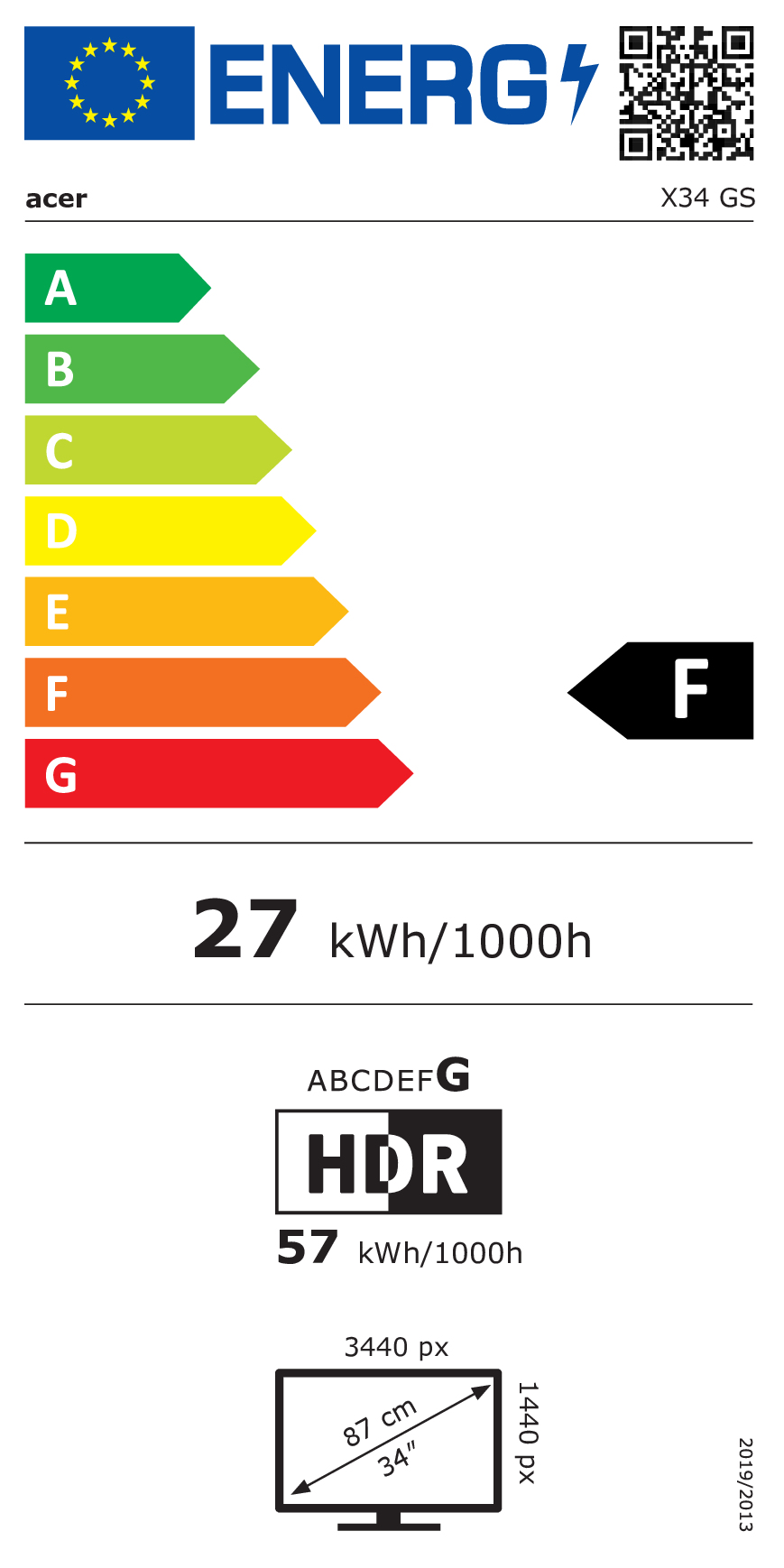
- Třída energetické účinnosti (SDR)
- F
- Třída energetické účinnosti (HDR)
- G
- Spotřeba energie (SDR) na 1000 hodin
- 27 kWh
- Spotřeba energie (HDR) na 1000 hodin
- 57 kWh
- Spotřeba elektrické energie
- 65 W
- Maximální spotřeba energie
- 180 W
- Stupnice energetické účinnosti
- A až G
Bezpečnost
- Slot pro zámek
- Ne
Ergonomie
- Nastavení výšky
- Ano
- Maximální nastavitelná výška
- 13 cm
- Výkyvný/otočný
- Ano
- Rozsah otáčení
- -30 - 30°
- Nastavení sklonu
- Ano
- Úhel náklonu
- -5 - 35°
Logistická data
- Kód harmonizovaného systému
- 85285210
Database Right data-sheet 2026 Icecat. All rights reserved. Poskytováno „tak, jak je“, bez záruky — před nákupem si podrobnosti ověřte v obchodě.
Recenze odborníků
- –
tomshardware.com2018
There is little to dislike about the Acer Predator X34P. It has G-Sync and 120Hz support wrapped up in a 1900R-curved IPS screen with accurate color and good contrast, made even better by a unique approach to gamma that works extremely well. It's better-l...
- +
- 120Hz refresh & G-Sync support, Accurate gamma and color after calibration, OSD joystick, Nice Styling & build quality
- −
- Lacks the contrast of a VA panel, No ULMB (if that matters to you)
- 60
expertreviews.co.uk2017
A good quality monitor, but it’s expensive and not as good as its main rival for gaming...
- +
- Impressive colour accuracy, Native 100Hz at 1440p, Excellent in-built speakers
- −
- Very expensive, Strong inverse ghosting, Sub-par screen uniformity
- –
eteknix.com2017
21:9 gaming can be a lot of fun, but it's worth spending some time to find the best monitor for your budget too. There are many on Amazon and most other major technology retailers to pick from. I would suggest many, but since the Acer X34 is the only one...
Přečíst recenzi na eteknix.com ↗ - 80
trustedreviews.com2016
Acer Predator X34A – Image Quality Thankfully, there isn't too much need to jump into this display's OSD – image quality out of the box is excellent. The Acer Predator X34A delivers right across the board, with accurate colours, good contrast and, as alre...
- +
- Excellent overall image quality, Huge, enveloping display, Stylish design, Useful underlighting
- −
- OSD controls slightly fiddly, Stand movements not all that smooth, Limited connectivity, No FreeSync option
Historie cen (90 dní, nejlepší denní cena)
Historii cen tohoto produktu teprve sbíráme — podívejte se brzy znovu.
Alternativní modely

Acer NITRO EI2 EI342CKRP
computer monitor 86.4 cm (34") 3440 x 1440 pixels UltraWide Quad HD LCD Black

Acer NITRO VG0 Nitro VG270Sbmiipx 27 inch FHD Gaming Monitor (IPS Panel, FreeSync
165Hz (OC), 2ms, HDR 10, DP, HDMI, Black/Red)

Acer XB XB253Q GP
computer monitor 62.2 cm (24.5") 1920 x 1080 pixels Full HD Black

Acer CB2 CB282Ksmiiprx 28 inch UHD Monitor (IPS Panel, FreeSync
60Hz, 4ms, HDR 10, Height Adjustable Stand, DP, HDMI, Silver/Black)

Acer EH3 EH273
computer monitor 68.6 cm (27") 1920 x 1080 pixels Full HD LCD Black

Acer X X25
computer monitor 62.2 cm (24.5") 1920 x 1080 pixels Full HD Black
Příslušenství a kompatibilní produkty

R-Go Tools Monitor arm R-Go Zepher Single, fully adjustable, 0-8 Kg load capacity, 100% circular, black

R-Go Tools Monitor arm R-Go Caparo Single, fully adjustable with gas spring, 3-9 kg load capacity, 100% circular, black

R-Go Tools Monitor arm R-Go Zepher Dual, for two monitors, fully adjustable, 0
8 kg load capacity, 100% circular, black
